
1. Introduction
The LEZYNE Fusion Drive 500+ Front Bicycle Light is designed to provide reliable illumination and enhanced visibility for cyclists in various conditions. This LED light features a durable CNC-machined aluminum construction, multiple output modes, and convenient USB-C recharging. It is rigorously tested for IPX7 waterproofing, ensuring performance in challenging weather.

Image 1.1: The LEZYNE Fusion Drive 500+ Front Bicycle Light, showcasing its compact design and integrated mount.
2. Setup
2.1 Mounting the Light
The Fusion Drive 500+ features an integrated silicone rubber strap mount for secure attachment to your bicycle handlebars. Follow these steps for proper installation:
- Position the light on your handlebar, ensuring the lens faces forward and the power button is easily accessible.
- Wrap the silicone strap around the handlebar.
- Hook the strap onto the designated latch on the light body. Ensure the strap is pulled taut for a secure fit.
- Verify the light is stable and does not rotate freely on the handlebar. Adjust as necessary.
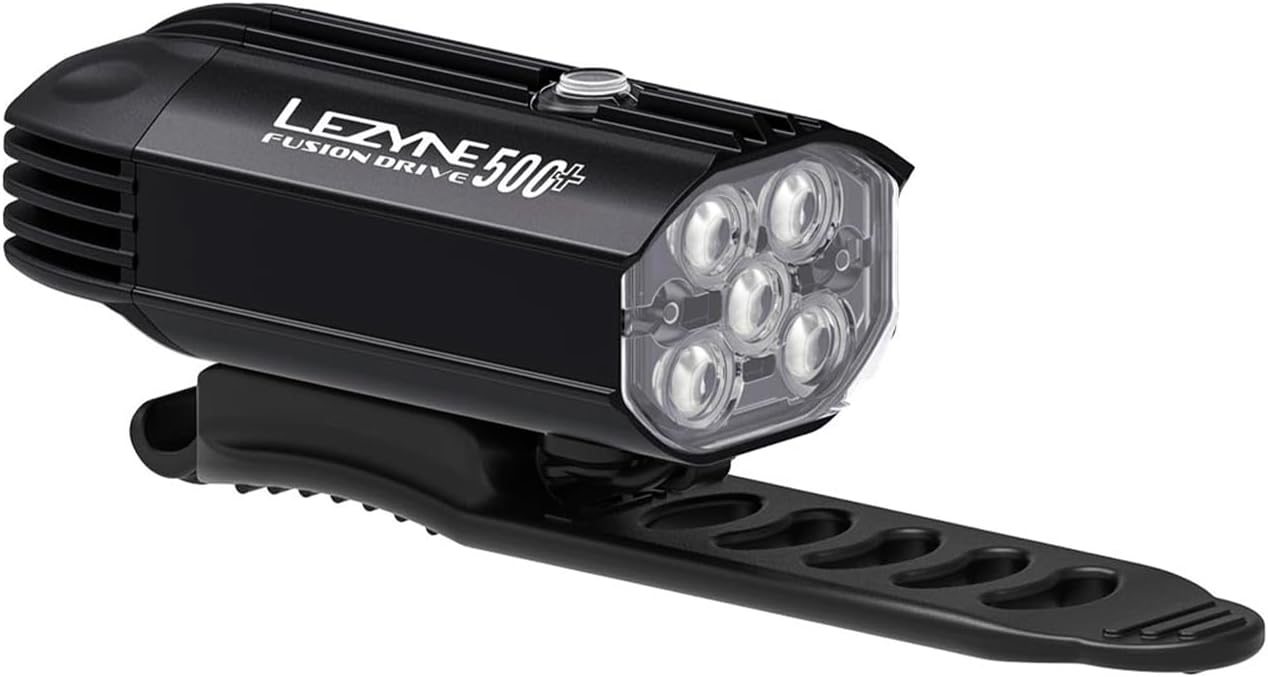
Image 2.1: The LEZYNE Fusion Drive 500+ mounted on a handlebar, demonstrating the silicone strap attachment.
2.2 Initial Charge
Before first use, fully charge the light. Refer to the "Charging" section for detailed instructions.
3. Operation
3.1 Power On/Off and Mode Selection
The light is operated via a single power button located on the top of the unit.
- To Turn On: Press and hold the power button for approximately 2 seconds.
- To Change Modes: Briefly press the power button to cycle through the available output modes.
- To Turn Off: Press and hold the power button for approximately 2 seconds.
3.2 Light Modes and Runtimes
The Fusion Drive 500+ offers six distinct output modes, including three solid and three flash options, to suit various riding conditions. The intelligent Power Indicator displays battery runtime.

Image 3.1: Overview of light modes, corresponding lumen output, and approximate runtimes for the Fusion Drive 500+.
| Mode | Lumens | Runtime (H:MIN) |
|---|---|---|
| Economy | 100 | 9:00 |
| Enduro | 250 | 3:30 |
| Blast | 500 | 1:45 |
| Day Flash | 500 | 30:00 |
| Femto | 20 | 35:00 |
| Pulse | 100 | 12:00 |
The Day Flash mode is specifically designed for maximum visibility during daylight hours.
3.3 Power Indicator
The integrated power indicator provides real-time battery status. The color of the indicator light changes to reflect the remaining battery charge, allowing you to monitor runtime effectively.

Image 3.2: The Fusion Drive 500+ operating in a low-light environment, showing its beam and power indicator.
3.4 Product Overview Video
Video 3.1: An official video from Lezyne USA, Inc. demonstrating the features and use of Lezyne bicycle lights, including aspects relevant to the Fusion Drive series. This video highlights the lights' durability, brightness, and various applications.
4. Charging
The Fusion Drive 500+ is equipped with a waterproof USB-C charging port for convenient and efficient recharging.
- Locate the USB-C port cover on the light body.
- Carefully open the cover to expose the USB-C port.
- Connect a standard USB-C cable (not included) to the light's port and the other end to a compatible USB power source (e.g., computer, wall adapter).
- The power indicator light will show charging status (e.g., solid red while charging, solid green when fully charged).
- Once charging is complete, disconnect the cable and securely close the USB-C port cover to maintain its waterproof seal.
The light is compatible with the Lezyne Infinite Light Power Pack+ for extended runtimes. Note that the original Infinite Light Power Pack is not compatible with this model.

Image 4.1: A close-up view of the USB-C charging port, emphasizing its design for easy access and protection.
5. Maintenance
5.1 Cleaning
To maintain optimal performance and appearance, clean the light regularly. Wipe the body and lens with a soft, damp cloth. Avoid using abrasive cleaners or solvents, as these can damage the finish or lens.
5.2 Storage
When not in use for extended periods, store the light in a cool, dry place. Ensure the USB-C port cover is securely closed to prevent dust and moisture ingress.
5.3 Waterproofing
The Fusion Drive 500+ has an IPX7 waterproof rating, meaning it can withstand immersion in water up to 1 meter for 30 minutes. Always ensure the USB-C port cover is fully sealed before exposing the light to water.
6. Troubleshooting
- Light does not turn on:
- Ensure the battery is charged. Connect to a USB-C power source and check the charging indicator.
- Press and hold the power button for the required duration (approximately 2 seconds) to activate.
- Light does not hold a charge:
- Verify the USB-C cable and power source are functioning correctly.
- Ensure the USB-C port is clean and free of debris.
- If the issue persists, the battery may require service. Contact customer support.
- Light flickers or changes modes unexpectedly:
- This could indicate a low battery. Recharge the light.
- Ensure the power button is not obstructed or being accidentally pressed.
- Mount is not secure:
- Ensure the silicone strap is pulled taut and properly hooked onto the latch.
- The mount is designed for standard handlebar diameters. If it feels loose, ensure it is correctly positioned.
7. Specifications
| Feature | Detail |
|---|---|
| Model | Fusion Drive 500+ |
| Max Lumens | 500 |
| Max Runtime | 35 hours (Femto mode) |
| Battery Capacity | 1400 mAh |
| Recharge Type | USB-C |
| Weight | 128g (0.28 lbs) |
| Dimensions (L x W x H) | 82mm x 42mm x 41mm (approx. 3.2" x 1.6" x 1.6") |
| Material | CNC-machined Aluminum |
| Water Resistance Rating | IPX7 |
| Mounting Type | Integrated Silicone Rubber Strap (Handlebar Mount) |
8. Warranty
The LEZYNE Fusion Drive 500+ Front Bicycle Light comes with a Limited Warranty. For specific terms and conditions, please refer to the warranty information provided with your purchase or visit the official LEZYNE website.
9. Support
For further assistance, technical support, or warranty claims, please contact LEZYNE customer service through their official website or the contact information provided in your product packaging.
Website: www.lezyne.com


