
1. Introduction
Thank you for choosing the AmazLit CLED-2601C LED Desk Lamp. This manual provides essential information for the safe and efficient use of your new desk lamp. Please read it thoroughly before installation and operation, and retain it for future reference.

Figure 1: AmazLit CLED-2601C LED Desk Lamp in an office setting.
2. Safety Instructions
To ensure safe operation and prevent damage, please observe the following safety precautions:
- Do not disassemble or modify the lamp. Unauthorized modifications may lead to electric shock or fire.
- Use only the provided power adapter. Using an incompatible adapter may damage the lamp or pose a safety risk.
- Keep the lamp away from water and high humidity environments.
- Avoid direct eye exposure to the LED light for extended periods, as it may cause discomfort.
- Ensure the lamp is securely clamped to a stable surface before use.
- Unplug the power adapter from the outlet before cleaning or when not in use for an extended period.
3. Package Contents
Please check the package for the following items:
- AmazLit CLED-2601C LED Desk Lamp
- Power Adapter
- Remote Control
- User Manual (this document)
- Desk Clamp

Figure 2: Included components in the product package.
4. Product Overview
The AmazLit CLED-2601C LED Desk Lamp features a flexible design and multiple control options for optimal lighting.
4.1 Lamp Components
- Light Head: Contains the main LED light source.
- Lamp Arm: Multi-jointed arm for flexible positioning.
- Control Panel: Touch-sensitive buttons on the lamp arm for power, brightness, and color temperature.
- Desk Clamp: Secures the lamp to a desk or table surface.
- Remote Control: Provides wireless control over lamp functions.
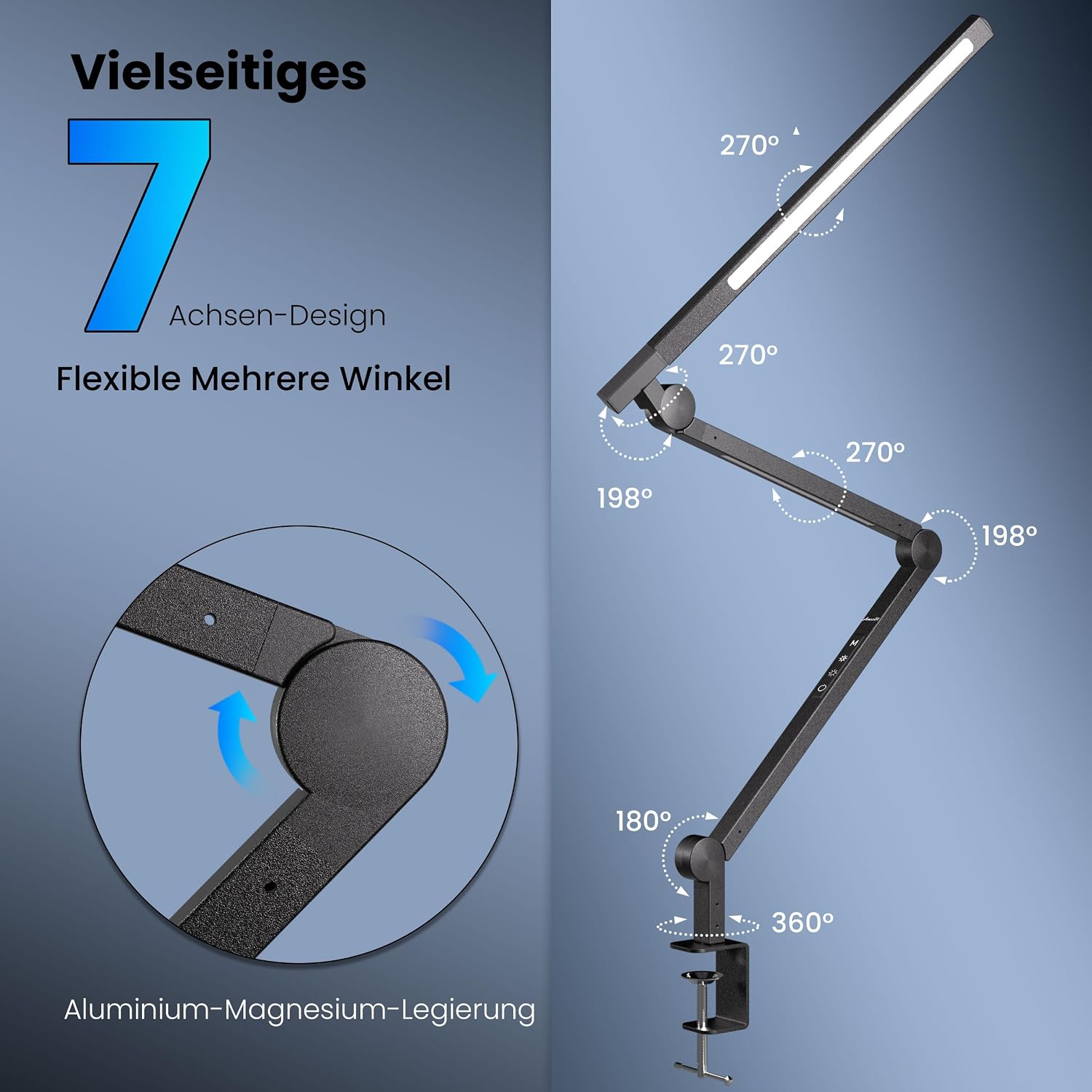
Figure 3: Flexible 7-axis design allowing for multiple angles and positions.
5. Setup
Follow these steps to set up your AmazLit CLED-2601C LED Desk Lamp:
- Attach the Clamp: Securely fasten the desk clamp to the edge of your desk or table. Ensure the surface is sturdy and the clamp is tightened to prevent wobbling.
- Mount the Lamp: Insert the base of the lamp arm into the clamp. Tighten any securing screws on the clamp to hold the lamp firmly in place.
- Connect Power: Plug the power adapter into the lamp's power input port, then plug the adapter into a standard electrical outlet.
- Adjust Position: Carefully adjust the lamp arm and light head to your desired position. The multi-jointed design allows for extensive flexibility.
6. Operating Instructions
The lamp can be controlled via the touch panel on the arm or the included remote control.
6.1 Touch Control Panel
The touch control panel is located on the lamp arm and typically includes buttons for:
- Power On/Off: Touch to turn the lamp on or off.
- Brightness Adjustment: Touch or hold to increase/decrease light intensity.
- Color Temperature Adjustment: Touch to cycle through different color temperature modes (e.g., warm, natural, cool white).
- Mode/Timer: Some models may include a button for preset modes or a timer function.
6.2 Remote Control
The remote control offers convenient wireless operation:
- Power Button: Turns the lamp on or off.
- Brightness Buttons: Adjusts the brightness level.
- Color Temperature Buttons: Changes the light color temperature.
- Preset Buttons: May include buttons for specific brightness or color temperature presets.
- Timer Button: Activates a timer function (e.g., 60 minutes auto-off).

Figure 4: Multiple control options including remote and touch buttons.
7. Key Features
- Stepless Dimming: Adjust brightness from 0% to 100% to suit various tasks and environments.
- Adjustable Color Temperature: Choose from various color temperatures (e.g., 3000K warm white to 5500K cool white) to match your preference or activity.
- Built-in Dual Lights: Provides a larger and more uniform illumination area.
- High Color Rendering Index (CRI): With a CRI of 95, the lamp accurately renders colors, making it suitable for tasks requiring color precision.
- Efficient Heat Dissipation: Designed for optimal heat management to ensure longevity of the LED components.

Figure 5: Visual representation of stepless dimming capability.

Figure 6: Illustration of adjustable color temperature settings.

Figure 7: Dual light sources for enhanced illumination.

Figure 8: Features including high CRI and effective heat dissipation.
8. Maintenance
To maintain your lamp in optimal condition:
- Cleaning: Ensure the lamp is unplugged before cleaning. Use a soft, dry cloth to wipe the surface. Do not use abrasive cleaners or solvents.
- Storage: If storing the lamp for an extended period, unplug it and store it in a dry, cool place.
- LED Lifetime: The LEDs have a long lifespan of 15,000-50,000 hours, requiring no replacement under normal use.
9. Troubleshooting
If you encounter issues with your lamp, refer to the following common problems and solutions:
| Problem | Possible Cause | Solution |
|---|---|---|
| Lamp does not turn on. | No power supply. Power adapter not connected properly. | Check if the power adapter is securely plugged into both the lamp and the wall outlet. Try a different outlet. |
| Remote control not working. | Remote battery is low or depleted. Obstruction between remote and lamp. | Replace the remote control battery. Ensure there is a clear line of sight between the remote and the lamp's sensor. |
| Light flickers or is unstable. | Loose power connection. Incompatible power source. | Check all power connections. Ensure you are using the original power adapter. |
If the problem persists, please contact customer support.
10. Specifications
| Feature | Detail |
|---|---|
| Model Number | CLED-2601C |
| Lamp Type | LED Desk Lamp |
| Brand | AmazLit |
| Wattage | 12 Watts |
| Voltage | AC 100-240V, 50/60Hz (Input) / DC 24V, 0.5A (Output) |
| Light Source Type | LED (154 LEDs) |
| Color Rendering Index (CRI) | 95.00 |
| Control Method | Touch, Remote Control |
| Special Features | Dimmable, Adjustable Color Temperature, Flexible Arm |
| Product Dimensions | 1.55 x 3.1 x 2.1 inches (Lamp Head/Arm dimensions vary with position) |
| Item Weight | 2.22 pounds |
| LED Lifetime | 15,000-50,000 hours |
| Manufacturer | Dongguan Saipin Electronic Technology Co., Ltd. |

Figure 9: Energy efficiency label for the CLED-2601C model. For more details, visit the EPREL database.
11. Warranty and Support
The AmazLit CLED-2601C LED Desk Lamp comes with a 2-Year Worry-free After-sale Warranty.
For technical support, warranty claims, or any inquiries, please contact our VIP Support team:
Email: easelit.cs@gmail.com

Figure 10: Warranty and support information as displayed on product packaging.