
1. Introduction
The VULKKANO T40 ARC active speaker is designed to deliver high-quality audio with versatile connectivity. Featuring a 4-inch woofer and a 1.25-inch dual tweeter, it provides 40W of power for balanced and full-bodied sound across a frequency range of 40 Hz to 20 kHz. This speaker is suitable for various home audio setups, including connection to TVs, music players, and other devices.
2. Safety Information
- Read all instructions before operating the device.
- Keep the speaker away from water or moisture.
- Do not block any ventilation openings.
- Use only attachments/accessories specified by the manufacturer.
- Unplug the device during lightning storms or when unused for long periods.
- Refer all servicing to qualified service personnel.
3. Package Contents
Verify that all items listed below are included in your package:
- VULKKANO T40 ARC Active Speaker
- RCA to 3.5mm Audio Cable
- RCA to RCA Audio Cable
- Optical Cable
- Power Adapter
- User Manual

4. Product Overview
4.1 Front View

4.2 Rear Panel

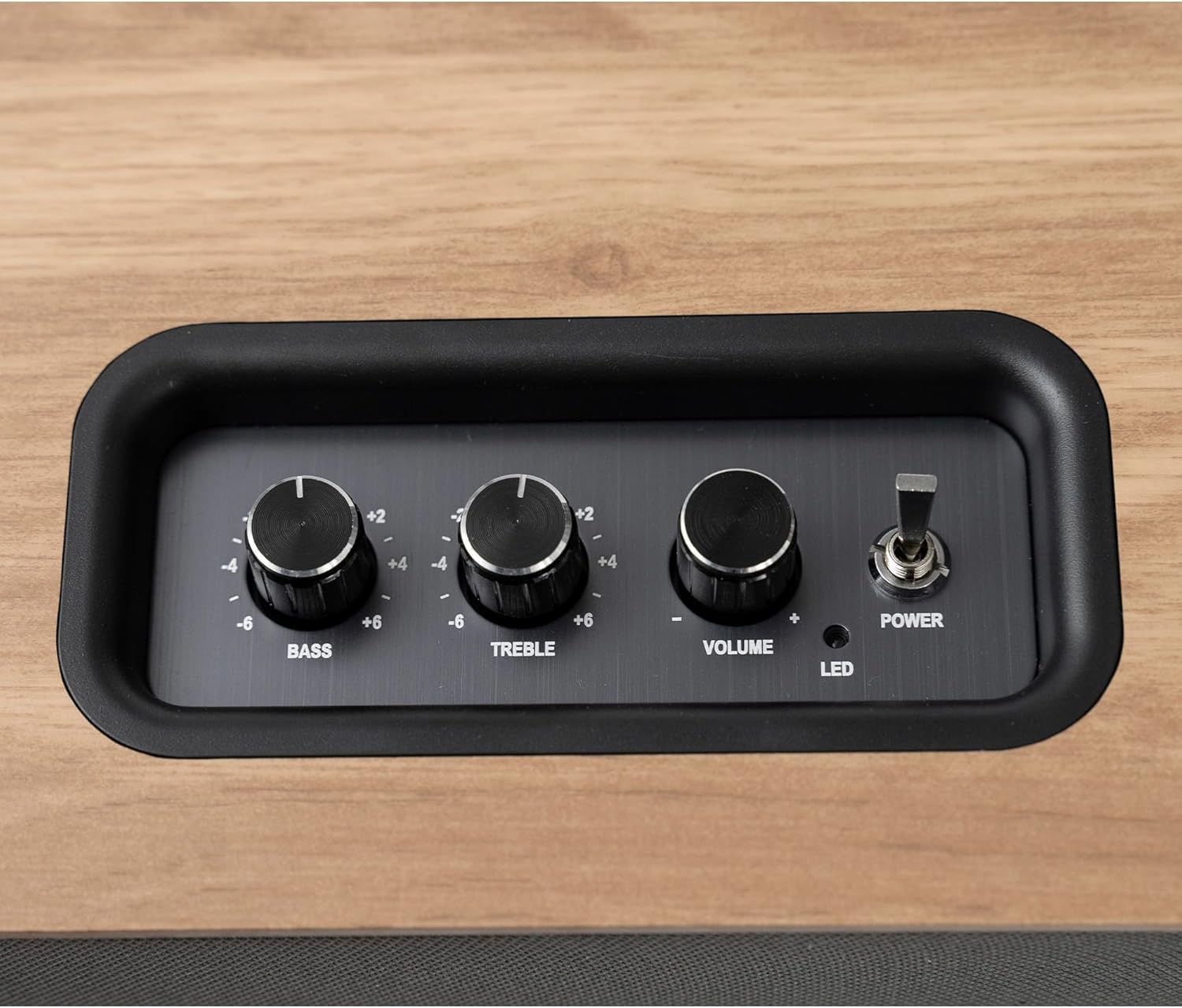
4.3 Top Control Panel
4.4 Dimensions

5. Setup
5.1 Placement
Place the VULKKANO T40 ARC speaker on a stable, flat surface such as a table, shelf, or TV stand. Ensure there is adequate space around the speaker for proper ventilation. For optimal sound, position the speaker at ear level when seated.

5.2 Power Connection
- Connect the power adapter to the 'DC IN' port on the rear of the speaker.
- Plug the power adapter into a wall outlet.
5.3 Audio Connections
The VULKKANO T40 ARC offers multiple connectivity options:
- HDMI ARC: Connect an HDMI cable from your TV's HDMI ARC port to the speaker's 'ARC' port. This allows for TV audio playback and volume control via your TV remote.
- Bluetooth 5.0: For wireless connection with smartphones, tablets, or other Bluetooth-enabled devices.
- RCA (LINE IN): Use the RCA cables to connect to devices like turntables, CD players, or other audio sources.
- USB: Connect a USB drive for direct audio playback.
- Optical (OPT): Connect an optical cable from your TV or other digital audio source for high-quality digital audio.
- AUX: Use a 3.5mm AUX cable to connect to devices with a headphone jack.
- Subwoofer Out (SUB OUT): Connect an external powered subwoofer for enhanced bass performance.

6. Operating Instructions
6.1 Power On/Off
Flip the 'POWER' switch on the top control panel to turn the speaker on or off. The LED indicator will illuminate when the speaker is powered on.
6.2 Input Selection
Use the input selection button (if available, or cycle through inputs using the remote control) to choose your desired audio source (HDMI ARC, Bluetooth, RCA, USB, Optical, AUX).
6.3 Volume, Bass, and Treble Control
Adjust the 'VOLUME', 'BASS', and 'TREBLE' knobs on the top control panel to customize your audio experience. For HDMI ARC connection, the volume can also be controlled via your TV remote.
6.4 Bluetooth Pairing
- Ensure the speaker is powered on and set to Bluetooth input mode.
- On your device (smartphone, tablet), enable Bluetooth and search for available devices.
- Select "VULKKANO T40 ARC" from the list to pair.
- Once paired, the speaker will confirm the connection, and you can begin playing audio wirelessly.
7. Maintenance
7.1 Cleaning
Wipe the speaker's exterior with a soft, dry cloth. Do not use liquid cleaners or abrasive chemicals, as they may damage the finish. Ensure the speaker is unplugged before cleaning.
7.2 Storage
When not in use for extended periods, store the speaker in a cool, dry place, away from direct sunlight and extreme temperatures. It is recommended to keep the original packaging for storage and transport.
8. Troubleshooting
| Problem | Possible Cause | Solution |
|---|---|---|
| No sound | Power not connected; incorrect input selected; volume too low; cable not properly connected. | Check power connection; select correct input source; increase volume; ensure all audio cables are securely connected. |
| Bluetooth not connecting | Speaker not in pairing mode; device Bluetooth off; speaker already paired to another device. | Ensure speaker is in Bluetooth input mode; enable Bluetooth on your device; unpair from other devices or restart speaker. |
| Distorted sound | Volume too high; poor audio source quality; speaker placement issues. | Reduce volume; try a different audio source; adjust speaker placement. |
| Remote control not working | Batteries depleted; obstruction between remote and speaker; remote not pointed correctly. | Replace batteries; remove obstructions; ensure remote is pointed at the speaker's sensor. |
9. Specifications
- Model Name: T40 ARC
- Brand: VULKKANO
- Speaker Type: Bookshelf
- Power Output: 40 Watts
- Woofer Diameter: 4 Inches
- Tweeter Diameter: Dual 1.25 Inches
- Frequency Response: 40 Hz - 20 kHz
- Connectivity Technology: HDMI ARC, Bluetooth 5.0, RCA, USB, Optical, AUX
- Audio Output Mode: Stereo
- Control Method: Remote Control, On-speaker knobs
- Power Source: AC Adapter
- Product Dimensions (L x W x H): 29.1 x 17 x 15.3 cm
- Weight: 2.93 kg
- Material: Wood (MDF)
- Color: Brown
- Country of Origin: China
10. Warranty and Support
VULKKANO is a European brand committed to user satisfaction. With every VULKKANO product, we guarantee quality and performance. Our dedicated after-sales team is available to provide professional support and resolve any issues or questions you may have quickly and efficiently.
For warranty claims or technical assistance, please refer to the contact information provided with your purchase or visit the official VULKKANO website.


