
SnapWireless PPU
SnapWireless PowerPack Universal PPU - 5-in-1 Travel Charger and Power Bank Instruction Manual
1. Introduction
The SnapWireless PowerPack Universal PPU is a versatile 5-in-1 charging solution designed for global travelers. It combines a 10,000mAh power bank, a universal travel adapter, and a wall charger with built-in charging cables. This manual provides essential information for the safe and efficient use of your PowerPack Universal.
2. Product Overview
Key Features:
- 10,000mAh Battery Capacity: Provides up to 2 full charges for most smartphones.
- PD 20W Fast Charge: Supports rapid charging and recharging of the device.
- Built-in Charging Cables: Includes integrated cables compatible with Apple (Lightning) and Android (USB-C) devices.
- Universal Travel Ready: Features interchangeable adapters for AU, EU, UK, and Asia, with a built-in US adapter.
- Wireless Charging: Integrated Qi wireless charging pad for compatible devices.
What's in the Box:
- SnapWireless PowerPack Universal
- Travel Pouch
- AU Adapter
- EU Adapter
- UK Adapter
- (Note: US Adapter is built-in)
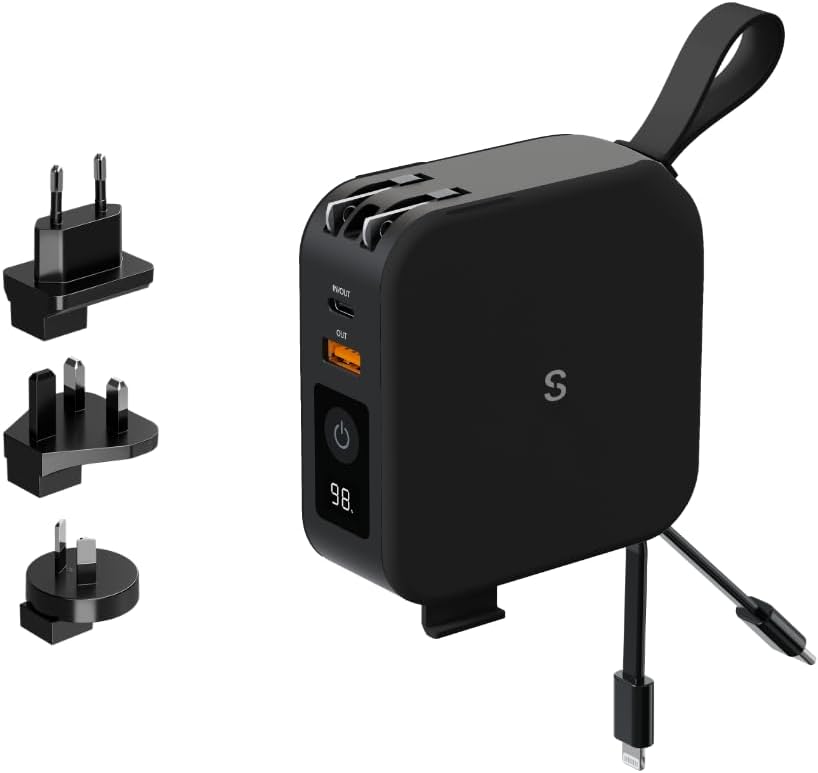
This image displays the SnapWireless PowerPack Universal in black, alongside its interchangeable international adapter plugs for EU, UK, and AU regions. The US adapter is integrated into the device. The PowerPack features a digital display, power button, USB-A and USB-C ports, and built-in charging cables.
3. Setup
Initial Charging of the PowerPack:
- Before first use, fully charge your PowerPack Universal.
- Extend the built-in US plug or attach the appropriate international adapter (AU, EU, UK) by sliding it onto the PowerPack until it clicks securely into place.
- Plug the PowerPack into a wall outlet. The digital display will show the charging progress.
- Once the display shows 100%, the PowerPack is fully charged and ready for use.

A hand is shown plugging the SnapWireless PowerPack Universal into a power outlet, demonstrating how the device can be used as a wall charger. A smartphone and wireless earbuds are on the table, ready for charging.
Attaching Travel Adapters:
- To attach an adapter, align the adapter's pins with the corresponding slots on the PowerPack.
- Slide the adapter firmly until it locks into place.
- To remove, press the release button (if present) or slide the adapter off in the opposite direction.

A hand holds the SnapWireless PowerPack Universal with an international adapter attached, while two other adapter types rest in the palm. This highlights the product's versatility for charging in over 150 countries worldwide by simply swapping the appropriate adapter.
4. Operating Instructions
Charging Devices (Wired):
The PowerPack Universal can charge devices using its built-in cables or external USB ports.
- Using Built-in Cables: Extend the integrated Lightning or USB-C cable and connect it directly to your compatible device.
- Using USB Ports: Connect your device's charging cable to the USB-A or USB-C output port on the PowerPack.
- Press the power button on the PowerPack to initiate charging if it does not start automatically. The digital display will show the remaining battery percentage.

This image shows the SnapWireless PowerPack Universal with its integrated USB-C and Lightning charging cables extended and connected to two different smartphones, demonstrating the convenience of having cables readily available.
Wireless Charging:
The PowerPack features a Qi-compatible wireless charging pad.
- Ensure your device is Qi-wireless charging compatible.
- Place your device centrally on the wireless charging pad located on the top surface of the PowerPack.
- Press the power button on the PowerPack to activate wireless charging. The charging indicator on your device should illuminate.
- For optimal charging, ensure there are no metallic objects between your device and the PowerPack.

The PowerPack Universal is depicted wirelessly charging a smartphone placed on its surface. Another smartphone and a pair of wireless earbuds are visible nearby, emphasizing its compatibility with both Apple and Samsung devices for various charging methods.
Simultaneous Charging:
The PowerPack Universal can charge multiple devices concurrently.
- You can use a combination of built-in cables, USB ports, and wireless charging simultaneously.
- Note that charging multiple devices may affect the overall charging speed for each device.

The PowerPack Universal is shown actively charging five different electronic devices: two smartphones, a tablet, a pair of wireless earbuds, and a smartwatch. This illustrates the device's multi-charging capability using its various ports and built-in cables.
5. Maintenance
- Cleaning: Use a soft, dry cloth to clean the PowerPack. Avoid using harsh chemicals or abrasive materials.
- Storage: Store the PowerPack in a cool, dry place away from direct sunlight and extreme temperatures.
- Battery Care: To prolong battery life, fully charge the PowerPack at least once every three months if not in regular use.
- Handling: Avoid dropping the device or subjecting it to strong impacts.

The compact SnapWireless PowerPack Universal is shown neatly placed inside a suitcase, resting on folded clothing. This illustrates its portable design and suitability as a travel essential.
6. Troubleshooting
- Device not charging:
- Ensure the PowerPack is sufficiently charged. Check the digital display.
- Press the power button to activate charging.
- Verify that the charging cable (built-in or external) is securely connected to both the PowerPack and your device.
- Try a different cable or USB port.
- Slow charging:
- Ensure your device supports fast charging and that the cable used is compatible.
- Charging multiple devices simultaneously may reduce individual charging speeds.
- Check if the PowerPack itself is fully charged.
- Wireless charging not working:
- Ensure your device is Qi-wireless charging compatible.
- Reposition your device centrally on the wireless charging pad.
- Remove any thick phone cases or metallic objects that may interfere with wireless charging.
- Press the power button to activate wireless charging.
- PowerPack not recharging:
- Ensure the wall adapter is correctly attached and the PowerPack is firmly plugged into a working wall outlet.
- Try a different wall outlet.
7. Specifications
| Product Dimensions | 3.39 x 3.39 x 1.34 inches |
| Item Weight | 0.634 ounces |
| Model Number | PPU |
| Battery Type | Lithium Polymer |
| Battery Capacity | 10000 Milliamp Hours |
| Connector Types | Lightning, USB Type C, Qi Wireless Charging |
| Special Features | Airline approved for carry-on, Built-in cables, Built-in rechargeable battery, Included international travel adapters, Wireless Charging |
| Manufacturer | SnapWireless |
8. Warranty and Support
For warranty information and customer support, please refer to the official SnapWireless website or contact their customer service directly. Keep your purchase receipt as proof of purchase for any warranty claims.
Website: www.snapwireless.com.au (Please note: This link is an example and may not be the exact support page.)
Ask a question about this manual
Ask about setup, troubleshooting, compatibility, parts, safety, or missing instructions. Manuals+ will review the question and use this page’s manual context to help answer it.