
Desky 5458858672284
Desky Single Sit Stand Desk - Instruction Manual
Model: 5458858672284 / Desky Single Sit Stand Desk
1. Introduction and Overview
Welcome to the Desky Single Sit Stand Desk. This electric height-adjustable desk is designed to enhance your workspace by promoting dynamic work habits, allowing you to effortlessly transition between sitting and standing throughout your day. Its robust construction and intuitive controls ensure a stable and productive environment.
2. Safety Information
Please read all instructions carefully before assembly and use. Failure to follow these guidelines may result in injury or damage to the product.
- Keep children and pets away from the desk during operation.
- Ensure all connections are secure before and during use.
- Do not overload the desk beyond its stated weight capacity of 176.4 lbs (80 kg).
- Avoid placing liquids directly on the control panel or motor components.
- Do not attempt to disassemble or repair the motor or control box yourself. Contact qualified personnel for service.
- Ensure there are no obstructions above or below the desk when adjusting its height. The desk features an anti-collision system.
3. Package Contents
Before beginning assembly, verify that all parts are present and undamaged. Refer to the included instruction manual for a complete list of parts. The package should contain:
- Motorised Electric Desk Legs
- Desk Frame
- Desk Top
- Desk Hand Controller
- Power Box
- Connecting Cords
- Hardware (Screws, Allen Key Wrench)
- Sticky Cable Ties
- GPO Wall Plug
4. Setup and Assembly
Assembly of your Desky Single Sit Stand Desk is designed to be straightforward. It is recommended to assemble the desk in an open, clean, and dry space, preferably where it will be permanently located. You will need a pair of scissors, a Phillips head screwdriver, and the provided Allen key wrench.
Watch the official assembly video for a step-by-step guide:
Official Desky Single Sit Stand Desk Assembly Video. This video provides a comprehensive visual guide to the assembly process.
Assembly Steps:
- Unpack and Verify: Carefully unpack all components and verify against the parts list in your instruction manual. Lay all items out on a protected surface to prevent scratches.
- Assemble Legs onto Frame: The crossbar ends are pre-attached. Use the provided hex key to loosen the grub screws, extend the crossbar to the desired width (matching your desktop size), and then re-tighten the grub screws.
- Attach Legs to Crossbar: Position the leg with the lifting motor facing inward, ensuring the cord faces away from the frame. Align the widely spaced holes on the crossbar with the bumps on the leg. Press the leg firmly against the crossbar and insert two screws through the crossbar into the leg, tightening them with the hex key. Repeat for the opposite leg, ensuring the single hole for the sync rod faces inward.
- Attach Side Brackets: Attach the side brackets to the back of each leg. Ensure the cable management channel hole on the side bracket faces the opposite side to the motor. Position the side bracket flush against the leg, aligning holes and bumps. Insert and tighten two screws to secure.
- Position Desktop: Carefully remove the desktop from its box and place it bottom-side up. Position the assembled frame onto the upturned desktop, ensuring the gearbox faces the front of the desk. The front of the desktop is identified by small pre-drilled holes on either side of the edge.
- Adjust Frame Width: Slightly loosen the grub screws on the crossbar ends. Pull the two halves apart to match the six pre-drilled holes on the desktop with those of the side brackets to achieve the correct width. Re-tighten the grub screws. (Note: Additional holes on the desktop are normal and accommodate different desk frames).
- Add Feet: With the pads facing up on the foot, position it on top of the leg, aligning all four holes. Insert four screws into the leg, hand-tightening them slightly first. Then, screw them down tightly in a criss-cross pattern to ensure the feet are level and even. Repeat for the opposite foot.
- Assemble Cable Management Tray: Align the mounting holes on the hangers with the screw holes on the inside of the cable management tray. Hold the hanger in place, flip the tray over, and insert two screws through the bottom of the tray to securely attach the hanger. Repeat for the opposite hanger.
- Install Cable Management Tray: From the back of the desk, with the tray facing upside down and the hangers pointing away from you, gently lift up the frame and slide the cable management tray into place. Position it either in the middle or close to the end where the motor is, ensuring it faces away from the side with the motor. Tighten the screws on the tray hangers to ensure it's secure.
- Secure Frame to Desktop: Ensure all holes on the frame align with the holes on the desktop. Insert and tighten all six screws into the pre-drilled holes (two in the middle of the frame, and two on each of the side brackets) to firmly fix the desktop and frame together.
- Insert Sync Rod: Insert the sync rod to attach the motor to the opposite side of the leg. Start with the end containing the extendable rod and insert it into the leg that does not have the motor. Unscrew the nut to loosen the rod and extend it out to meet the leg. Match the hex-shaped rod with the hex-shaped opening in the leg (you may need to rotate it to fit). Press it in to secure it. Then, undo the nut on the opposite end of the sync rod to extend it onto the gearbox shaft. Tighten the middle nut on the sync rod to secure its length, and then return to tighten the nut at the end of the rod positioned inside the motor.
- Attach Control Panel and Power: Attach the control panel to the desktop using the pre-drilled holes on either side for left or right installation. Use two screws to secure it. Connect the cables from the control panel to the control box, ensuring a tight connection. Then, connect the motor to the control panel. Finally, connect the control box to the power lead, plug it into the wall, and turn on your desk for the first time.
- Cable Management: Use the included adhesive-backed cable clips to keep any hanging cords tidy and out of the way. If you have the cable channel, you can run all your cables through it hassle-free.
5. Operating Instructions
Your Desky Single Sit Stand Desk is equipped with an intuitive control panel for easy height adjustments and memory presets.
Control Panel Functions:
- Up/Down Arrows: Use the up and down arrows to manually adjust the desk height.
- Preset Buttons (1, 2, 3): Store your preferred sitting and standing heights. To set a preset, adjust the desk to the desired height, then press the 'M' button followed by the desired number (1, 2, or 3). The display will show 'S-' indicating it's saved.
- Anti-Collision System: The desk is equipped with an anti-collision system that automatically stops movement if an obstruction is detected.
- Programmable Height Limit: Set minimum and maximum height limits to prevent accidental adjustments beyond your desired range.
- Power Saving Auto-Off LED: The display will automatically turn off after a period of inactivity to save power.
Resetting the Desk:
To reset the Desky Single Sit Stand Desk, follow these steps:
- Turn off the power at the wall outlet and wait 10 seconds for the desk to completely power down.
- Turn the power back on at the wall outlet.
- Press and hold the down arrow until the desk reaches its lowest height.
- Continue to press and hold the down arrow whilst the display reads 'RST' or 'Reset'. The desk will briefly bob up and down, displaying the lowest height, and is now ready to use.
6. Features
The Desky Single Sit Stand Desk offers a range of features designed for optimal performance and user comfort:
- Cost-Effective Ergonomics: Fosters healthy work habits without compromising on quality or performance.
- Smooth and Even Power: Top-mounted motor ensures seamless and quiet height adjustments.
- Wide Height Range: Accommodates a wide range of user heights (28.7" to 48.4"), promoting comfortable sitting and standing positions.
- High Lifting Capacity: Boasts a lifting capacity of 176.4 lbs (80 kg), supporting various home and office setups.
- Heavy-Duty Construction: Features a heavy-duty frame and 2-stage telescopic legs for stability and efficient lifting speeds.
- Quiet Operation: Operates at a low noise level of 45db, minimizing disruption.
- Three Preset Heights: Easily switch between your favorite positions at the touch of a button.
- Integrated Cable Management: Keeps your workspace organized and tidy, ensuring a clutter-free environment.
- Australian Design: Proudly crafted and designed in Australia for an exceptional and functional addition to your workspace.

The Desky Single Sit Stand Desk is built to support up to 176 lbs and has been tested for durability over 20,000 cycles.
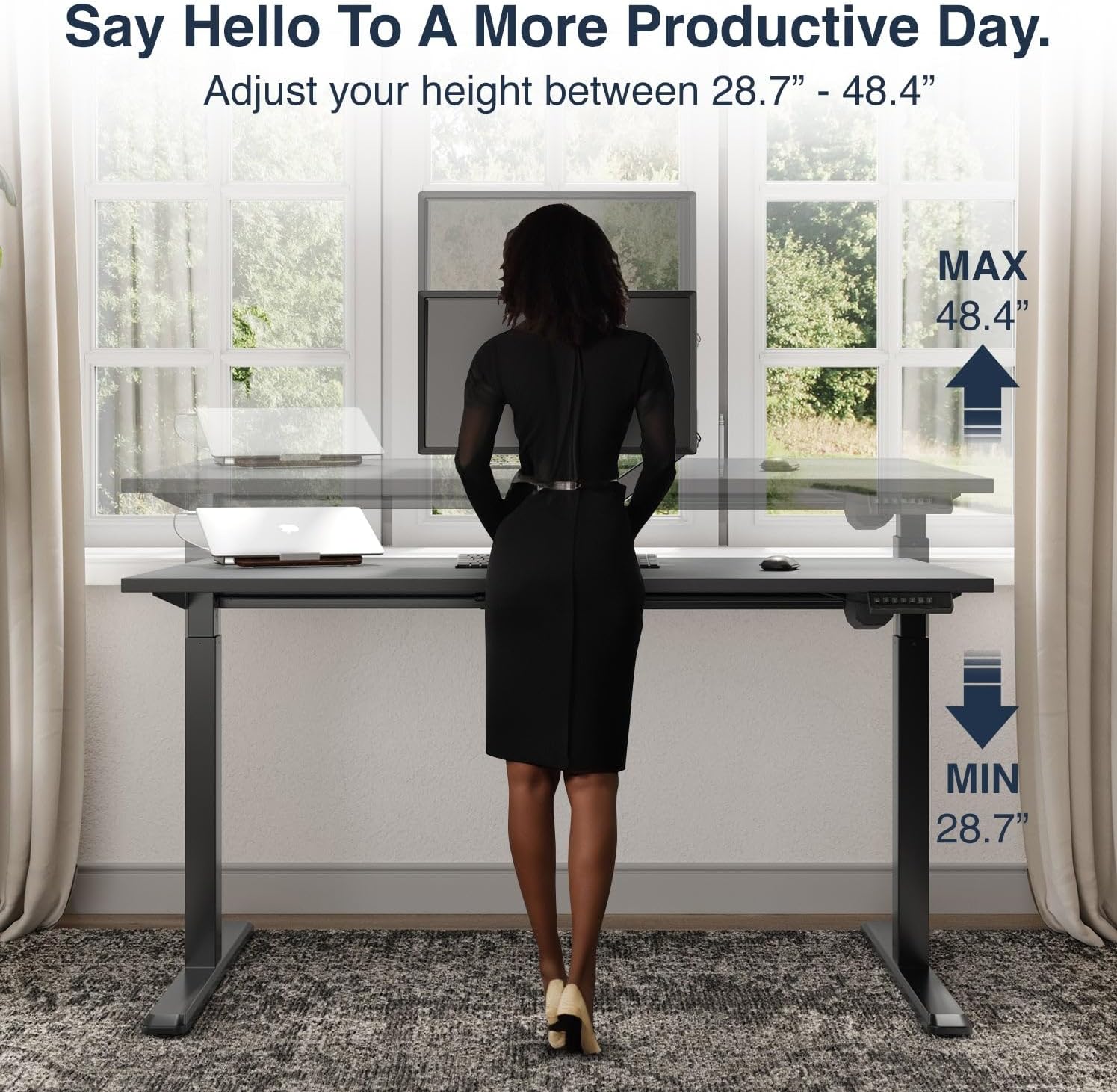
Adjust your desk height between 28.7 inches (Min) and 48.4 inches (Max) for a more productive day.
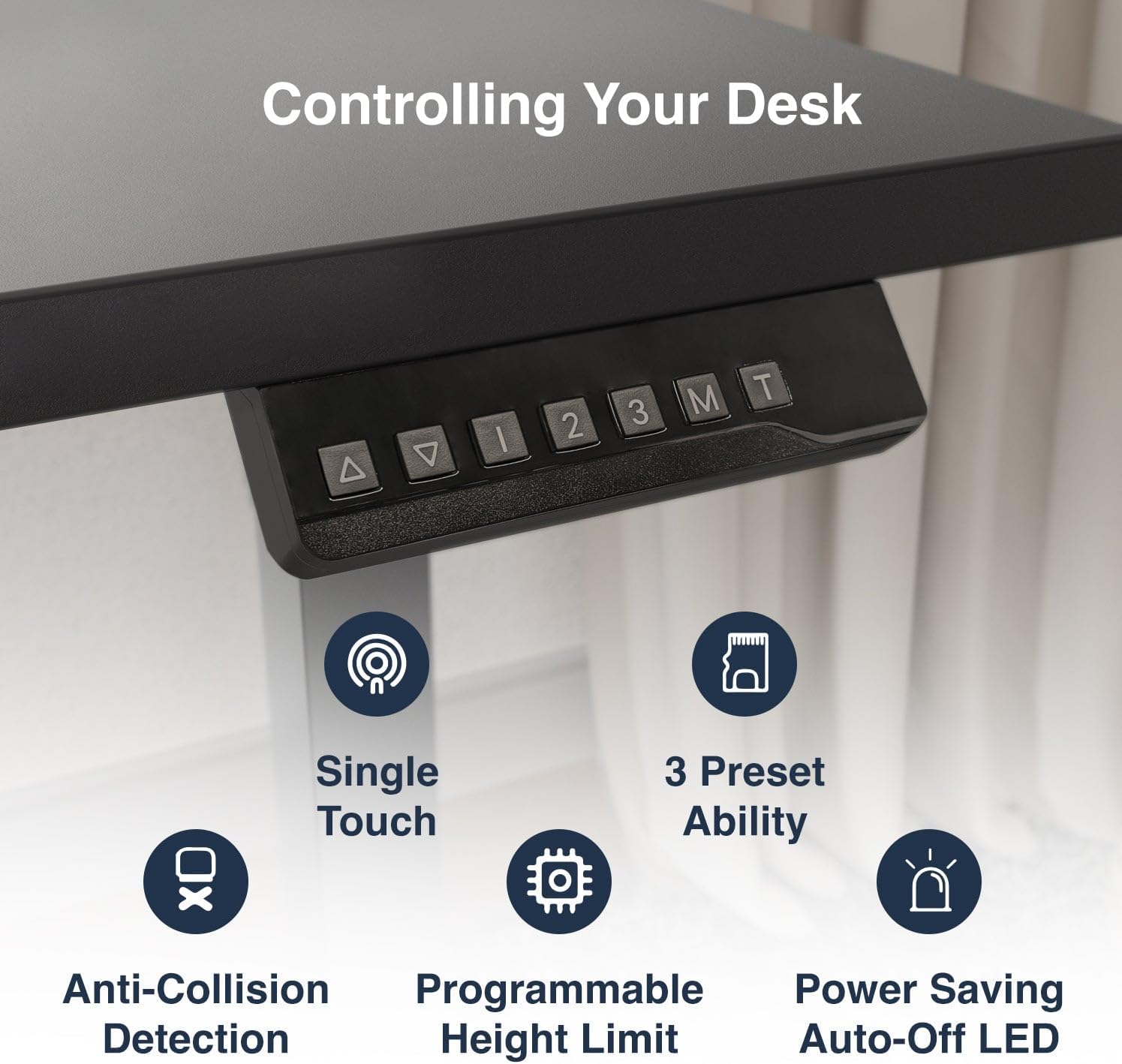
The intuitive control panel offers single-touch operation, three preset height options, anti-collision detection, programmable height limits, and a power-saving auto-off LED.
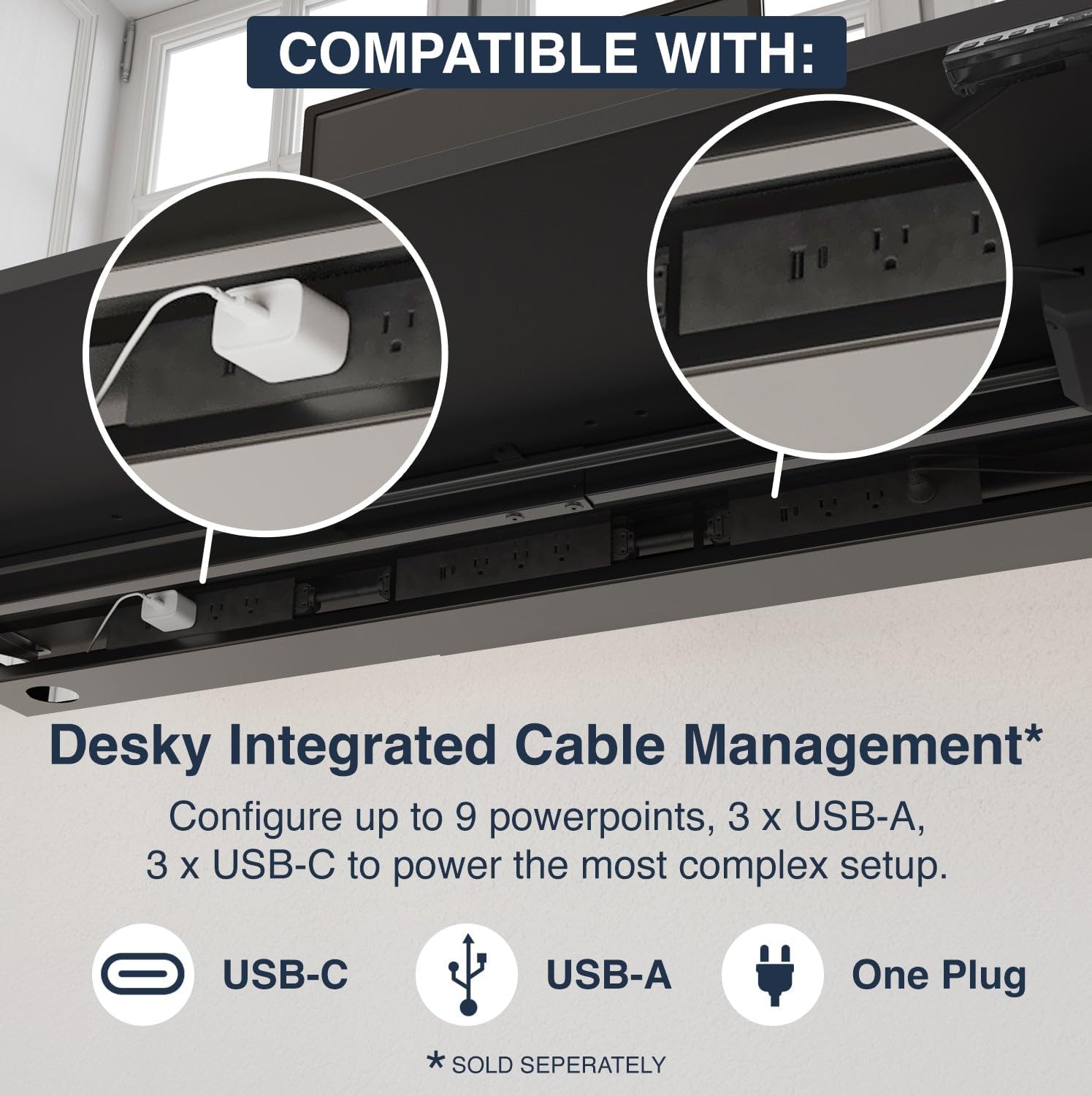
Keep your workspace organized with Desky's integrated cable management system, configurable with multiple power and USB ports (sold separately).

Experience smooth and fast height adjustments at 1.5 inches per second, with whisper-quiet operation and no wobbling.
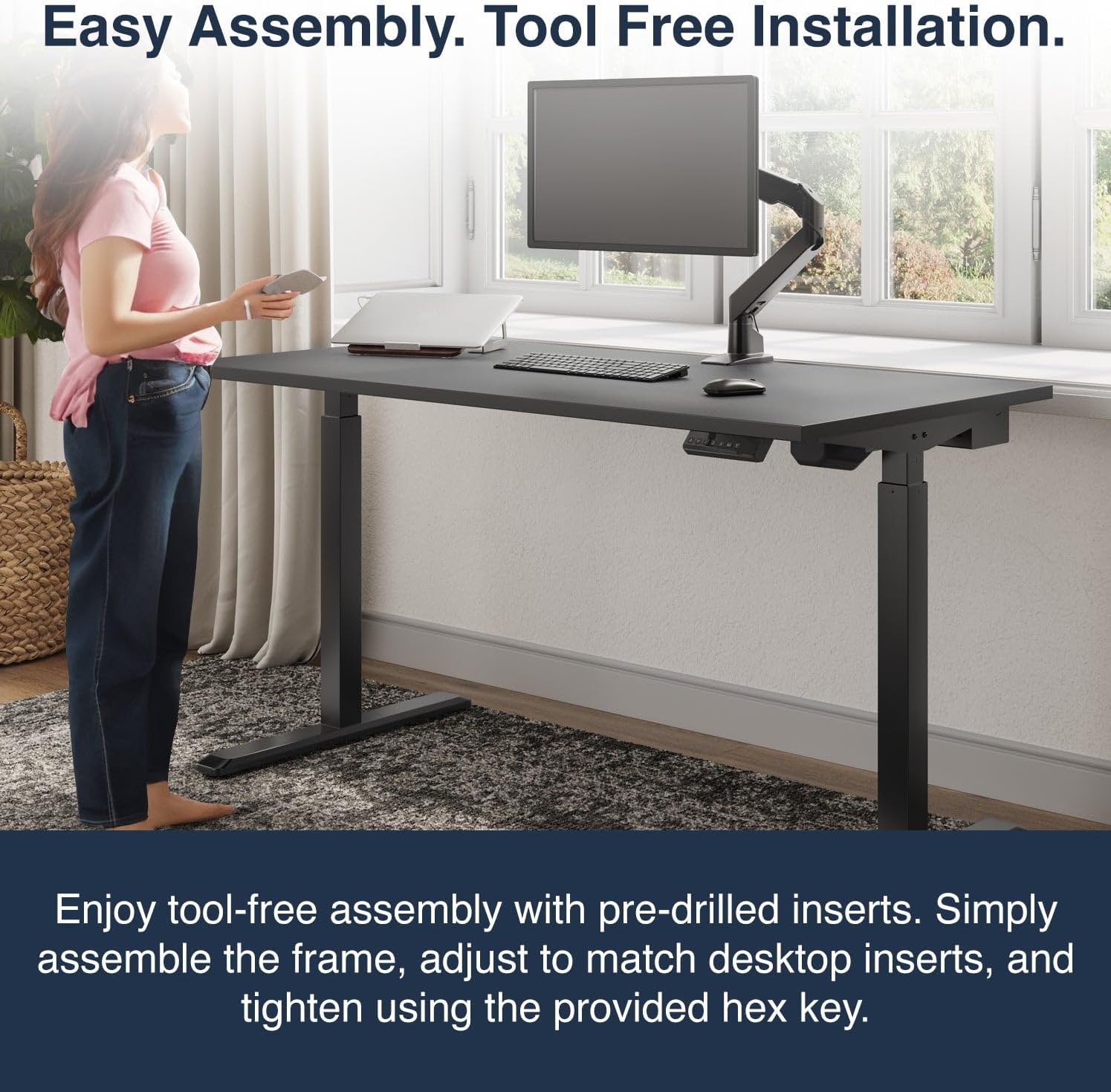
Enjoy tool-free assembly with pre-drilled inserts. Simply assemble the frame, adjust to match desktop inserts, and tighten using the provided hex key.

Elevate your workspace with a premium, one-piece solid top, high-pressure laminate desktop featuring a durable, hard-wearing finish and spacious design.
7. Maintenance
Proper maintenance will ensure the longevity and optimal performance of your Desky Single Sit Stand Desk.
- Regular Cleaning: Wipe the desk surface and legs with a soft, damp cloth. Avoid using abrasive cleaners, harsh chemicals, or solvents that could damage the finish.
- Check Connections: Periodically inspect all screws, bolts, and cable connections to ensure they are secure. Tighten any loose fasteners.
- Motor Care: Keep the motor and electrical components free from dust and debris. Do not obstruct the motor's ventilation.
- Avoid Overloading: Do not exceed the maximum weight capacity of 176.4 lbs (80 kg) to prevent strain on the motor and frame.
- Cable Management: Utilize the integrated cable management system to prevent cables from snagging or becoming tangled during height adjustments.
8. Troubleshooting
If you encounter any issues with your Desky Single Sit Stand Desk, please refer to the following common troubleshooting tips:
- Desk Not Responding:
- Check that the power cable is securely plugged into both the desk's control box and the wall outlet.
- Ensure the wall outlet has power. Try plugging in another device.
- Perform a reset as described in the Operating Instructions section.
- Uneven Desk Surface:
- Verify that the desk is placed on a level surface.
- Check that all assembly screws, especially those connecting the legs and frame, are tightened securely.
- Ensure the feet are properly installed and level.
- Desk Stops During Adjustment:
- The anti-collision system may have been triggered. Check for any obstructions above or below the desk.
- Ensure the desk is not overloaded beyond its weight capacity.
- Unusual Noises:
- A slight humming sound during operation is normal.
- If you hear grinding or loud noises, immediately stop operation and check for any loose parts or obstructions.
If these steps do not resolve the issue, please contact Desky customer support for further assistance.
9. Specifications
| Attribute | Detail |
|---|---|
| Brand | Desky |
| Model Number | 5458858672284 |
| Model Name | Desky Single Sit Stand Desk |
| Product Dimensions | 29.53"D x 55"W x 37"H |
| Color | Black / White |
| Style | Modern |
| Base Material | Alloy Steel |
| Finish Type | Laminate Decorative Surface |
| Special Features | Ergonomically Suited for 95% of Users, Adjustable Height, Anti-Collision System, Leading Stability and Strength, BIFMA Compliant, Tool Free Installation, 4 Height Memory Presets, Dual Motor Lifting System, Whisper Quiet Operation, 3-Stage Frame Design |
| Recommended Uses | Office Work, Computer Gaming, Working, Drafting, Writing, Computer Work |
| Mounting Type | Hardware |
| Included Components | Connecting Cords, Sticky Cable Ties, Motorised Electric Desk Legs, Screws, Desk Hand Controller, Desk Top, Desk Frame, Power Box, Hardware, GPO Wall Plug |
| Required Assembly | Yes |
| Maximum Weight Recommendation | 80 Kilograms (176.4 lbs) |
| Item Weight | 57 Kilograms |
| Size | 70.9 x 29.5 in |
| Tabletop Thickness | 1 Inches |
| Maximum Height | 48.4 Inches |
| Minimum Height | 28.7 Inches |
10. Warranty and Support
Desky is committed to providing high-quality products and excellent customer service.
- Warranty: This product comes with a 3-Year Supplier Warranty.
- Returns: Enjoy a 30-day easy returns policy.
- Customer Support: For any questions, technical assistance, or warranty claims, please visit the Desky Store or contact their customer support directly.
Related documents5458858672284

Ask a question about this manual
Ask about setup, troubleshooting, compatibility, parts, safety, or missing instructions. Manuals+ will review the question and use this page’s manual context to help answer it.