HiFuture FlyBuds3 TWS Earbuds User Manual
Model: Flybuds3-W
1. Introduction
Welcome to the user manual for your new HiFuture FlyBuds3 True Wireless Stereo (TWS) Earbuds. This guide provides detailed instructions on how to set up, operate, maintain, and troubleshoot your earbuds to ensure optimal performance and longevity. Please read this manual carefully before using your device.
Package Contents:
- HiFuture FlyBuds3 TWS Earbuds (Left and Right)
- Charging Case
- USB Charging Cable
- User Manual
2. Setup
2.1 Charging the Earbuds and Case
Before first use, fully charge the FlyBuds3 and their charging case. The charging case acts as a portable power bank for your earbuds.
- Charging the Case: Connect the provided USB charging cable to the charging port on the case and the other end to a USB power adapter (not included) or a computer USB port. The LED indicator on the case will show charging status.
- Charging the Earbuds: Place the earbuds into their respective slots in the charging case. Ensure they are correctly seated. The earbuds will automatically begin charging. The LED indicators on the earbuds (if present) or case will confirm charging.
A full charge typically takes approximately 1.5 to 2 hours for both the case and earbuds.

Image: HiFuture FlyBuds3 earbuds in their charging case, ready for charging or use.
2.2 Pairing with Your Device
The FlyBuds3 use Bluetooth 5.3 for a stable and efficient connection.
- First-Time Pairing:
- Open the charging case. The earbuds will automatically power on and enter pairing mode.
- On your device (smartphone, tablet, computer), enable Bluetooth.
- Search for new Bluetooth devices and select "HiFuture FlyBuds3" from the list.
- Once connected, you will hear a confirmation tone, and the earbuds' LED indicators will change (e.g., turn off or solid blue).
- Re-pairing: The earbuds will automatically connect to the last paired device when taken out of the case, if Bluetooth is enabled on the device.
- Single Earbud Use: Either earbud can be used independently. Simply take one earbud out of the case, and it will connect to your device. The other earbud can remain in the case or be used later.
3. Operating the Earbuds
The FlyBuds3 feature intuitive touch controls for easy management of calls and music.
3.1 Power On/Off
- Power On: Open the charging case, and the earbuds will automatically power on.
- Power Off: Place the earbuds back into the charging case and close the lid. They will automatically power off and begin charging.
3.2 Touch Controls
The touch-sensitive areas are located on the outer surface of each earbud. Specific functions may vary slightly, but common controls include:
- Play/Pause: Single tap on either earbud.
- Next Track: Double tap on the Right earbud.
- Previous Track: Double tap on the Left earbud.
- Answer/End Call: Single tap on either earbud during an incoming call.
- Reject Call: Press and hold on either earbud for 2 seconds during an incoming call.
- Activate Voice Assistant: Triple tap on either earbud (e.g., Siri, Google Assistant).
- Toggle Gaming Mode (Ultra-Low Latency): Specific gesture (e.g., long press on a specific earbud or multiple taps) to switch between standard and low-latency modes for gaming or video. Refer to quick start guide for exact gesture.
3.3 Environmental Noise Cancellation (ENC)
The FlyBuds3 feature AI ENC microphones designed to block background noise during calls, ensuring clear communication even in noisy environments.

Image: HiFuture FlyBuds3 earbud highlighting its ENC (Environmental Noise Cancellation) feature for clear calls.
4. Maintenance
Proper care will extend the life and performance of your FlyBuds3.
4.1 Cleaning
- Use a soft, dry, lint-free cloth to clean the earbuds and charging case.
- Do not use abrasive cleaners, alcohol, or chemical solvents.
- Gently clean the charging contacts on both the earbuds and the case with a dry cotton swab if necessary.
4.2 Storage
- Always store the earbuds in their charging case when not in use to protect them and keep them charged.
- Store the device in a cool, dry place, away from extreme temperatures and direct sunlight.
4.3 Battery Care
- Avoid fully discharging the battery frequently.
- Charge the earbuds regularly, even if not used for extended periods, to maintain battery health.
- The FlyBuds3 are IPX4 splashproof, meaning they are resistant to sweat and light splashes. Do not submerge them in water.

Image: HiFuture FlyBuds3 earbuds demonstrating water resistance. The product is rated IPX4 splashproof.
5. Troubleshooting
If you encounter issues with your FlyBuds3, try the following solutions:
- No Sound from Earbuds:
- Ensure earbuds are charged.
- Check if Bluetooth is enabled on your device and the earbuds are connected.
- Adjust volume on both your device and the earbuds.
- Try re-pairing the earbuds.
- Earbuds Not Pairing:
- Ensure earbuds are in pairing mode (out of case, open lid).
- Turn off and on Bluetooth on your device.
- Forget/delete "HiFuture FlyBuds3" from your device's Bluetooth list and try pairing again.
- Ensure no other devices are connected to the earbuds.
- Only One Earbud Working:
- Place both earbuds back into the charging case, close the lid, wait a few seconds, then take them out again.
- Ensure both earbuds are charged.
- Perform a factory reset (if applicable, refer to manufacturer's website for specific steps).
- Charging Issues:
- Check the charging cable and adapter.
- Ensure charging contacts on earbuds and case are clean and free of debris.
- Verify the charging case has power.
6. Specifications
| Feature | Specification |
|---|---|
| Model Number | Flybuds3-W |
| Bluetooth Version | 5.3 |
| Playtime | Up to 60 hours (with charging case) |
| Microphone | AI ENC Enabled |
| Water Resistance | IPX4 Splashproof |
| Latency | Ultra-Low Latency |
| Ear Placement | In Ear |
| Product Dimensions | 6.5 x 3 x 5 cm |
| Weight | 80 g |
| Battery | 1 Lithium Polymer battery (included) |
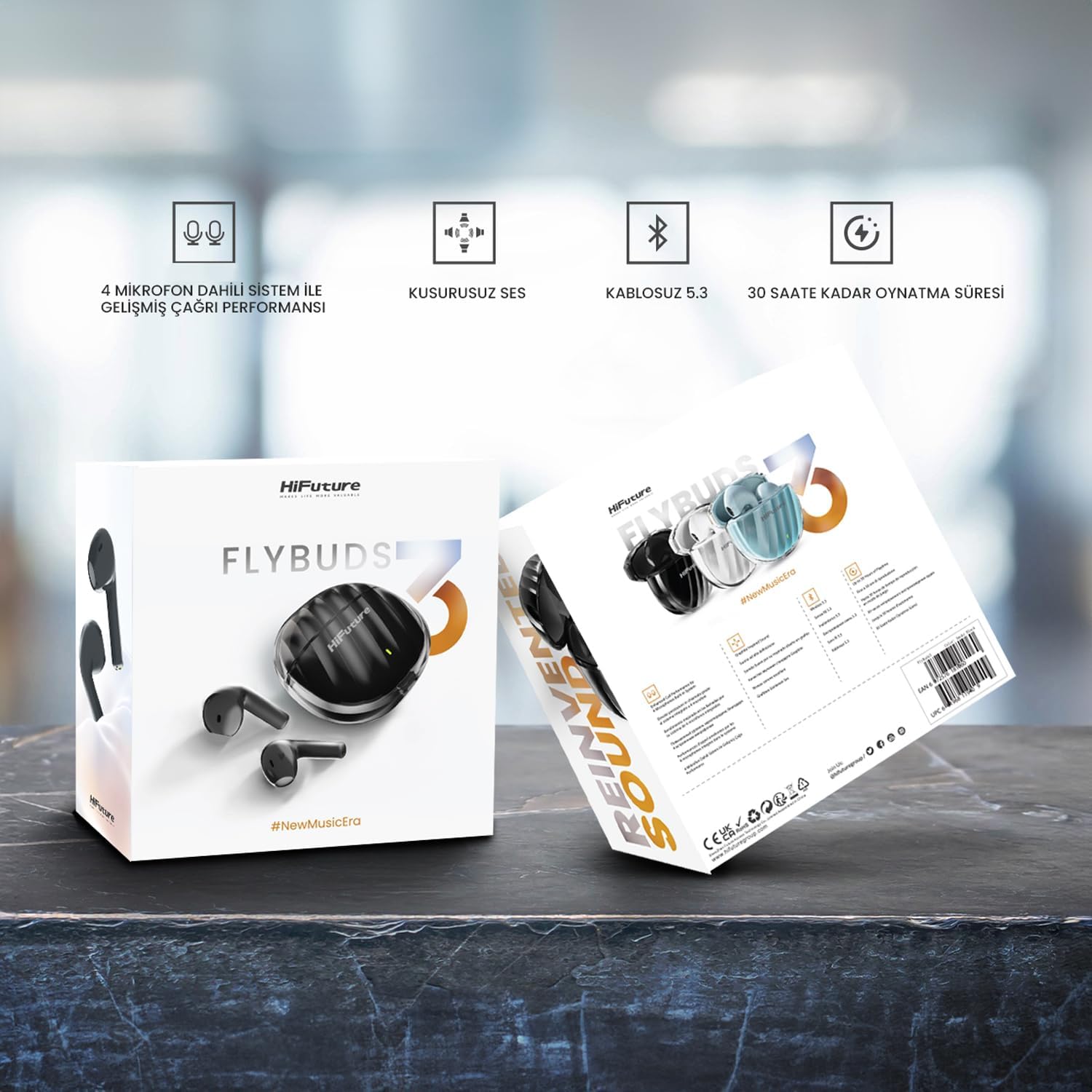
Image: HiFuture FlyBuds3 product packaging highlighting key features and specifications.
7. Warranty and Support
HiFuture products are designed for durability and performance. For warranty information, technical support, or any inquiries not covered in this manual, please visit the official HiFuture website or contact their customer service directly. Keep your purchase receipt as proof of purchase for warranty claims.
For more information, visit: HiFuture Store on Amazon


