1. Introduction
This manual provides detailed instructions for the safe and effective operation of your OKM Delta Ranger Professional metal detector. Please read this manual thoroughly before using the device to ensure optimal performance and longevity. This device is designed for professional use in treasure hunting, archeology, and cavity detection.
2. Product Overview
The Delta Ranger Professional is an advanced metal detector system capable of detecting various targets up to 18 meters (60 feet) deep using sophisticated 3D imaging technology.
2.1 Key Components

2.2 Features
- 6 Operating Modes: The device features Bionic Stream, Ionic Stream, Magnetometer, 3D Ground Scan, Thermo Scan, and Thermo Stream modes for diverse detection needs.
- Deep Detection Capability: Capable of locating targets up to 18 meters (60 feet) in depth with its advanced 3D imaging technology.
- Versatile Applications: Best suited for treasure hunting, tunnel detection, archeology, and the identification of cavities and militaria. It can detect gold, jewelry, treasure chests, voids, and tunnels.
- Integrated Compass: Assists with navigation and precise target localization.
- Durable Construction: Designed for professional use in various outdoor environments.
3. Setup
3.1 Unpacking and Assembly
- Carefully unpack all components from the robust carrying case.
- Identify the main Delta Ranger Professional unit.
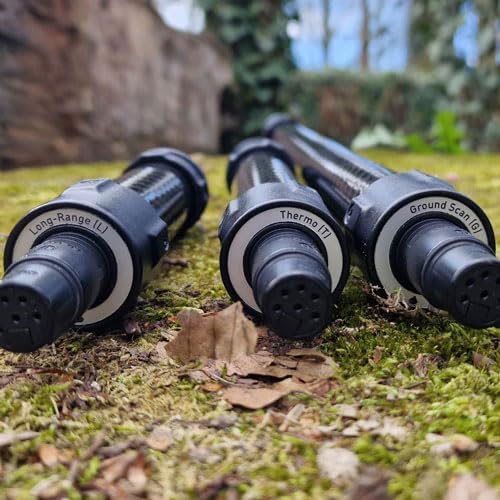
- Select the appropriate probe (Long-Range, Thermo, or Ground Scan) for your intended detection task.
- Securely attach the chosen probe to the main unit by aligning the connectors and twisting until it locks into place.


3.2 Charging the Battery
- The device is equipped with a non-removable Li-ion battery.
- Connect the provided charger to the device's charging port and then to a standard power outlet.
- A full charge typically takes approximately 3.5 hours when charging within the recommended temperature range of 50°F to 86°F (10°C to 30°C).
- A fully charged battery provides approximately 24 hours of operating time.
3.3 Initial Power On and Calibration
- Press and hold the power button located on the device handle until the indicator light illuminates.
- Ensure your compatible smartphone or tablet is paired via Bluetooth to the Delta Ranger Professional.
- Launch the OKM control application on your smart device.
- Follow the on-screen prompts within the application for initial setup and calibration. This process ensures accurate readings and optimal performance.
4. Operating Modes
The Delta Ranger Professional offers six specialized operating modes to cater to various detection requirements. Select the mode that best suits your target and environmental conditions.
4.1 Bionic Stream
This mode is designed for long-range detection of gold and other precious metals. It utilizes bio-energetic principles to locate targets, making it effective for initial reconnaissance of large areas.
4.2 Ionic Stream
The Ionic Stream mode detects ionized gold and other metals. This is particularly useful for finding older, buried treasures that have developed an ionic field over time due to environmental interactions.
4.3 Magnetometer
This mode measures variations in the Earth's magnetic field. It is primarily used to detect ferromagnetic objects (iron, steel) and anomalies in the ground that may indicate buried structures or objects.
4.4 3D Ground Scan
The 3D Ground Scan mode provides a detailed three-dimensional graphical representation of the underground. This allows for precise identification of buried objects, cavities, tunnels, and geological formations.

4.5 Thermo Scan
This mode utilizes thermal imaging to detect temperature differences in the ground. Significant temperature variations can indicate the presence of hidden tunnels, caves, or buried structures that affect the ground's thermal properties.

4.6 Thermo Stream
Thermo Stream is a real-time thermal imaging mode that provides continuous monitoring of temperature changes. This mode is ideal for quickly surveying an area for thermal anomalies that may indicate subsurface features.
5. Operation Guidelines
5.1 General Usage
- Hold the device firmly with a comfortable grip.
- Sweep the device slowly and steadily over the search area, maintaining a consistent height above the ground.
- Observe the readings and graphical representations on the connected smartphone/tablet display. Interpret the data according to the specific operating mode selected.
- Utilize the integrated compass for precise navigation and to accurately map the location of detected anomalies.
5.2 Depth Range
The Delta Ranger Professional is capable of detecting targets up to 18 meters (60 feet) in depth. Actual detection depth may vary depending on the selected operating mode, target size, material, soil composition, and environmental conditions.
6. Maintenance
6.1 Cleaning
- After each use, especially in dusty or damp conditions, gently wipe down the device with a soft, dry, lint-free cloth.
- Avoid using abrasive cleaners, solvents, or harsh chemicals, as these can damage the device's surface or internal components.
- Ensure all ports and connectors are free from debris.
6.2 Storage
- Store the device in its original robust carrying case to protect it from physical damage and environmental elements.
- Keep the device in a cool, dry place, away from direct sunlight, extreme temperatures, and high humidity.
6.3 Battery Care
- For long-term storage (more than one month), ensure the battery is charged to approximately 50% to prolong its lifespan.
- Recharge the battery every few months if the device is not in regular use to prevent deep discharge.
- Avoid exposing the battery to extreme heat or cold.
7. Troubleshooting
This section addresses common issues you might encounter. For problems not listed here, please contact OKM customer support.
7.1 Device Not Powering On
- Check Battery: Ensure the battery is fully charged. Connect the charger and allow sufficient time for charging.
- Power Button: Confirm you are pressing and holding the power button for the required duration.
- Contact Support: If the issue persists after charging, contact OKM customer support for further assistance.
7.2 Inaccurate Readings or No Detection
- Recalibration: Perform a recalibration of the device through the control application as described in the initial setup instructions.
- Environmental Interference: Ensure you are not operating near strong electromagnetic fields, power lines, or large metal structures that could interfere with signals.
- Probe Connection: Verify that the selected probe is securely attached to the main unit.
- Mode Selection: Confirm that the correct operating mode is selected for the type of target you are searching for.
7.3 Connectivity Issues (Bluetooth)
- Bluetooth Enabled: Ensure Bluetooth is enabled on both the Delta Ranger Professional and your smartphone/tablet.
- Pairing: Verify that the devices are correctly paired. If not, unpair and re-pair them.
- Restart Devices: Try restarting both the Delta Ranger Professional and your smart device.
- Application Update: Ensure the OKM control application is updated to the latest version.
8. Specifications
| Feature | Detail |
|---|---|
| Brand | OKM |
| Model Number | 4313 |
| Color | Black |
| Material | Metal |
| Power Source | Battery Powered |
| Item Weight | 7.1 Kilograms (15.62 pounds) |
| Product Dimensions | 11.8"L x 5.3"W x 8.7"H |
| Battery Life | 24 Hours |
| Batteries Required | Yes (1 Lithium Ion battery included) |
| Adjustable Length | Yes |
| Operating Frequency | 7.69 KHz |
| Recommended Uses | Metal Detection |
| Display Type | LCD or OLED |
| Number of Programs | 6 |
| Manufacturer | OKM |
| Waterproof | No |
9. Warranty and Support
The OKM Delta Ranger Professional is backed by a 2-year warranty. This warranty covers service and support for all experience levels, exclusive service at OKM headquarters in Germany, 1 hour of instruction for your device, and 90-day technical support with a personal contact.
For technical support, warranty claims, or additional information, please visit the official OKM website or contact their customer service directly. Refer to your purchase documentation for specific contact details.


