
BEYSTE BEYSTE-A09
BEYSTE A09 LED Rechargeable Flashlight User Manual
Model: BEYSTE-A09
Introduction
Thank you for choosing the BEYSTE A09 LED Rechargeable Flashlight. This powerful and versatile flashlight is designed for various applications, from outdoor adventures to emergency situations. It features an ultra-bright 500,000 lumen output, multiple lighting modes, an intelligent LCD display, and a durable, waterproof construction. This manual provides essential information for setting up, operating, maintaining, and troubleshooting your flashlight to ensure optimal performance and longevity.

Image: The BEYSTE A09 LED Rechargeable Flashlight, its mini keychain flashlight, and included accessories neatly organized in a protective carrying case.
Package Contents
Before you begin, please ensure all items listed below are present in your package:
- 1 x BEYSTE A09 XHQ99.2 LED Rechargeable Flashlight
- 1 x BEYSTE Mini Keychain LED Flashlight
- 1 x Rechargeable Lithium-Ion Battery (pre-installed or separate)
- 1 x USB-C Charging Cable
- 3 x AAA Batteries (for AAA battery holder)
- 1 x Flashlight Holster
- 1 x Lanyard
- 1 x AAA Battery Holder
- 1 x Plastic Tube (for battery)
- 1 x User Manual (this document)
- 1 x Gift Box

Image: A visual representation of all components included in the BEYSTE A09 LED Flashlight kit, including the main flashlight, mini flashlight, battery, cables, and accessories.
Setup
1. Battery Installation
The BEYSTE A09 flashlight uses a rechargeable lithium-ion battery. Ensure the battery is correctly inserted before first use.
- Unscrew the tail cap of the flashlight by turning it counter-clockwise.
- Identify the positive (+) and negative (-) poles of the battery. The positive end typically has a raised button.
- Insert the battery into the flashlight body with the positive (+) end facing towards the flashlight head (LED).
- Screw the tail cap back on clockwise until it is securely tightened.

Image: A four-step visual guide demonstrating how to open the flashlight, identify battery polarity, insert the battery correctly, and re-secure the tail cap.
2. Initial Charging
For optimal performance, fully charge the flashlight before its first use. The flashlight features a USB-C input for convenient charging.
- Connect the provided USB-C charging cable to the flashlight's USB-C port.
- Connect the other end of the cable to a USB power source (e.g., computer, car charger, wall adapter, power bank).
- The LCD display will show the charging progress. A full charge typically takes about 4 hours.
- Once fully charged, the LCD display will show "100%". Disconnect the charging cable.

Image: The BEYSTE A09 flashlight connected via a USB-C cable to a power source, illustrating the charging process.
Operating Instructions
Main Flashlight Operation
Power On/Off: Press the power button once to turn the flashlight on. To turn it off, press the button once after 10 seconds of operation in any mode. Alternatively, long-press the button for 3 seconds in any mode to turn it off immediately.
Mode Switching: With the flashlight on, press the power button repeatedly to cycle through the main lighting modes: High, Medium, Low, Strobe, and SOS. The flashlight retains the most useful functions for ease of use.
Focus Adjustment: Extend or retract the flashlight head to adjust the beam from a wide floodlight to a focused spotlight. The zoom function operates smoothly for precise illumination.
LCD Display: The integrated LCD screen clearly displays the remaining battery power as a percentage, allowing you to monitor the battery level in real-time.
USB Output (Power Bank Function): The flashlight can act as a power bank. Connect your device (e.g., smartphone) to the flashlight's USB-A output port using a compatible cable. This feature is useful for emergency charging of small electronic devices.

Image: The BEYSTE A09 flashlight showcasing its High, Low, and Strobe modes, along with an explanation of the quick power-off feature.

Image: An illustration demonstrating the BEYSTE A09 flashlight's ability to focus its beam up to 1520 meters and illuminate an area of 268 square meters.
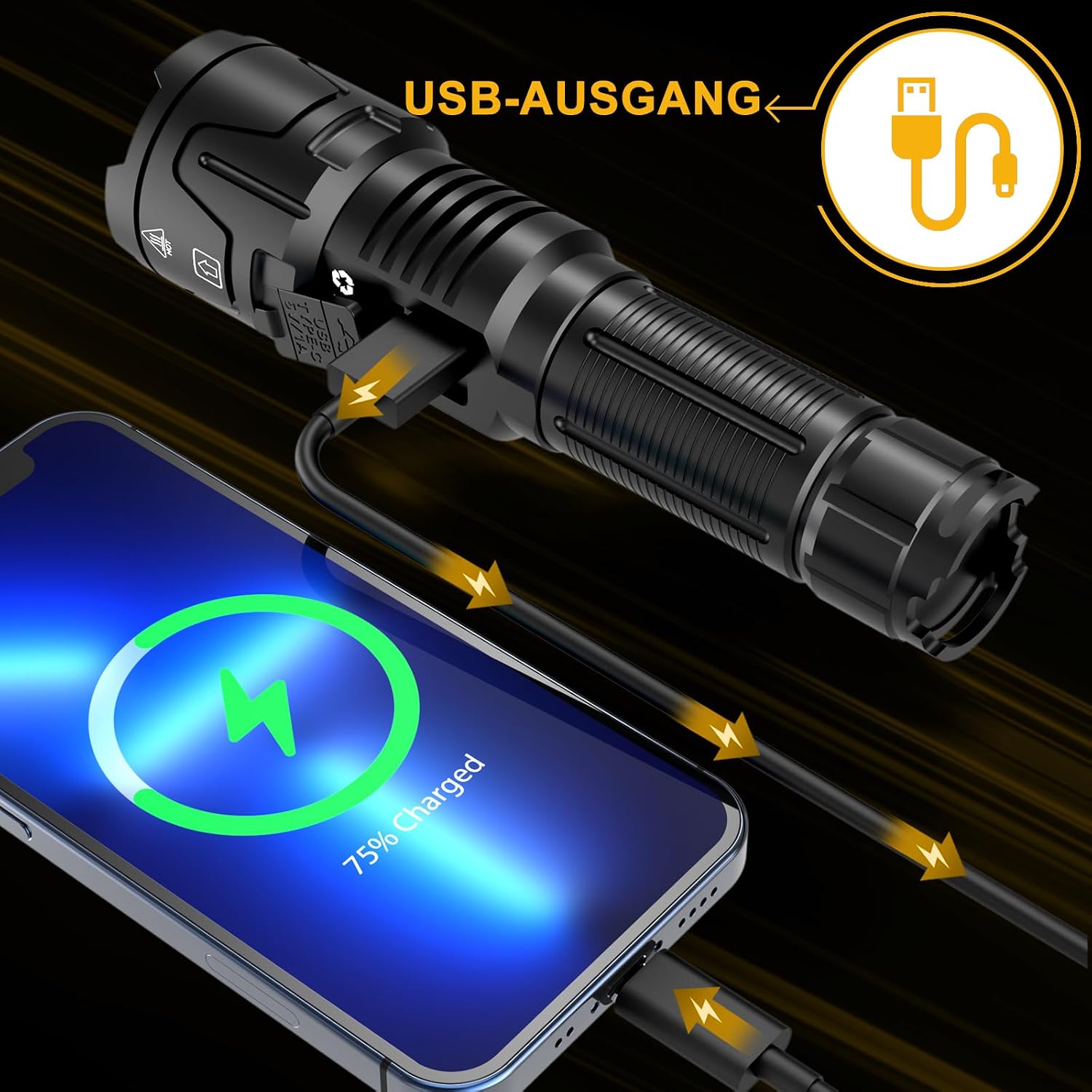
Image: The BEYSTE A09 flashlight connected to a smartphone via its USB-A output, demonstrating its functionality as an emergency power bank.
Mini Keychain Flashlight Operation
The included mini COB flashlight is lightweight and versatile, perfect for quick tasks or as a backup light source.
Power On/Off & Modes: The mini flashlight has 2 light sources and 6 modes. Press the button to cycle through its modes. Double-press the button quickly to activate the spotlight mode.
Magnetic Base: It features a strong magnetic base, allowing you to attach it to metal surfaces for hands-free operation, making it ideal as a work light.
Charging: The mini flashlight is also rechargeable via USB-C.

Image: A detailed view of the BEYSTE mini keychain flashlight, highlighting its 6 modes, foldable stand, built-in strong magnet, and USB-C charging port.
Maintenance
Cleaning: Wipe the flashlight body with a soft, damp cloth. Do not use abrasive cleaners or solvents. Keep the lens clean for optimal light output.
Battery Care: To prolong battery life, avoid fully discharging the battery frequently. Recharge the flashlight regularly, especially if it has not been used for an extended period.
Storage: Store the flashlight in a cool, dry place away from direct sunlight and extreme temperatures. If storing for a long time, it is recommended to charge the battery to about 50% and recharge every 3-6 months.
Water Resistance: The flashlight is IPX6 waterproof, meaning it is protected against powerful water jets. While it can withstand rain and splashes, it is not designed for submersion. Ensure the USB port cover is securely closed to maintain water resistance.
Heat Dissipation: The flashlight is designed with efficient heat dissipation to maintain performance and extend its lifespan. It is normal for the flashlight to warm up during prolonged use on high settings.

Image: The BEYSTE A09 flashlight submerged in water, illustrating its IPX6 waterproof rating, alongside images depicting its impact resistance and efficient heat dissipation.
Troubleshooting
| Problem | Possible Cause | Solution |
|---|---|---|
| Flashlight does not turn on. | Battery is depleted or incorrectly inserted. | Charge the battery. Ensure the battery is inserted with the correct polarity and the tail cap is tightened. |
| Light is dim or flickers. | Low battery charge. Loose connections. | Recharge the battery. Ensure the tail cap and head are securely tightened. |
| Flashlight not charging. | Faulty cable or power source. USB port cover not fully open. | Try a different USB-C cable and power source. Ensure the USB port cover is fully open and the cable is inserted correctly. |
| Mini flashlight not working. | Battery depleted. | Recharge the mini flashlight via its USB-C port. |
If you encounter issues not listed here or if the solutions provided do not resolve the problem, please contact BEYSTE customer service for assistance.
Specifications
| Feature | Detail |
|---|---|
| Brand | BEYSTE |
| Model Number | BEYSTE-A09 |
| Light Source | 50W XHQ99.2 LED Chip |
| Lumen Output | 500,000 Lumens (Max) |
| Beam Distance | Up to 1520 meters |
| Material | Aircraft-grade Aluminum |
| Water Resistance | IPX6 (Protected against powerful water jets) |
| Power Source | Rechargeable Lithium-Ion Battery (included) |
| Charging Port | USB-C |
| Output Port | USB-A (for power bank function) |
| Dimensions (Main Flashlight) | 18.4 x 3.4 x 4.8 cm (7.24 x 1.34 x 1.89 inches) |
| Weight (Main Flashlight) | 318 grams (0.7 lbs) |
| Special Features | LCD Digital Display, Adjustable Focus, Shockproof, Durable, High-Performance XHQ 99.2 Chip, Portable, Dustproof, Weatherproof, Mini Keychain Flashlight included. |

Image: A visual representation of the dimensions and weights for both the BEYSTE A09 main flashlight and the mini keychain flashlight.
Warranty and Support
BEYSTE is committed to providing the best user experience. Our products are made with high-quality materials and modern technology, ensuring excellent brightness, durability, and stability.
If you encounter any problems with your BEYSTE A09 flashlight, please do not hesitate to contact our customer service team. We are dedicated to offering first-class customer support and will provide the best solution in the shortest possible time.
For support, please refer to the contact information provided with your purchase or visit the official BEYSTE store on Amazon: BEYSTE Amazon Store.
Ask a question about this manual
Ask about setup, troubleshooting, compatibility, parts, safety, or missing instructions. Manuals+ will review the question and use this page’s manual context to help answer it.