
Product Overview
The iSunirm 47 Inch Computer Desk is designed for home office, gaming, or study use, featuring integrated power outlets and USB charging ports for convenience. Its sturdy construction and modern design make it a versatile addition to any workspace.

Image: The iSunirm 47 Inch Computer Desk configured as multiple workstations in an office environment.
Key Features:
- Integrated Power Strip: Includes 3 standard US power outlets and 2 USB charging ports with a 5ft power cord.
- Versatile Design: Can be used as a single desk, combined for a long desk, corner desk, L-shaped desk, or conference table.
- Robust Construction: Features extra fixed steel brackets for stability and a heavy-duty steel frame.
- Durable Desktop: Crafted from thick MDF, the desktop is waterproof, anti-scratched, and resistant to deformation.
- Adjustable Stability: Equipped with adjustable leg pads to ensure stability on uneven surfaces and protect floors.
Safety Information
WARNING: Always assemble the desk on a flat, stable surface. Use caution when handling heavy components to avoid injury. Ensure the desk is properly assembled and adjusted for stability on uneven floors to prevent tipping. Keep the work area clear of obstacles during assembly to prevent accidents.
Setup and Assembly
The iSunirm Computer Desk is designed for quick and easy assembly. All necessary tools are included.
Assembly Steps:
- Unpack Components: Carefully remove all parts from the packaging. Verify that all parts are present by comparing them with the included parts list. Each part is clearly labeled.
- Prepare Workspace: Choose a flat, stable surface for assembly. Ensure sufficient space to move around the desk components.
- Attach Legs to Desktop: Follow the detailed instructions provided in the package to securely attach the desk legs to the desktop using the provided hardware.
- Install Steel Brackets: Secure the extra fixed steel brackets to enhance the overall stability of the desk structure.
- Adjust Leg Pads: Once the desk is assembled, adjust the leg pads at the bottom of each leg to level the desk and prevent wobbling. This also helps protect your floor from scratches.
- Connect Power Strip: Ensure the integrated power strip is securely seated in its recess. Plug the 5ft power cord into a wall outlet.
Estimated assembly time: Under 15 minutes for one person.

Image: Dimensional diagram of the desk, showing length (47.24 inches) and height (29.52 inches).
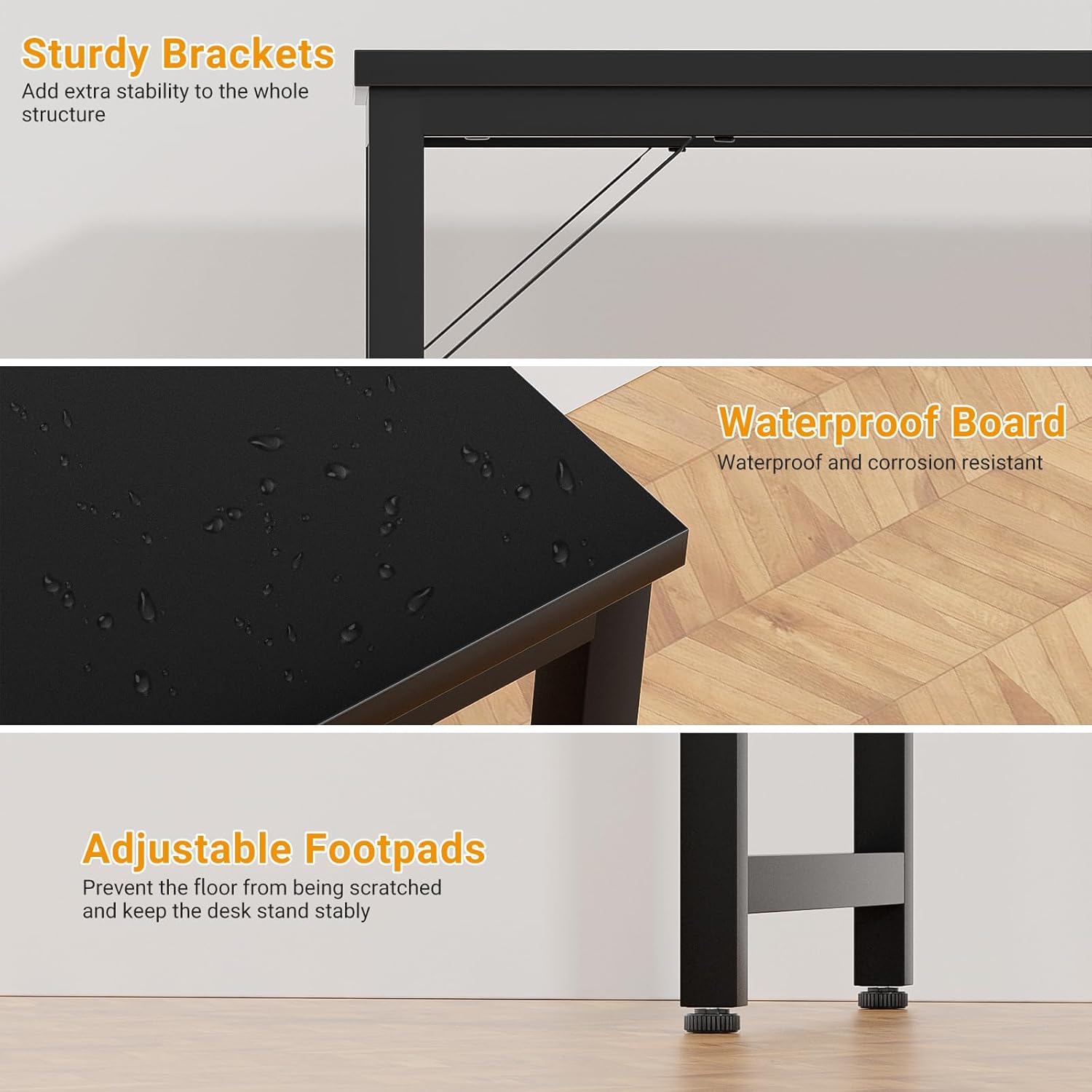
Image: Detailed views highlighting the sturdy steel brackets, the waterproof surface of the desktop, and the adjustable footpads for stability and floor protection.
Operating Instructions
Using the Integrated Power Strip:
The desk features a built-in power strip for convenient access to power and charging.
- AC Outlets: Use the 3 standard US AC outlets (125V/12A) to power your computer, monitor, lamps, or other electronic devices.
- USB Charging Ports: The 2 USB ports (5V-2A) are suitable for charging smartphones, tablets, and other USB-powered devices.
- Power Cord: The 5ft power cord allows flexible placement and easy connection to wall outlets.

Image: A close-up view of the recessed power strip on the desk, demonstrating its 3 AC outlets and 2 USB charging ports in use with a tablet and smartphone.
Desk Configurations:
This desk's design allows for multiple configurations to suit various needs:
- Single Workstation: Use as a standalone computer desk, writing table, or gaming desk.
- Extended Workstation: Combine two desks side-by-side to create a longer workspace.
- Corner/L-Shaped Setup: Arrange two desks at a 90-degree angle to form an L-shaped configuration, ideal for corner spaces or increased surface area.
- Collaborative Space: Multiple desks can be arranged to form a conference table or a larger office workstation.

Image: Two iSunirm desks are shown configured into an L-shape, providing an expansive workspace in a home office setting.
Maintenance
To ensure the longevity and appearance of your iSunirm Computer Desk, follow these maintenance guidelines:
- Cleaning the Desktop: The MDF desktop is waterproof and anti-scratched. Wipe surfaces with a soft, damp cloth. Avoid abrasive cleaners or harsh chemicals that could damage the finish.
- Frame Care: The steel frame can be wiped clean with a damp cloth. Dry immediately to prevent rust.
- Check Connections: Periodically inspect all screws and bolts to ensure they remain tight. Retighten if necessary to maintain stability.
- Power Strip: Keep the power outlets and USB ports free from dust and debris. Do not expose the power strip to liquids.
Troubleshooting
| Problem | Possible Cause | Solution |
|---|---|---|
| Desk is wobbly or unstable. | Uneven floor surface or loose leg pads. | Adjust the leg pads at the bottom of each leg until the desk is stable. Ensure all assembly screws are tightened. |
| Power outlets/USB ports are not working. | Power cord not fully plugged in, or device issue. | Ensure the desk's power cord is securely plugged into a functional wall outlet. Test the device with another power source. If the issue persists, contact customer support. |
| Difficulty during assembly. | Incorrect part orientation or missing step. | Refer to the detailed instruction manual and verify each part's label and orientation. Do not force parts together. |
Specifications
| Feature | Detail |
|---|---|
| Brand | iSunirm |
| Model | B0C7VKN5VS |
| Shape | Rectangular |
| Desk Design | Computer Desk |
| Product Dimensions (D x W x H) | 47.2" x 19.7" x 29.5" |
| Color | Black |
| Base Material | Metal (Steel Frame) |
| Top Material Type | Engineered Wood (MDF) |
| Special Feature | Easy to Assemble, Built-in Magic Power Strip |
| Item Weight | 19.35 Kilograms |
| Power Outlets | 3 Standard US AC Outlets (125V/12A) |
| USB Charging Ports | 2 USB Ports (5V-2A) |
| Power Cord Length | 5 feet |
| Required Assembly | Yes |
| Recommended People for Assembly | 1 |
| Includes All Assembly Tools | Yes |
Warranty and Support
This iSunirm Computer Desk comes with a 3-year warranty from the date of purchase.
For any questions, concerns, or support needs regarding your product, please contact iSunirm customer service. Refer to your purchase documentation for specific contact details or visit the official iSunirm website.