
Introduction
This manual provides comprehensive instructions for the MokerLink 8-Port 2.5 Gigabit Ethernet Switch, Model 8x2.5G + 1x10G SFP+ Unmanaged. This device is designed to expand your network capabilities with high-speed 2.5 Gigabit Ethernet ports and a 10 Gigabit SFP+ uplink. Please read this manual carefully before installation and operation to ensure proper use and optimal performance.

Image: Front view of the MokerLink 8-Port 2.5 Gigabit Ethernet Switch. This image displays the compact design and the arrangement of the 8 RJ45 ports and the 1 SFP+ port on the front panel.
Product Overview
Key Features
- 8x 2.5 Gigabit Ethernet Ports: Provides 8 Base-T ports supporting 10/100/1000M/2.5G adaptive speeds, compliant with IEEE802.3bz.
- 1x 10 Gigabit SFP+ Uplink: Includes one SFP+ slot for high-speed fiber connections (compatible with 1G/2.5G modules; SFP module not included).
- Unmanaged Plug and Play: Requires no configuration; simply connect power and Ethernet cables for immediate operation. Features auto-MDI/MDIX and auto-negotiation.
- Fanless Design: Durable metal casing with a fanless design ensures silent operation and reduced power consumption.
- High Performance: 60 Gbps backplane bandwidth and 44.64 Mpps packet forwarding rate for efficient data transfer.
- Easy Maintenance: Clear LED indicators for power and port status simplify monitoring and troubleshooting.
- Versatile Installation: Compact size suitable for desktop placement or wall mounting in various environments, including home and office.
Port Configuration and Indicators

Image: Detailed view of the MokerLink 8-Port 2.5 Gigabit Ethernet Switch's front panel, highlighting the 8x 2.5G RJ45 ports and 1x 10G SFP+ port. It also shows the LED indicators and their functions.
- RJ45 Ports (1-8): 2.5 Gigabit Ethernet ports.
- SFP+ Port (9): 10 Gigabit SFP+ uplink port.
- LED Indicators:
- PWR (Power Indicator): On when powered, Off when power is disconnected.
- Link/Act (Left LED for RJ45 ports): Green for Link/Activity.
- Speed (Right LED for RJ45 ports): Orange for 2.5Gbps, Green for 10/100/1000Mbps.
- SFP Indicator: On when link is connected normally.
Package Contents
Please check the package contents upon unpacking. If any items are missing or damaged, contact your vendor.
- MokerLink 8-Port 2.5 Gigabit Ethernet Switch (Model: 8x2.5G + 1x10G SFP+ Unmanaged)
- Power Adapter (12V/1A)
- User Manual (this document)
Setup
The MokerLink switch is designed for simple plug-and-play operation. No software configuration is required.
- Connect Power: Connect the provided power adapter to the DC input port on the switch and then plug it into a standard electrical outlet. The PWR LED will illuminate.
- Connect Network Devices: Connect your network devices (e.g., computers, NAS, WiFi 6 APs, servers) to the RJ45 ports (1-8) using standard Ethernet cables (Cat5e, Cat6, or Cat6a recommended for 2.5G speeds).
- Connect SFP+ Module (Optional): If using the 10G SFP+ uplink, insert a compatible 1G/2.5G/10G SFP+ module (not included) into the SFP+ slot (port 9) and connect a fiber optic cable to your desired uplink device.
- Verify Connection: Check the Link/Act and Speed LEDs on the connected ports. A lit Link/Act LED indicates a successful connection, and the Speed LED will show the negotiated speed (Orange for 2.5G, Green for 1G/100M/10M).

Image: Illustration showing the simple plug-and-play setup of the MokerLink switch, including connecting Ethernet cables and the power adapter. This image also highlights features like 4KV lighting protection, fanless design, and wide operating temperature.
Operating Instructions
Once connected, the switch operates automatically. It functions as a layer 2 unmanaged switch, forwarding data frames between connected devices.
Understanding LED Indicators
The LEDs provide visual feedback on the switch's status and network activity:
- PWR LED: Indicates the power status of the switch. A solid light means the switch is powered on.
- RJ45 Port Link/Act LED (Left): A solid light indicates a stable network link. A blinking light indicates data activity (transmitting or receiving data).
- RJ45 Port Speed LED (Right):
- Orange: The port is operating at 2.5 Gigabit speed.
- Green: The port is operating at 10/100/1000 Mbps speed.
- SFP+ Port Link/Act LED: A solid light indicates a stable SFP+ link. A blinking light indicates data activity.
The switch supports automatic MDI/MDIX, so you can use either straight-through or crossover Ethernet cables. It also features auto-negotiation to automatically determine the optimal speed and duplex mode with connected devices.
Maintenance
The MokerLink switch is designed for reliable, low-maintenance operation due to its fanless design.
- Cleaning: Periodically clean the exterior of the switch with a soft, dry cloth. Do not use liquid or aerosol cleaners. Ensure no dust accumulates around the ventilation holes to maintain proper heat dissipation.
- Environment: Operate the switch within the specified temperature range of -10°C to +55°C. Avoid placing the switch in direct sunlight, near heat sources, or in areas with high humidity.
- Cable Management: Ensure all network cables are securely connected and properly routed to prevent accidental disconnections or damage.
- Power Supply: Use only the provided power adapter. If the power adapter is damaged, replace it with an equivalent certified adapter.

Image: Diagram illustrating the fanless and noiseless design of the MokerLink switch, emphasizing its efficient heat dissipation without moving parts. This image also compares 2.5Gbps speed to 1Gbps.
Troubleshooting
If you encounter issues with your MokerLink switch, refer to the following common troubleshooting steps:
- No Power:
- Ensure the power adapter is securely connected to the switch and a working electrical outlet.
- Check if the PWR LED is illuminated. If not, try a different outlet or power adapter.
- No Link on a Port:
- Verify that the Ethernet cable is securely connected to both the switch port and the connected device.
- Try a different Ethernet cable.
- Ensure the connected device is powered on and its network adapter is functioning correctly.
- Check the Link/Act LED for the specific port. If it's off, there's no link.
- Slow Network Speed:
- Confirm that both the switch port and the connected device's network adapter support 2.5 Gigabit speeds.
- Check the Speed LED for the port. Orange indicates 2.5G, Green indicates 1G or lower.
- Ensure you are using Cat5e, Cat6, or Cat6a Ethernet cables for optimal 2.5G performance.
- Test with a different cable or port.
- Intermittent Connection:
- Check for loose cable connections.
- Ensure the switch is placed in a well-ventilated area and not overheating.
- Consider temporarily power cycling the switch (unplug and replug the power adapter).
Specifications
| Model Number | 8x2.5G + 1x10G SFP+ Unmanaged |
| Number of Ports | 8x 2.5G Base-T RJ45, 1x 10G SFP+ |
| Data Transfer Rate | 10/100/1000Mbps, 2.5Gbps (RJ45), 1Gbps/2.5Gbps/10Gbps (SFP+) |
| Backplane Bandwidth | 60 Gbps |
| Packet Forwarding Rate | 44.64 Mpps |
| Jumbo Frame Support | 10Kbytes |
| MAC Address Table Size | 4K |
| Switch Type | Unmanaged |
| Housing Material | Metal |
| Operating Temperature | -10°C to +55°C (14°F to 131°F) |
| Power Input | 12V/1A DC (External Power Adapter) |
| Dimensions | (Information not available in provided data) |
| Color | Black |
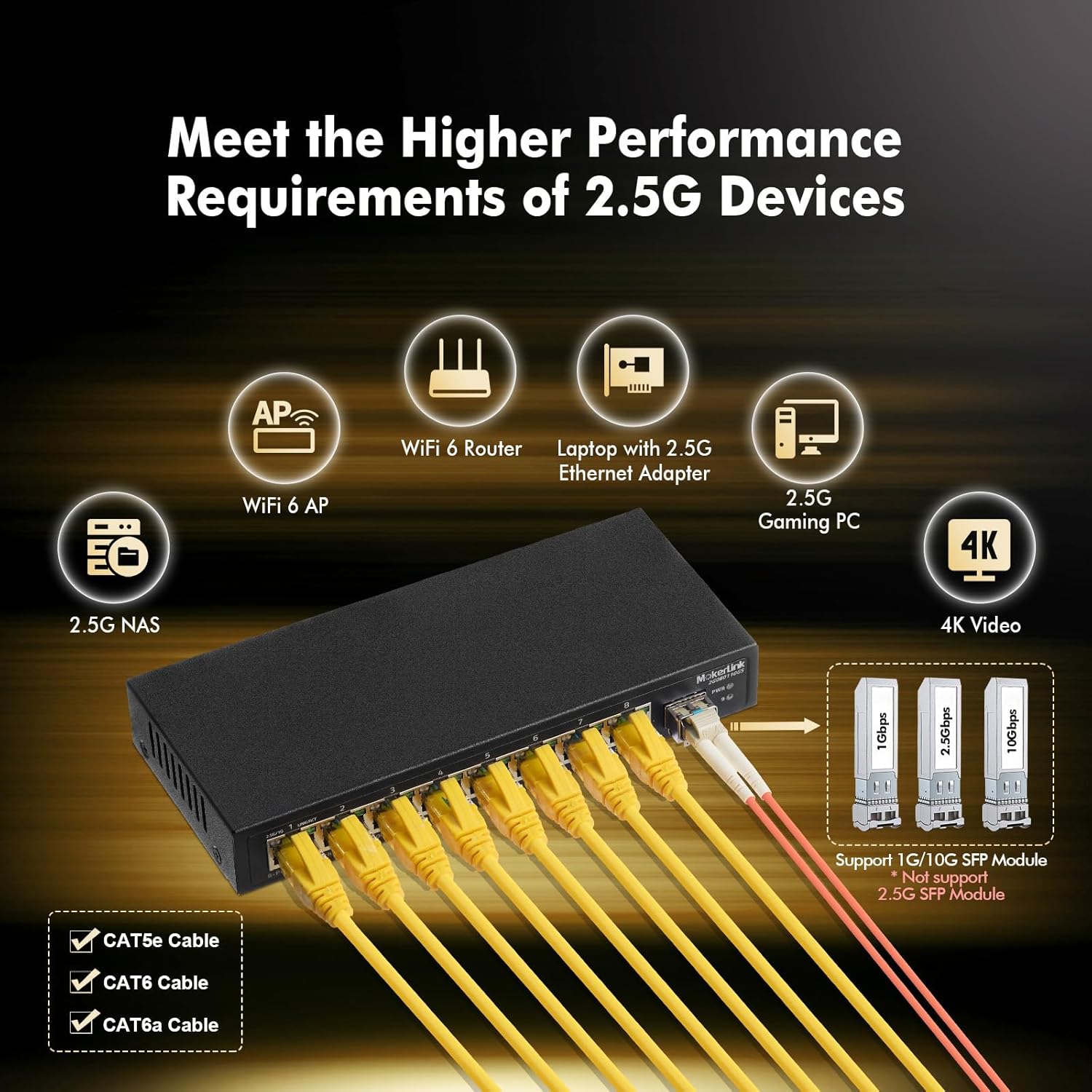
Image: The MokerLink switch connected to various 2.5G devices such as a 2.5G NAS, WiFi 6 Router, laptop with 2.5G adapter, and 2.5G gaming PC, demonstrating its compatibility and application in high-performance networks.
Safety Information
- Do not expose the device to water or moisture.
- Do not open the device casing. There are no user-serviceable parts inside.
- Use only the power adapter supplied with the device.
- Ensure proper ventilation around the device to prevent overheating.
- Keep the device away from strong electromagnetic fields.
- Dispose of the product and its components responsibly according to local regulations.
Warranty and Support
Warranty information for the MokerLink 8-Port 2.5 Gigabit Ethernet Switch is typically provided with the product packaging or can be found on the official MokerLink website. Please retain your proof of purchase for warranty claims.
For technical support or further inquiries, please refer to the contact information provided by your retailer or visit the MokerLink official support channels.


