
1. Product Overview
The Dreamegg XT-6 White Noise Machine is a versatile sound therapy device designed to aid sleep and relaxation for both babies and adults. It integrates a baby sleep soother, white noise machine, and night light into a single unit, offering a range of features to create a calming environment.
Key features include:
- Integrated sound machine, night light, and baby sleep soother.
- Multiple non-looping soothing sounds: human shushing, fetal tone (heartbeat), hairdryer, white noise, lullabies, music box, ocean surf, and brook.
- Adjustable warm night light for nursing and diaper changes.
- Timer options (30/60/90 minutes) or continuous play.
- Child lock function to prevent accidental setting changes.
- Rechargeable via USB for portability.
- Constructed with child-safe materials and smooth surface design.

Image: Front view of the Dreamegg XT-6 White Noise Machine, showcasing its compact design and speaker grille.
2. Safety Information
Please read and understand all safety instructions before using the Dreamegg XT-6 White Noise Machine. Failure to follow these instructions may result in injury or damage to the device.
- This product should be used in a dry environment. Avoid exposure to water or excessive moisture.
- Do not attempt to open the device casing. Servicing should only be performed by qualified personnel.
- Only use the provided power adapter and USB cable for charging. Using unauthorized accessories may damage the device or pose a safety risk.
- Always monitor children during use. This device is not a toy.
- The device is made of child-safe materials and includes a child lock function for added safety.
- Keep the device away from heat sources, direct sunlight, and flammable materials.

Image: Visual representation of the Dreamegg XT-6's safety features, including angular-free appearance, silicone material, and child lock function.
3. Package Contents
Verify that all items are present in the package:
- Dreamegg XT-6 White Noise Machine
- USB Charging Cable
- User Manual
- Hanging Rope
Video: An unboxing demonstration of the Dreamegg XT-6 Portable Baby Sound Machine, showing the contents of the package.
4. Setup
Follow these steps for initial setup:
- Charge the Device: Connect the provided USB cable to the charging port on the device and to a suitable USB power adapter (not included). The indicator light will show charging status. A full charge lasts all day.
- Power On: Press and hold the power button (usually located on the side or front) for a few seconds until the device powers on and the indicator light illuminates.
- Placement: Place the device on a stable, flat surface or use the hanging rope to attach it to a stroller, crib, or bag.
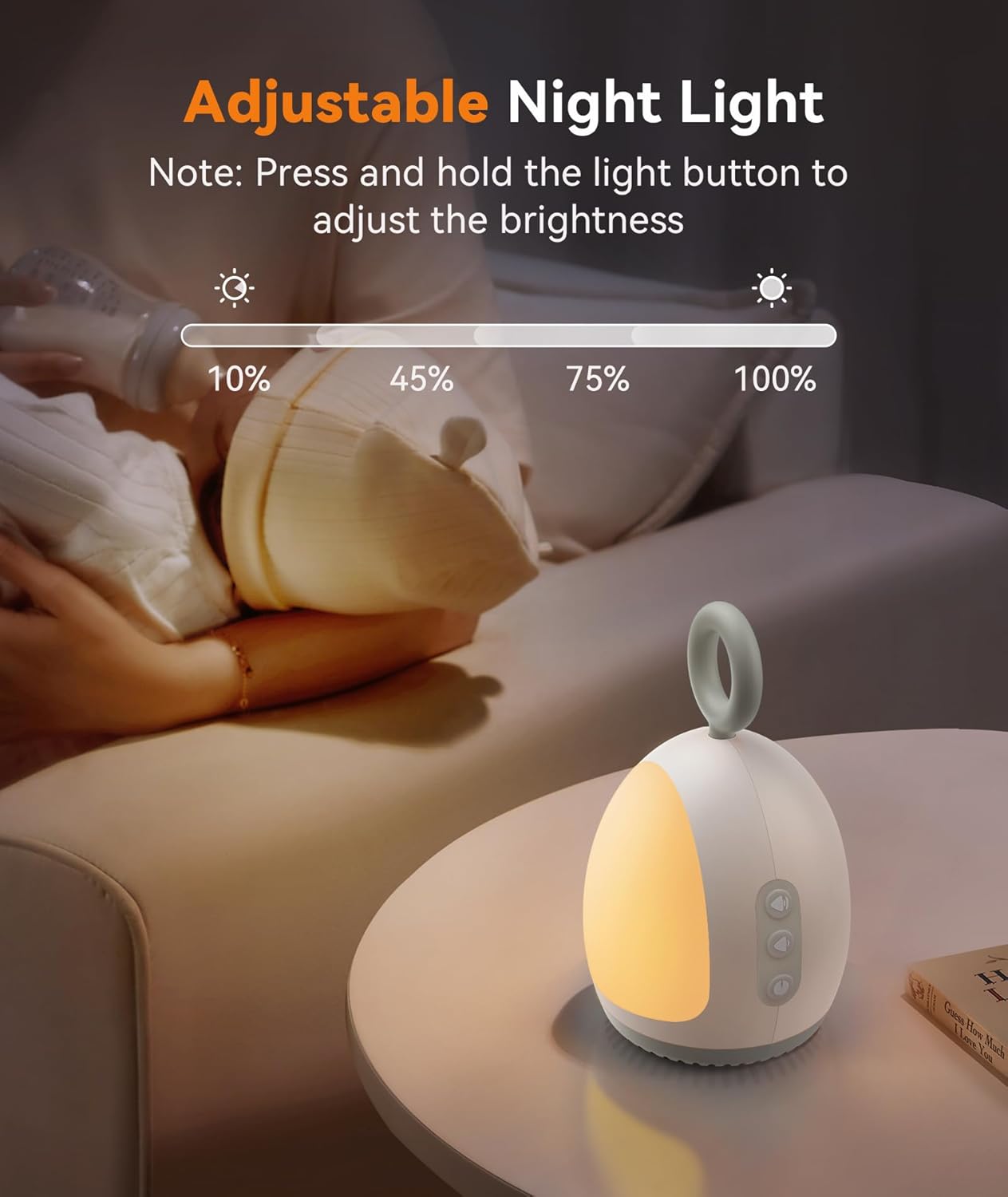
Image: The Dreamegg XT-6 White Noise Machine placed next to a baby in a crib, illustrating typical usage.
5. Operating Instructions
The Dreamegg XT-6 offers various functions to customize your sound and light experience.
5.1 Sound Selection
Press the sound mode button (often indicated by a music note icon) to cycle through the available sound options. The device features a selection of non-looping sounds:
- Human Shushing
- Fetal Tone (Heartbeat)
- Hairdryer
- White Noise
- Lullabies
- Music Box
- Ocean Surf
- Brook

Image: Icons representing the eight soothing sounds available on the Dreamegg XT-6, including fetal tone, white noise, hairdryer, Brahms's lullaby, shushing, baby music box, ocean surf, and brook.
Video: A demonstration of the Dreamegg XT-6 Portable Baby Sound Machine in use, playing various sounds to help a baby sleep.
5.2 Volume Adjustment
Use the '+' and '-' buttons to increase or decrease the sound volume to your desired level. Adjust the volume to create a comfortable and effective sound environment.

Image: Close-up of the Dreamegg XT-6 showing volume control buttons and a visual representation of sound level customization.
5.3 Night Light Operation
The device features a warm night light. Press the light button (often indicated by a light bulb icon) to turn the night light on or off. To adjust the brightness, press and hold the light button until the desired intensity is reached. This feature is ideal for nighttime feedings and diaper changes.

Image: A detailed view of the Dreamegg XT-6, highlighting the light button and illustrating how to press and hold to adjust brightness levels.
5.4 Timer Function
The Dreamegg XT-6 includes a timer function for automatic shut-off. Press the timer button (often indicated by a clock icon) to cycle through the available timer settings: 30 minutes, 60 minutes, or 90 minutes. The device can also be set to run continuously without a timer.

Image: The Dreamegg XT-6 with its timer button highlighted, showing options for 30, 60, and 90-minute automatic shut-off.
5.5 Child Lock Function
To prevent children from accidentally changing settings, activate the child lock function. Locate the child lock switch (usually a small toggle switch) and slide it to the locked position. This will disable the control buttons. Slide it back to the unlocked position to regain control.

Image: A close-up of the Dreamegg XT-6 showing the child lock switch in both locked and unlocked positions.
6. Maintenance
Proper maintenance ensures the longevity and optimal performance of your Dreamegg XT-6 White Noise Machine.
- Cleaning: Wipe the exterior of the device with a soft, dry cloth. Do not use abrasive cleaners, solvents, or immerse the device in water.
- Storage: When not in use for extended periods, store the device in a cool, dry place, away from direct sunlight and extreme temperatures.
- Battery Care: To maintain battery health, avoid fully discharging the device frequently. Charge it regularly, even if not in constant use.
7. Troubleshooting
If you encounter any issues with your Dreamegg XT-6, refer to the following troubleshooting guide:
| Problem | Possible Cause | Solution |
|---|---|---|
| Device does not turn on. | Low battery or device is off. | Charge the device using the provided USB cable. Press and hold the power button to turn it on. |
| No sound or low volume. | Volume is too low or muted. | Increase the volume using the '+' button. |
| Night light not working. | Night light is off or brightness is set to minimum. | Press the light button to turn it on. Press and hold the light button to adjust brightness. |
| Buttons are unresponsive. | Child lock is activated. | Slide the child lock switch to the unlocked position. |
8. Specifications
| Feature | Detail |
|---|---|
| Model Name | Dreamegg White Noise Sound Machine for Baby (XT-6) |
| Power Source | Battery Powered (1 Lithium Polymer battery included) |
| Material | Plastic |
| Color | Light Gray |
| Package Dimensions | 6.22 x 4.21 x 3.7 inches |
| Weight | 11.99 ounces |
9. Warranty and Support
The Dreamegg XT-6 White Noise Machine comes with a 365-day warranty from the date of purchase. This warranty covers manufacturing defects and issues arising from normal use.
For warranty claims, technical support, or any inquiries, please contact Dreamegg customer service. Our team is committed to providing prompt and friendly assistance.
Please visit the official Dreamegg website or refer to your purchase documentation for specific contact details.


