
1. Introduction
This manual provides essential instructions for the safe operation, maintenance, and troubleshooting of your Shark HP232 Clean Sense Air Purifier MAX. Please read this manual thoroughly before using the appliance and retain it for future reference.
The Shark HP232 Clean Sense Air Purifier MAX is designed to provide powerful air purification for large rooms up to 1200 sq. ft., featuring Pure Air MicroForce technology, an Anti-Allergen NANOSEAL HEPA Filter, and Odor Neutralizer Technology. Its Clean Sense IQ system automatically monitors and adjusts purification settings to maintain optimal air quality.
2. Important Safety Instructions
When using electrical appliances, basic safety precautions should always be followed to reduce the risk of fire, electric shock, and injury.
- Read all instructions before using the air purifier.
- Do not operate any appliance with a damaged cord or plug. If the cord or plug is damaged, contact Shark Customer Service.
- Do not use outdoors or on wet surfaces.
- Always turn off the air purifier before moving it, changing filters, or cleaning.
- Keep the air purifier and its cord away from heated surfaces.
- Do not block air openings; keep them free of dust, lint, hair, and anything that may reduce airflow.
- Do not insert objects into openings.
- Use only as described in this manual.
3. Product Overview
The Shark HP232 Clean Sense Air Purifier MAX is equipped with advanced features to ensure clean air in your home.
Key Components:
- Main Unit with Control Panel
- Anti-Allergen NANOSEAL HEPA Filter (pre-installed or included)
- Odor Neutralizer Cartridge (pre-installed or included)
- Power Cord
Technologies:
- Pure Air MicroForce: Delivers fast, powerful, and quiet air purification.
- Anti-Allergen NANOSEAL HEPA Filter: Captures 99.98% of airborne particles as small as 0.1-0.2 microns, including dust, dander, allergens, and smoke.
- Odor Neutralizer Technology: Guards against household odors and releases a fresh scent.
- Clean Sense IQ: Automatically tracks air quality and adjusts purification power in real-time. The LED display shows air quality levels (PM1, PM2.5, PM10).
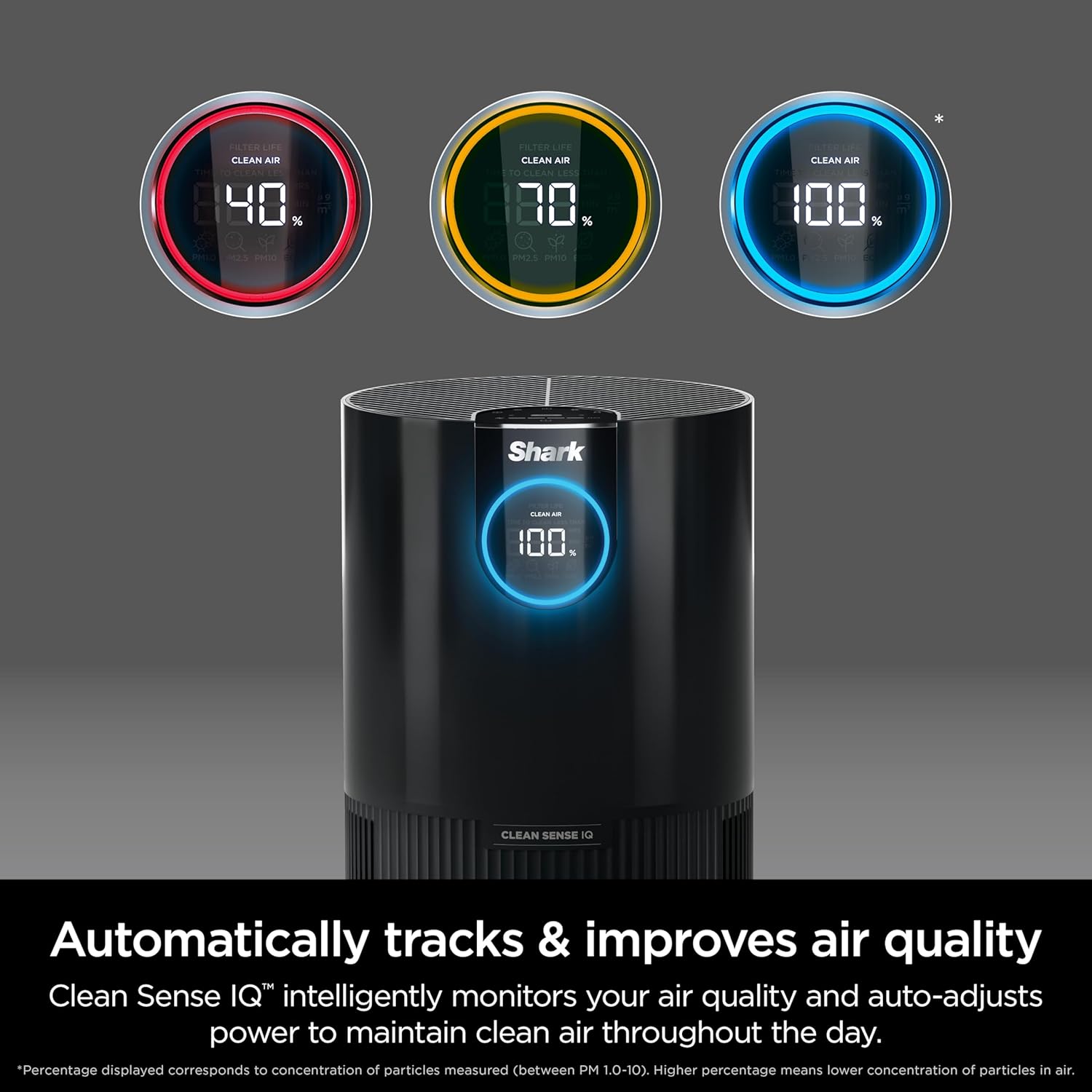
Figure 3.1: The Clean Sense IQ display provides real-time air quality feedback.

Figure 3.2: Odor Neutralizer Technology dial for adjusting scent intensity.
4. Setup
Unpacking and Placement:
- Carefully remove the air purifier from its packaging.
- Place the air purifier on a firm, level surface. Ensure there is at least 6 inches (15 cm) of clearance from walls or furniture on all sides for optimal airflow.
- Ensure the air filter and Odor Neutralizer cartridge are correctly installed. Refer to the 'Maintenance' section for filter installation details.
- Plug the power cord into a standard electrical outlet.

Figure 4.1: The easy-to-use control panel for initial setup and operation.
5. Operating Instructions
Power On/Off:
Press the Power button on the control panel to turn the unit on or off.
Fan Speed Adjustment:
Use the fan speed buttons (usually indicated by '+' and '-' or fan icons) to cycle through different fan speeds (1-4). Higher speeds provide faster purification but may increase noise levels.
Clean Sense IQ (Auto Mode):
When activated, Clean Sense IQ automatically monitors the air quality and adjusts the fan speed to maintain optimal purification. This mode is recommended for continuous operation.
Odor Neutralizer Adjustment:
Rotate the Odor Neutralizer dial (if applicable to your model) to adjust the intensity of the fresh scent released. Settings typically include Min, Med, and Max.
Display and Indicators:
The LED display shows real-time air quality readings (PM1, PM2.5, PM10), filter life, current fan speed, and Eco mode status. Dimmable lights are available for minimal sleep interruption.
Video 5.1: An instructional video demonstrating the features and operation of the Shark Clean Sense Air Purifier.
6. Maintenance
Filter Replacement:
The Anti-Allergen NANOSEAL HEPA Filter has a lifespan of 6-12 months, depending on usage and air quality. The control panel will indicate when a filter change is needed.
- Turn off and unplug the air purifier.
- Locate the filter access panel (usually at the bottom or back of the unit).
- Remove the old filter by pulling it out.
- Insert the new Shark genuine NANOSEAL HEPA Filter, ensuring it is seated correctly.
- Replace the filter access panel.
- Plug in the unit and reset the filter life indicator on the control panel (refer to the display instructions for your specific model).
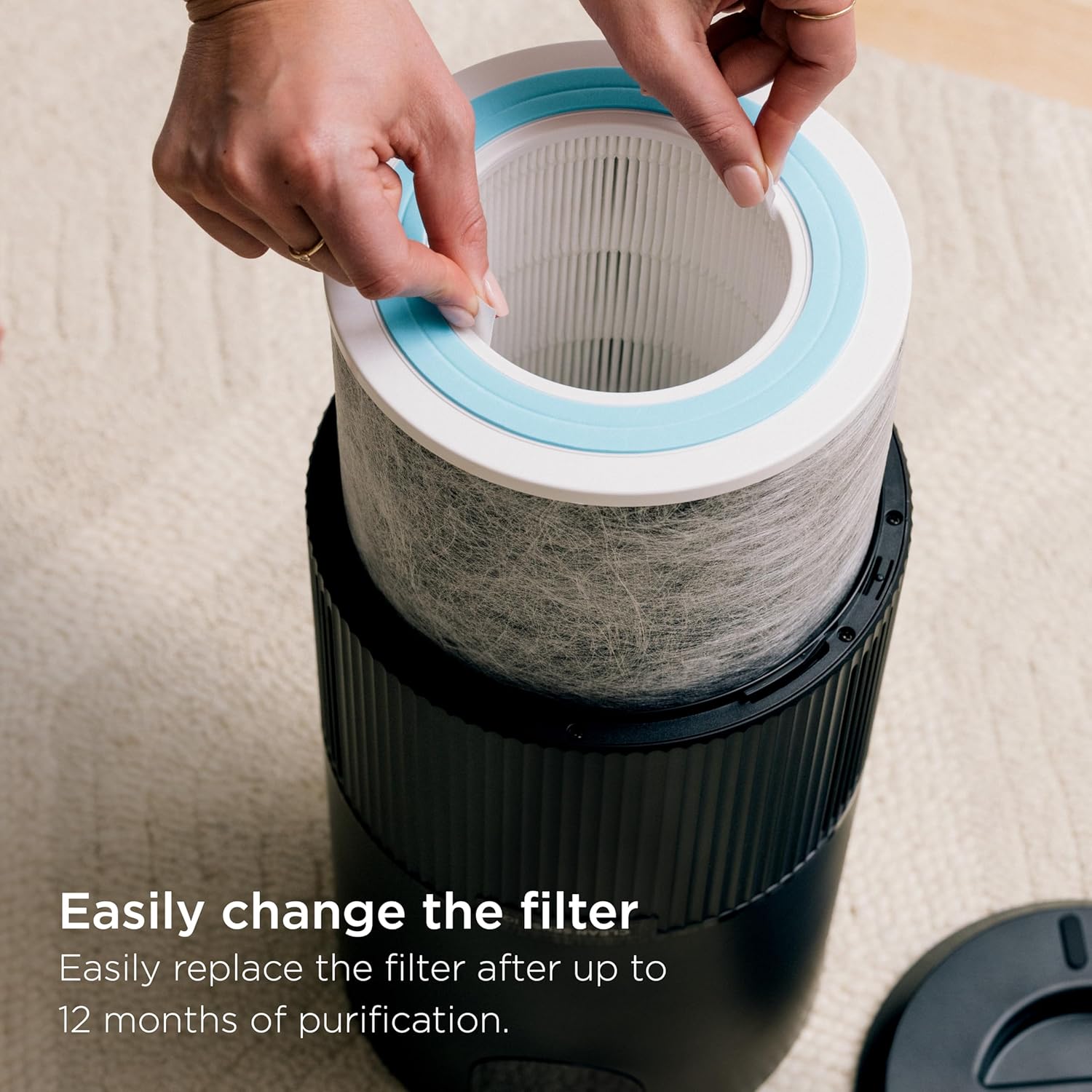
Figure 6.1: Illustration of replacing the air filter in the Shark HP232.
Cleaning the Unit:
- Wipe the exterior of the air purifier with a dry cloth.
- Do not use abrasive cleaners or solvents.
- Periodically clean the air intake and exhaust vents with a soft brush or vacuum cleaner attachment to prevent dust buildup.
7. Troubleshooting
If you encounter issues with your air purifier, refer to the following common problems and solutions:
| Problem | Possible Cause | Solution |
|---|---|---|
| Unit does not turn on | No power; Power cord not fully plugged in | Check power outlet; Ensure cord is securely plugged in. |
| Reduced airflow or purification | Clogged filter; Blocked air vents | Replace filter; Clear any obstructions from air intake/exhaust. |
| Air quality reading remains high | Sensor is dirty; Large amount of pollutants present | Clean the air quality sensor (refer to manufacturer's guide); Allow more time for purification. |
| Unusual noise | Foreign object in fan; Unit not on a level surface | Turn off and unplug, inspect for obstructions; Place on a stable, flat surface. |
If the problem persists after trying these solutions, please contact Shark Customer Support.
8. Specifications
| Feature | Detail |
|---|---|
| Model Number | HP232 |
| Brand | Shark |
| Color | Grey |
| Product Dimensions (D x W x H) | 10.82" x 10.82" x 22.79" |
| Floor Area Coverage | Up to 1200 Square Feet (based on 1 air change per hour) |
| Noise Level | 35 Decibels (lowest setting) |
| Filter Type | Anti-Allergen NANOSEAL HEPA Filter (Certified HEPA) |
| Particle Retention Size | 0.1-0.2 Micron |
| Controller Type | Button Control |
| Wattage | 36 watts |
| Power Source | Corded Electric |
| Item Weight | 10.97 pounds |
| Included Components | Air Purifier, NANOSEAL HEPA Filter |
9. Warranty Information
Shark products are manufactured to the highest quality standards. For detailed warranty information, including terms, conditions, and registration, please refer to the warranty card included with your product or visit the official Shark website. Keep your proof of purchase for warranty claims.
10. Customer Support
For further assistance, product registration, or to purchase replacement filters and accessories, please visit the official Shark website or contact their customer service department:
- Website: www.sharkclean.com
- Phone: Refer to your product packaging or website for local contact numbers.