
Introduction
This manual provides detailed instructions for the setup, operation, and maintenance of your Edillas Kids Digital Alarm Clock. Please read this manual thoroughly before using the product to ensure proper function and longevity.
Product Features
- Dual Alarm Settings: Configure two independent alarms for weekdays, weekends, or all seven days.
- Snooze Function: Provides a 5-minute snooze interval, repeatable up to three times.
- Countdown Timer: Adjustable from 1 to 59 minutes for various activities.
- Night Light with Sleep Timer: Offers a warm glow with a timer from 1 to 59 minutes.
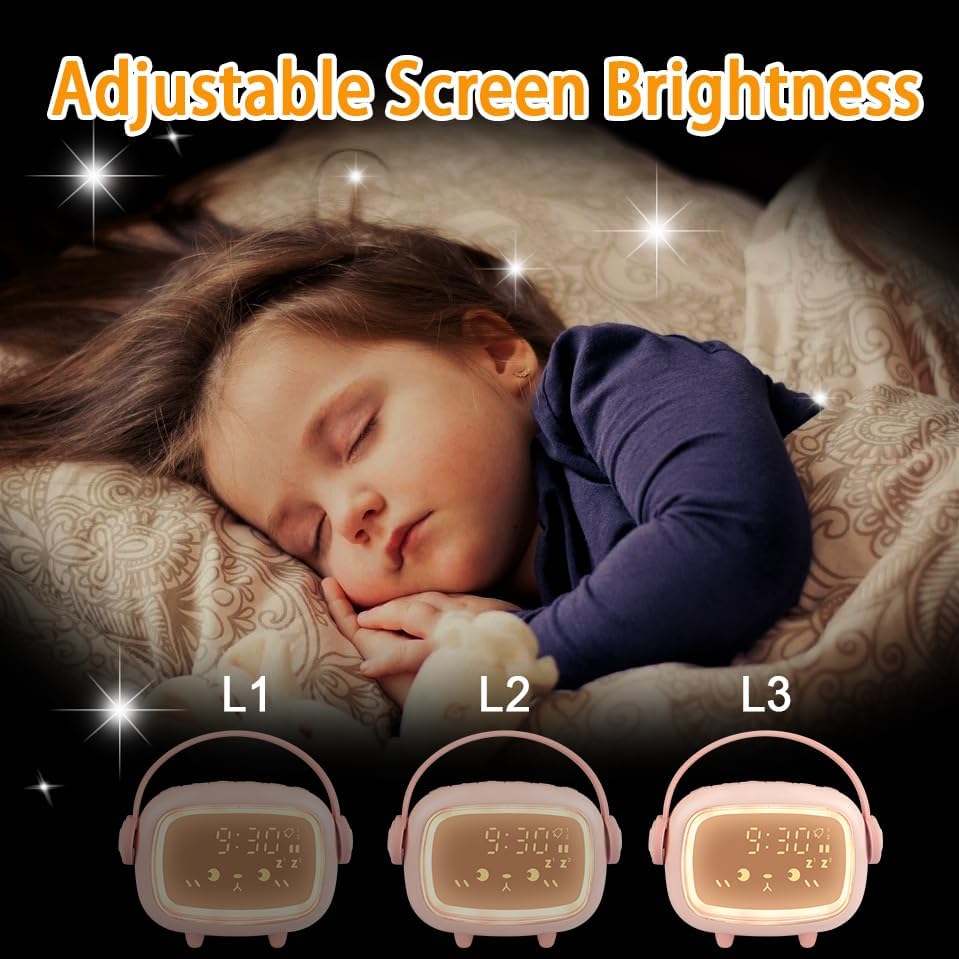
- Adjustable Brightness: Three display brightness levels for optimal visibility day and night.
- Six Ringtones: A selection of six distinct alarm sounds.
- Adjustable Alarm Volume: Customize the alarm sound level.
- Rechargeable Battery: Built-in 2000mAh lithium battery, charged via USB.
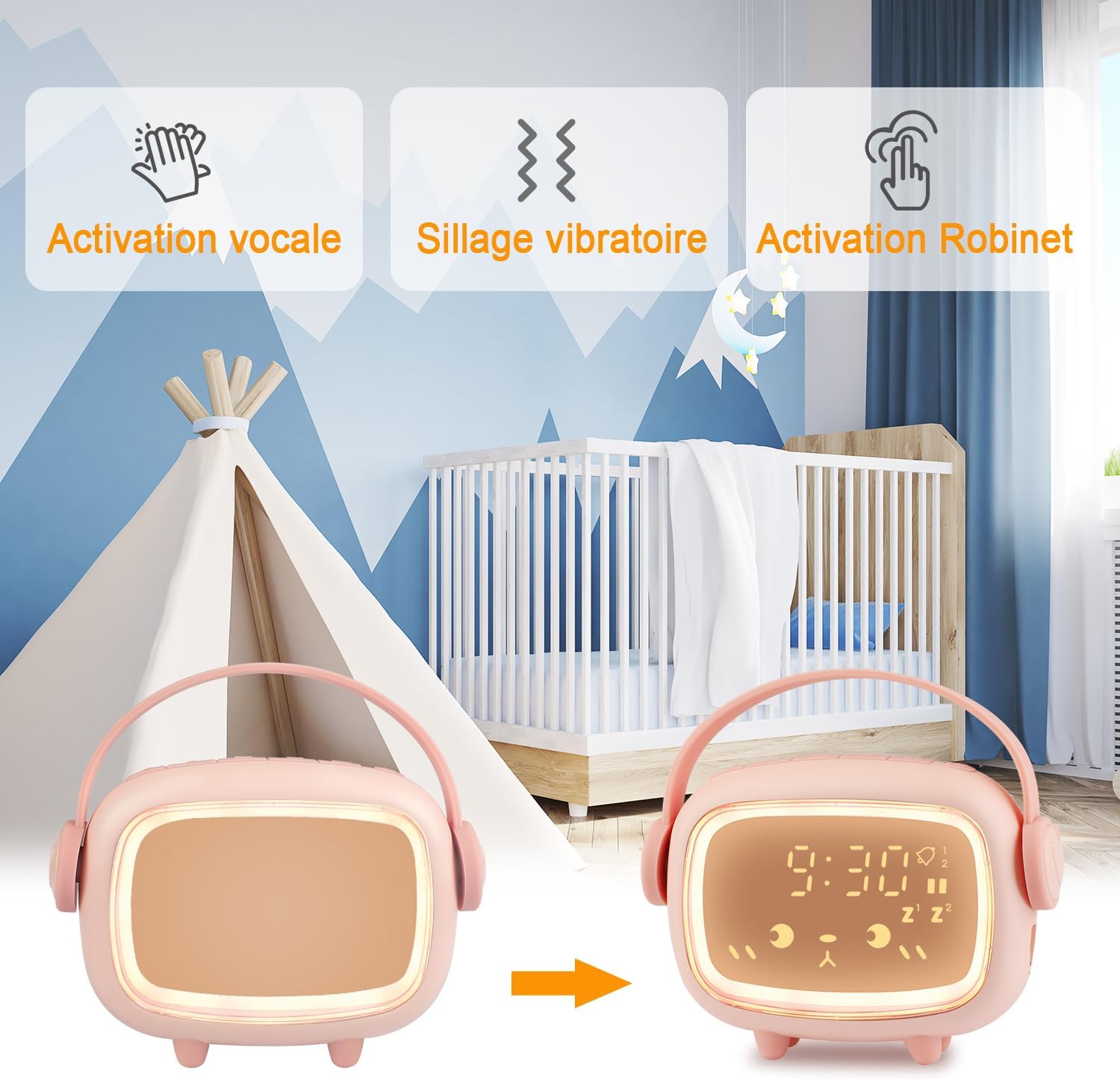
- Energy-Saving Mode: Display activates with tap or clap.
Package Contents
Please check the package for the following items:
- Edillas Kids Digital Alarm Clock (Model Réveil Enfants)
- USB Charging Cable
- User Manual (this document)
Setup
1. Initial Charging
Before first use, fully charge the alarm clock using the provided USB cable. Connect the USB cable to the charging port on the device and to a standard USB power adapter (not included) or a computer USB port. The charging indicator will show the charging status.
2. Power On/Off
Press and hold the power button (location typically on the back or bottom) to turn the device on or off.
Operating Instructions
1. Setting the Time
- Press the 'Time Set' button (refer to product diagram for exact button).
- Use the '+' and '-' buttons to adjust the hour.
- Press 'Time Set' again to confirm the hour and move to minutes adjustment.
- Use the '+' and '-' buttons to adjust the minutes.
- Press 'Time Set' one more time to save the time setting.
- Select 12-hour or 24-hour format if available (refer to specific button or menu option).
2. Setting Alarms (Alarm 1 & Alarm 2)
The clock supports two independent alarms. The setup process is similar for both.
- Press the 'Alarm 1' or 'Alarm 2' button. The alarm time will flash.
- Use the '+' and '-' buttons to set the desired alarm hour.
- Press the 'Alarm' button again to confirm the hour and move to minutes.
- Use the '+' and '-' buttons to set the desired alarm minutes.
- Press the 'Alarm' button to confirm minutes.
- Select the alarm frequency:
- 1-5: Monday to Friday
- 1-6: Monday to Saturday
- 1-7: Monday to Sunday
- Press the 'Alarm' button to save the alarm setting.
- To enable/disable an alarm, press the corresponding 'Alarm' button briefly. An icon on the display will indicate if the alarm is active.
Snooze Function
When an alarm sounds, press the Night Light button to activate the 5-minute snooze. The alarm will sound again after 5 minutes. This can be repeated up to three times. To stop the alarm completely, press any other button.
3. Countdown Timer
The countdown timer can be set from 1 to 59 minutes.
- Press the 'Timer' button. The display will show '00'.
- Use the '+' and '-' buttons to set the desired countdown duration in minutes.
- Press the 'Timer' button again to start the countdown.
- When the countdown reaches zero, an alert will sound.
- To stop the countdown prematurely, press the 'Timer' button again.

4. Night Light Function and Brightness Adjustment
The integrated night light provides a soft illumination.
- Night Light Activation: Press the 'Night Light' button to turn the night light on/off.
- Brightness Adjustment: The display has three brightness levels (L1, L2, L3). Press the 'Brightness' button (or cycle through by pressing the Night Light button multiple times) to adjust the display brightness.
- Night Light Sleep Timer: While the night light is on, press and hold the 'Night Light' button to enter the timer setting. Use '+' and '-' to set the duration (1-59 minutes). The light will automatically turn off after the set time.
- Energy-Saving Mode Activation: The clock enters energy-saving mode by default. In this mode, the display turns off. To activate the display, tap the clock, tap the surface it rests on, or clap your hands.

5. Alarm Ringtones and Volume
- Selecting Ringtones: While in alarm setting mode (or a dedicated 'Ringtone' button), use the '+' and '-' buttons to cycle through the 6 available ringtones.
- Adjusting Volume: Use the 'Volume' button (or a combination with '+' / '-') to set the desired alarm volume level.

Maintenance
- Clean the device with a soft, dry cloth. Do not use abrasive cleaners or solvents.
- Avoid exposing the clock to extreme temperatures, direct sunlight, or high humidity.
- Do not immerse the device in water.
- Store in a cool, dry place when not in use for extended periods.
Troubleshooting
| Problem | Possible Cause | Solution |
|---|---|---|
| Clock display is off. | Energy-saving mode is active. | Tap the clock, the table, or clap your hands to activate the display. |
| Alarm does not sound. | Alarm is not enabled or volume is too low. | Ensure the alarm is enabled (check display icon) and the volume is set appropriately. |
| Device not charging. | USB cable or power adapter issue. | Check USB cable connection. Try a different USB port or power adapter. |
| Buttons are unresponsive. | Temporary software glitch or low battery. | Recharge the device. If issue persists, try resetting the device (refer to specific reset instructions if available, otherwise let battery drain and recharge). |
Specifications
| Feature | Detail |
|---|---|
| Model Number | Réveil Enfants |
| Brand | Edillas |
| Product Dimensions (L x W x H) | 4.5 x 3.81 x 11.5 cm |
| Weight | 200 Grams |
| Manufacturer | Yadelai |
| Display Type | Digital |
| Power Source | Built-in Rechargeable Lithium Battery (2000mAh), USB Charged |
| Frame Material | Acrylonitrile Butadiene Styrene (ABS) |
| Special Features | Alarm, Countdown Timer, Snooze, Night Light, Adjustable Brightness |
| Color | Pink (other colors may be available) |
| Shape | Rectangular with rounded corners (as pictured) |
Note: Specifications are subject to change without prior notice.
Warranty and Support
For warranty information and customer support, please refer to the documentation provided with your purchase or contact your retailer. Keep your proof of purchase for any warranty claims.