
M5Stack C008-C
M5Stack Atom Echo Smart Speaker Dev Kit User Manual
Model: C008-C
1. Introduction
The M5Stack Atom Echo is a compact and portable smart speaker development kit designed for voice interaction and AI capabilities. It integrates a microphone and speaker, enabling functions such as voice control and audio playback. This device is ideal for rapid prototyping in various applications including IIoT, home automation, smart retail, and STEM education.
Key features include:
- Compact and Portable: Measuring only 24 x 24 x 17 mm, it is highly convenient for on-the-go use.
- Voice Interaction and AI Capabilities: Built-in microphone and speaker support voice control, story-telling, and integration with cloud platforms like AWS and Baidu.
- Wireless Music Playback: Utilizes ESP32's BT capabilities for seamless audio streaming from mobile devices.
- Versatile Connectivity: Supports 2.4G Wi-Fi IEEE 802.11b/g/n for reliable wireless connection.
- RGB LED Status Display: An embedded SK6812 RGB LED provides visual indication of the device's operational status.

Figure 1: M5Stack Atom Echo Smart Speaker Dev Kit, a compact and portable device.
2. Product Components and Dimensions
The Atom Echo features several key components and a compact design, as detailed below.
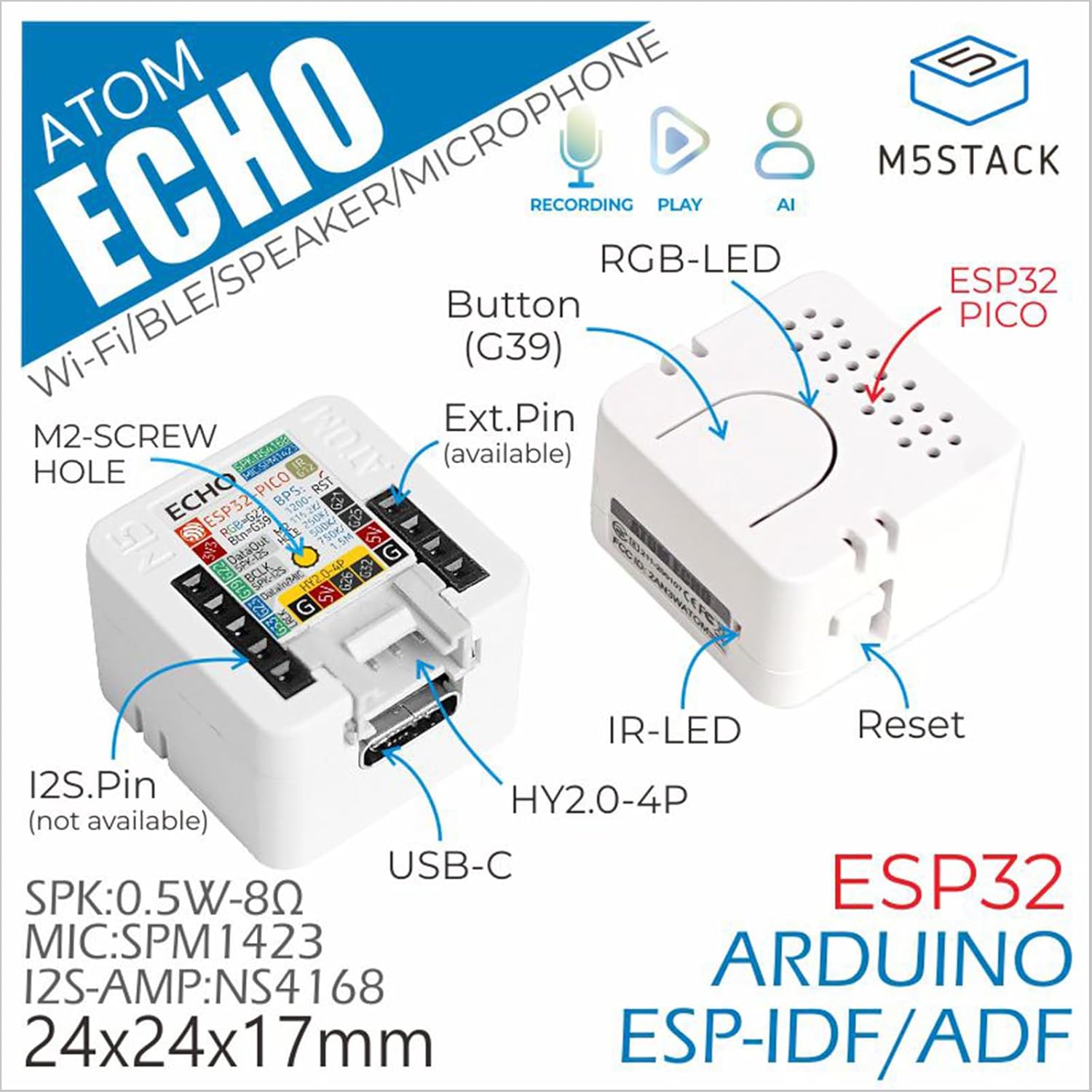
Figure 2: Detailed component diagram of the Atom Echo, highlighting the Button (G39), RGB-LED, ESP32 PICO, IR-LED, Reset button, USB-C port, Extension Pins, M2-screw hole, and I2S.Pin.

Figure 3: Dimensions of the Atom Echo, measuring 24mm (0.94in) in width and depth, and 17mm (0.67in) in height.

Figure 4: Size comparison of the Atom Echo next to a US Quarter, illustrating its compact form factor.
3. Setup and Connectivity
The Atom Echo is designed for easy setup and versatile connectivity. It supports both Wi-Fi and Bluetooth for communication.
3.1 Powering On
Connect the Atom Echo to a 5V DC power source using the USB-C port. The device will power on automatically.
3.2 Wireless Connectivity
The device supports 2.4G Wi-Fi (IEEE 802.11b/g/n) and Bluetooth. Specific connection procedures will depend on the firmware loaded onto the device. Refer to the official M5Stack documentation for detailed programming and connection guides.
For detailed tutorials and quick start guides, please visit the official M5Stack website:
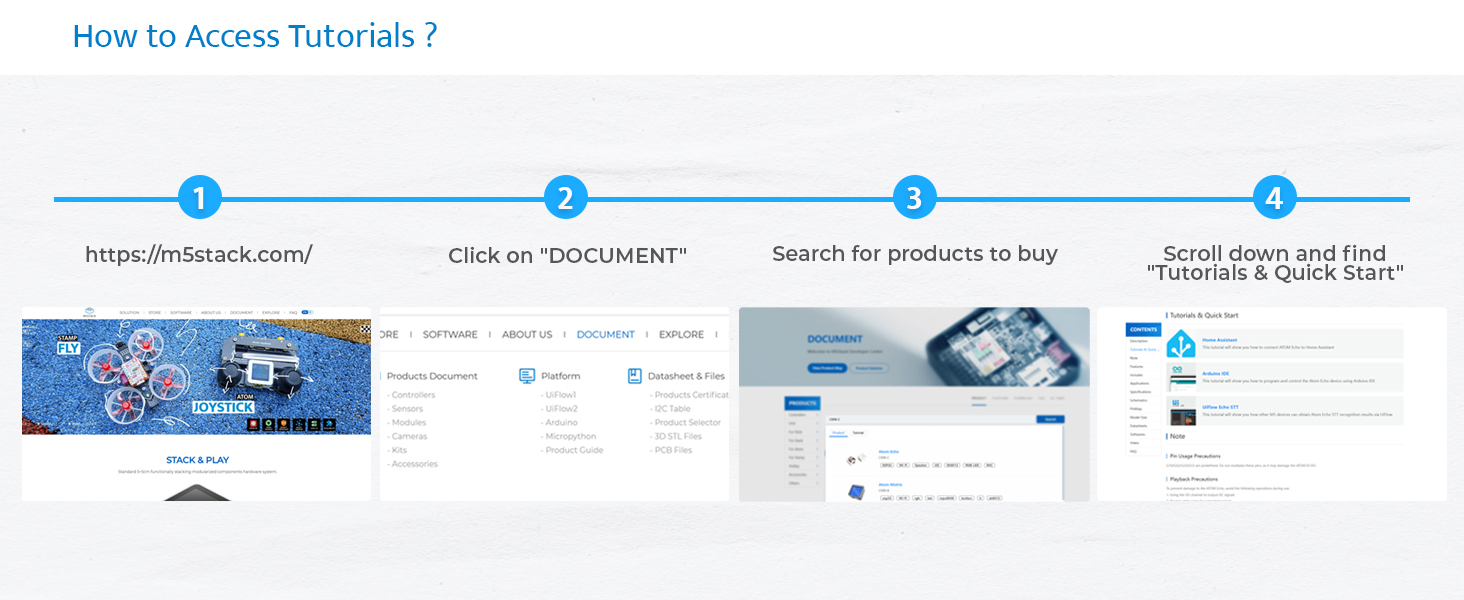
Figure 5: Steps to access tutorials and quick start guides on the M5Stack website (m5stack.com).
4. Operating the Atom Echo
The Atom Echo is primarily operated through its programmable button and voice commands, depending on the loaded application.
4.1 Voice Interaction
The built-in microphone allows for voice input. Depending on the programmed functionality, you can use voice commands for control, ask questions, or interact with AI services.
4.2 Audio Playback
The integrated speaker enables audio output. This can be used for playing music wirelessly via Bluetooth, delivering voice responses, or playing system notifications.
4.3 RGB LED Indicator
The RGB LED (SK6812) provides visual feedback on the device's status, such as connection status, active listening mode, or error indications. The specific color patterns and their meanings are defined by the loaded firmware.

Figure 6: Key features of the Atom Echo, including support for STT services, RGB LED status display, compact and lightweight design, and a GROVE expansion interface.
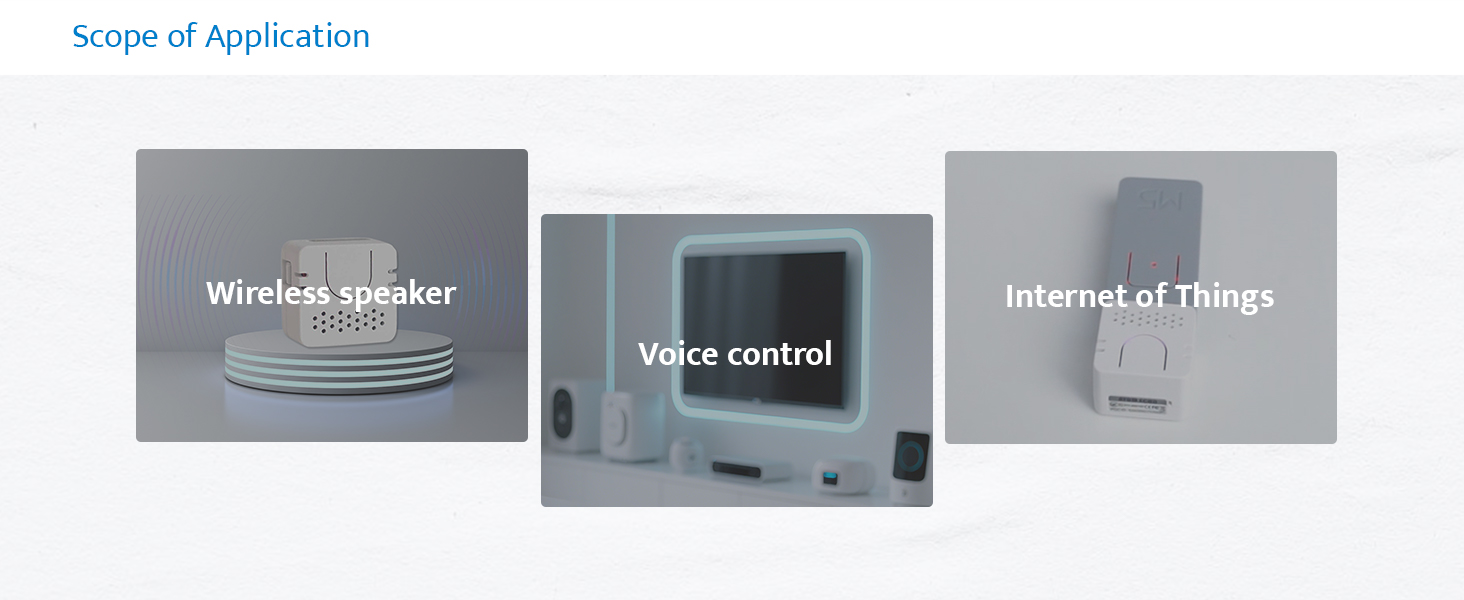
Figure 7: Examples of Atom Echo applications, including use as a wireless speaker, for voice control, and in Internet of Things (IoT) projects.
5. Maintenance
The M5Stack Atom Echo requires minimal maintenance. Keep the device clean and free from dust and moisture.
- Cleaning: Use a soft, dry cloth to clean the exterior of the device. Do not use liquid cleaners or solvents.
- Storage: Store the device in a cool, dry place when not in use.
- Environmental Conditions: Avoid exposing the device to extreme temperatures, direct sunlight, or high humidity.
6. Troubleshooting
If you encounter issues with your Atom Echo, consider the following common troubleshooting steps:
- Device Not Powering On:
- Ensure the USB-C cable is securely connected to both the device and a working 5V power source.
- Try a different USB-C cable or power adapter.
- No Audio Output:
- Verify that the device is properly programmed to output audio.
- Check the volume settings within your application or connected device.
- Ensure the speaker is not physically obstructed.
- Microphone Not Responding:
- Confirm that the microphone functionality is enabled and correctly configured in your firmware.
- Ensure there are no physical obstructions covering the microphone.
- Test in a quiet environment, as excessive background noise can affect performance.
- Connectivity Issues (Wi-Fi/Bluetooth):
- Ensure the device is within range of your Wi-Fi router or Bluetooth device.
- Verify Wi-Fi credentials or Bluetooth pairing status in your firmware.
- Restart the Atom Echo and your router/Bluetooth device.
- Unexpected Behavior:
- Perform a soft reset using the reset button if available, or by power cycling the device.
- Review your loaded firmware for any programming errors or conflicts.
- Consult the M5Stack official documentation and community forums for specific programming and debugging assistance.
7. Specifications
Detailed technical specifications for the M5Stack Atom Echo:

Figure 8: Overview of the Atom Echo's key specifications.
| Specification | Value |
|---|---|
| Input Voltage | 5 Volts (DC) |
| Mounting Type | Wall Mount |
| Material | Plastic |
| Model Name | Atom Echo |
| Speaker Type | Multimedia |
| Special Feature | Programmable |
| Recommended Uses | Smart Speaker Development Kit |
| Compatible Devices | Smartphone, Tablet |
| Unit Count | 1.0 Count |
| Controller Type | Button |
| Surround Sound Channel Configuration | 2.0 |
| Color | White |
| Included Components | 1x ATOM ECHO |
| Product Dimensions | 0.94"D x 0.94"W x 0.67"H |
| Age Range (Description) | All Ages |
| Is Waterproof | False |
| Warranty Type | Limited |
| Number of Items | 1 |
| Control Method | Voice |
| Wireless Communication Technology | Bluetooth, Wi-Fi |
| Speaker Size | 16 Millimeters |
| Power Source | USB-C |
| Woofer Diameter | 40.2 Millimeters |
| Water Resistance Level | Not Water Resistant |
| Customer Package Type | FFP |
| Audio Driver Type | Dynamic Driver |
| Bluetooth Range | 10 Meters |
| Number of Microphones | 1 |
| Subwoofer Connectivity Technology | Wireless |
| Connectivity Protocol | Bluetooth, Wi-Fi, USB |
| Includes MP3 player? | No |
| Number Of Circuits | 1 |
| Number of Power Levels | 1 |
| Processor Count | 1 |
| Manufacturer | M5Stack Technology Co., Ltd. |
| Item Weight | 1.13 ounces |
| Item model number | C008-C |
| Date First Available | June 12, 2023 |
| Country of Origin | China |
| Brand | M5Stack |
| Speaker Maximum Output Power | 0.5 Watts |
| Frequency Response | 240 Hz |
| Connectivity Technology | Bluetooth, Wi-Fi, USB, IR |
| Audio Output Mode | Mono |
8. What's in the Box
The M5Stack Atom Echo package includes the following items:
- 1x ATOM ECHO unit

Figure 9: Visual representation of the Atom Echo unit included in the package.
9. Warranty and Support
The M5Stack Atom Echo comes with a limited warranty. For specific warranty terms and conditions, please refer to the documentation provided with your purchase or visit the official M5Stack website.
For technical support, additional resources, and community forums, please visit the M5Stack official website:
Related documentsC008-C


Ask a question about this manual
Ask about setup, troubleshooting, compatibility, parts, safety, or missing instructions. Manuals+ will review the question and use this page’s manual context to help answer it.