
Raddy WF-100SE
Raddy WF-100SE 13-in-1 Wi-Fi Weather Station User Manual
Your comprehensive guide to setting up, operating, and maintaining your Raddy WF-100SE Weather Station.
Product Overview
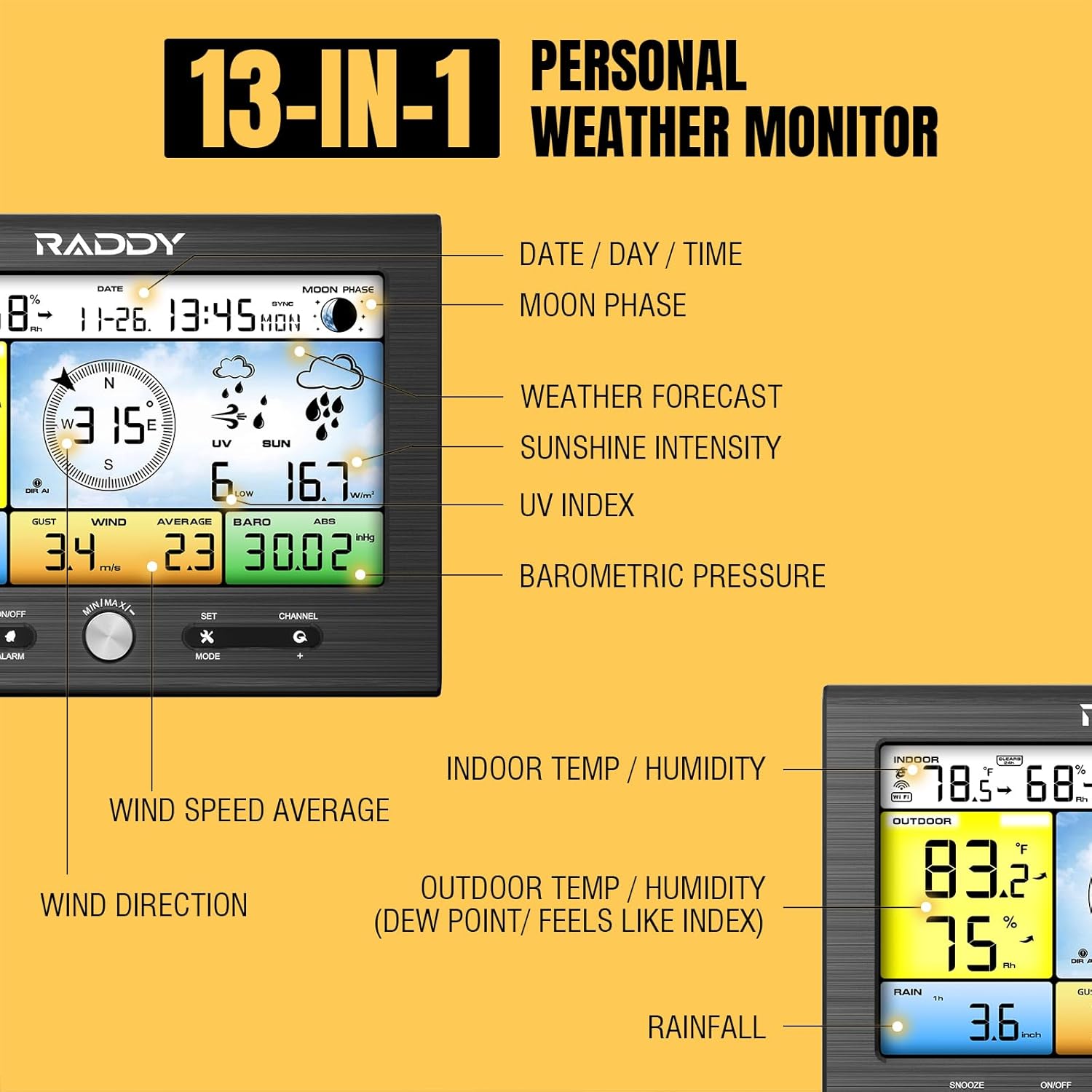
The Raddy WF-100SE is a sophisticated 13-in-1 weather station designed to provide accurate and real-time weather data for your home or garden. It features a vibrant color display and a robust outdoor sensor that measures various environmental parameters.

Key features include:
- 13-in-1 Data Display: Temperature (indoor/outdoor), Humidity (indoor/outdoor), Rainfall, UV Index, Feels-Like Temperature, Dew Point, Sunshine Intensity, Weather Forecast, Wind Direction, Wind Speed, Barometric Pressure, and Moon Phase.
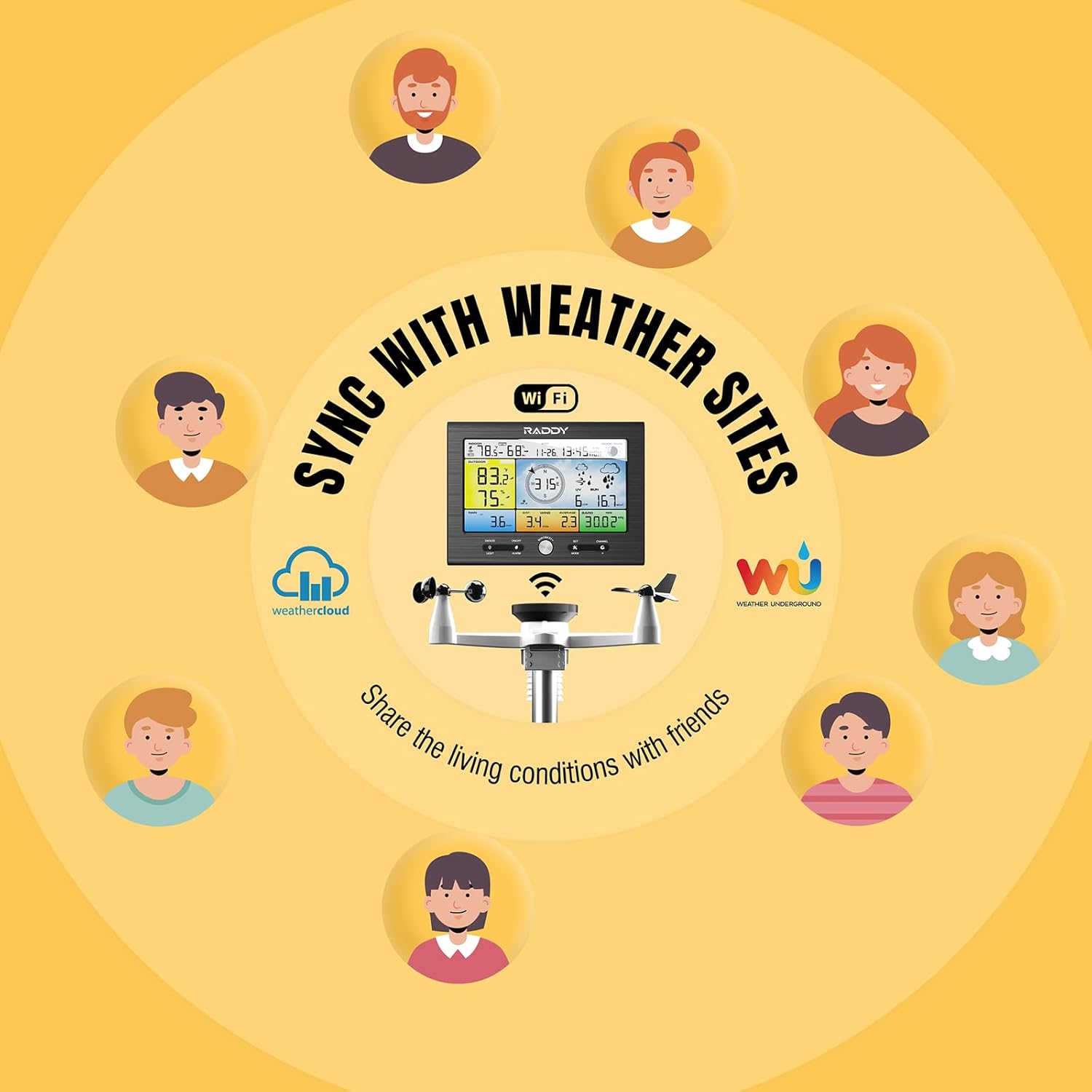
- Wi-Fi Connectivity: Syncs with online weather platforms like WeatherCloud and Wunderground for remote access and data sharing.
- 7-in-1 Accurate Outdoor Sensor: Equipped with an upgraded rain collector, thermo-hygrometer radiation shield, and a solar panel for precise measurements.
- Wireless Transmission: Up to 330ft (100m) communication range between the outdoor sensor and indoor display.
- 24-48 Hour Weather Forecast: Provides reliable predictions to help you plan activities.
Package Contents
Ensure all items are present before proceeding with installation:
- WF-100SE Indoor Display Unit
- 7-in-1 Outdoor Sensor Unit
- Mounting Pole
- Mounting Hardware (U-bolts, nuts, washers)
- Wind Vane
- Wind Cups
- Rain Collector
- Bird Spikes (to deter birds from the rain collector)
- Power Adapter for Indoor Display
- User Manual

Setup Guide
1. Outdoor Sensor Assembly
Carefully unpack all components. Attach the wind vane and wind cups to their designated slots on the outdoor sensor unit. Ensure they can rotate freely. Install the rain collector onto the main unit. The bird spikes can be inserted around the rim of the rain collector to prevent birds from interfering with rainfall measurements.

2. Mounting the Outdoor Sensor
Select a location for the outdoor sensor that is open and free from obstructions (e.g., trees, buildings) that could affect wind or rain measurements. The sensor should be mounted securely using the provided pole and hardware. Ensure the unit is level using the built-in bubble level. For optimal solar charging, position the solar panel facing south. The wireless transmission range is up to 330 feet (100 meters), but obstructions can reduce this distance.
3. Indoor Display Setup
Connect the indoor display unit to power using the provided AC adapter. Insert 3 AAA batteries (not included) into the battery compartment for backup power. The display will automatically search for the outdoor sensor. Once connected, set the current time, date, and preferred units of measurement (e.g., Celsius/Fahrenheit, mph/km/h).
4. Wi-Fi Connectivity and Online Sync
To enable Wi-Fi features and sync with online weather services like WeatherCloud and Wunderground, follow the instructions in the detailed manual for connecting the display to your home Wi-Fi network. You will need to create accounts on these platforms and register your weather station to view data remotely.

Operating Instructions
Display Navigation
The indoor display features several buttons for navigation and settings adjustment:
- SNOOZE/LIGHT: Activates snooze for alarms or adjusts display brightness.
- ON/OFF/ALARM: Powers the unit on/off or sets/disables alarms.
- MIN/MAX/SET: Views minimum/maximum recorded values or enters setup mode.
- MODE: Cycles through different display modes or confirms selections.
- CHANNEL: Selects different outdoor sensor channels if multiple are used.
The display offers adjustable brightness for comfortable viewing in various lighting conditions.

Understanding Weather Data
The display presents a comprehensive array of weather data. Refer to the icons and labels on the screen for specific readings. You can set customizable high-low alerts for various parameters, such as temperature or wind speed, to be notified when conditions change significantly.

Maintenance
Cleaning the Sensors
Periodically inspect the outdoor sensor for dirt, debris, or insect nests that may affect accuracy. Clean the rain collector funnel and wind sensors gently with a soft, damp cloth. Avoid using abrasive cleaners or solvents.
Battery Replacement
The outdoor sensor requires 1 AA battery (not included) for operation, which is supplemented by its solar panel. The indoor display uses an AC adapter for primary power and 3 AAA batteries (not included) as a backup. Replace batteries when the low battery indicator appears on the display to ensure continuous operation.
Troubleshooting
If you encounter issues with your Raddy WF-100SE weather station, consider the following common solutions:
- No Data/Inaccurate Readings: Ensure the outdoor sensor is within the 330ft transmission range and free from major obstructions. Check battery levels in both units. Verify the outdoor sensor is correctly assembled and its components (wind vane, cups) move freely.
- Wi-Fi Connection Issues: Double-check your Wi-Fi password and network name. Ensure the display is within range of your Wi-Fi router. Refer to the detailed manual for specific Wi-Fi setup steps, as initial configuration can sometimes be complex.
- Incorrect Temperature Readings: If indoor temperature appears high, ensure the display unit is not placed near heat sources or in direct sunlight. For outdoor temperature, confirm the sensor is mounted in an open area away from heat-radiating surfaces. Calibration options may be available in the settings to fine-tune readings.
- Outdoor Sensor Battery Life: The outdoor sensor uses a solar panel for power, but a backup AA battery is crucial, especially in low light conditions or winter. If batteries drain quickly, ensure the solar panel is clean and receives adequate sunlight.
- Display Button Responsiveness: If buttons feel unresponsive, ensure you are pressing them firmly and correctly. Some units may have touch-sensitive areas rather than physical buttons.
For persistent issues, consult the full user manual or contact customer support.
Specifications
| Feature | Detail |
|---|---|
| Model Number | WF-100SE |
| Product Dimensions | 7.1 x 17.6 x 11.6 inches; 5.49 Pounds |
| Power Source (Outdoor) | Solar Powered with 1 AA battery backup |
| Power Source (Indoor) | AC Adapter with 3 AAA battery backup |
| Connectivity Technology | Wi-Fi |
| Wireless Transmission Range | Up to 330ft (100m) |
| Material | Plastic |
| Special Features | Adjustable Brightness, Alarm, Customizable Alert, Large Display, Wireless |
| Recommended Uses | Garden, Laboratory |
| Specific Uses | Dew Point, Moon Phase, Pressure, Solar Radiation, UV Index |
Warranty and Support
Raddy products are designed for reliability and performance. For information regarding warranty coverage, please refer to the warranty card included in your product packaging or visit the official Raddy website. If you require technical assistance, troubleshooting, or have questions about your WF-100SE weather station, please contact Raddy customer support through their official channels. Contact details are typically found in the full user manual or on the manufacturer's website.
Related documentsWF-100SE


Ask a question about this manual
Ask about setup, troubleshooting, compatibility, parts, safety, or missing instructions. Manuals+ will review the question and use this page’s manual context to help answer it.