
1. Introduction
Thank you for choosing the PalliPartners G3040 Metal Detector. This device is designed for efficient and accurate metal detection across various terrains. Featuring an advanced DSP chip, a 12-inch waterproof search coil, and multiple operating modes, it is suitable for both beginners and experienced users. Please read this manual thoroughly before operating the device to ensure proper usage and to maximize your treasure hunting experience.
2. Safety Information
- Always obtain permission before searching on private property.
- Avoid searching in areas where underground cables or pipes may be present.
- Exercise caution when digging to prevent injury or damage to property.
- The control box is not waterproof. Protect it from moisture and submersion.
- Keep the device away from extreme temperatures and direct sunlight.
- Dispose of batteries responsibly according to local regulations.
3. Package Contents
Verify that all components are present in your package:
- PalliPartners G3040 Metal Detector Main Unit (Control Box and Stem)
- 12-inch Waterproof Search Coil
- Armrest with Thick Sponge Pad
- User Manual
- Shovel (may be included as an accessory)
4. Assembly & Setup
Follow these steps to assemble your metal detector:
- Attach the Search Coil: Secure the 12-inch search coil to the lower stem using the provided bolt and nut. Ensure it is firmly attached but can still be adjusted for angle.
- Connect the Stems: Connect the lower stem to the middle stem, and then connect the middle stem to the upper stem (which includes the control box and armrest). The adjustable stem allows for lengths between 43.3 inches and 60.2 inches.
- Wrap the Cable: Carefully wrap the search coil cable around the stem, ensuring it is not too tight or loose, and plug the connector into the control box.
- Adjust the Armrest: Position the armrest for comfortable use. The thick sponge pad and arc upgraded handle provide ergonomic support.
- Install Batteries: Open the battery compartment on the control box and insert the required batteries (not included).

The 10-inch wide IP68 waterproof search coil is shown in use for underwater treasure hunting. Inset images highlight the thick sponge pad and arc upgraded handle for comfort, and the coil's ultrasonic heatfusion sealing for water resistance.

This diagram illustrates the comprehensive functionality and components of the metal detector, including the 12-inch waterproof search coil, anti-interference nylon material, LCD backlight display, adjustable stem (36.2" to 47.2"), ergonomically designed hand rest, and EVA foam handshake.
5. Operating Instructions
5.1. LCD Display Overview

This diagram illustrates the main control panel and LED display of the G3040 metal detector. Key indicators and buttons are numbered for easy reference: 1. Sens Level Indicator, 2. Power/Light Control Button, 3. Coin Depth Indicator, 4. Volume Indicator, 5. Sens/Volume Control Button, 6. Increase Control Button, 7. Pinpoint Control Button, 8. Decrease Control Button, 9. Target ID, 10. Mode Indicator, 11. Low Battery Indicator.
5.2. Power On/Off and Volume Control
- To power on, rotate the VOLUME knob clockwise. To power off, rotate it counter-clockwise until it clicks.
- Adjust the volume by rotating the VOLUME knob.
- The Power/Light Control Button (2) can be used to turn on/off the backlight for the LCD display.
5.3. Operating Modes
The G3040 offers 5 distinct modes for various detection scenarios:

This image details the five distinct search modes available on the metal detector: DISC Mode, PP (Pinpointer) Mode, Memory Mode, Jewelry Mode, and All Metal Mode. Each mode is designed for specific detection needs.
- ALL METAL MODE: Detects all types of metal without discrimination. Ideal for general searching when you want to find any metallic object.
- DISC MODE (Discrimination Mode): Allows you to eliminate certain types of metals from detection. This is useful for ignoring junk metals like iron and focusing on more valuable targets. Use the Increase Control Button (6) and Decrease Control Button (8) to adjust the discrimination level.
- MEMORY MODE: This mode allows the detector to remember a specific target metal and only respond to that type of metal, ignoring others.
- JEWELRY MODE: Specifically designed to eliminate iron signals and primarily respond to other metals commonly found in jewelry.
- PINPOINTER (PP) MODE: Used to precisely locate the exact position of a detected target. Once a target is found in another mode, switch to PP mode to narrow down its location before digging.
5.4. Discrimination and Target ID
The detector provides visual and auditory cues to help identify targets:
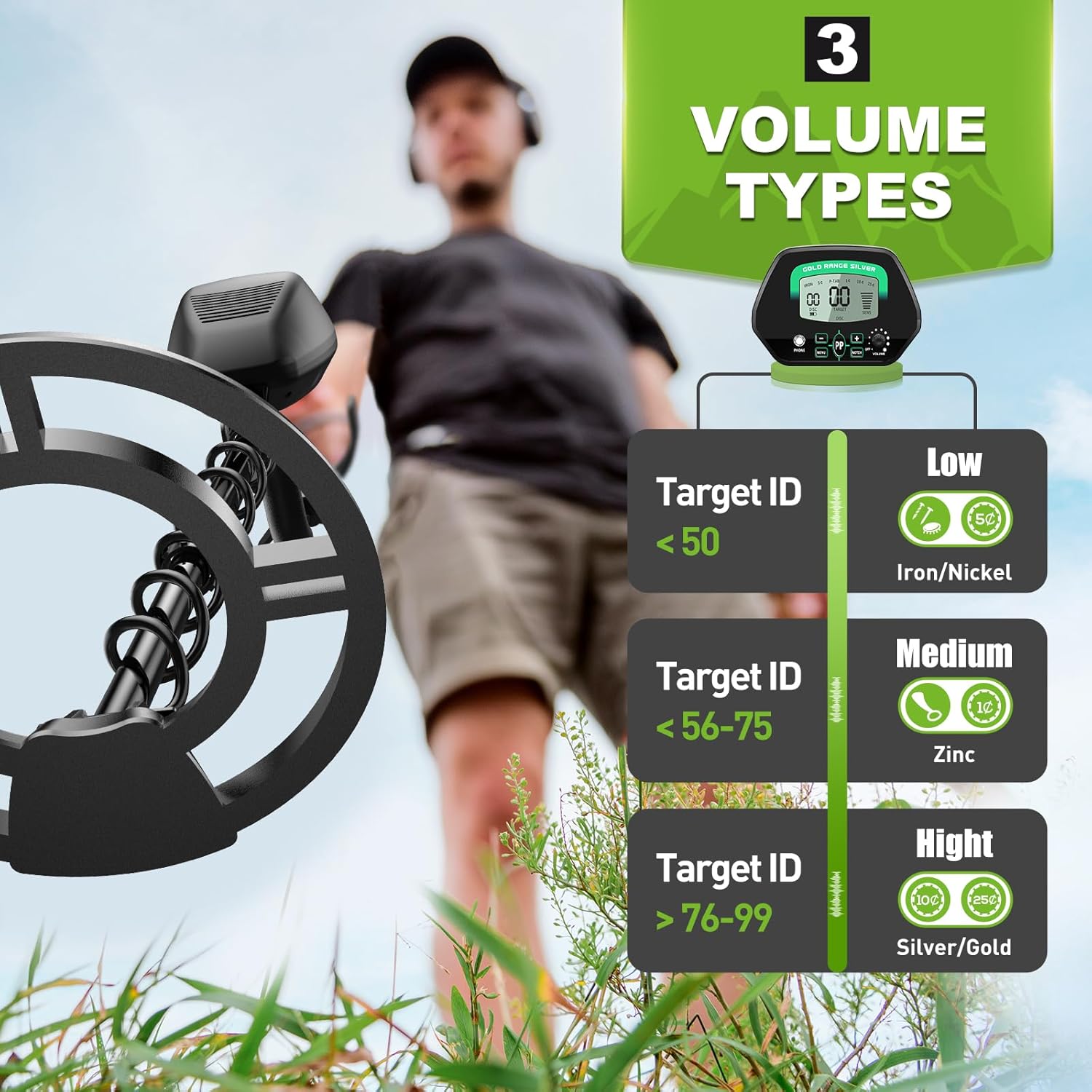
The metal detector provides three distinct audio tones to help identify target metals: Low tone for Target ID < 50 (e.g., Iron/Nickel), Medium tone for Target ID 56-75 (e.g., Zinc), and High tone for Target ID > 76-99 (e.g., Silver/Gold).
- Target ID (9): The LCD display shows a numeric Target ID, which helps categorize the detected metal.
- Audio Tones: Different metals produce different tones:
- Low Tone (Target ID 1-40): Typically indicates iron or nickel.
- Medium Tone (Target ID 41-75): Often indicates zinc, copper, or smaller silver items.
- High Tone (Target ID 76-99): Usually indicates larger silver items or gold.
5.5. Sensitivity Adjustment
Adjust the sensitivity using the Sens/Volume Control Button (5) and the Increase Control Button (6) or Decrease Control Button (8). Higher sensitivity increases detection depth but can also increase false signals in mineralized ground or areas with electromagnetic interference. Lower sensitivity reduces false signals but may decrease detection depth.
5.6. General Usage Tips
- Sweep the search coil slowly and steadily, keeping it parallel to the ground.
- Overlap your sweeps to ensure complete coverage of the search area.
- When a target is detected, use the Pinpointer mode to narrow down its exact location.
- The 12-inch search coil is IP68 waterproof, allowing for detection in shallow water. Remember, the control box is not waterproof.
This video demonstrates the PalliPartners G3040 metal detector in various outdoor environments, showcasing its features like the waterproof search coil, ergonomic design, and discrimination capabilities. It illustrates how to use the detector for finding objects in different terrains, including shallow water.
6. Maintenance
- Clean the search coil with fresh water after use, especially after detecting in saltwater environments.
- Wipe the control box and stem with a damp cloth. Do not use abrasive cleaners.
- Store the metal detector in a dry, cool place when not in use.
- Remove batteries if the device will not be used for an extended period to prevent leakage.
- Regularly check all connections and bolts for tightness.
7. Troubleshooting
| Problem | Possible Cause | Solution |
|---|---|---|
| No power | Dead or incorrectly installed batteries | Replace batteries or ensure they are installed with correct polarity. |
| Constant false signals / Chatter | High sensitivity, electromagnetic interference, mineralized ground | Reduce sensitivity. Move away from power lines or other electronic devices. Try ground balancing if available (refer to advanced settings). |
| No detection | Search coil not connected, incorrect mode, low sensitivity | Check coil connection. Switch to ALL METAL mode. Increase sensitivity. |
| Inaccurate target ID | Deep target, multiple targets, highly mineralized ground | Sweep slower. Try different angles. Adjust sensitivity. |
8. Specifications
| Feature | Detail |
|---|---|
| Brand | PalliPartners |
| Model Number | G3040 |
| Color | Green |
| Material | Metal |
| Power Source | Battery Powered (Batteries not included) |
| Adjustable Length | Yes, 43.3 to 60.2 inches |
| International Protection Rating | IP68 (Search Coil only) |
| Operating Frequency | 9 KHz |
| Recommended Uses | Metal Detection |
| Product Dimensions | 10 x 8 x 47 inches |
| Item Weight | 6.32 pounds |
9. Warranty and Support
For warranty information or technical support, please refer to the contact details provided with your purchase documentation or visit the official PalliPartners website. Keep your purchase receipt as proof of purchase.