
Zephyr PRW24C02CG
Zephyr Presrv Dual Zone Wine Cooler Instruction Manual
Model: PRW24C02CG | Brand: Zephyr
1. Introduction
Thank you for choosing the Zephyr Presrv Dual Zone Wine Cooler. This appliance is designed to provide optimal storage conditions for your wine collection, featuring two distinct temperature zones, PreciseTemp™ temperature control, and Active Cooling Technology. This manual provides essential information for the safe and efficient operation, installation, and maintenance of your wine cooler.
Please read this manual thoroughly before installation and use, and retain it for future reference.
2. Safety Information
Your safety and the safety of others are very important. Please read all instructions before operating this appliance to reduce the risk of fire, electric shock, or injury.
- Electrical Safety: This appliance must be properly grounded. Do not use extension cords or ungrounded adapters. Ensure the power outlet is properly rated for the appliance's voltage (115 Volts).
- Ventilation: Maintain proper ventilation around the appliance. Do not block any ventilation openings. Adequate airflow is crucial for efficient operation and to prevent overheating.
- Child Safety: This appliance is not intended for use by persons (including children) with reduced physical, sensory or mental capabilities, or lack of experience and knowledge, unless they have been given supervision or instruction concerning use of the appliance by a person responsible for their safety. Children should be supervised to ensure that they do not play with the appliance.
- Disposal: When disposing of old appliances, remove the door and leave the shelves in place to prevent children from easily climbing inside. Dispose of the appliance according to local regulations, as it contains refrigerant and flammable insulation materials.
- Proposition 65 Warning: This product can expose you to chemicals including Di(2-ethylhexyl)phthalate (DEHP), which is known to the State of California to cause cancer and birth defects or other reproductive harm. For more information go to www.P65Warnings.ca.gov.
3. Setup and Installation
3.1 Unpacking
Carefully remove all packaging materials, including the foam base and adhesive tape. Inspect the appliance for any shipping damage. Keep the original packaging in case you need to transport the unit in the future.
3.2 Placement
The Zephyr Presrv wine cooler is designed for both built-in and free-standing installation. Ensure the chosen location has a strong, level surface capable of supporting the unit's weight (approximately 137.9 pounds when empty, more when full).
- Ventilation: Allow adequate space around the unit for proper air circulation. For built-in installations, ensure the front grille is unobstructed.
- Temperature: Avoid placing the unit in direct sunlight or near heat sources such as ovens, radiators, or heating vents. Extreme ambient temperatures can affect performance.
- Humidity: Avoid areas of high humidity.
3.3 Leveling the Appliance
It is crucial for the wine cooler to be level for proper operation and door alignment. Adjust the leveling legs at the bottom of the unit by turning them clockwise to raise or counter-clockwise to lower. Use a spirit level to ensure the unit is perfectly level from front to back and side to side.
3.4 Electrical Connection
Before plugging in the appliance, ensure the voltage specified on the rating label matches your local power supply. This appliance requires a dedicated 115 Volt, 60 Hz, 15 Amp grounded electrical outlet. Do not use an adapter or extension cord.
3.5 Initial Operation
After installation, allow the unit to stand upright for at least 2-4 hours before plugging it in. This allows the refrigerant to settle. Once plugged in, allow the unit to cool for at least 24 hours before loading with bottles to ensure it reaches stable operating temperatures.

Image: Zephyr Presrv Wine Cooler integrated into a kitchen island, demonstrating its built-in capability and the interior lighting with the door open.
4. Operating Instructions
Your Zephyr Presrv wine cooler features a user-friendly control panel for managing temperature and lighting.

Image: Detailed view of the digital control panel, showing temperature displays for both zones and various control buttons.
4.1 Control Panel Overview
The control panel is located inside the unit, above the lower zone. It includes touch-sensitive buttons for power, light control, and temperature adjustment for both upper and lower zones.
4.2 Temperature Adjustment
The wine cooler has two independent temperature zones. The upper zone is typically for white wines, and the lower zone for red wines, though settings can be customized.
- Press the 'Zone Select' button (often indicated by an arrow pointing up/down or 'Upper/Lower') to choose the zone you wish to adjust.
- Use the 'Temperature Up' (^) or 'Temperature Down' (v) buttons to set the desired temperature.
- The display will show the set temperature, then revert to the actual internal temperature.
- Recommended temperatures: White wines (45-55°F / 7-13°C), Red wines (55-65°F / 13-18°C).
4.3 Lighting Control
The unit features vertical LED light strips with three color options (Cloud White, Deep Blue, Amber) and four light levels.
- Press the 'Light' button (often indicated by a light bulb icon) to cycle through the color options.
- Continue pressing the 'Light' button to adjust the brightness levels for the selected color.
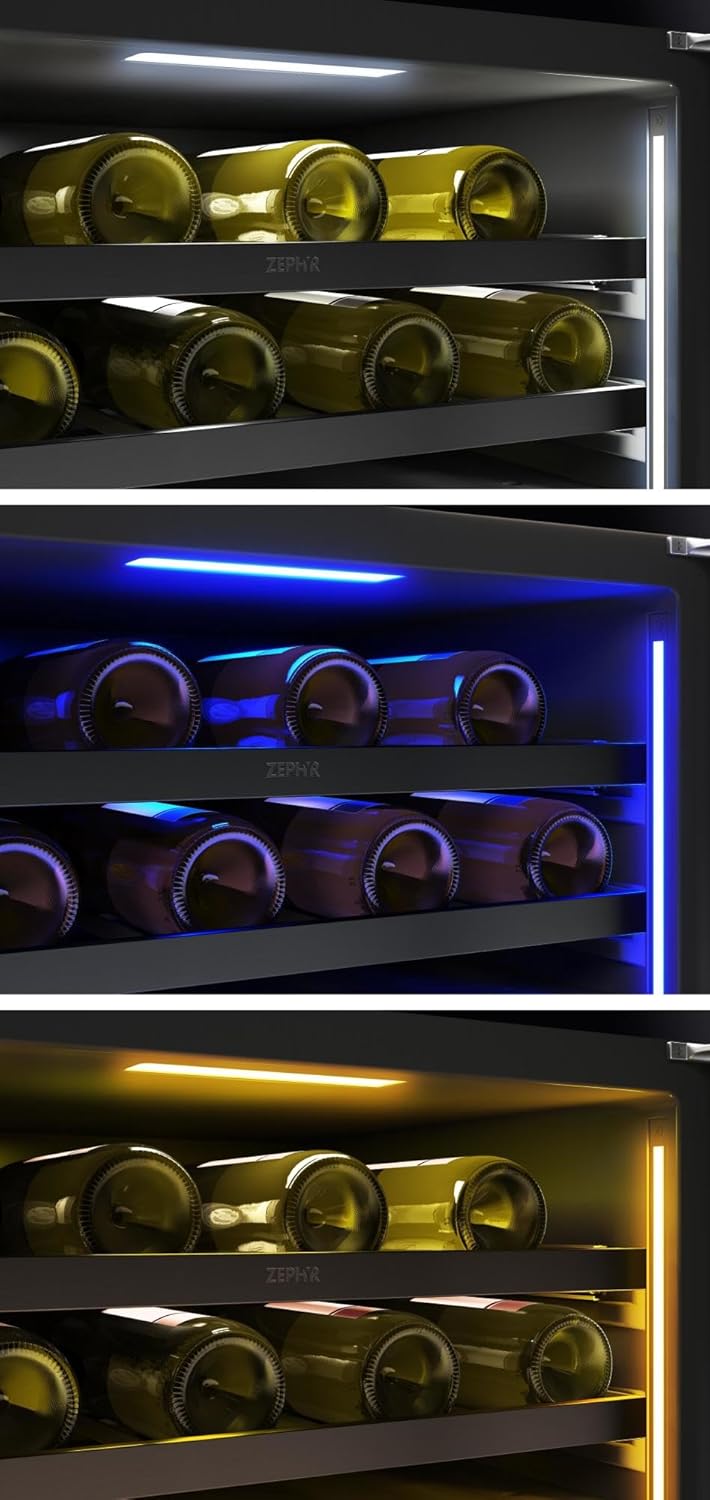
Image: Interior view with Cloud White LED lighting.

Image: Interior view with Deep Blue LED lighting.

Image: Interior view with Amber LED lighting.
4.4 Loading Bottles
The wine cooler features full-extension wood racks designed to accommodate various bottle sizes. For optimal air circulation and to prevent damage to bottles or shelves, ensure bottles are placed securely and do not obstruct the door from closing fully.
4.5 Vibration Dampening System
The integrated Vibration Dampening System minimizes vibrations from the compressor, protecting your wine from agitation and ensuring optimal aging conditions.
5. Maintenance
5.1 Cleaning
- Interior: Clean the interior with a mild detergent and warm water solution. Avoid abrasive cleaners or solvents. Wipe dry thoroughly.
- Exterior: Clean the exterior stainless steel surfaces with a soft cloth and a non-abrasive stainless steel cleaner. For other exterior surfaces, use a mild soap and water solution.
- Door Gasket: Regularly clean the door gasket to ensure a proper seal. A dirty or damaged gasket can lead to inefficient cooling.
- Condenser Coils: For optimal performance, the condenser coils (located at the back or bottom of the unit) should be cleaned periodically. Consult a qualified technician if you are unsure how to access and clean them.
5.2 Defrosting
This appliance is designed with an automatic defrost system. Frost will melt and drain into a drip tray at the back of the unit, where it evaporates. No manual defrosting is typically required.
5.3 Power Outage
In case of a power outage, the wine cooler will generally maintain its temperature for several hours if the door remains closed. Avoid opening the door unnecessarily during an outage to preserve the internal temperature.
5.4 Vacation Care
- Short Vacations (less than 3 weeks): Leave the wine cooler operating normally.
- Long Vacations (more than 3 weeks): Unplug the unit, empty all contents, clean the interior, and leave the door slightly ajar to prevent odors and mold growth.
6. Troubleshooting
Before contacting customer service, please refer to the following common issues and their solutions:
| Problem | Possible Cause | Solution |
|---|---|---|
| Appliance does not operate. | No power; circuit breaker tripped; power cord not fully plugged in. | Check power supply; reset circuit breaker; ensure plug is secure. |
| Temperature is not cold enough. | Door not closed properly; excessive door openings; warm ambient temperature; condenser coils dirty; temperature setting too high. | Ensure door is sealed; reduce door openings; move unit to cooler location; clean coils; lower temperature setting. |
| Appliance is making too much noise. | Unit not level; loose parts; fan obstruction. | Adjust leveling legs; check for loose components; ensure nothing is blocking the fan. |
| Light is not working. | Light switch off; LED failure. | Press the light button; if still not working, contact service. |
| Door does not close properly. | Unit not level; door gasket dirty/damaged; shelves obstructed. | Level the unit; clean or replace gasket; rearrange bottles/shelves. |
7. Specifications
| Feature | Specification |
|---|---|
| Brand | Zephyr |
| Model Number | PRW24C02CG |
| Capacity | 45 Bottles / 5.6 Cu. Ft. |
| Dimensions (W x D x H) | 23.63 x 23.88 x 33.88 inches |
| Item Weight | 137.9 pounds |
| Voltage | 115 Volts |
| Wattage | 180 watts |
| Color | Stainless Steel |
| Finish Type | Stainless Steel |
| UPC | 646328011450 |
8. Warranty and Customer Support
Zephyr products are manufactured to the highest quality standards and come with a limited warranty. Please refer to the warranty card included with your product or visit the official Zephyr website for detailed warranty information and registration.
For technical assistance, parts, or service inquiries, please contact Zephyr Customer Support. Have your model number (PRW24C02CG) and serial number ready when you call.
Zephyr Customer Support:
Website: www.zephyronline.com
Contact information can typically be found on their website.
Related documentsPRW24C02CG


Ask a question about this manual
Ask about setup, troubleshooting, compatibility, parts, safety, or missing instructions. Manuals+ will review the question and use this page’s manual context to help answer it.