
1. Introduction
Thank you for choosing the FERM Cordless Li-ion Screwdriver 4V, model CDM1178. This manual provides essential information for the safe and effective use of your new tool. Please read these instructions carefully before operating the screwdriver and keep them for future reference. Proper use and maintenance will ensure long-lasting performance and safety.
2. Safety Instructions
Always observe the following basic safety precautions when using electric tools to reduce the risk of fire, electric shock, and personal injury.
2.1 General Power Tool Safety
- Work Area Safety: Keep the work area clean and well-lit. Cluttered or dark areas invite accidents. Do not operate power tools in explosive atmospheres, such as in the presence of flammable liquids, gases, or dust.
- Electrical Safety: Avoid body contact with earthed or grounded surfaces such as pipes, radiators, ranges, and refrigerators. There is an increased risk of electric shock if your body is earthed or grounded.
- Personal Safety: Always wear eye protection. Use personal protective equipment such as dust masks, non-skid safety shoes, hard hats, or hearing protection when appropriate. Stay alert, watch what you are doing, and use common sense when operating a power tool.
- Tool Use and Care: Do not force the power tool. Use the correct power tool for your application. It will do the job better and safer at the rate for which it was designed. Disconnect the plug from the power source and/or the battery pack from the power tool before making any adjustments, changing accessories, or storing power tools.
2.2 Battery Safety (Li-ion)
- Only recharge with the charger specified by the manufacturer. A charger that is suitable for one type of battery pack may create a risk of fire when used with another battery pack.
- Use power tools only with specifically designated battery packs. Use of any other battery packs may create a risk of injury and fire.
- When the battery pack is not in use, keep it away from other metal objects, like paper clips, coins, keys, nails, screws, or other small metal objects, that can make a connection from one terminal to another. Shorting the battery terminals together may cause burns or a fire.
- Under abusive conditions, liquid may be ejected from the battery; avoid contact. If contact accidentally occurs, flush with water. If liquid contacts eyes, additionally seek medical help. Liquid ejected from the battery may cause irritation or burns.
3. Product Overview
The FERM Cordless Li-ion Screwdriver 4V is designed for various light-duty screwing tasks around the home. It features a compact design, USB-C charging, and multiple torque settings for versatile use.
3.1 Components
- Cordless Screwdriver Unit
- USB-C Charging Cable
- Screwdriver Bits (5 included, plus an additional 21-piece bit set)
- Integrated Li-ion Battery
3.2 Visual Guide
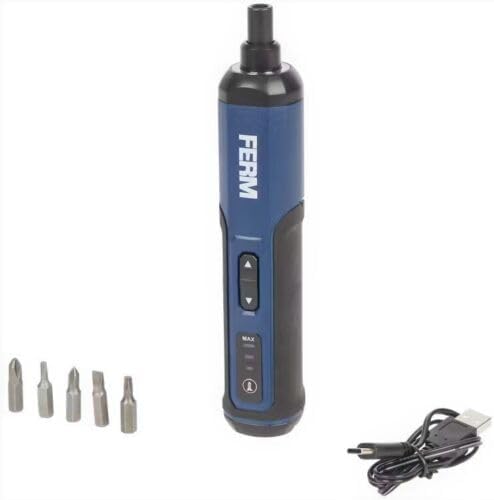
Figure 1: The FERM Cordless Li-ion Screwdriver 4V shown with its included screwdriver bits and USB-C charging cable. This image illustrates the compact design and essential accessories.
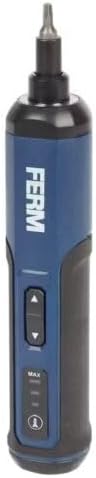
Figure 2: A detailed view of the FERM Cordless Screwdriver, highlighting the forward/reverse buttons, torque setting indicators (MAX, MID, MIN), and the power/battery indicator light.
4. Setup
4.1 Charging the Battery
The screwdriver is equipped with an integrated Li-ion battery. Before first use, fully charge the battery.
- Locate the USB-C charging port on the screwdriver.
- Connect the provided USB-C cable to the screwdriver's charging port.
- Connect the other end of the USB-C cable to a compatible USB power adapter (not included) or a USB port on a computer.
- The battery indicator lights will show the charging status. Allow the screwdriver to charge until the indicator shows a full charge.
- Once fully charged, disconnect the USB-C cable.
Note: Only use the provided USB-C cable for charging. Do not attempt to charge with damaged cables or non-compatible chargers.
4.2 Installing Screwdriver Bits
The screwdriver uses standard 1/4-inch hex shank bits.
- Ensure the screwdriver is turned off and not operating.
- Select the appropriate screwdriver bit for your task.
- Insert the hex shank of the bit firmly into the screwdriver's chuck until it clicks into place.
- To remove a bit, pull it straight out from the chuck.
5. Operating Instructions
5.1 Powering On/Off and Direction Selection
The screwdriver features a simple control for forward and reverse rotation.
- To drive screws (forward rotation), press the upper button.
- To remove screws (reverse rotation), press the lower button.
- Release the button to stop the screwdriver.
5.2 Adjusting Torque Settings
The FERM screwdriver offers 3 torque speed settings to match different applications.
- Locate the torque selection button/switch (refer to Figure 2).
- Cycle through the settings (e.g., MIN, MID, MAX) to select the desired torque.
- Use lower torque settings for delicate materials or small screws to prevent overtightening or damage.
- Use higher torque settings for larger screws or tougher materials.
Tip: Always start with a lower torque setting and increase it if necessary to avoid stripping screw heads or damaging the workpiece.
6. Maintenance
Regular maintenance ensures the longevity and safe operation of your FERM screwdriver.
- Cleaning: Keep the ventilation slots of the tool clean to prevent overheating. Use a soft, damp cloth to clean the housing. Do not use harsh chemicals or abrasive cleaners.
- Storage: Store the screwdriver in a dry, secure place, out of reach of children. Ensure the battery is partially charged before long-term storage.
- Battery Care: Do not allow the battery to fully discharge for extended periods. Recharge the battery periodically if the tool is not used frequently. Avoid exposing the battery to extreme temperatures.
- Inspection: Regularly check the screwdriver for any signs of damage, loose parts, or wear. If any issues are found, do not use the tool and contact customer support.
7. Troubleshooting
This section addresses common issues you might encounter with your FERM Cordless Screwdriver.
| Problem | Possible Cause | Solution |
|---|---|---|
| Screwdriver does not turn on. | Battery is discharged. | Charge the battery using the USB-C cable. |
| Screwdriver lacks power or stops during use. | Low battery charge. Overload. | Recharge the battery. Reduce the load or use a higher torque setting if appropriate. |
| Bit slips in screw head. | Incorrect bit size. Torque setting too low. | Ensure the correct bit size is used. Increase the torque setting. Apply firm, steady pressure. |
| Screwdriver gets hot. | Prolonged heavy use. Blocked ventilation. | Allow the tool to cool down. Ensure ventilation slots are clear. Avoid continuous heavy-duty tasks. |
If you encounter problems not listed here or if solutions do not resolve the issue, please contact FERM customer support.
8. Specifications
Key technical specifications for the FERM Cordless Li-ion Screwdriver 4V, model CDM1178.
| Model Number | CDM1178 |
| Brand | FERM |
| Voltage | 4 V |
| Battery Type | Lithium-ion (integrated) |
| Charging Method | USB-C |
| Torque Settings | 3 speeds |
| Included Components | Screwdriver, Li-ion battery, USB-C cable, 5 bits (+ 21-piece bit set) |
| Dimensions (Package) | 22.3 x 8.9 x 7.1 cm |
| Weight (Product) | 530 grams |
9. Warranty and Support
For warranty information, technical support, or spare parts availability, please refer to the warranty card included with your product or visit the official FERM website. Keep your proof of purchase for any warranty claims.
Manufacturer: FERM power since 1965
