
CYKOV CY59H
CYKOV Home Office Chair User Manual
Model: CY59H
1. Introduction
Thank you for choosing the CYKOV Home Office Chair. This ergonomic desk chair is designed to provide maximum comfort and support for your home or office workspace. With its adjustable features, durable construction, and modern design, it aims to enhance your productivity and well-being.

Figure 1.1: The CYKOV Home Office Chair in a typical office environment.
Please read this manual thoroughly before assembly and use to ensure proper setup and operation. Keep this manual for future reference.
2. Product Features
The CYKOV Home Office Chair is equipped with several features designed for optimal comfort and functionality:
- High-Quality Materials: Constructed with premium leather and durable metal for longevity and resilience.
- Adjustable Height: Features 4 inches of height adjustment to suit various desk heights and user preferences.
- Reclining Function: Offers a tilt range of 90° to 135° for comfortable reclining and relaxation.
- Adjustable Headrest: Provides 6 inches of headrest adjustment and 60° rotation to protect your neck and head.
- Flip-Up Armrests: 90° flip-up armrests allow for space-saving storage under desks and versatile seating positions.
- Lumbar Support: Integrated adjustable lumbar support (2 inches) protects and supports your lower back.
- Multi-Functional Mobility: Features 360° swiveling, smooth-rolling casters, and a rocking function for versatile movement.
- Sturdy Construction: Designed with a Y-shaped thickened back frame and a 300lb weight capacity for stability and durability.
- Comfortable Seating: Features a contoured seat cushion with thickened high-density sponge and dust-proof, wear-resistant leather.

Figure 2.1: Chair dimensions and maximum weight capacity (300 lbs) and height (6.5 ft).

Figure 2.2: Detail of the Y-shaped thickened back frame and 2-inch adjustable lumbar support.

Figure 2.3: The chair's seat features dust-proof, wear-resistant leather and thickened high-density sponge for comfort.
3. Setup and Assembly
The CYKOV Home Office Chair is designed for easy assembly, typically taking around 20 minutes. All necessary tools and instructions are included in the package.
3.1. Unpacking and Parts Identification
Carefully unpack all components from the box. Verify that all parts listed in the assembly instructions are present and undamaged. Refer to the parts diagram below:

Figure 3.1: All components included for assembly.
3.2. Assembly Steps
Follow the step-by-step instructions provided in the included assembly manual. A general overview of the assembly process is shown below:

Figure 3.2: Visual guide for chair assembly.
- Attach the casters to the chair base.
- Insert the gas lift cylinder into the center hole of the base.
- Secure the seat plate mechanism to the bottom of the seat cushion.
- Attach the backrest to the seat assembly.
- Mount the assembled seat and backrest onto the gas lift cylinder.
- Install the headrest into its designated slot on the backrest.
4. Operating Instructions
Familiarize yourself with the chair's adjustable features to customize your seating experience for optimal comfort and ergonomic support.
4.1. Height Adjustment
To adjust the chair's height, locate the lever on the right side beneath the seat. Pull the lever upwards while seated to lower the chair, or stand up and pull the lever upwards to raise the chair. Release the lever at your desired height.
4.2. Reclining and Tilt Adjustment
The chair offers 4 levels of reclining adjustment, from 90° to 135°. Use the lever on the left side beneath the seat to lock or unlock the tilt mechanism. Push the lever inwards to lock the backrest in an upright position, or pull it outwards to allow the chair to recline. Adjust the tension of the recline using the tension knob located under the front of the seat.

Figure 4.1: The chair offers four distinct reclining positions for natural posture.
4.3. Headrest Adjustment
The headrest can be adjusted vertically by 6 inches and rotated by 60° to provide optimal neck and head support. Simply push or pull the headrest to adjust its height, and pivot it to find the most comfortable angle.

Figure 4.2: Adjust the headrest height and angle for personalized neck support.
4.4. Armrest Adjustment (Flip-Up)
The armrests can be flipped up by 90° to allow the chair to be pushed closer to your desk, saving space. To flip them up, simply lift the armrests upwards until they lock into the vertical position. To return them, pull them down until they lock into the horizontal position.

Figure 4.3: The 90° flip-up armrests provide flexibility and space-saving convenience.
4.5. Lumbar Support Adjustment
The lumbar support can be adjusted vertically by 2 inches to provide targeted support to your lower back. Gently push or pull the lumbar support mechanism on the backrest to find your preferred position.
5. Maintenance
To ensure the longevity and optimal performance of your CYKOV Home Office Chair, follow these simple maintenance guidelines:
- Cleaning: Wipe clean with a damp cloth. Avoid using harsh chemicals or abrasive cleaners, as they may damage the materials.
- Regular Checks: Periodically check all screws and bolts to ensure they are tight. Re-tighten if necessary to maintain stability and safety.
- Caster Care: Keep the casters free of hair and debris to ensure smooth rolling.
- Leather Care: For the leather seat, use a mild leather cleaner or conditioner as needed to keep it supple and prevent cracking.
6. Troubleshooting
If you encounter any issues with your chair, please refer to the following common troubleshooting tips:
| Problem | Possible Cause | Solution |
|---|---|---|
| Chair does not adjust height. | Gas lift cylinder malfunction or lever not engaged. | Ensure the height adjustment lever is fully engaged. If the issue persists, the gas lift cylinder may need replacement. Contact customer support. |
| Backrest does not recline or lock. | Tilt lock lever is engaged or tension is too high. | Ensure the tilt lock lever is disengaged. Adjust the tilt tension knob counter-clockwise to loosen the recline. |
| Headrest does not stay in position. | Mechanism not locking or wear. | Newer models feature a button to lock the headrest into place. Ensure this button is pressed. If your model does not have this or the issue persists, contact customer support. |
| Chair is too high even at lowest setting (for shorter users). | Standard gas cylinder height. | Contact customer support for information on a shorter gas cylinder replacement, if available. Consider using a footrest. |
| Squeaking or creaking noises. | Loose bolts or friction between parts. | Tighten all assembly bolts. Apply a small amount of silicone lubricant to moving parts if necessary. |
If the problem persists after attempting these solutions, please contact CYKOV customer support for further assistance.
7. Specifications
Below are the detailed specifications for the CYKOV Home Office Chair (Model: CY59H):
| Feature | Detail |
|---|---|
| Brand | CYKOV |
| Model Name | home office desk chair |
| Product Dimensions | 22"D x 25"W x 45"H |
| Item Weight | 28.6 pounds |
| Maximum Weight Recommendation | 300 Pounds |
| Color | Black |
| Style | Modern |
| Back Style | Mesh Back |
| Seat Height | 17.32 - 21.26 Inches (Adjustable) |
| Seat Depth | 20 inches |
| Arm Height | 30.71 Inches (from floor) |
| Reclining Position Count | 3 (90°-135° tilt) |
| Included Components | Office Chair, Assembly Instruction, 5-Year Warranty |
| Certifications | BIFMA Certified & Class 4 Gas Cylinder |
| Country of Origin | China |
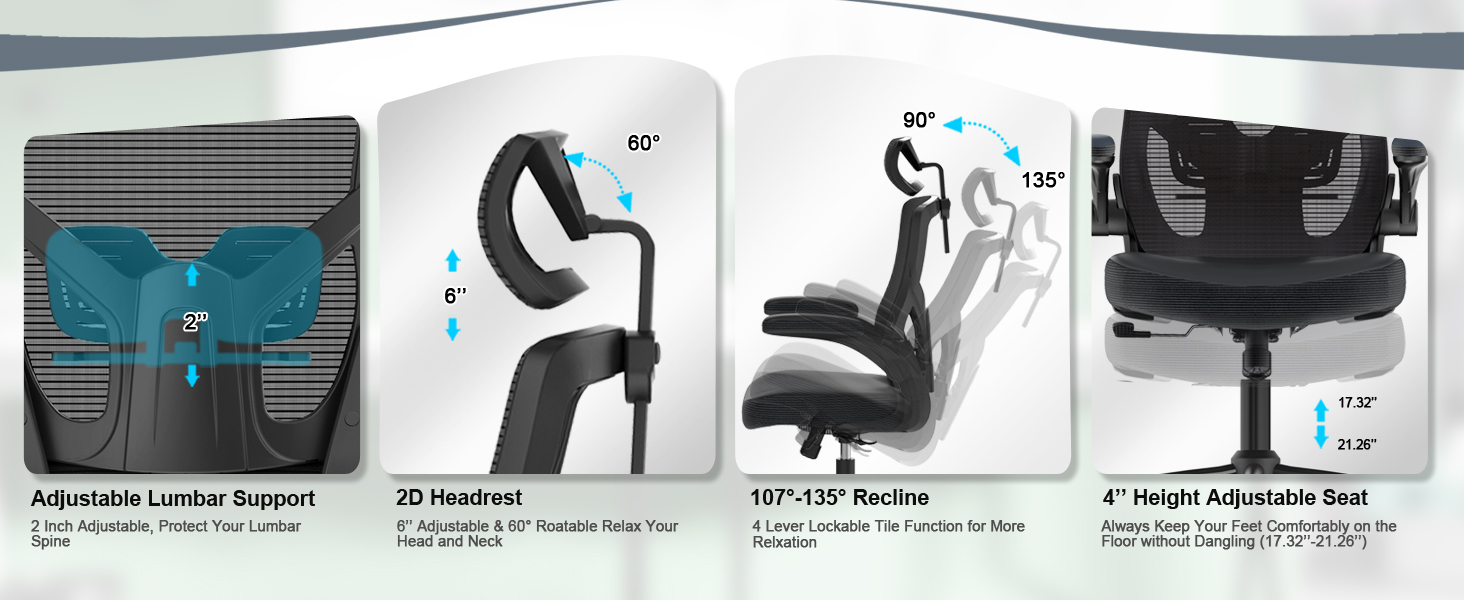
Figure 7.1: Key components and safety certifications, including SGS certified gas cylinder and durable casters.
8. Warranty and Support
The CYKOV Home Office Chair comes with a 5-Year Warranty, ensuring peace of mind regarding its quality and durability. This warranty covers manufacturing defects and significant malfunctions under normal use.
For any questions, concerns, or warranty claims, please contact CYKOV customer support. Have your model number (CY59H) and purchase information ready when contacting support.
We value every customer's experience and are committed to providing excellent products and support.
Figure 8.1: Our dedicated customer support team is ready to assist you.
Ask a question about this manual
Ask about setup, troubleshooting, compatibility, parts, safety, or missing instructions. Manuals+ will review the question and use this page’s manual context to help answer it.