
Introduction
This manual provides essential information for the proper use and care of your Sigma 14MM F1.4 DG DN | A lens, designed for Sony E-mount cameras. Please read this manual thoroughly before using the lens to ensure optimal performance and longevity.
Package Contents
Upon opening the package, please verify that all items are present and in good condition:
- Sigma 14MM F1.4 DG DN | A Lens
- Front Lens Cap
- Rear Lens Cap
- Instruction Manual (this document)

Figure 1: Front view of the Sigma 14MM F1.4 DG DN | A lens, showing the integrated lens hood and aperture ring.
Setup
- Attaching the Lens:
Align the mounting index on the lens barrel with the corresponding index on your Sony E-mount camera body. Rotate the lens clockwise until it clicks securely into place. Ensure the camera is powered off before attaching or detaching the lens.
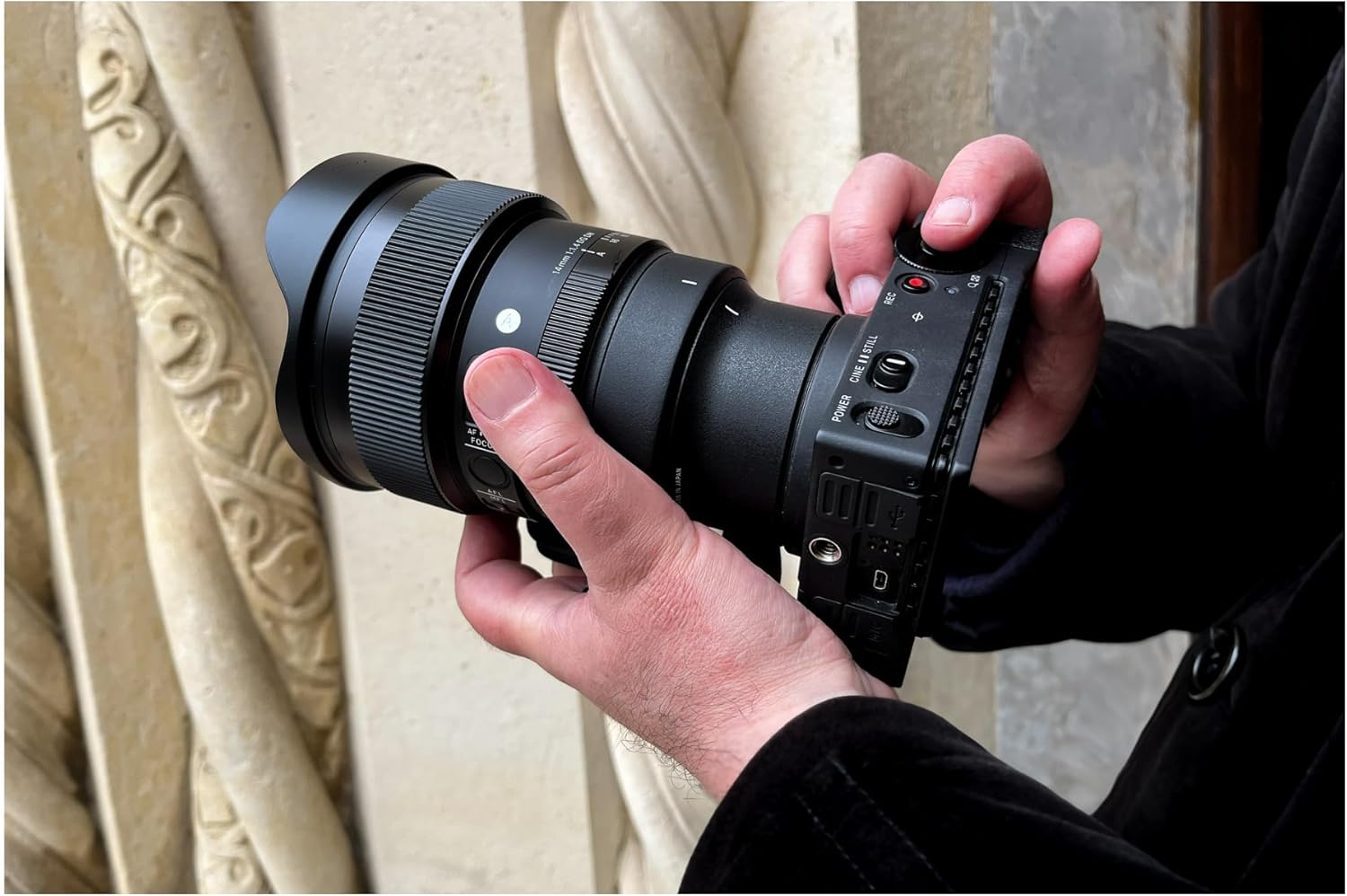
Figure 2: Proper method for attaching the lens to a compatible camera body.
- Removing the Lens:
While pressing the lens release button on your camera body, rotate the lens counter-clockwise until it detaches. Immediately attach the front and rear lens caps to protect the lens elements.
- Tripod Collar:
The lens features an integrated tripod collar for stable mounting on a tripod or monopod, especially given its weight. Loosen the locking knob on the collar to rotate the lens for vertical or horizontal shooting without re-positioning the tripod head. Tighten the knob firmly once the desired orientation is achieved.

Figure 3: Side view of the lens highlighting the integrated tripod collar for balanced mounting.
Operating the Lens
Focusing
- Autofocus (AF):
Set the AF/MF switch on the lens barrel to 'AF'. The lens will then utilize the camera's autofocus system. Ensure your camera's focus mode is set appropriately (e.g., Single-shot AF, Continuous AF).
- Manual Focus (MF):
Set the AF/MF switch on the lens barrel to 'MF'. Rotate the focus ring to manually adjust focus. Utilize your camera's focus peaking or magnification features for precise manual focusing.
- Focus Hold Button:
The lens is equipped with a customizable focus hold button. By default, pressing this button locks the focus at the current distance. This button's function can often be customized via your camera's menu system.
Aperture Control
- Aperture Ring:
The lens features an aperture ring for direct control over the aperture setting. Rotate the ring to select your desired f-stop (from F1.4 to F16). The 'A' position on the aperture ring allows the camera to control the aperture automatically (Program AE, Shutter-priority AE).
- Aperture Ring Click Switch:
A switch on the lens allows you to enable or disable the click stops on the aperture ring. Disabling clicks is useful for smooth aperture transitions during video recording.

Figure 4: Close-up view of the lens barrel, indicating the aperture ring, AF/MF switch, and focus hold button.
Maintenance and Care
- Cleaning the Lens:
Use a soft, lint-free cloth or a lens brush to remove dust from the lens surfaces. For smudges or fingerprints, apply a small amount of lens cleaning solution to a microfiber cloth and gently wipe the surface in a circular motion. Never apply cleaning solution directly to the lens element.
- Storage:
When not in use, store the lens with both front and rear caps attached in a dry, cool place, away from direct sunlight and extreme temperatures. Avoid storing the lens in areas with high humidity to prevent mold growth.
- Handling:
Avoid dropping or subjecting the lens to strong impacts, as this can damage the optical elements or internal mechanisms. Always hold the lens firmly when attaching or detaching it from the camera.
Troubleshooting
| Problem | Possible Cause | Solution |
|---|---|---|
| Lens not recognized by camera. | Improper attachment; dirty contacts. | Ensure lens is securely mounted. Clean lens and camera contacts with a dry, lint-free cloth. Restart camera. |
| Autofocus not working. | AF/MF switch set to MF; insufficient light; camera settings. | Set AF/MF switch to AF. Ensure adequate lighting. Check camera's focus mode and settings. |
| Images are blurry. | Incorrect focus; camera shake; dirty lens element. | Verify focus. Use a faster shutter speed or tripod. Clean the front and rear lens elements. |
| Aperture ring not responding. | Aperture ring click switch disabled; camera controlling aperture. | Check the aperture ring click switch. If set to 'A', the camera controls aperture. Adjust camera settings or rotate ring off 'A'. |
Specifications
| Feature | Detail |
|---|---|
| Model Number | 451965 |
| Brand | Sigma |
| Focal Length | 14mm |
| Maximum Aperture | F1.4 |
| Compatible Mountings | Sony E |
| Product Dimensions | 5.9 x 4 x 4 inches (approx.) |
| Item Weight | 2.55 pounds (approx.) |
| Manufacturer | Sigma Corporation of America |
| First Available | June 8, 2023 |
Note: Specifications are subject to change without notice.
Warranty and Support
Sigma products are manufactured with the highest quality standards. For information regarding warranty coverage, service, or technical support, please refer to the official Sigma website or contact your local authorized Sigma distributor.
Online Resources:
- Sigma Global Website
- Sigma America Website (for US customers)
Please retain your proof of purchase for warranty claims.


