
1. Introduction
The NOYAFA NF-8108-M is a versatile cable and network tester designed for professionals to efficiently measure network cable length, identify open and short circuits, and detect wiring errors in various cable types. This device is suitable for RJ45, Cat5, Cat6, 5E, and 6E cables, providing accurate and reliable results for network installation and maintenance.
2. Product Features
- Cable Length Measurement: Accurately measures network cable length and determines the distance to open or short circuits.
- Wiring Error Detection: Checks for wiring errors in 5E, 6E, and coaxial cables, including open circuit, short circuit, jumper wire, and reverse connection.
- Multi-Remote Testing: Capable of testing up to 8 groups of cables sequentially using remote units.
- Portable Design: Compact unit with an extended battery life of approximately 50 hours in standby mode.
- Automatic Shut-off: Features an automatic time-delay shut-off function to conserve battery power.
- Self-Calibration: Includes self-checking and automatic compensation for changes in battery capacity or ambient temperature.
- LCD Display: Clear LCD for displaying test results and operational status.
3. Product Components
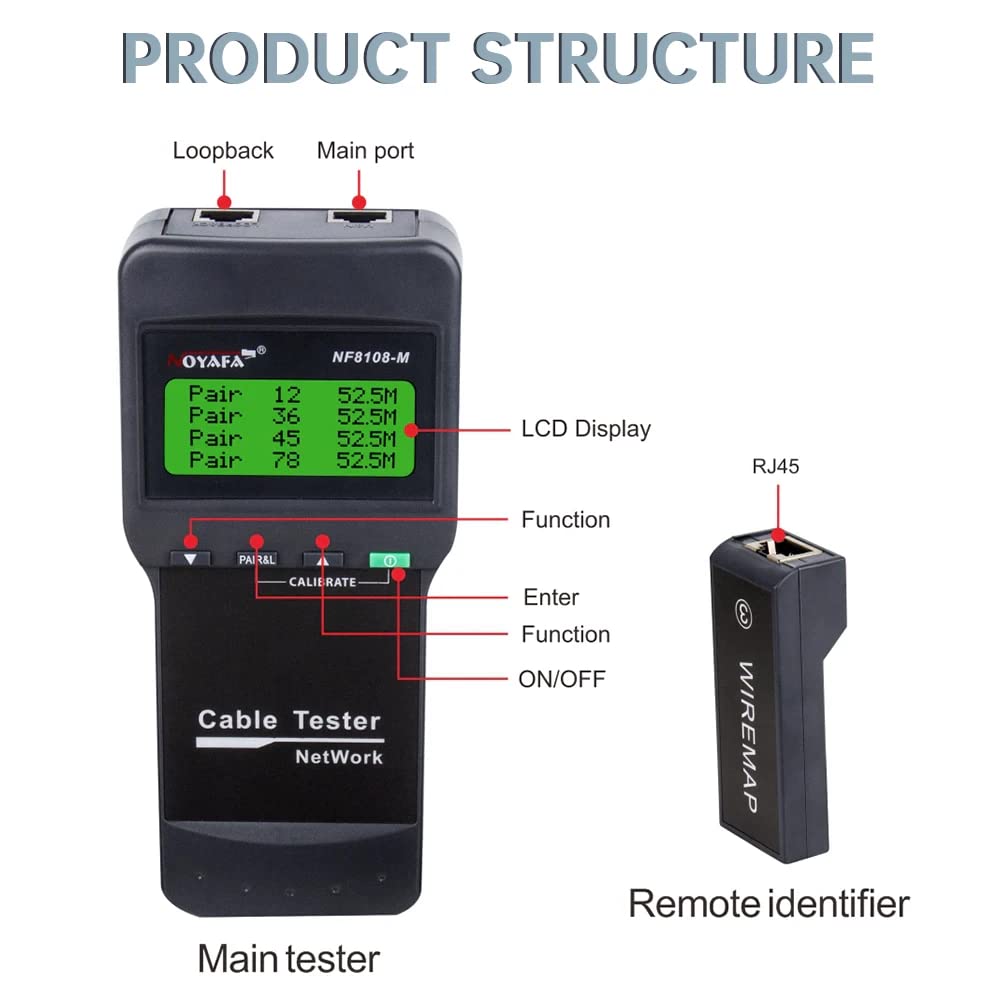
Figure 3.1: Product Structure Overview
This image illustrates the main components of the NF-8108-M tester, including the main unit with its LCD display, function buttons, and ports, alongside a remote identifier. Key labels point to the Loopback port, Main port, LCD Display, Function button, Enter button, and ON/OFF switch on the main tester, and the RJ45 port on the remote identifier.
Main Tester Unit
- LCD Display: Shows test results, settings, and status.
- Function Buttons: For navigating menus and selecting test modes.
- RJ45 Ports: For connecting network cables.
- Power Button: To turn the device on and off.
Remote Identifier Units
- RJ45 Port: For connecting the far end of the network cable during testing.
- The NF-8108-M model includes 8 remote units for sequential testing of multiple cables.
4. Setup
4.1 Battery Installation
- Locate the battery compartment on the back of the main tester unit.
- Open the battery compartment cover.
- Insert 4 x 1.5V DC batteries (or the included Lithium Ion battery) according to the polarity markings.
- Close the battery compartment cover securely.
4.2 Initial Power On
- Press the ON/OFF button to power on the device.
- The LCD display will illuminate, indicating the device is ready for use.
- The device performs a self-check upon startup.
5. Operating Instructions

Figure 5.1: Measuring Cable Length
The main tester unit is shown connected to a LAN cable, displaying the length measurement for each wire pair on its LCD screen. This function helps identify the exact length of the cable and the distance to any faults.

Figure 5.2: Cable Continuity Testing
This image depicts the main tester unit connected to a cable, with several remote identifier units laid out. The LCD shows 'WIRE MAP: PASS' and the pinout sequence, indicating successful continuity testing across multiple cable segments or connections.
5.1 Measuring Cable Length
- Connect one end of the network cable to the 'Main port' on the tester.
- If measuring an installed cable, connect the other end to a remote identifier unit. For uninstalled cables, the remote unit may not be necessary for basic length measurement.
- Select the 'Measure Length' function from the menu using the function buttons.
- The LCD will display the length of each wire pair and the total cable length. It will also indicate the distance to any open or short circuits.
5.2 Cable Continuity and Wiring Error Testing
- Connect one end of the network cable to the 'Main port' on the tester.
- Connect the other end of the cable to one of the remote identifier units (e.g., Remote 1).
- Select the 'Wire Map' or 'Continuity Test' function from the menu.
- The LCD will display the wiring sequence (e.g., 1-1, 2-2, etc.).
- 'PASS' indicates correct wiring.
- 'OPEN' indicates a broken wire.
- 'SHORT' indicates two or more wires are touching.
- 'CROSS' or 'REVERSE' indicates incorrect pin assignments.
- To test multiple cables, connect each cable to a different remote identifier (up to 8) and cycle through the remote units using the tester's functions.
6. Safety Precautions
- High Voltage Warning: Do not connect the tester to high voltage lines (AC 60V/DC 42V or higher) to prevent damage to the device and potential injury.
- Proper Handling: Handle the device with care. Some parts may be sharp; store it in a safe place to avoid injury.
- Correct Port Usage: Always connect cables to the correct ports (RJ45) as indicated on the device.
- Read Manual: Always read and understand the user manual completely before operating the device.
7. Technical Specifications
Transmitter (Main Unit)
- LCD Indicator: 53 x 25 mm
- Tone Frequency: 225 Hz
- Max. Distance of Cable Map: 300m
- Max. Working Current: Less than 70mA
- Compatible Connectors: RJ45
- Faults Display: LCD display
- Low Battery Display: LCD (below 6.5V)
- Voltage Protection: AC 60V / DC 42V
- Battery Type: 4 x 1.5V DC (or 1 Lithium Ion battery, included)
- Dimensions (LxWxD): 184 x 84 x 46 mm
Remote Unit
- Compatible Connectors: RJ45
- Number of Remote Units: 8
- Dimensions (LxWxD): 78 x 33 x 22 mm
General
- Item Weight: 500 g
- Product Dimensions: 15 x 10 x 6 cm
- Material: Acrylonitrile Butadiene Styrene (ABS)
- Power Source: Battery Powered
- Wattage: 1 watts
- Measurement System: Metric
- Measurement Accuracy: ±1%
- Certifications: CE, ISO 9001, RoHS
- Battery Life: Approximately 4 weeks (standby)
- Operating Voltage (Min): 1.5 Volts
- Upper Temperature Rating: 60 Degrees Celsius
8. Maintenance
- Cleaning: Wipe the device with a soft, dry cloth. Do not use abrasive cleaners or solvents.
- Storage: Store the tester in a cool, dry place away from direct sunlight and extreme temperatures.
- Battery Care: If the device will not be used for an extended period, remove the batteries to prevent leakage.
- Port Protection: Keep the RJ45 ports free from dust and debris. Use protective caps if provided.
9. Troubleshooting
- Device Not Powering On: Check battery installation and ensure batteries have sufficient charge. Replace if necessary.
- Inaccurate Length Measurement: Ensure proper connection of the cable to both the main unit and the remote identifier. Verify cable type settings if applicable.
- No Continuity Reading: Check for secure connections at both ends of the cable. Ensure the remote unit is functioning correctly.
- LCD Display Issues: If the display is dim or flickering, replace the batteries.
- Error Messages: Refer to the specific error code or message displayed on the LCD for guidance. If issues persist, contact customer support.
10. Warranty and Support
The NOYAFA NF-8108-M Cable and Network Tester comes with a 1-year warranty from the date of purchase. This warranty covers manufacturing defects and malfunctions under normal use. Please retain your proof of purchase for warranty claims.
For technical support, service, or warranty inquiries, please contact NOYAFA customer service through their official channels or the retailer where the product was purchased.