
1. Introduction
This manual provides comprehensive instructions for the assembly, operation, and maintenance of your YILETKC Technology Loader Building Block Set. Please read this manual thoroughly before beginning assembly or operation to ensure correct usage and to maximize the product's lifespan. This set is designed for enthusiasts and builders, offering a detailed and engaging construction experience.
2. Product Overview
2.1 Included Components
- 1227 Building Block Pieces
- 1 x 2.4GHz Remote Control (requires 2 x AAA batteries, not included)
- 1 x 500mAh Rechargeable Battery Box
- 2 x M Motors
- 2 x L Motors
- Detailed Physical Instruction Manual
2.2 Key Features
- Simulation Loader Design: Features a realistic and detailed loader model.
- Flexible Loader Boom: The loader boom can be elevated and positioned.
- Adjustable Shovel Bucket: The shovel bucket can be remotely adjusted for various operations.
- Crawler Tires: Enables forward, backward, and spot rotation movements.
- Dual Control Modes: Operable via 2.4GHz remote control or a dedicated mobile application.
- High-Quality Construction: Made from durable, non-toxic ABS material.
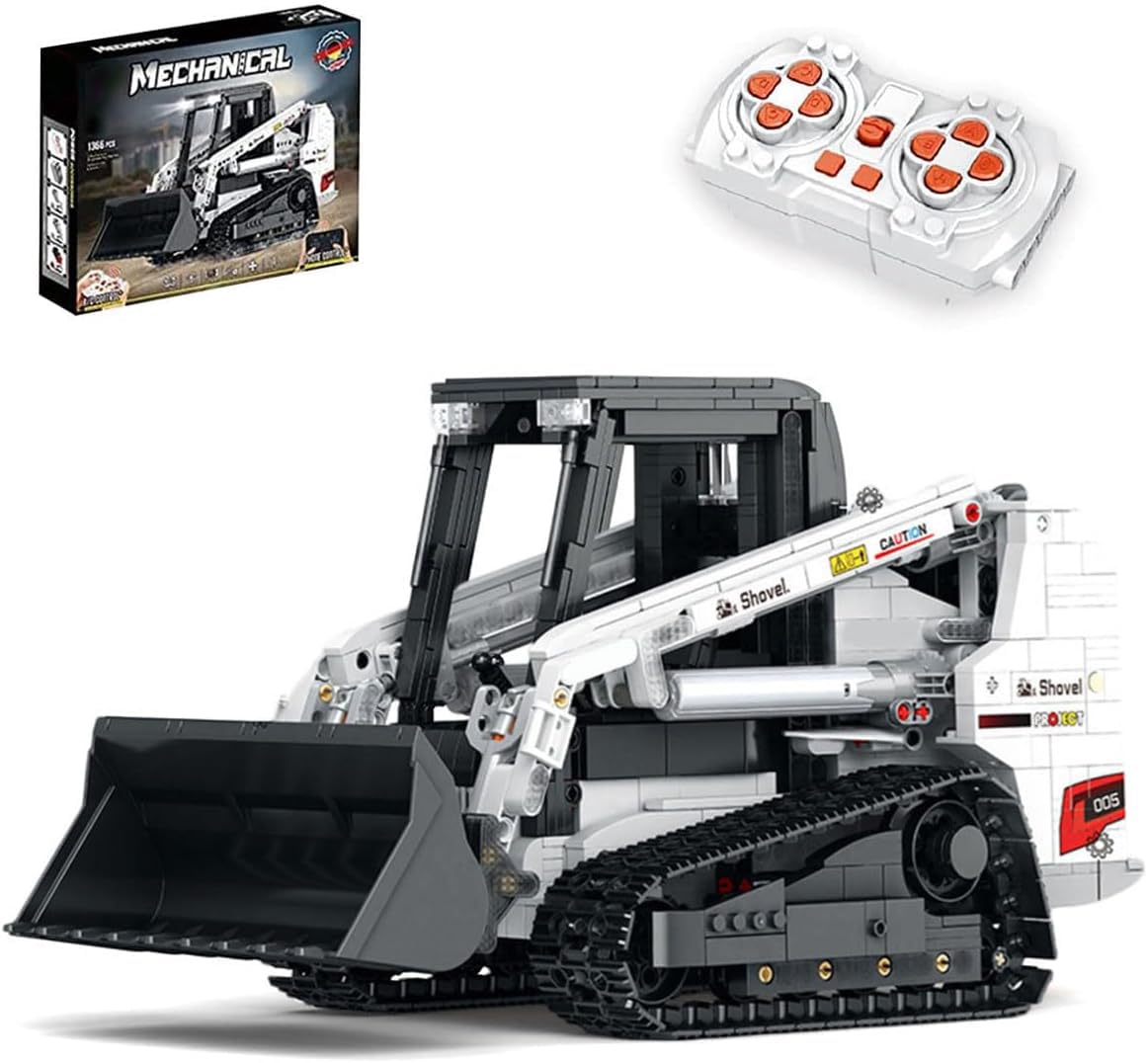
Figure 1: Fully assembled YILETKC Technology Loader Building Block Set.

Figure 2: Detailed analysis of the loader's engineering features.

Figure 3: Operational features including flexible lever control and adjustable bucket.
3. Setup
3.1 Assembly
Follow the detailed step-by-step instructions provided in the included physical instruction booklet to assemble the 1227 pieces of the Technology Loader. Pay close attention to motor placement and gear alignment to prevent operational issues. Ensure all connections are secure.
3.2 Battery Installation
- Remote Control: Insert 2 x AAA batteries (not included) into the remote control unit. Ensure correct polarity as indicated inside the battery compartment.
- Loader Unit: Connect the included 500mAh rechargeable battery box to the designated port on the loader. Ensure it is securely fastened and properly connected to the motors.
3.3 Charging the Battery Box
To charge the 500mAh battery box, connect it to a USB power source (e.g., computer USB port, wall adapter) using the provided charging cable. The charging indicator will show the charging status. A full charge is recommended before first use and after each play session for optimal performance.

Figure 4: Key electronic components: Remote Control, Battery Box, and Motors.
4. Operating Instructions
4.1 Remote Control Operation
The loader can be controlled using the 2.4GHz remote control. Use the joysticks to control forward/backward movement and turning. Dedicated buttons control the elevating loader boom and the adjustable shovel bucket. Refer to the remote control diagram in the physical manual for specific button functions and pairing instructions.

Figure 5: Operating the loader using the 2.4GHz remote control.
4.2 Mobile App Control
Download the official YILETKC control app on your mobile device. Enable Bluetooth and pair your device with the loader. The app provides an alternative interface for controlling the loader's movements and functions, including programming different operating experiences. Follow the in-app instructions for pairing and operation.

Figure 6: Controlling the loader via the mobile application.
5. Maintenance
To ensure the longevity and optimal performance of your Technology Loader:
- Cleaning: Use a soft, dry cloth to wipe down the model. Avoid using water or chemical cleaners, as these can damage electronic components or block integrity.
- Storage: Store the assembled model in a cool, dry place away from direct sunlight and extreme temperatures.
- Battery Care: If storing for extended periods, remove AAA batteries from the remote control. Ensure the rechargeable battery box is fully charged before storage and recharged periodically if not in use to maintain battery health.
6. Troubleshooting
This section addresses common issues you might encounter during assembly or operation.
- Gears Binding or Movement Issues: If the loader's tracks or functions are stiff or do not move smoothly, carefully inspect the gear assemblies. Ensure all gears are correctly aligned and not overly tightened during assembly. Refer to the assembly instructions for precise gear placement and ensure no foreign objects are obstructing movement.
- Motor Direction Issues: If the loader moves in an unexpected direction (e.g., one track moves forward while the other moves backward when attempting to go straight), it indicates a motor may be installed with reversed polarity or connected incorrectly. Re-check the motor connections and orientation against the assembly instructions.
- Remote Control Not Responding:
- Ensure the remote control has fresh AAA batteries installed with correct polarity.
- Verify the loader's rechargeable battery box is charged and properly connected, and the loader is powered on.
- Ensure the remote control and loader are within the 2.4GHz operating range.
- Re-pair the remote control with the loader if necessary (refer to the physical manual for pairing instructions).
- App Connection Issues:
- Ensure Bluetooth is enabled on your mobile device.
- Verify the loader's rechargeable battery box is charged and powered on.
- Restart the app and attempt to re-pair.
- Check for app updates in your device's app store.
7. Specifications
| Model Number | YILETKC-Tech |
| Number of Pieces | 1227 |
| Assembled Dimensions (L x W x H) | 35 cm x 16.5 cm x 19 cm (approximately 13.8 in x 6.5 in x 7.5 in) |
| Material | High-quality ABS plastic |
| Control Methods | 2.4GHz Remote Control, Mobile App (Bluetooth) |
| Power Source (Loader) | 1 x 500mAh Rechargeable Battery Box (included) |
| Power Source (Remote Control) | 2 x AAA Batteries (not included) |
| Recommended Age | 16 months and up (Note: Due to complexity and small parts, this product is generally recommended for older teens and adults.) |
| Item Weight | 4.59 pounds (approximately 2.08 kg) |

Figure 7: Assembled product dimensions.
8. Warranty and Support
8.1 Warranty Information
Specific warranty details are not provided in this manual. Please refer to the product packaging or contact the retailer from whom you purchased the product for warranty terms and conditions.
8.2 Customer Support
For further assistance, technical support, or inquiries regarding replacement parts, please contact YILETKC customer service through the retailer's platform or the contact information provided on the product packaging. Please have your model number (YILETKC-Tech) and purchase details ready when contacting support.