
1. Introduction
Thank you for choosing the Lume Cube RGB Tube Light Mini. This versatile and powerful LED light is designed for photographers, videographers, and content creators seeking precise and customizable lighting solutions. With its app-controlled features, extensive color range, and durable design, the Tube Light Mini is an essential tool for enhancing your creative projects. This manual provides detailed instructions for setup, operation, maintenance, and troubleshooting to ensure you get the most out of your device.
2. What's in the Box

Figure 2.1: Lume Cube RGB Tube Light Mini and its accessories.
Please verify that all items listed below are included in your package:
- Tube Light Mini
- Mini Tripod
- Wrist Strap
- USB Power Cable
- Molded Hard Shell Travel Case
3. Product Overview
3.1 Key Features
- Millions of Colors: Select from millions of color options, including saturation & tint, to bring your creative vision to life.
- Bluetooth App Control: The Lume Control App allows you to change any setting from your smartphone.
- Durable & Weatherproof: Built with an aluminum body, designed for use in various environments.
- Precision & Premium Lighting: Features a CRI of 97+, ensuring near-perfect color output for high-quality content.
- Mount Anywhere: Equipped with multiple 1/4"-20 mounting points for versatile positioning.
- Magnetic: Built-in magnets allow for creative placement on metal surfaces.
3.2 Controls and Ports

Figure 3.1: Physical controls and ports on the Tube Light Mini.
The Tube Light Mini features intuitive physical controls for quick adjustments:
- Power Button: Press and hold to power on/off.
- Mode Button: Cycles through different lighting modes (CCT, HSI, Effects).
- Stepless Adjustment Dial: Adjusts brightness, color temperature, or hue/saturation depending on the selected mode.
- USB-C Charge Port: Used for charging the device and can also function as a power bank.
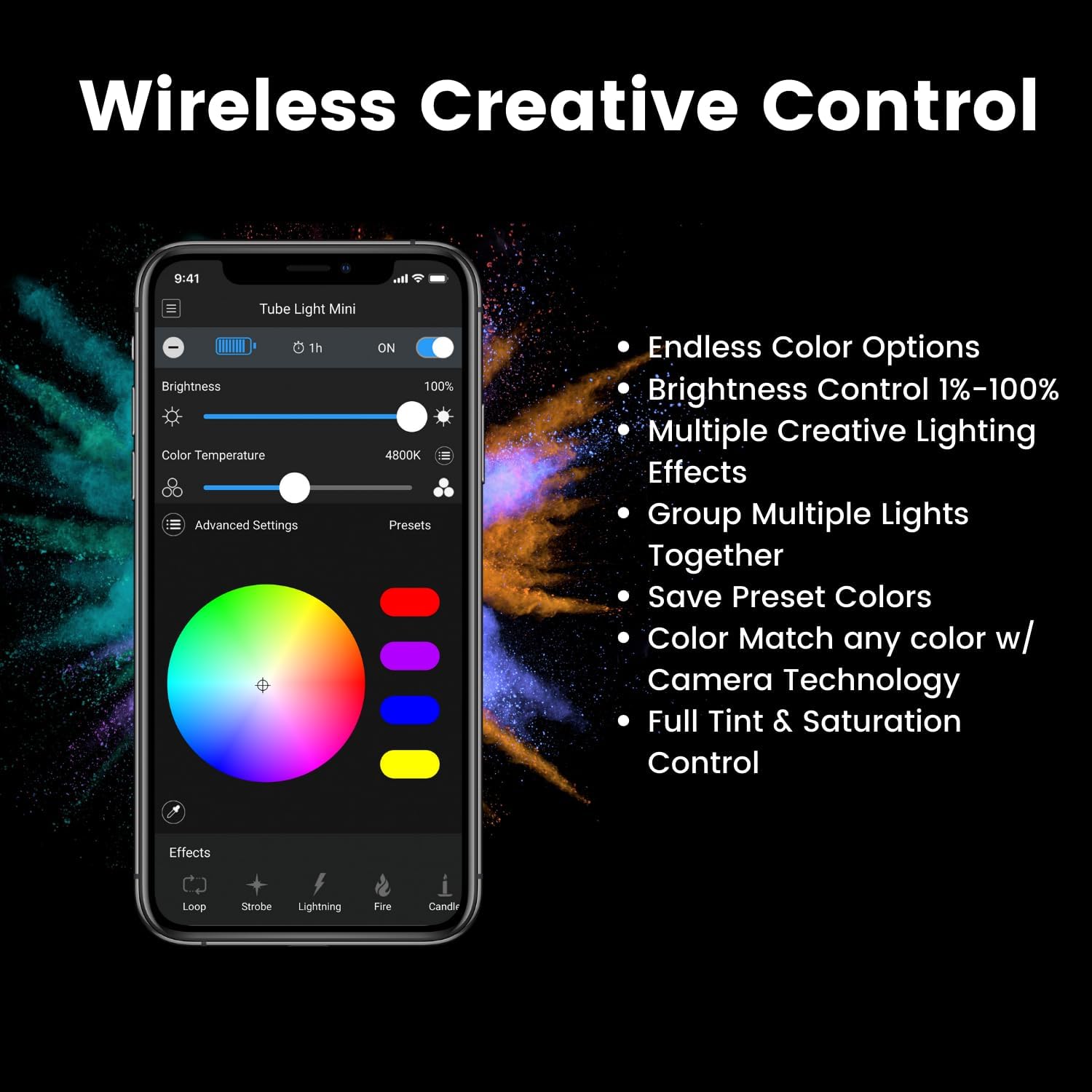
Figure 3.2: Lume Control App interface for wireless control.
For comprehensive control, download the Lume Control App. The app provides:
- Endless Color Options
- Brightness Control (1%-100%)
- Multiple Creative Lighting Effects
- Ability to Group Multiple Lights Together
- Save Preset Colors
- Color Match with Camera Technology
- Full Tint & Saturation Control
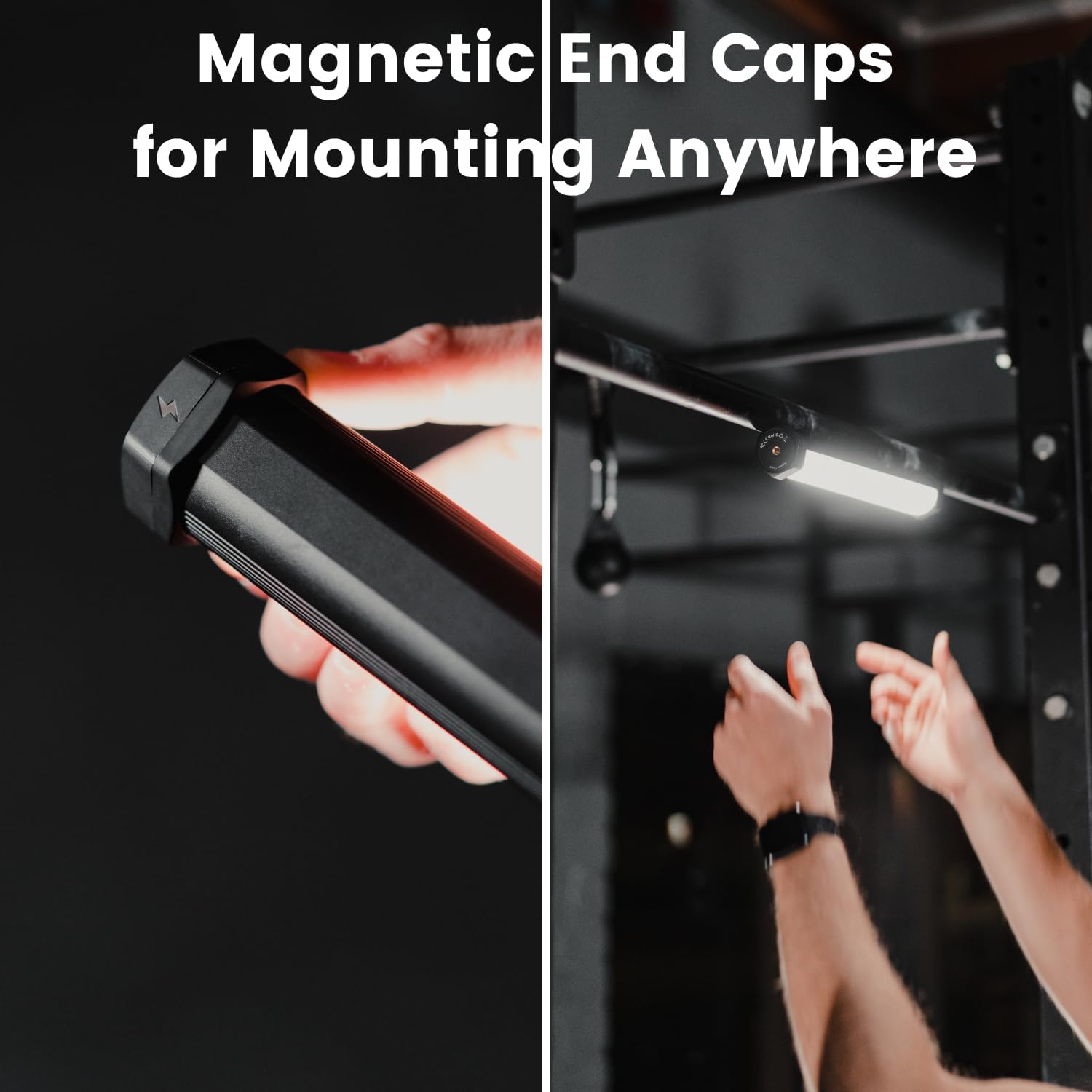
Figure 3.3: Magnetic end caps for versatile mounting.

Figure 3.4: Tube Light Mini with included tripod base.
The Tube Light Mini features magnetic end caps for quick attachment to metal surfaces and multiple 1/4"-20 screw threads for mounting on tripods, stands, or other accessories. A mini tripod is included for immediate use.
4. Setup
4.1 Initial Charging
Before first use, fully charge your Tube Light Mini. Connect the provided USB Power Cable to the USB-C port on the light and to a compatible USB power adapter (not included). The LCD screen will indicate charging status. A full charge typically takes approximately 2 hours.
4.2 App Download and Pairing
- Download the "Lume Control" app from your device's app store (iOS or Android).
- Ensure Bluetooth is enabled on your smartphone.
- Power on the Tube Light Mini by pressing and holding the Power Button.
- Open the Lume Control app. The app should automatically detect and connect to your Tube Light Mini. If not, follow the in-app instructions to manually add the device.
5. Operating Instructions
5.1 Power On/Off
Press and hold the Power Button for 2 seconds to turn the light on or off.
5.2 Adjusting Settings (Manual Control)
Use the Mode Button to cycle through different modes displayed on the LCD screen (Figure 3.1):
- CCT Mode: Adjusts color temperature (warm to cool white) using the Stepless Adjustment Dial.
- HSI Mode: Adjusts hue, saturation, and intensity (brightness) using the Stepless Adjustment Dial.
- Effects Mode: Cycles through pre-programmed special effects. Use the dial to adjust effect parameters.
5.3 Adjusting Settings (App Control)
For advanced control, use the Lume Control App (Figure 3.2):
- Brightness: Use the slider to adjust light intensity from 1% to 100%.
- Color Temperature: Select precise color temperatures for white light.
- Color Wheel: Choose from millions of RGB colors by tapping or dragging on the color wheel.
- Effects: Access and customize various built-in lighting effects (e.g., Strobe, Lightning, Fire, Candle).
- Presets: Save and recall your favorite custom lighting settings.
5.4 Power Bank Functionality

Figure 5.1: Tube Light Mini charging a smartphone.
The Tube Light Mini can act as a portable power bank (2500mAh) to charge other devices. Connect your device to the USB-C port on the Tube Light Mini using a compatible cable.
6. Maintenance
6.1 Cleaning
To clean the Tube Light Mini, use a soft, dry cloth. For stubborn marks, a slightly damp cloth with mild soap can be used, ensuring no liquid enters the ports or internal components. Do not use harsh chemicals or abrasive cleaners.
6.2 Storage
When not in use, store the Tube Light Mini in its provided hard shell travel case in a cool, dry place away from direct sunlight and extreme temperatures.
6.3 Battery Care
To prolong battery life, avoid fully discharging the battery frequently. Recharge the device when the battery indicator is low. If storing for extended periods, charge the battery to approximately 50% every 3-6 months.

Figure 6.1: The Tube Light Mini is designed to be durable and weatherproof.
7. Troubleshooting
7.1 Light Not Turning On
- Ensure the battery is charged. Connect to a power source and allow it to charge for at least 15 minutes before attempting to power on again.
- Press and hold the Power Button firmly for 2-3 seconds.
7.2 App Connectivity Issues
- Ensure Bluetooth is enabled on your smartphone and the Tube Light Mini is powered on.
- Close and reopen the Lume Control app.
- Restart your smartphone and the Tube Light Mini.
- Ensure the app is updated to the latest version.
7.3 Inconsistent Light Output/Color
- Check the battery level; low battery can affect performance.
- Ensure the light is not overheating. Allow it to cool down if it feels excessively warm.
- Perform a factory reset (refer to Lume Cube's official support for specific instructions if needed).
8. Specifications
| Feature | Detail |
|---|---|
| Model Number | LC-TLMINI |
| Product Dimensions | 12 x 6 x 12 inches |
| Item Weight | 2.71 pounds |
| CRI Rating | 97+ |
| Light Output | 950 lumens |
| Battery Life | 102 minutes |
| Connectivity | Bluetooth |
| Power Bank Capacity | 2500mAh |
| First Available Date | June 22, 2023 |
9. Warranty and Support
For detailed warranty information and customer support, please visit the official Lume Cube website or contact their customer service directly. Keep your proof of purchase for any warranty claims.
You can find more information and support at the LUME CUBE Store on Amazon.


