
1. Introduction
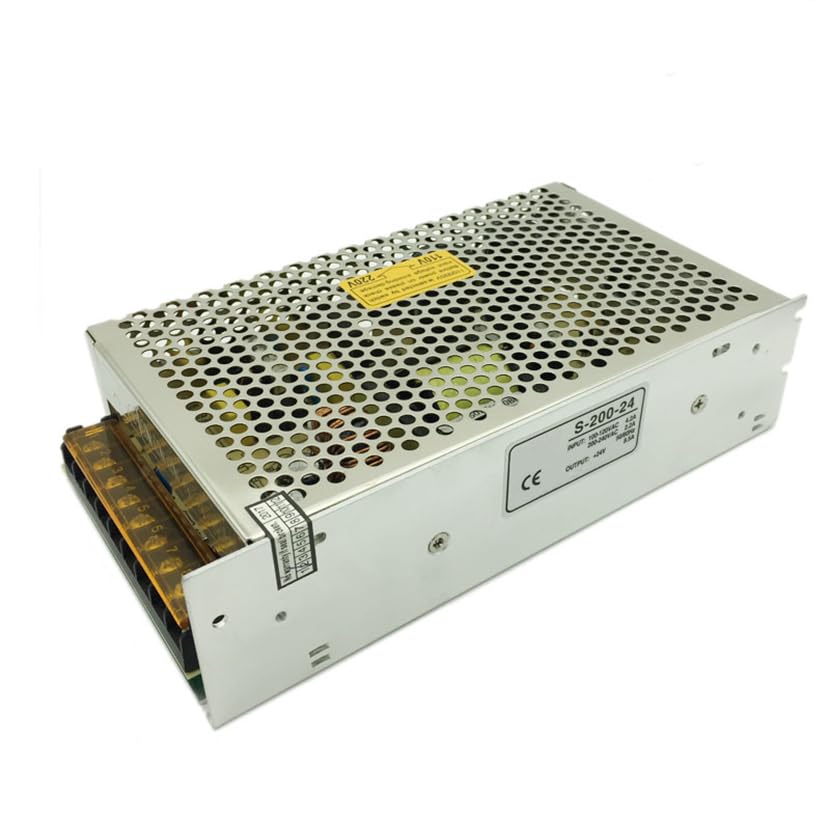
This manual provides essential instructions for the safe and efficient installation, operation, and maintenance of your Finglai S-200-24 Switching Power Supply. This unit is designed to convert AC input power into a stable 24V DC output, suitable for various electronic applications, particularly desktop computers. Please read this manual thoroughly before use and retain it for future reference.
2. Safety Information
WARNING: Failure to follow these safety instructions may result in electric shock, fire, or damage to the product or connected equipment.
- Ensure the power supply is disconnected from the AC mains before any installation, wiring, or maintenance procedures.
- This unit operates with high voltage. Only qualified personnel should perform installation and servicing.
- Do not operate the power supply in wet or damp conditions.
- Ensure proper ventilation to prevent overheating. The unit uses air cooling.
- Verify input voltage compatibility (120-240V AC) before connecting to the mains.
- Ensure all connections are secure and correctly polarized.
- Do not open the power supply casing. There are no user-serviceable parts inside.
3. Product Overview
The Finglai S-200-24 is a 200W single-group switching power supply designed to deliver a stable 24V DC output at 8.5A. It features an ATX connector type, making it compatible with desktop computer systems and other applications requiring a reliable 24V power source. The unit employs air cooling for thermal management.
4. Setup and Installation
Follow these steps for proper installation:
- Mounting: Securely mount the power supply in a well-ventilated area, ensuring adequate airflow for the air cooling system. Avoid enclosed spaces that could restrict heat dissipation.
- Input Wiring: Connect the AC input wires to the designated input terminals. This power supply supports an input voltage range of 120-240 Volts AC. Ensure the Live (L), Neutral (N), and Ground (GND) connections are correctly made according to local electrical codes.
- Output Wiring: Connect your device requiring 24V DC power to the output terminals. The output is 24V DC at 8.5A. Observe correct polarity (+ and -) to prevent damage to your connected equipment. The connector type used on the cable is ATX.
- Verification: Double-check all wiring connections for security and correctness before applying power.
5. Operating Instructions
Once installed and wired correctly:
- Power On: Apply AC power to the input terminals. The power supply should activate, providing 24V DC output.
- Monitoring: Observe the connected device for proper operation. If any issues arise, refer to the Troubleshooting section.
- Power Off: To power off the unit, disconnect the AC input power.
6. Maintenance
The Finglai S-200-24 Switching Power Supply requires minimal maintenance. Regular inspection can help ensure longevity and reliable operation.
- Cleaning: Periodically clean the exterior of the power supply, especially ventilation openings, to prevent dust buildup. Use a soft, dry cloth. Do not use liquid cleaners.
- Inspection: Check all wiring connections periodically to ensure they remain secure and free from corrosion or damage.
- Ventilation: Ensure that the area around the power supply remains clear and unobstructed to allow for proper air circulation and cooling.
7. Troubleshooting
If you encounter issues with your power supply, refer to the following common problems and solutions:
| Problem | Possible Cause | Solution |
|---|---|---|
| No output voltage | No AC input power; incorrect wiring; internal fault. | Check AC power source and connections. Verify input wiring. If problem persists, discontinue use and contact support. |
| Output voltage is unstable or incorrect | Overload; faulty connections; internal fault. | Reduce load on the power supply. Check output wiring. If problem persists, discontinue use and contact support. |
| Unit is overheating | Insufficient ventilation; excessive load. | Ensure proper airflow around the unit. Reduce the connected load. |
If troubleshooting steps do not resolve the issue, do not attempt to repair the unit yourself. Contact customer support for assistance.
8. Specifications
| Feature | Specification |
|---|---|
| Brand | Finglai |
| Model Number | S-200-24 |
| Manufacturer Part Number | S-200-24 |
| Output Wattage | 200 Watts |
| Output Voltage | 24 Volts DC |
| Output Current | 8.5 Amps |
| Minimum Input Voltage | 120 Volts (AC) |
| Maximum Input Voltage | 240 Volts (AC) |
| Cooling Method | Air |
| Connector Type | ATX |
| Compatible Devices | Desktop Computer |
| UPC | 736112409379 |
9. Warranty and Support
This Finglai S-200-24 Switching Power Supply is covered by a standard manufacturer's warranty against defects in materials and workmanship. Please refer to your purchase documentation for specific warranty terms and duration.
For technical support, warranty claims, or further assistance, please contact your retailer or the manufacturer directly. Keep your purchase receipt or proof of purchase handy when contacting support.