
1. Introduction and Overview
The Ajazz AK832 Pro is a compact 75% layout mechanical keyboard designed for versatility and performance. It features a gasket-mounted structure for a flexible typing feel, low-profile Outemu switches for faster actuation, and a vibrant 1.6M RGB backlight with 20 effects. The integrated LED screen provides real-time information such as battery status, date, and connection mode. With triple connectivity options, including Type-C wired, Bluetooth 5.1, and 2.4GHz wireless, it offers seamless switching between multiple devices and operating systems (Mac/Windows).

Key features include:
- 75% Compact Layout (81 keys)
- Triple Connectivity Modes: Type-C Wired, Bluetooth 5.1, 2.4GHz Wireless
- Gasket-Mounted Design
- Low-Profile Outemu Switches (Red/Brown/Blue options)
- Integrated LED Screen for status display
- 1.6M RGB Backlighting with 20 effects and per-key customization
- Durable PBT Low-Profile Keycaps
- 2500mAh Built-in Battery
- Compatible with Mac and Windows operating systems
2. Setup
2.1 Package Contents
Before setup, ensure all items are present:
- Ajazz AK832 Pro Mechanical Keyboard
- USB Type-C Cable
- 2.4GHz USB Receiver
- Keycap Puller
- User Manual (this document)

2.2 Connecting the Keyboard
The AK832 Pro offers three connection methods:
- Wired Mode (USB Type-C):
- Locate the USB-C port on the keyboard (typically on the top edge).
- Connect one end of the provided USB Type-C cable to the keyboard and the other end to an available USB port on your computer.
- Ensure the mode switch on the side/back of the keyboard is set to 'USB' or 'Wired' mode.
- The keyboard will be automatically recognized by your computer.
- 2.4GHz Wireless Mode:
- Take out the 2.4GHz USB receiver from the keyboard's storage slot (if applicable) or from the packaging.
- Plug the USB receiver into an available USB port on your computer.
- Set the mode switch on the keyboard to '2.4G' mode.
- The keyboard should connect automatically. If not, press Fn + 4 (for 2.4G pairing) to initiate pairing.
- Bluetooth 5.1 Mode:
- Set the mode switch on the keyboard to 'BT' (Bluetooth) mode.
- To enter pairing mode, press and hold Fn + 1, Fn + 2, or Fn + 3 for 3-5 seconds until the corresponding indicator light flashes rapidly. This allows you to pair up to three Bluetooth devices.
- On your computer or device, open Bluetooth settings and search for new devices.
- Select 'Ajazz AK832 Pro' (or similar name) from the list of available devices to pair.
- Once paired, the indicator light will stop flashing and remain solid.

2.3 Operating System Switch
The keyboard has a dedicated switch to toggle between Windows and Mac operating system layouts. Locate the 'WIN/MAC' switch on the side/back of the keyboard and set it to your desired operating system for optimal key functionality.
3. Operating Instructions
3.1 LED Screen Functions
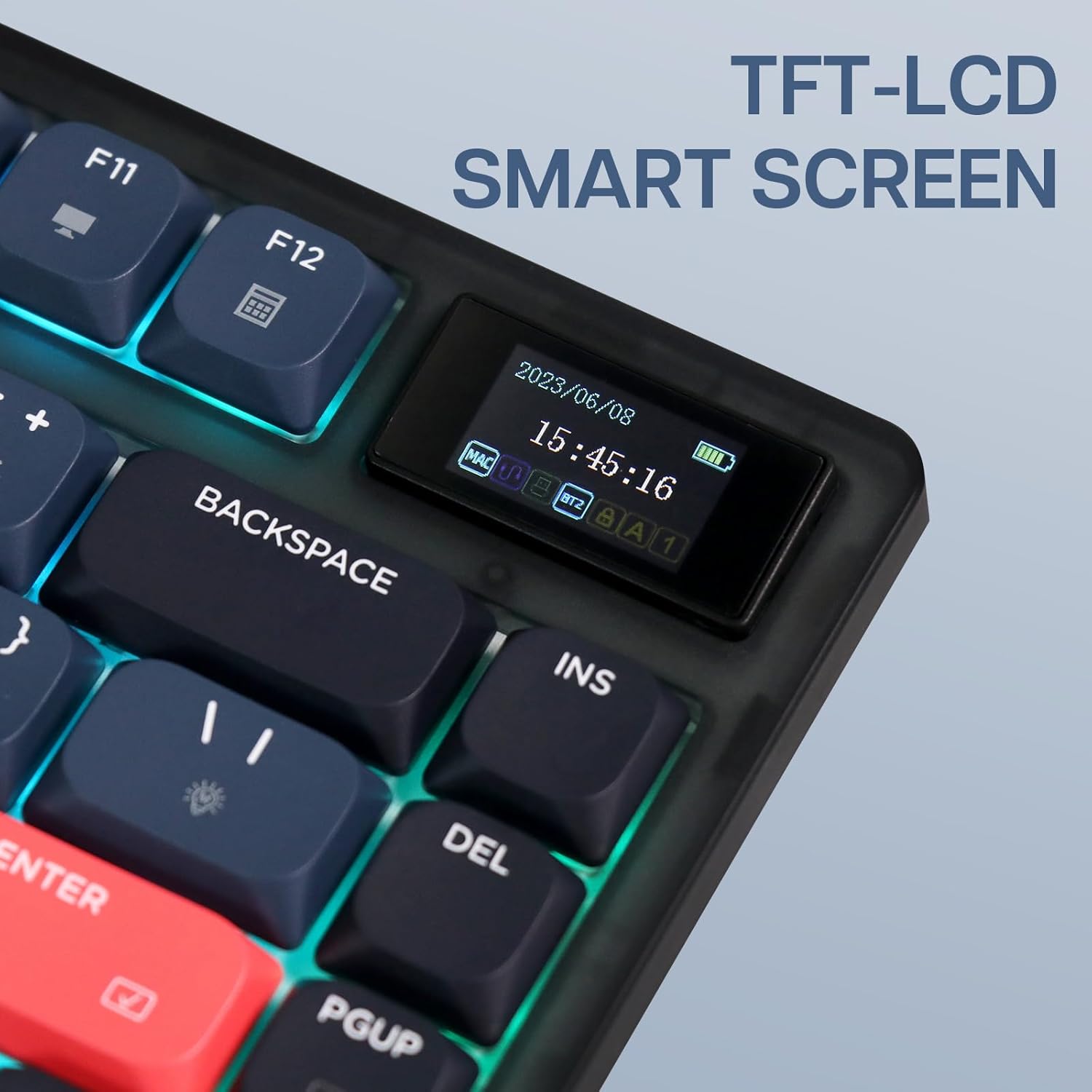
The integrated LED screen on the top right of the keyboard displays various real-time information:
- Date and Time
- Battery Level (full charge green, 20-80% yellow, below 20% red)
- Current Connection Mode (Wired, 2.4G, BT1/BT2/BT3)
- Operating System Mode (Mac/Win)
- Caps Lock, Num Lock, Win Lock status

3.2 RGB Backlighting
The keyboard features 1.6 million colors RGB backlighting with 20 pre-set lighting effects. You can cycle through these effects and adjust brightness and speed using function key combinations. Per-key RGB customization is also available via the Ajazz driver software.
- Fn + \|: Cycle through lighting effects.
- Fn + ↑ / ↓: Adjust brightness.
- Fn + ← / →: Adjust lighting speed/direction.

3.3 Multimedia and Function Keys
The F-row keys (F1-F12) have secondary multimedia and system functions accessible by pressing them in combination with the Fn key. Refer to the keycap legends for specific functions (e.g., volume control, media playback, calculator, email).
3.4 Software Customization
For advanced customization, including key remapping, macro creation, and per-key RGB lighting effects, download the official Ajazz driver software from the manufacturer's website. The software allows for comprehensive control over the keyboard's functions.

4. Maintenance
Proper maintenance ensures the longevity and performance of your keyboard.
- Cleaning: Regularly clean the keycaps and keyboard surface with a soft, lint-free cloth. For deeper cleaning, use a can of compressed air to remove dust and debris from between the keycaps. If necessary, use a slightly damp cloth with a mild cleaning solution, ensuring no liquid enters the keyboard.
- Keycap Removal: Use the provided keycap puller to safely remove keycaps for cleaning or replacement. Gently pull straight up to avoid damaging the switch stem.
- Storage: When not in use for extended periods, store the keyboard in a dry, cool place away from direct sunlight and extreme temperatures.
- Avoid Liquids: Do not expose the keyboard to liquids. In case of a spill, immediately disconnect the keyboard, power it off, and allow it to dry completely before reconnecting.
5. Troubleshooting
If you encounter issues with your Ajazz AK832 Pro keyboard, refer to the following common solutions:
| Problem | Possible Cause | Solution |
|---|---|---|
| Keyboard not responding (Wired) | Loose cable connection, incorrect mode switch, driver issue. | Ensure USB-C cable is securely connected. Check if the mode switch is set to 'USB' or 'Wired'. Try a different USB port or computer. Reinstall keyboard drivers if necessary. |
| Keyboard not connecting (2.4GHz Wireless) | USB receiver not plugged in, incorrect mode switch, pairing issue, low battery. | Ensure 2.4GHz USB receiver is plugged in. Set mode switch to '2.4G'. Press Fn + 4 to re-pair. Charge the keyboard. |
| Keyboard not connecting (Bluetooth) | Incorrect mode switch, not in pairing mode, device Bluetooth off, low battery. | Set mode switch to 'BT'. Press and hold Fn + 1/2/3 to enter pairing mode. Ensure Bluetooth is enabled on your device. Remove previous pairings and re-pair. Charge the keyboard. |
| RGB backlighting not working or dim | Backlight turned off, brightness too low, low battery. | Press Fn + \| to cycle effects. Press Fn + ↑ to increase brightness. Charge the keyboard. Check software settings. |
| LED screen is blank or incorrect | Low battery, software glitch. | Charge the keyboard. Restart the keyboard (power off/on). Update firmware via Ajazz software. |
| Keys not registering or double-typing | Dust/debris under keycap, switch malfunction. | Clean under the keycap with compressed air. If issue persists, contact customer support. |
| Battery not charging | Faulty cable, faulty USB port, keyboard issue. | Try a different USB-C cable and USB port. Ensure the keyboard is powered on or in wired mode. |
6. Specifications
| Feature | Detail |
|---|---|
| Model | AK832 Pro |
| Layout | 75% (81 Keys) |
| Dimensions | 12.52 x 5.31 x 1.02 inches (31.8 x 13.5 x 2.6 cm) |
| Weight | 1.54 pounds (0.7 kg) |
| Connectivity | USB Type-C Wired, Bluetooth 5.1, 2.4GHz Wireless |
| Switches | Low-Profile Outemu (Red/Brown/Blue) |
| Keycaps | PBT Low-Profile |
| Backlighting | 1.6M RGB with 20 effects |
| Battery Capacity | 2500mAh |
| Compatible OS | Windows, macOS |
| Special Features | LED Screen, Gasket-Mounted, Rechargeable |
7. Warranty and Support
For warranty information and technical support, please refer to the warranty card included with your product or visit the official KiiBoom/Ajazz website. Keep your proof of purchase for warranty claims.
If you require further assistance, please contact the retailer or manufacturer's customer service department.


