
BSIDE A2 Intelligent Multimeter
BSIDE A2 Intelligent Digital Multimeter User Manual
Model: A2 Intelligent Multimeter
Introduction
The BSIDE A2 Mini Smart Multimeter is an advanced version of the A1 Multimeter, designed for precise and versatile electrical measurements. This compact device offers a wide range of functions including AC/DC voltage and current, resistance, frequency, continuity, capacitance, diode testing, and VFC measurement for inverter outputs. It features a large, illuminated LCD display, NCV detection, and a rechargeable battery, making it an essential tool for electricians, DIY enthusiasts, and automotive technicians.
Package Contents

This image displays the complete package contents of the BSIDE A2 Intelligent Digital Multimeter, including the main unit, test leads, charging cable, and a protective carry bag.
- BSIDE A2 Intelligent Digital Multimeter
- Test Leads (Red and Black)
- USB Type-C Charging Cable
- Protective Carry Bag
- English User Manual (this document)
Key Features
- Large Red & Green Illuminated LCD Display: Provides clear readings with automatic backlight adjustment for enhanced readability.

The multimeter features a large LCD screen with red and green backlighting, improving visibility and reading experience in various lighting conditions.
- Automatic/Manual Mode Selection: Smart mode automatically detects measurement type, with options for manual selection.

This image illustrates the various measurement modes available on the BSIDE A2 Multimeter, including voltage, resistance, NCV, frequency, current, live wire detection, VFC, and temperature.
- Non-Contact Voltage (NCV) Detection: Detects voltage presence with adjustable sensitivity and triple buzzer alarm.
- Rechargeable Li-ion Battery: Integrated 400mA rechargeable battery with Type-C charging.
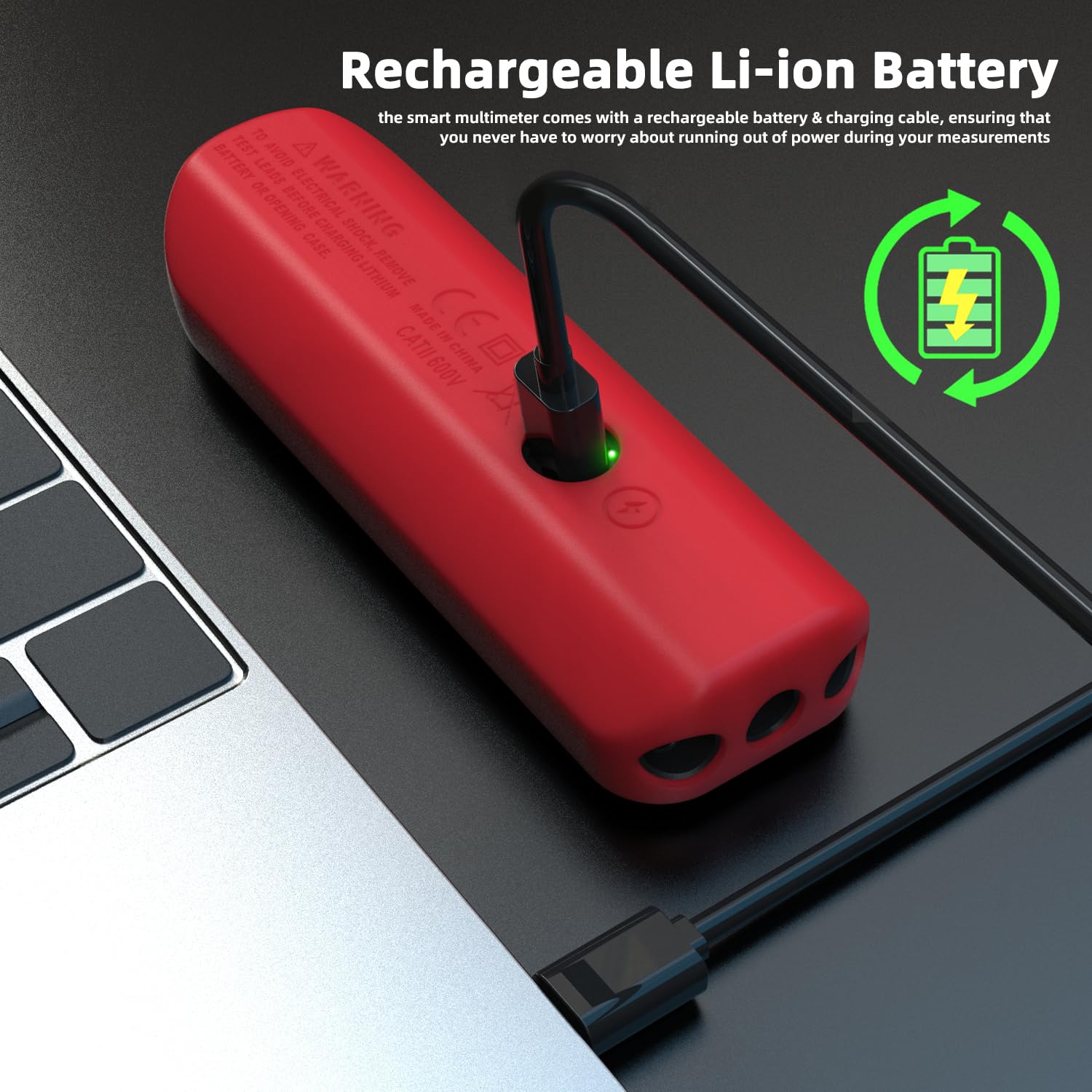
The multimeter is equipped with a rechargeable Li-ion battery, shown here being charged via a USB-C cable, eliminating the need for disposable batteries.
- Bright LED Flashlight: Assists in working in dimly lit environments.

An integrated bright LED flashlight on the top of the multimeter provides illumination for testing in dark or poorly lit areas.
- Auto Range & Auto Shut-Off: Enhances ease of use and conserves battery life.
- Protection Features: Includes protection against burns and overcharging.
- Compact Design: Small and portable with a removable silicone leather cover and a sturdy carry bag.
Setup
- Initial Charge: Before first use, fully charge the multimeter using the provided USB Type-C cable. Connect the cable to the multimeter's charging port and a standard USB power adapter (not included). The charging indicator will show progress.
- Attach Test Leads: Insert the red test lead into the "VΩmA" input jack and the black test lead into the "COM" input jack. Ensure they are securely connected.
- Power On: Press and hold the power button to turn on the multimeter. It will typically default to Smart Mode.
Operating Instructions
The BSIDE A2 Multimeter features a smart mode for automatic measurement type detection, as well as manual mode for specific functions.
Smart Mode Operation
When powered on, the multimeter defaults to Smart Mode. In this mode, it automatically identifies and measures AC/DC voltage, resistance, and continuity without requiring manual selection. Simply connect the test leads to the circuit or component you wish to measure.
Manual Mode Selection
To access specific measurement functions, press the "AUTO SEL" button repeatedly to cycle through available modes. The selected mode will be indicated on the display.
- AC/DC Voltage Measurement (V): Select the voltage mode. Connect test leads in parallel to the circuit.
- Resistance Measurement (Ω): Select resistance mode. Ensure the circuit is de-energized before measuring.
- Continuity Test ()))): Select continuity mode. A buzzer will sound if resistance is less than 50Ω.
- Capacitance Measurement (µF): Select capacitance mode. Discharge capacitors before testing.
- Diode Test (→|): Select diode mode. Measures diodes with less than 3V forward voltage.
- Frequency Measurement (Hz): Select frequency mode.
- AC/DC Current Measurement (mA): When test leads are plugged into the amp connection, the multimeter automatically activates the current measurement function.

This image demonstrates the multimeter's ability to automatically switch to AC/DC ampere test mode when the test leads are connected to the amp port, simplifying current measurements.
- Non-Contact Voltage (NCV) Detection: Hold the top of the multimeter near a live wire or outlet. The display will show "Hi" or "Lo" and the buzzer will sound, with red/green flashing on the screen.
- Live Wire Test: Insert the red test lead into the live wire. The display will indicate "LIVE" and provide a reading.
- VFC Measurement: For measuring the output voltage of inverters.
Applications
The BSIDE A2 Multimeter is suitable for a variety of applications:
- Electronic Maintenance: Ideal for testing components on circuit boards.

The multimeter is shown in use for electronic maintenance, demonstrating its precision in testing components on a circuit board.
- Automotive Maintenance: Useful for diagnosing electrical issues in vehicles.

Here, the multimeter is being used for automotive maintenance, specifically for checking the voltage of a car battery, highlighting its utility in vehicle diagnostics.
- Home Electrical Work: Safe and easy for general household electrical testing.
Maintenance
- Cleaning: Wipe the multimeter with a dry, clean cloth. Do not use abrasive cleaners or solvents. Ensure the device is powered off before cleaning.
- Battery Care: The built-in rechargeable battery should be charged regularly, especially if the device is not used for extended periods, to maintain battery health. Avoid fully discharging the battery frequently.
- Storage: Store the multimeter in its protective carry bag in a cool, dry place, away from direct sunlight and extreme temperatures.
- Test Leads: Inspect test leads for any signs of damage (cracks, frayed wires) before each use. Replace damaged leads immediately to ensure safety and accurate measurements.
Troubleshooting
- Multimeter does not power on:
- Ensure the battery is charged. Connect the multimeter to a USB power source using the charging cable.
- Check if the power button is pressed and held sufficiently.
- Inaccurate readings:
- Verify that the correct measurement mode is selected (if not using Smart Mode).
- Ensure test leads are properly connected and not damaged.
- Check for external interference or environmental factors affecting the measurement.
- No continuity beep:
- Confirm continuity mode is active.
- Ensure the resistance is below 50Ω for the beep to activate.
- Display shows "OL" (Overload):
- The measured value exceeds the multimeter's range for the current setting. Switch to a higher range if available, or ensure the measurement is within the device's capabilities.
Specifications
| Parameter | Value |
|---|---|
| Display | 6000 counts |
| DC Voltage | 0-620V (DC mode) / 0.8-620V (auto) ±(0.8%+3) |
| AC Voltage | 60mV-620V (AC) / 0.8V-620V ±(1.2%+5); 10V-620V (VFC) |
| DC Current | 1-610mA ±(1.5%+3) |
| AC Current | 1-610mA (40-1000Hz) ±(1.5%+3) |
| Resistance | 0-6MΩ ±(1.2%+3); 6MΩ-60MΩ ±(2.0%+10) |
| Capacitance | 0.5µF-6mF ±(3.5%+8); 6mF-60mF ±(4.5%+10) |
| Frequency | 0-9999Hz (900mVrms-20Vrms) ±(2.0%+10) |
| NCV Detection | 90V-1000V / 12V-1000V |
| Live Line Test | Yes |
| Continuity | Buzzer sounds if resistance < 50Ω |
| Diode Test | Measures diodes with < 3V |
| Ambient Temperature | 0-50℃ ±2.0℃ |
| Power | 3.7V 400mA rechargeable Li-ion battery |
| Size | 146 x 44 x 25 mm |
| Weight | 95 g |
Warranty and Support
Specific warranty information for the BSIDE A2 Intelligent Digital Multimeter is not provided in this manual. Please refer to the product packaging or the retailer's website for details regarding warranty coverage and terms.
For technical support, troubleshooting assistance, or inquiries about your product, please contact BSIDE customer service through their official website or the platform where the product was purchased. When contacting support, please have your product model number (A2 Intelligent Multimeter) and purchase details ready.
Ask a question about this manual
Ask about setup, troubleshooting, compatibility, parts, safety, or missing instructions. Manuals+ will review the question and use this page’s manual context to help answer it.