
Fotopro X-Aircross 3 Lite
Fotopro X-Aircross 3 Lite Carbon Fiber Tripod User Manual
Model: X-Aircross 3 Lite

Figure 1: Fotopro X-Aircross 3 Lite Tripod. An overview of the tripod in its extended state.
Introduction
Thank you for choosing the Fotopro X-Aircross 3 Lite Carbon Fiber Tripod. This manual provides essential information for the safe and effective use of your new tripod. Please read these instructions thoroughly before operation and retain them for future reference.
Package Contents
Verify that all items listed below are included in your package:
- Fotopro X-Aircross 3 Lite Carbon Fiber Tripod with Ball Head
- Bracket
- User Manual (this document)
Product Features

Figure 2: Ultralight Design. The tripod weighs only 1.78 lbs (0.81 kg), making it ideal for travel.
- Ultralight and Compact Design: Weighs approximately 1.78 lbs (0.81 kg) with a folded height of 15.74 inches, making it highly portable for travel.
- High Load Capacity: Supports equipment up to 11.02 lbs (5 kg) on the ball head, with individual leg sections capable of supporting up to 22 lbs (10 kg).
- Innovative Quick Locking System: Patented leg locking system allows for rapid extension and retraction of tripod legs, ensuring quick setup and stability.
- Professional Panoramic Ball Head: Features a 360-degree rotating ball head for precise angle adjustments and efficient panoramic photography, even on uneven surfaces.
- 3K Carbon Fiber Construction: Equipped with 25mm diameter 3K twill carbon fiber woven tubes for superior strength, reduced weight, enhanced stability, durability, and corrosion resistance.
- Detachable Center Axis: The center column can be removed to enable low-angle shooting, ideal for macro photography. Includes a built-in phone clip for smartphone photography.

Figure 3: Stable and Durable. The tripod's carbon fiber construction allows it to support significant weight, such as a DSLR with a 70-200mm lens.
Component Identification
Before operating your tripod, please identify the following components:
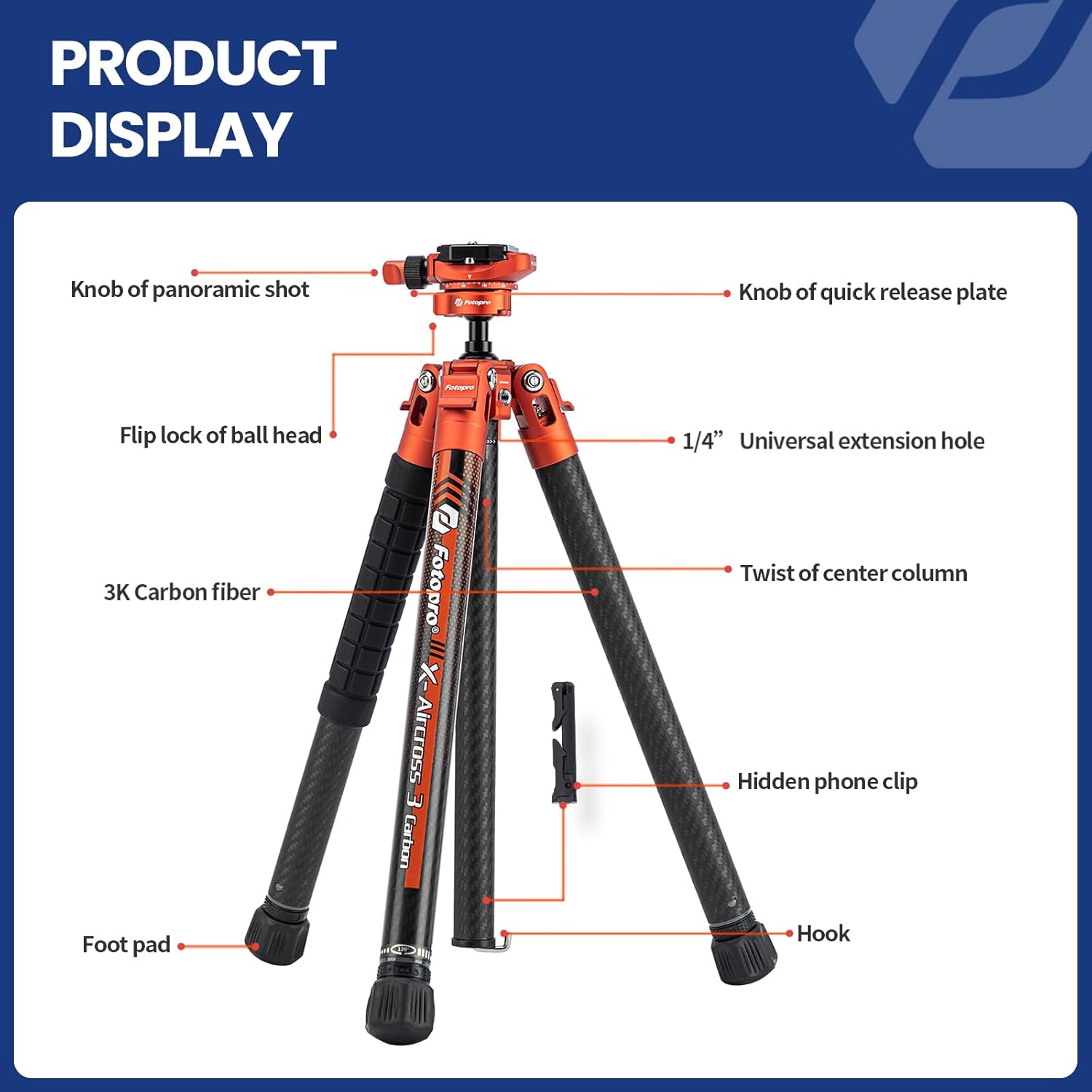
Figure 4: Tripod Components Overview. This diagram illustrates the main components of your Fotopro X-Aircross 3 Lite tripod. Familiarize yourself with each part for optimal use.
- Ball Head: For precise camera positioning and 360-degree rotation.
- Quick Release Plate: Attaches to your camera for quick mounting and dismounting.
- Flip Lock of Ball Head: Secures the ball head's position.
- 1/4" Universal Extension Hole: For attaching accessories.
- 3K Carbon Fiber Legs: Lightweight and strong leg sections.
- Twist Lock Mechanism: For extending and retracting leg sections.
- Hidden Phone Clip: Integrated into the center column for smartphone use.
- Foot Pad: Provides stability on various surfaces.
- Hook: Located at the bottom of the center column for adding weight for increased stability.
Setup Instructions
1. Unfolding the Tripod Legs
- Grasp the tripod legs and gently spread them outwards until they click into one of the available angle positions.
- To extend a leg section, locate the twist lock at the bottom of each leg. Turn the lock counter-clockwise (left) to unlock all sections simultaneously.
- Pull the leg sections downwards to extend them to your desired height.
- Once extended, turn the twist lock clockwise (right) to securely lock the leg sections in place. Ensure all sections are firmly locked before mounting equipment.

Figure 5: Quick Locking System. Turn left to unlock, pull downward to extend, and turn right to lock the leg sections.
2. Attaching Your Camera
- Remove the quick release plate from the ball head by loosening its locking knob and sliding it out.
- Attach the quick release plate to the bottom of your camera by screwing the 1/4-inch screw into the camera's tripod socket. Ensure it is tightened securely.
- Slide the camera with the attached quick release plate back into the ball head clamp. Tighten the quick release plate locking knob to secure your camera.
Operating Instructions
1. Adjusting the Ball Head
- To adjust the camera angle, loosen the main locking knob on the ball head.
- Position your camera to the desired angle (horizontal, vertical, or tilted). Use the integrated leveling bubble for precise alignment.
- Once the desired angle is achieved, tighten the main locking knob firmly to secure the camera in place.
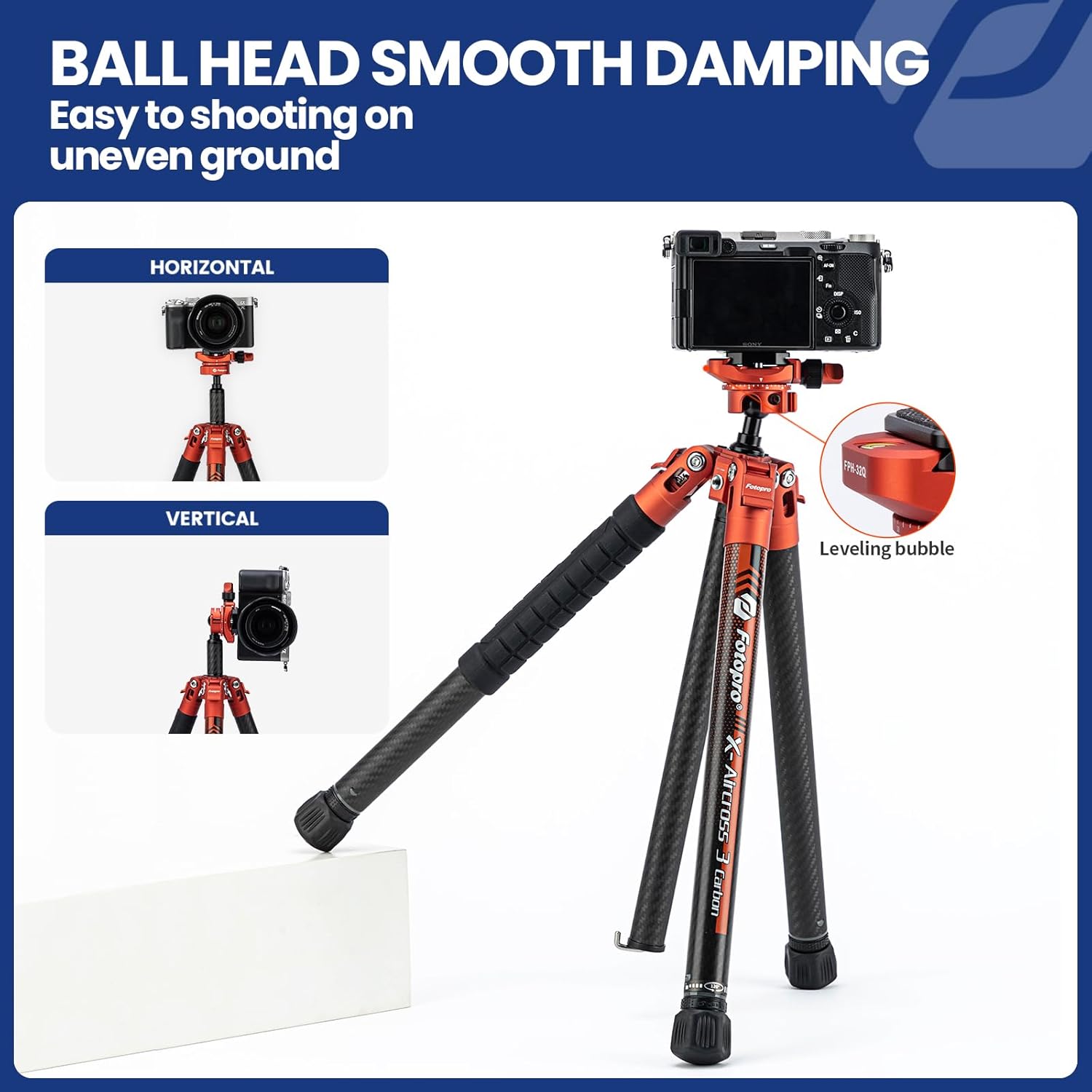
Figure 6: Ball Head Adjustment. The ball head allows for flexible camera positioning, including horizontal and vertical shots.
2. Panoramic Shooting
The ball head features a separate panoramic rotation lock. Loosen the panoramic base knob to rotate the camera horizontally for panoramic shots without affecting the tilt angle. Tighten the knob to lock the panoramic rotation.
3. Low-Angle Shooting (No Center Column Mode)
- To achieve extremely low shooting angles, the center column can be detached.
- Unscrew the center column from the tripod chassis.
- Reattach the ball head directly to the tripod chassis. This allows the camera to be positioned very close to the ground.

Figure 7: Low-Angle Configuration. Detaching the center column enables low-angle and macro photography.
4. Using the Hidden Phone Clip
The center column includes a hidden phone clip. Pull it out to secure your smartphone for photography or video recording. This feature is accessible even when the center column is attached to the tripod.
Maintenance
- Cleaning: Wipe the tripod with a soft, dry cloth after each use. For stubborn dirt, use a slightly damp cloth and mild soap, then dry thoroughly. Avoid harsh chemicals.
- Lubrication: The moving parts of the tripod are designed for smooth operation and generally do not require lubrication. If any part feels stiff, contact customer support.
- Storage: Store the tripod in a dry, cool place, away from direct sunlight and extreme temperatures. Ensure it is clean and fully retracted before storage.
- Inspection: Periodically check all screws, knobs, and leg locks for tightness. Tighten any loose components to ensure stability and safety.
Troubleshooting
| Problem | Possible Cause | Solution |
|---|---|---|
| Tripod is unstable. | Leg sections not fully extended or locked. Uneven ground. | Ensure all leg sections are fully extended and twist locks are tightened. Adjust leg angles to adapt to uneven terrain. Consider hanging weight from the hook for added stability. |
| Camera slips on ball head. | Quick release plate not securely attached to camera or ball head. Ball head locking knob is loose. | Verify the quick release plate is tightly screwed to the camera. Ensure the quick release plate is fully seated in the ball head clamp and its locking knob is tightened. Firmly tighten the main ball head locking knob. |
| Leg sections are difficult to extend/retract. | Dirt or debris in the twist lock mechanism. | Clean the leg sections and twist locks. Avoid forcing the mechanism. If the issue persists, contact customer support. |
Specifications
| Feature | Detail |
|---|---|
| Model Name | X-Aircross 3 Lite |
| Material | Carbon Fiber |
| Item Weight | 1.78 lbs (0.81 kg) |
| Maximum Height | 62 Inches (157.5 cm) |
| Folded Length | 15.74 Inches (40 cm) |
| Weight Limit (Payload) | 22 Pounds (10 kg) - Note: Ball head capacity is 11.02 lbs (5kg) |
| Leg Sections | 5-Sec |
| Tube Diameter | 25mm |
| Tripod Head Type | Ball Head (FPH-32Q) |
| Compatible Devices | Camera, Smartphone |
Safety Information
- Do not exceed the maximum load capacity of 22 lbs (10 kg) for the tripod legs and 11.02 lbs (5 kg) for the ball head. Overloading can cause damage to the tripod and your equipment.
- Always ensure all locking mechanisms (leg locks, ball head lock, quick release plate lock) are securely tightened before leaving your equipment unattended.
- Be cautious when operating the tripod on uneven or slippery surfaces. Use the leg angle adjustments and consider adding weight to the hook for enhanced stability.
- Keep hands and fingers clear of moving parts when extending or retracting legs to prevent pinching.
- Do not expose the tripod to extreme temperatures or corrosive environments, which can damage the carbon fiber and metal components.
- Keep out of reach of children.
Warranty and Support
Fotopro products are manufactured to high-quality standards. For warranty information, technical support, or service inquiries, please contact Fotopro customer service through their official website or the retailer where the product was purchased.
You can visit the Fotopro store on Amazon for more information: Fotopro Amazon Store
Ask a question about this manual
Ask about setup, troubleshooting, compatibility, parts, safety, or missing instructions. Manuals+ will review the question and use this page’s manual context to help answer it.