
1. Introduction
Thank you for choosing the TONEMAC TM-B2 Portable Bluetooth Speaker. This speaker is designed to provide high-quality audio in a compact, durable, and waterproof package. Please read this manual carefully to ensure proper use and to maximize your listening experience.
2. Product Overview
2.1 Key Features
- Bluetooth 5.3: Provides instant pairing and a stable connection up to 10 meters.
- IP67 Waterproof & Dustproof: Fully protected against dust and can withstand immersion in water up to 1 meter for 30 minutes. Ideal for outdoor and shower use.
- Long Playtime: Up to 10 hours of continuous music playback at medium volume on a single charge.
- Powerful Audio: Equipped with a 40mm dynamic driver for clear sound and punchy bass with 5W output.
- True Wireless Stereo (TWS): Pair two TM-B2 speakers for a dynamic left and right channel stereo sound experience.
- Built-in Microphone: For hands-free calling with clear sound quality.
- Portable Design: Lightweight (240g) with a durable silicone case and a multi-way strap for easy attachment to backpacks, bikes, or other gear.

Image: Overview of the TONEMAC TM-B2 speaker highlighting its key features like Bluetooth 5.3, IP67 rating, lightweight design, and dynamic driver.
2.2 Package Contents
- TONEMAC TM-B2 Portable Bluetooth Speaker
- Clip Hook / Multi-way Strap
- USB Charging Cable (Type-C, not explicitly mentioned but standard)
- User Manual
3. Setup
3.1 Charging the Speaker
Before first use, fully charge the speaker. Connect the provided USB charging cable to the speaker's charging port and to a USB power adapter (not included) or a computer's USB port. The charging indicator light will show the charging status. A full charge takes approximately 2 hours.
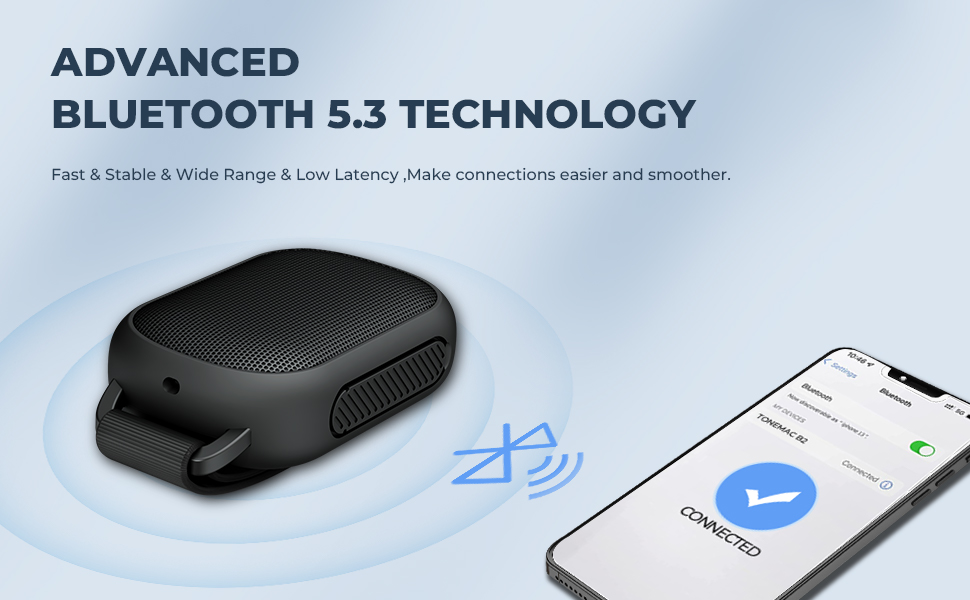
Image: Illustration of the speaker's extended battery life, offering up to 600 minutes (10 hours) of playback per charge.
3.2 Powering On/Off
- To Power On: Press and hold the Power button for 2-3 seconds until you hear an audible prompt and the LED indicator lights up.
- To Power Off: Press and hold the Power button for 2-3 seconds until you hear an audible prompt and the LED indicator turns off.
3.3 Bluetooth Pairing
- Ensure the speaker is powered on and in pairing mode (LED indicator will flash).
- On your device (smartphone, tablet, computer), enable Bluetooth and search for available devices.
- Select "TONEMAC B2" from the list of devices.
- Once connected, you will hear a confirmation sound, and the LED indicator will turn solid.

Image: Visual representation of the advanced Bluetooth 5.3 technology and a smartphone successfully connected to the TONEMAC B2 speaker.
3.4 True Wireless Stereo (TWS) Pairing
To achieve a stereo sound experience, you can pair two TONEMAC TM-B2 speakers together:
- Ensure both speakers are powered on and not connected to any other Bluetooth device.
- On one speaker (this will be the primary speaker), double-press the Power button (or a dedicated TWS button if available, refer to product diagram). The speaker will enter TWS pairing mode.
- The two speakers will automatically search for and connect to each other. You will hear a confirmation tone once connected.
- Once TWS is established, connect your device to the primary speaker via Bluetooth as described in section 3.3.
4. Operating Instructions
4.1 Button Functions
| Button | Function |
|---|---|
| Power Button | Press and hold for 2-3s to Power On/Off. Double-press for TWS pairing (primary speaker). |
| Volume Up (+) | Short press to increase volume. Long press for next track. |
| Volume Down (-) | Short press to decrease volume. Long press for previous track. |
| Play/Pause Button | Short press to Play/Pause music. Short press to Answer/End a call. Long press to Reject a call. |
4.2 Making/Receiving Calls
With the built-in microphone, you can manage calls directly through the speaker:
- Answer Call: Short press the Play/Pause button when a call comes in.
- End Call: Short press the Play/Pause button during a call.
- Reject Call: Long press the Play/Pause button when a call comes in.
5. Maintenance
5.1 Cleaning
The TM-B2 speaker is IP67 rated, making it resistant to water and dust. To clean, gently wipe the surface with a damp cloth. For heavier dirt, you may rinse it under tap water, ensuring the charging port cover is securely closed. Do not use harsh chemicals or abrasive cleaners.

Image: The TONEMAC B2 speaker shown partially submerged in water, illustrating its IP67 dustproof and waterproof capabilities.
5.2 Storage
Store the speaker in a cool, dry place away from direct sunlight and extreme temperatures. If not used for extended periods, charge the battery every 3 months to maintain its lifespan.
5.3 Water Resistance Precautions
- Ensure the charging port cover is fully sealed before exposing the speaker to water.
- Do not submerge the speaker in saltwater or other liquids besides fresh water.
- After exposure to water, dry the speaker thoroughly before charging.
6. Troubleshooting
If you encounter issues with your speaker, please refer to the following common problems and solutions:
| Problem | Solution |
|---|---|
| Speaker does not power on. | Ensure the battery is charged. Connect to a power source and try again. |
| Cannot pair via Bluetooth. | 1. Ensure the speaker is in pairing mode (flashing LED). 2. Make sure Bluetooth is enabled on your device. 3. Move the speaker closer to your device. 4. Forget the device on your phone and try pairing again. |
| No sound or low volume. | 1. Increase the volume on both the speaker and your connected device. 2. Ensure the speaker is properly connected via Bluetooth. 3. Check if the speaker is muted. |
| Poor sound quality. | 1. Move the speaker closer to your device to reduce interference. 2. Ensure there are no obstacles between the speaker and your device. 3. Check the battery level; low battery can affect sound quality. |
| TWS pairing fails. | 1. Ensure both speakers are fully charged and not connected to any other device. 2. Power off both speakers, then power them on and try TWS pairing again. |
7. Specifications
| Feature | Detail |
|---|---|
| Model Number | TM-B2 |
| Dimensions (L x W x H) | 15.2 x 4.7 x 9.9 cm |
| Weight | 240 grams |
| Connectivity Technology | Bluetooth 5.3 |
| Bluetooth Range | Up to 10 meters |
| Max Speaker Output Power | 5 Watts |
| Audio Output Mode | Stereo |
| Driver Size | 40mm (Dynamic Driver) |
| Battery Life | Up to 10 hours (at medium volume) |
| Charging Time | Approximately 2 hours |
| Water Resistance Rating | IP67 (Waterproof and Dustproof) |
| Material | Plastic, Rubber, Silicone |
| Control Method | Button/Tactile |
| Included Accessories | Clip Hook |
8. Warranty and Support
TONEMAC products are designed and manufactured to the highest quality standards. This product is covered by a limited warranty from the date of purchase. For detailed warranty information, please refer to the warranty card included in your package or visit our official website.
If you have any questions or require assistance, please contact TONEMAC customer support:
- Email: support@tonemac.com (Example)
- Website: www.tonemac.com (Example)