
1. Introduction
The Tapo T315 Smart Temperature and Humidity Monitor provides accurate, real-time environmental data for your home. This device features a 2.7-inch E-Ink display and a Swiss-made sensor for reliable measurements. It requires a Tapo Hub H100 (sold separately) and connects via a secured 2.4 GHz Wi-Fi network. This manual outlines the product's features, setup, operation, and maintenance to ensure optimal performance.

Image: Front view of the Tapo T315 Smart Temperature and Humidity Monitor displaying temperature and humidity readings.
2. Package Contents
Verify that all items are present in your package:
- Tapo T315 Smart Temperature and Humidity Monitor × 1
- AAA/LR03 Battery × 2
- 3M Adhesive × 1
- Quick Start Guide × 1

Image: The Tapo T315 product packaging, showing the monitor and listed accessories.
3. Product Overview
The Tapo T315 is designed for efficient environmental monitoring with key features highlighted below:
- 2.7" E-Ink Display: Provides clear, sharp visuals with a wide viewing angle and no screen glare, even in bright sunlight. It displays temperature, humidity, comfort level, battery status, and signal strength.
- High-Accuracy Swiss-Made Sensor: Monitors temperature and humidity with an accuracy of ±0.54°F and ±3% RH, updating data every 2 seconds.
- Long-Lasting Battery: Operates on two AAA batteries (included) for up to 2 years under normal use conditions.
- Tapo App Integration: Connects to the Tapo app via a Tapo Hub (H100, sold separately) for real-time notifications, data logging, and smart home automation.

Image: Close-up of the Tapo T315 display highlighting features like reflective, clear, wide view, and glare-free E-Ink technology.

Image: Internal view of the Tapo T315 circuit board, showing the Swiss-made high-accuracy sensor.
4. Setup
To set up your Tapo T315 monitor, follow these steps:
- Install Batteries: Open the battery compartment on the back of the device and insert the two AAA batteries provided. Ensure correct polarity.
- Download the Tapo App: Download the Tapo app from the App Store (iOS) or Google Play Store (Android). You can also visit tapo.com/app/download-app/.
- Tapo Hub Required: The Tapo T315 requires a Tapo Hub H100 (sold separately) to function. Ensure your Tapo Hub is already set up and connected to your 2.4 GHz Wi-Fi network.
- Add Device in App: Open the Tapo app, tap the '+' icon to add a new device, and select the Tapo T315 from the list. Follow the on-screen instructions to pair the monitor with your Tapo Hub.

Image: The battery compartment of the Tapo T315, showing two AAA batteries inserted.
5. Operating Instructions
5.1 Display Information
The 2.7-inch E-Ink display shows the following information:
- Temperature: Current temperature reading in °F or °C.
- Humidity: Current relative humidity reading in %.
- Comfort Level Indicator: A small icon (e.g., smiley face) indicating the comfort level based on temperature and humidity.
- Battery Status: An icon showing the remaining battery life.
- Signal Strength: An icon indicating the connection strength to the Tapo Hub.
Image: The Tapo T315 display showing temperature, humidity, and a comfort level indicator (smiley face).
5.2 Using the Tapo App
The Tapo app provides advanced functionalities for your monitor:
- Real-Time Monitoring: View current temperature and humidity from anywhere.
- Notifications: Set custom temperature and humidity ranges to receive instant alerts when conditions fall outside your preferred limits.
- Data Logging and Export: Access historical data and visual graphs of temperature and humidity trends. You can export up to 2 years of data for free.
- Smart Actions: Integrate the T315 with other Tapo smart devices to create automated routines (e.g., turn on a heater if temperature drops).
- Device Sharing: Share access to the monitor's data with family members through the app.

Image: A smartphone screen displaying the Tapo app interface, showing real-time temperature and humidity graphs.

Image: A smartphone displaying a Tapo app notification alert for "Too Warm!" conditions.

Image: A smartphone screen showing the Tapo app's data export interface, allowing users to send data via email.
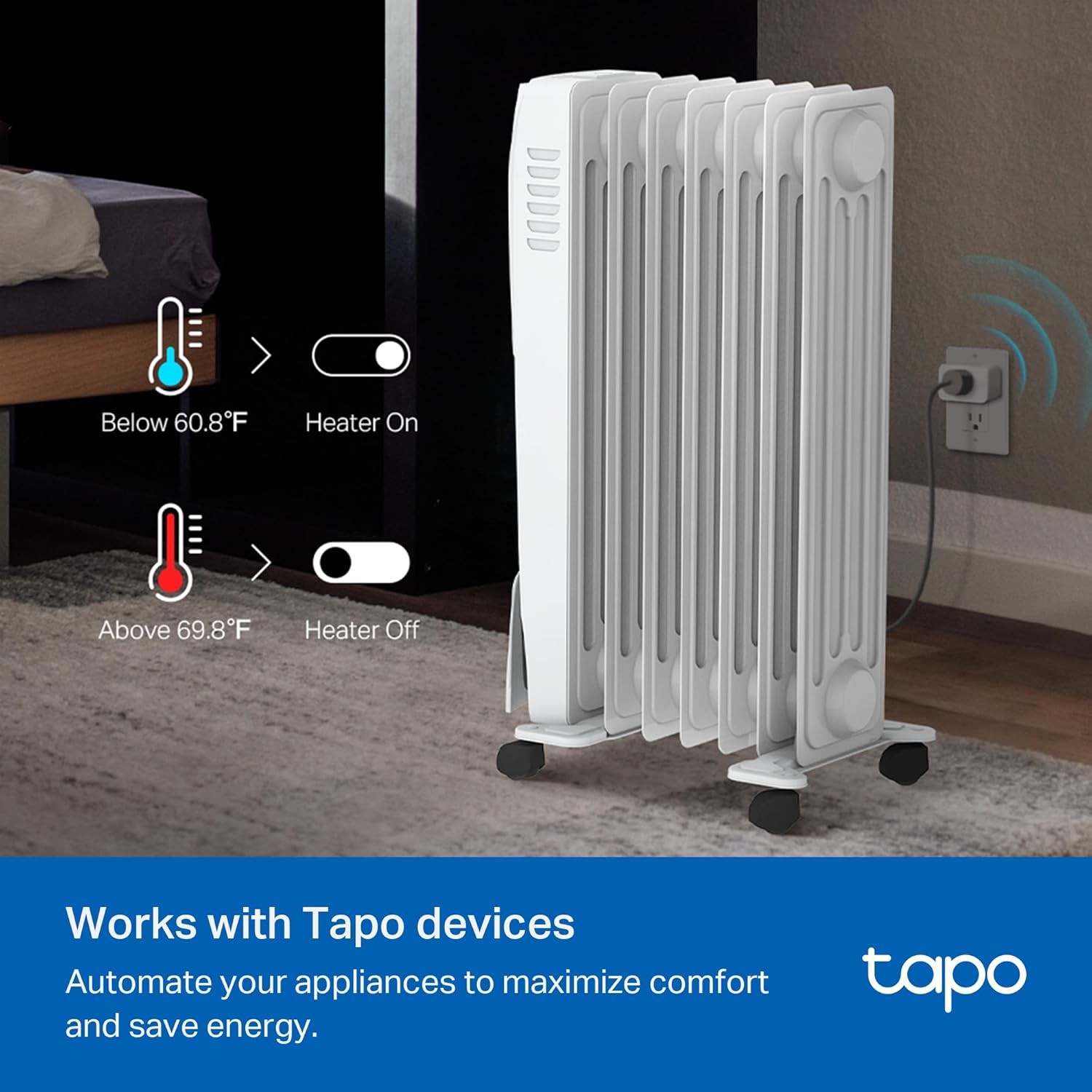
Image: An illustration demonstrating smart automation with Tapo devices, showing a heater turning on/off based on temperature readings from the T315.
6. Installation and Placement
The Tapo T315 offers flexible placement options:
- Freestanding: Place the monitor on any flat surface, such as a table, shelf, or desk.
- Wall-Mounted: Use the included 3M adhesive to attach the monitor to a wall or other vertical surface. Ensure the surface is clean and dry before application.
- Magnetic Attachment: The device features a magnetic back, allowing it to be attached to metallic surfaces like refrigerators or metal shelves.
For accurate readings, place the monitor away from direct sunlight, heat sources, or drafts.

Image: Multiple placement examples for the Tapo T315, including on a nightstand, mounted on a wall, and attached to a refrigerator.
7. Maintenance
7.1 Battery Replacement
When the battery indicator on the display or in the Tapo app shows low battery, replace the AAA batteries:
- Gently open the battery compartment cover on the back of the device.
- Remove the old AAA batteries.
- Insert two new AAA batteries, ensuring correct polarity (+ and -).
- Close the battery compartment cover securely.
Note: Battery life is approximately 2 years under normal usage conditions. Actual battery life may vary.
7.2 Cleaning
Wipe the device with a soft, dry cloth. Do not use liquid cleaners or abrasive materials.
8. Troubleshooting
- Device not connecting to Tapo Hub:
- Ensure the Tapo Hub H100 is powered on and connected to your 2.4 GHz Wi-Fi network.
- Make sure the monitor is within range of the Tapo Hub.
- Check the batteries in the T315 monitor.
- Verify that both the Tapo Hub and T315 monitor are from the same regional version (e.g., US devices with US hub).
- Inaccurate readings:
- Ensure the monitor is not placed near direct heat sources, cold drafts, or in direct sunlight.
- Allow the device some time to stabilize after initial setup or relocation.
- Compare readings with another calibrated device if available.
- Display not updating:
- Check battery level. Replace batteries if low.
- Ensure the device is connected to the Tapo Hub.
9. Specifications
| Model | Tapo T315 |
| Dimensions | 2.53"W x 2.7"H (64.26mm x 68.58mm) |
| Weight | 0.08 Kilograms (2.82 ounces) |
| Display | 2.7" E-Ink |
| Temperature Accuracy | ±0.54°F (±0.3°C) |
| Humidity Accuracy | ±3% RH |
| Power Source | 2 × AAA/LR03 Batteries (included) |
| Battery Life | Up to 2 years (typical usage) |
| Connectivity | Sub-1G Low-Power Wireless (requires Tapo Hub H100) |
| Operating Temperature | -20°C to 60°C (32°F to 140°F) - Note: E-Ink screen displays temperature from 0 to 50°C (32 to 122°F). |
| Operating Humidity | 0% to 99% RH |
| Manufacturer | TP-Link |
10. Warranty and Support
For technical support, warranty information, and further assistance, please contact Tapo customer support:
- Phone: (866) 225-8139
- Website: myproducts.tp-link.com/us
- Email: support.USA@tp-link.com
Please have your product model (Tapo T315) and purchase information ready when contacting support.


