
1. Introduction
The DIYmall WS2812 8-Bit RGB LED Stick is a compact and individually addressable LED module designed for various lighting and display projects. It features 8 WS2812 5050 RGB LEDs, each with an integrated driver, allowing for precise control over color and brightness. This module is compatible with popular microcontrollers like Arduino and Raspberry Pi, making it ideal for hobbyists and developers.
Key Features:
- Voltage: DC5V operation.
- Full Color Display: Each pixel can achieve 256 brightness levels for each primary color (Red, Green, Blue), enabling 16,777,216 full-color display options.
- High Scan Frequency: Supports a scan frequency of not less than 400Hz/s.
- Communication Interface: Single-wire communication for individual pixel addressing.
- Versatile Application: Suitable for full-color modules, soft light strips, LED decorative lighting, and indoor/outdoor LED video screens.
What's in the Box:
- 1 x DIYmall WS2812 8-Bit 5050 RGB LED Module
2. Setup
This section guides you through the physical connection of your WS2812 8-Bit RGB LED Stick to a microcontroller.
2.1 Pinout Description
The LED stick features three essential pins for operation:
- GND: Ground connection.
- 4-7VDC (VCC): Power supply input. The module operates at DC5V.
- DIN: Data input pin. Connect this to a digital output pin on your microcontroller.
- DOUT: Data output pin. Used for chaining multiple LED sticks together.

Image: Back of the WS2812 8-Bit RGB LED Stick, highlighting the power and data pins. Note the recommended voltage range of DC4-7V, with DC5V being optimal.
2.2 Physical Dimensions
The LED stick has a compact design, making it suitable for various projects.
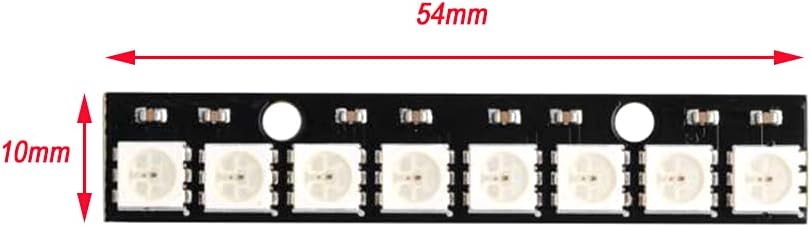
Image: Top view of the LED stick, illustrating its length of 54mm and width of 10mm.
2.3 Connecting to a Microcontroller (e.g., Arduino)
Follow these steps to connect the LED stick to your development board:
- Connect the GND pin of the LED stick to the GND pin of your microcontroller.
- Connect the 4-7VDC (VCC) pin of the LED stick to the 5V output of your microcontroller or an external 5V power supply. Ensure your power supply can provide sufficient current for all LEDs (each WS2812 LED can draw up to 60mA at full brightness).
- Connect the DIN pin of the LED stick to a digital output pin on your microcontroller (e.g., Digital Pin 6 on an Arduino Uno).
- If chaining multiple LED sticks, connect the DOUT pin of the first stick to the DIN pin of the next stick.
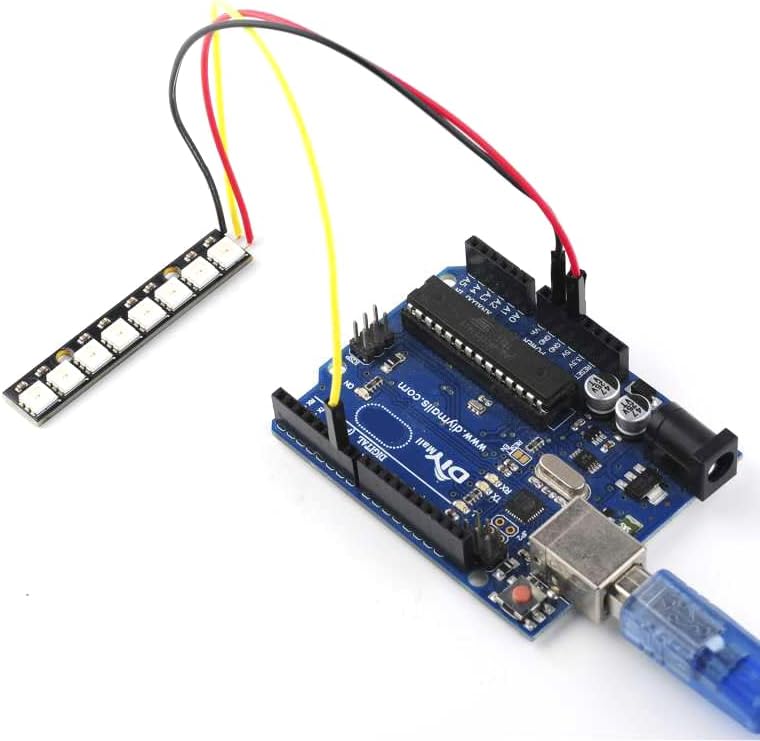
Image: The 8-Bit RGB LED Stick wired to an Arduino board, demonstrating a typical connection setup.
3. Operating Instructions
To operate the WS2812 LED stick, you will need to program your microcontroller. Libraries like Adafruit NeoPixel or FastLED are commonly used for this purpose.
3.1 Basic Programming Concepts
- Include Library: Start by including the chosen library (e.g., `#include
`). - Define LED Count and Pin: Specify the number of LEDs (8 for this stick) and the data pin you connected.
- Initialize: Create an instance of the NeoPixel object.
- Set Color: Use functions like `setPixelColor(pixelIndex, red, green, blue)` to set the color of individual LEDs.
- Show Colors: Call `show()` to update the LED colors.
- Brightness Control: Adjust overall brightness using `setBrightness()`.
3.2 Example Color Displays
The WS2812 LEDs can display a vast range of colors and dynamic effects.

Image: The LED stick illuminated with a smooth transition from red to green.

Image: The LED stick showcasing a vibrant gradient from red to purple.
3.3 Product Video Demonstration
Watch this video for a visual demonstration of the WS2812 8-Bit RGB LED Stick in action, showcasing various color patterns and effects.
Video: A demonstration of the 8-bit RGB LED stick displaying various light patterns and colors.
4. Maintenance
Proper care ensures the longevity and optimal performance of your LED stick.
- Handling: Handle the LED stick by its edges to avoid damaging the LEDs or solder joints.
- Power Supply: Always use a stable DC5V power supply. Overvoltage can permanently damage the LEDs.
- Cleaning: If necessary, gently clean the surface with a soft, dry cloth. Avoid using liquids or abrasive materials.
- Storage: Store the LED stick in a dry, anti-static environment when not in use.
5. Troubleshooting
If you encounter issues with your WS2812 LED stick, refer to the following common problems and solutions:
- LEDs Not Lighting Up:
- Check all power connections (GND and VCC) to ensure they are secure and receiving the correct DC5V.
- Verify the data connection (DIN) to your microcontroller's digital pin.
- Ensure your code is correctly uploaded to the microcontroller and is running.
- Confirm that the power supply can provide enough current for all LEDs.
- Incorrect Colors or Flickering:
- Double-check your wiring, especially the data line. A loose connection can cause erratic behavior.
- Ensure your code correctly specifies the number of LEDs and the data pin.
- If using a long data wire, consider adding a 300-500 Ohm resistor in series with the data line near the LED stick to improve signal integrity.
- Ensure your power supply is stable and not experiencing voltage drops.
- Only First Few LEDs Light Up:
- This often indicates a power issue or a broken data line further down the strip. Check power connections along the entire strip if chaining.
- Inspect the solder joints on the LED stick for any cold joints or breaks.
6. Specifications
| Feature | Detail |
|---|---|
| Brand | DIYmall |
| Model Name | WS2812B RGB LED Ring (8-Bits) |
| Model Number | 8-Bits |
| Manufacturer Part Number | WS2812B-5050 |
| Voltage | DC5V (Operating range DC4-7V) |
| Light Source Type | LED (WS2812 5050 RGB) |
| Number of LEDs | 8 |
| Color Depth | 256 brightness levels per primary color, 16.7 million colors |
| Scan Frequency | ≥ 400Hz/s |
| Communication | Single-wire (individually addressable) |
| Indoor/Outdoor Usage | Indoor, Outdoor |
| Material Type | Metal |
| Item Weight | 0.1 kg |
7. Warranty and Support
7.1 Manufacturer Warranty
This DIYmall WS2812 8-Bit RGB LED Stick comes with a 1-year manufacturer's warranty. This warranty covers defects in materials and workmanship under normal use. Please retain your proof of purchase for warranty claims.
7.2 Technical Support
For technical assistance, programming examples, or further inquiries, please refer to the DIYmall official website or contact their customer support. Online communities and forums dedicated to Arduino and Raspberry Pi also offer extensive resources for WS2812 LED projects.