1. Important Safety Instructions
Please read all instructions carefully before beginning installation and save this manual for future reference. Improper installation or operation can lead to electric shock, fire, or personal injury.
- Ensure the power is turned off at the circuit breaker before installation or maintenance.
- All wiring must be in accordance with national and local electrical codes. If you are unfamiliar with wiring, consult a qualified electrician.
- The mounting structure must be capable of supporting the fan's weight (approximately 14.15 lbs).
- Do not bend the blade holders during installation, balancing, or cleaning.
- Keep hands, tools, and other objects clear of the fan blades when the fan is operating.
- This fan is suitable for indoor and covered outdoor use. Avoid direct water contact.
2. Package Contents
Verify that all components are present before beginning installation.
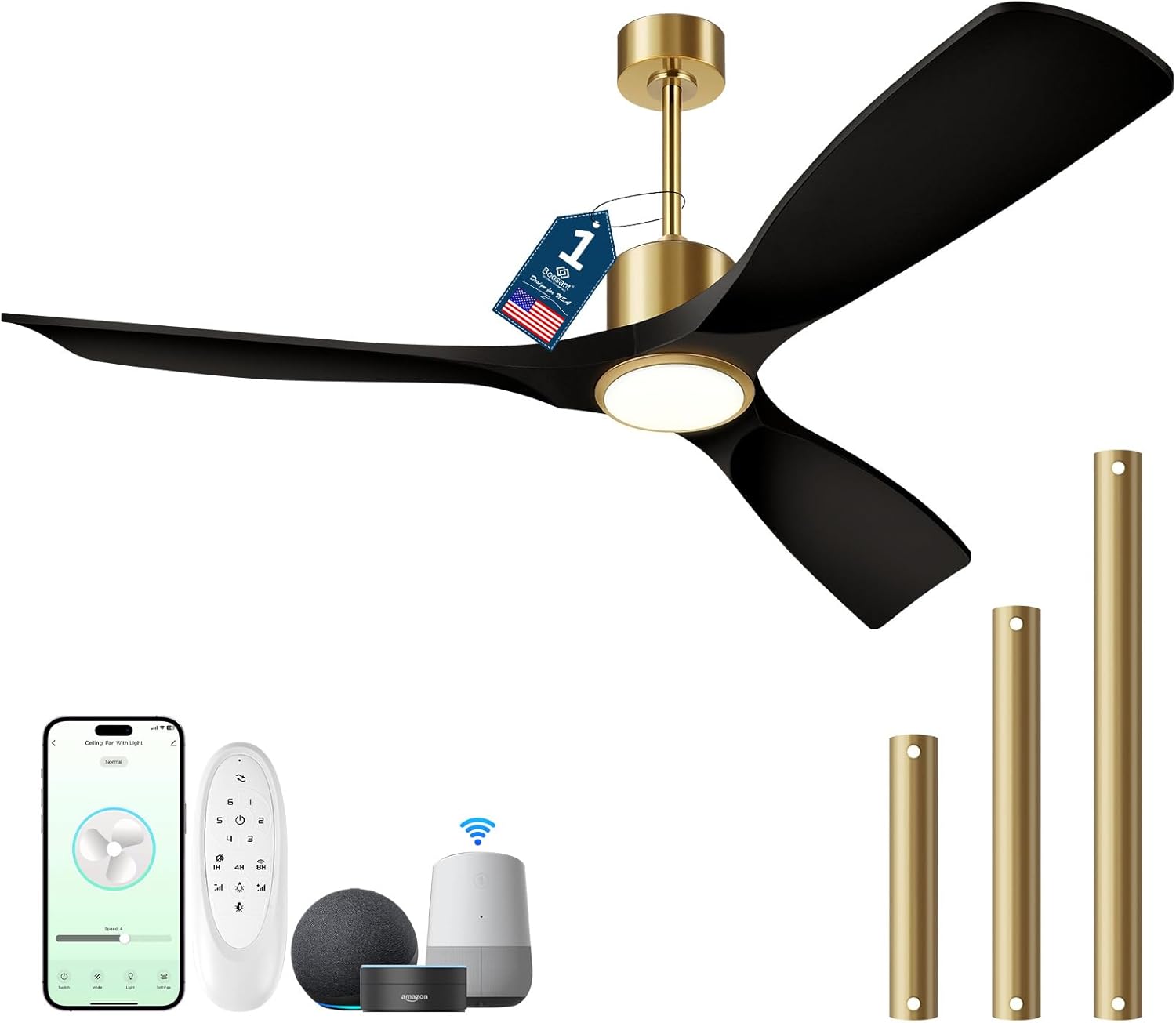
Image: Overview of the BOOSANT 52-inch Smart Ceiling Fan and its included accessories, such as the remote control, various downrod lengths, and compatibility with smart home devices like Amazon Alexa and Google Assistant.
- Ceiling Fan Assembly (Motor, Blades, Light Kit)
- Remote Control
- Downrods (5-inch, 10-inch, 15-inch options)
- Mounting Bracket
- Hardware Pack (screws, wire nuts, etc.)
- Instruction Manual
3. Installation Guide
3.1 Pre-Installation
- Turn off power at the main circuit breaker.
- Ensure the electrical box is securely mounted and capable of supporting the fan.
- Unpack all components and inspect for any damage.
3.2 Mounting the Fan
The fan supports flat ceilings and sloped ceilings up to 15 degrees. Select the appropriate downrod length (5", 10", or 15") for your ceiling height.
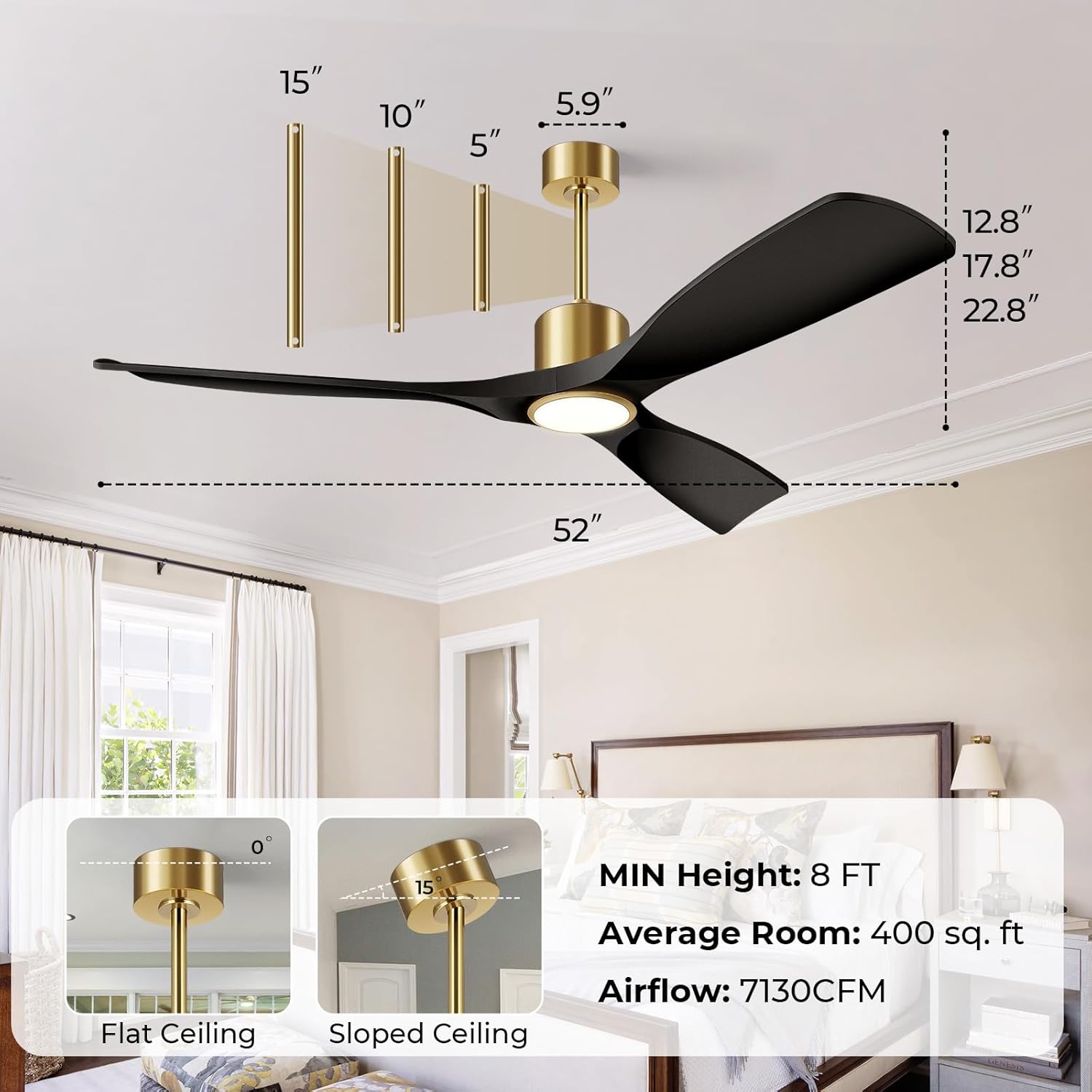
Image: This diagram illustrates the dimensions of the 52-inch ceiling fan and various installation configurations, including options for flat and sloped ceilings, and the use of 5-inch, 10-inch, and 15-inch downrods to achieve a minimum height of 8 feet.
- Attach the mounting bracket to the ceiling electrical box using the provided screws.
- Assemble the downrod with the canopy and hang the fan motor assembly onto the mounting bracket.
- Connect the electrical wires according to the wiring diagram (typically black to black, white to white, and ground to ground).
- Secure the canopy to the mounting bracket.
3.3 Attaching Blades and Light Kit
- Attach the fan blades to the motor housing using the provided screws.
- Connect the light kit wiring to the fan motor wiring.
- Secure the light kit to the fan motor housing.
4. Operating Instructions
4.1 Remote Control Functions
The included remote control allows for convenient operation of your ceiling fan and light.
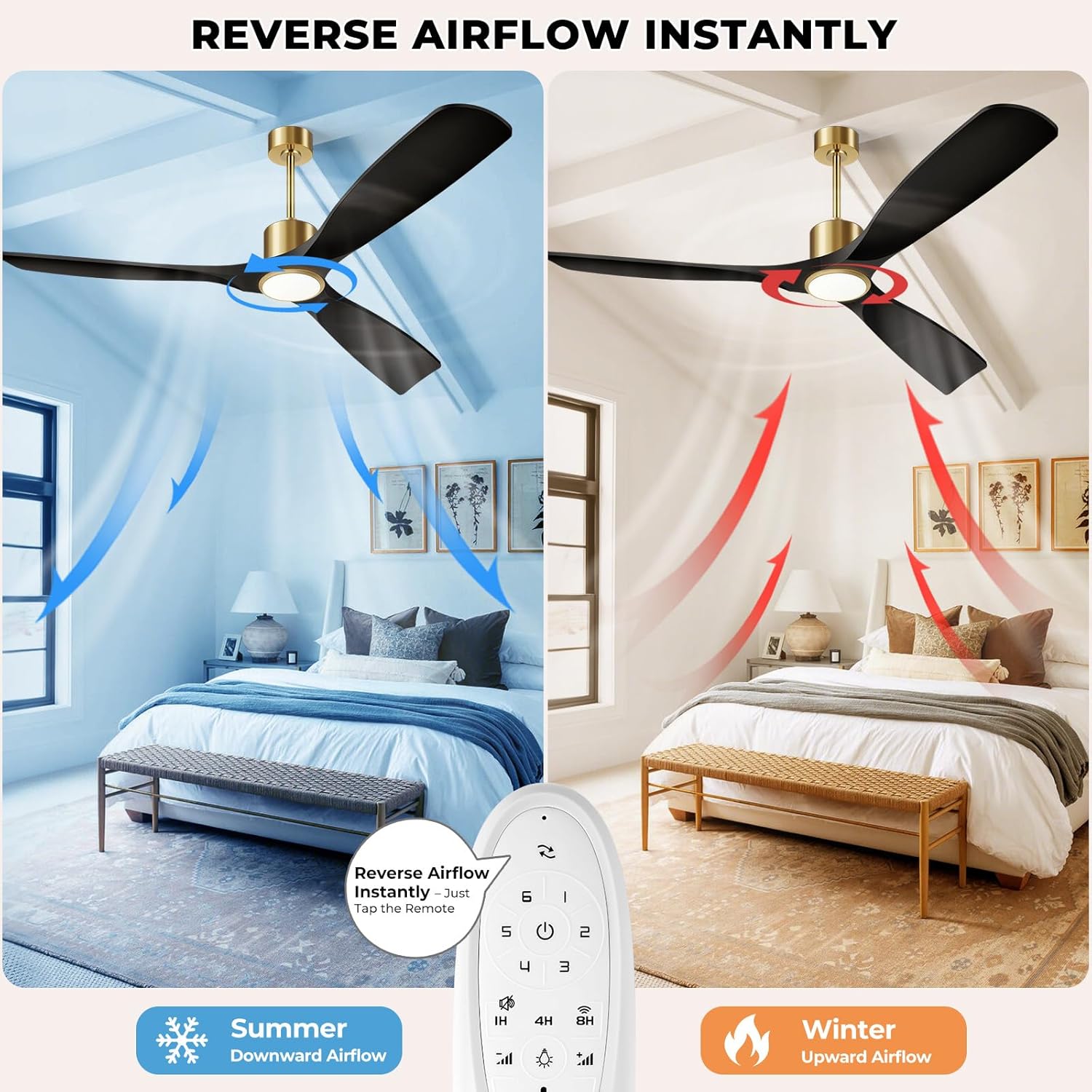
Image: This illustration demonstrates the reversible airflow feature of the BOOSANT ceiling fan, showing downward airflow for cooling in summer and upward airflow for heat circulation in winter, controlled by a button on the remote.
- Fan ON/OFF: Turns the fan on or off.
- Fan Speed (1-6): Adjusts the fan speed from low (1) to high (6).
- Light ON/OFF: Turns the light on or off.
- Brightness +/-: Dims or brightens the light (10% to 100%).
- Color Temperature: Cycles through 3000K (Warm White), 4000K (Neutral White), and 6000K (Daylight). The light features a memory function to recall the last setting.
- Reverse Airflow: Changes the direction of blade rotation for summer (downward airflow) or winter (upward airflow) modes.
- Timer (1H/4H/8H): Sets the fan to turn off automatically after 1, 4, or 8 hours.
- Silent Function: Activates a low-noise mode for quiet operation.
- Wi-Fi Pairing: Press and hold the designated key for less than 3 seconds to turn off the fan and light. Press and hold for more than 3 seconds to reset Wi-Fi.

Image: This image demonstrates the three adjustable light color temperatures (6000K Cool White, 4500K Natural White, 3000K Warm White) and the dimming capability from 12% to 100% brightness of the BOOSANT ceiling fan light.
4.2 Smart Control (App & Voice)
This smart ceiling fan can be controlled via a mobile application and voice commands through Amazon Alexa or Google Assistant.

Image: This image illustrates the smart voice control feature of the BOOSANT ceiling fan, showing compatibility with Amazon Alexa and Google Assistant for hands-free operation.
- App Control: Download the designated smart home app (refer to packaging or product details for specific app name). Follow the in-app instructions to pair your fan. The app allows full control over fan speed, light settings, and scheduling.
- Voice Control: Once paired with Amazon Alexa or Google Assistant, use voice commands such as "Alexa, turn on the fan" or "Hey Google, set fan speed to 3."
5. Maintenance
Regular maintenance ensures optimal performance and longevity of your ceiling fan.
- Cleaning: Use a soft, damp cloth to clean the fan blades and motor housing. Do not use abrasive cleaners or solvents. Ensure power is off before cleaning.
- Blade Care: Periodically check that all blade screws are tight. Loose blades can cause wobbling and noise.
- Light Kit: The integrated LED light source is designed for long life and typically does not require replacement.
6. Troubleshooting
Refer to this section for common issues and their solutions.
| Problem | Possible Cause | Solution |
|---|---|---|
| Fan does not start | No power; Loose wire connections; Remote control battery low/dead; Incorrect pairing. | Check circuit breaker; Verify all wire connections are secure; Replace remote battery; Re-pair remote/app. |
| Light does not work | Loose wire connections; Remote control battery low/dead; Light function off. | Check light kit wiring; Replace remote battery; Ensure light is turned on via remote/app. |
| Fan wobbles | Loose blade screws; Unbalanced blades; Loose mounting bracket. | Tighten all blade screws; Use a balancing kit (not included) to balance blades; Ensure mounting bracket is secure. |
| Remote control not responding | Battery low/dead; Remote not paired; Obstruction between remote and receiver. | Replace battery; Re-pair remote (refer to Wi-Fi pairing instructions); Ensure clear line of sight. |
| Excessive noise | Loose screws; Motor issue; Blades hitting an obstruction. | Check and tighten all screws; Ensure no obstructions are near blades. If noise persists, contact support. |
7. Specifications
Technical details for the BOOSANT 52-inch Smart Ceiling Fan.
| Feature | Detail |
|---|---|
| Model Name | 102L-52 |
| Size | 52 inches |
| Product Dimensions | 21"D x 52"W x 21"H |
| Item Weight | 14.15 pounds |
| Power Source | Corded Electric |
| Voltage | 120 Volts |
| Wattage | 50 watts |
| Motor Type | DC Motor |
| Number of Blades | 3 |
| Air Flow Capacity | 6000 CFM |
| Number of Power Levels | 6 |
| Noise Level | 35 dB (typically <30dB during operation) |
| Light Color Temperature | 3000K / 4000K / 6000K (Dimmable 10%-100%) |
| Control Method | App, Remote, Voice (Alexa, Google Assistant) |
| Indoor/Outdoor Usage | Indoor, Covered Outdoor |
| Certification | ETL Certified |
8. Warranty and Support
Your BOOSANT ceiling fan is manufactured to high-quality standards and is ETL certified for safety. For technical assistance or any product-related inquiries, please contact our support team.
- Technical Support: 24/7 technical support is available.
- Contact Number: +1-7712322914 (US)
- Operating Hours: Monday to Friday: 9 AM - 5 PM (PT)


