
LCLCTC NDR120-24
LCLCTC NDR 120W 24Vdc Power Supply Instruction Manual
Model: NDR120-24
1. Product Overview
The LCLCTC NDR 120W 24Vdc Power Supply (Model: NDR120-24) is a high-efficiency switching converter designed for industrial and commercial applications. It provides a stable 24V DC output from a wide 100-240VAC input, making it suitable for various global power environments. Its compact design and DIN rail mounting capability ensure convenient installation in distribution boxes and control cabinets.

Figure 1: LCLCTC NDR 120W 24Vdc Power Supply, showing its compact form factor and DIN rail mounting bracket.
2. Safety Information
Please read and understand all safety instructions before installation and operation. Failure to follow these instructions may result in electric shock, fire, or serious injury.
- Ensure the power supply is disconnected from the main power source before any installation, wiring, or maintenance.
- Installation should only be performed by qualified personnel in accordance with local electrical codes and regulations.
- Use copper wire only for connections.
- Do not operate the unit beyond its specified input voltage, output current, or power ratings.
- Ensure proper ventilation to prevent overheating. The maximum surrounding air temperature for operation is 50°C.
- This device is designed for installation in a pollution degree 2 environment.
- Ensure all terminal connections are secure. The terminal torque should be 9 Lb-in.
3. Product Features
- Din Rail Installation: Designed for convenient mounting on standard DIN rails, suitable for distribution boxes and industrial control cabinets.
- Wide Input Voltage Range: Accepts input from 100-240VAC, 50/60Hz, making it compatible with various international power grids.
- High Power Output: Delivers 120W of power with a stable 24VDC output at 5A.
- Model Specific: Identified as NDR120-24.
- Efficient Conversion: Converts 120Vac to 24Vdc efficiently.
- Overload and Overvoltage Protection: Built-in protection mechanisms to ensure safe operation and prolong product life.
- Compact Design: Space-saving dimensions for efficient use of cabinet space.
4. Specifications
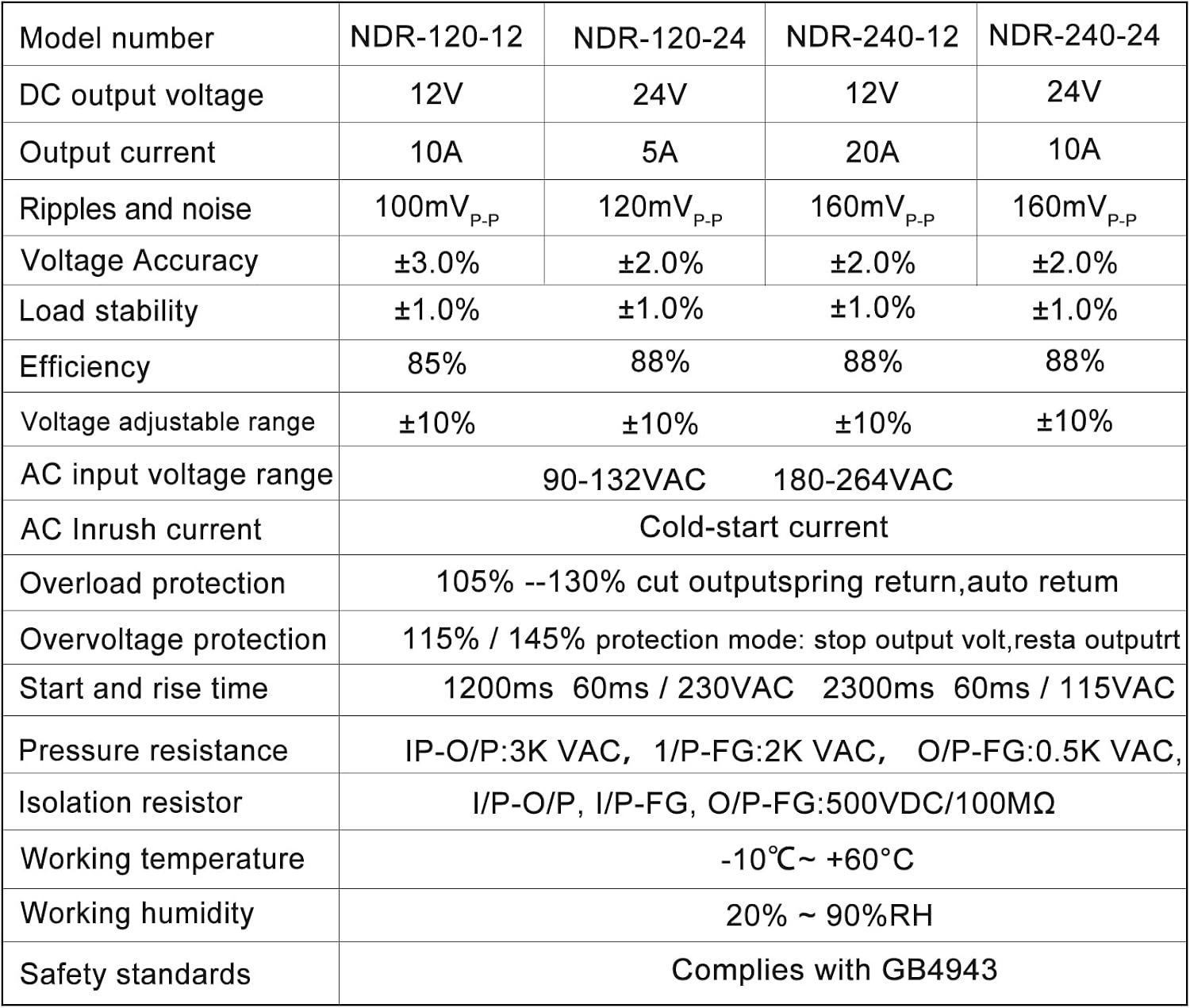
Figure 2: Detailed technical specifications for various NDR series models, including NDR-120-24.
| Parameter | Value |
|---|---|
| Model Number | NDR120-24 |
| Input Voltage | 100-240VAC, 50/60Hz |
| Output Voltage | 24VDC |
| Output Current | 5A |
| Power Rating | 120W |
| Dimensions (L x W x H) | 4.92 x 4.45 x 1.57 inches (125 x 113 x 40 mm) |
| Item Weight | 1.03 pounds (0.47 Kilograms) |
| Current Rating | 5 Amps |
| Minimum Frequency | 50 Hz |
| Maximum Frequency | 60 Hz |
| Specification Met | Electromagnetic Compatibility |
| Operating Temperature | -10°C to +60°C |
| Working Humidity | 20% ~ 90%RH |
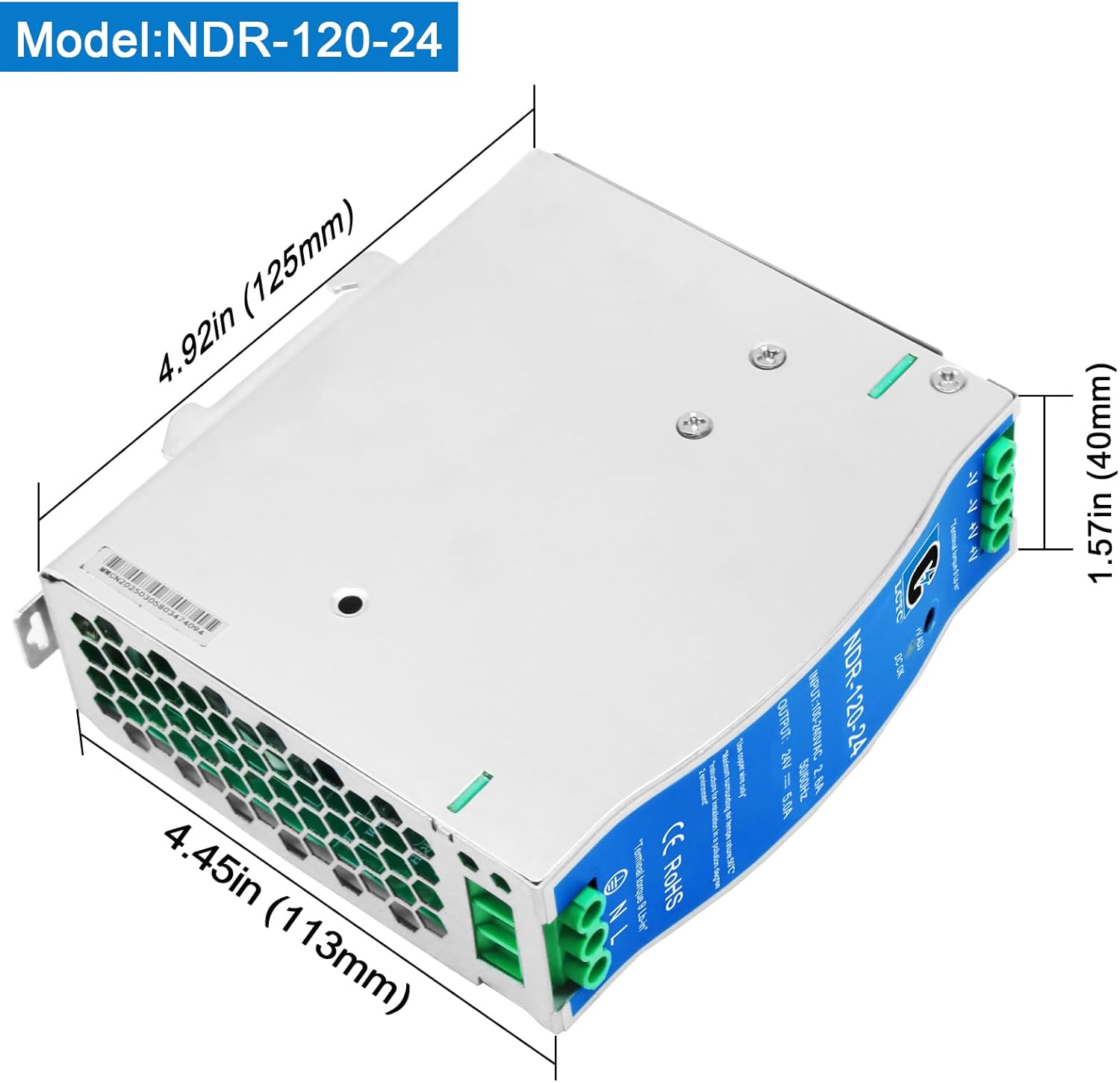
Figure 3: Dimensions of the NDR120-24 Power Supply.
5. Setup and Installation
The NDR120-24 power supply is designed for easy DIN rail mounting. Follow these steps for proper installation:
- Mounting:
- Ensure the DIN rail is securely fastened within the enclosure or distribution box.
- Align the power supply's DIN rail clip with the top edge of the DIN rail.
- Press the bottom of the power supply firmly against the DIN rail until it clicks into place. Verify it is securely attached and does not wobble.
- Wiring (Input):
- Before wiring, ensure the main power supply is OFF.
- Connect the AC input wires to the "N" (Neutral) and "L" (Line) terminals.
- Connect the ground wire to the "PE" (Protective Earth) terminal.
- Ensure all connections are tight. The recommended terminal torque is 9 Lb-in.
- Wiring (Output):
- Connect the positive (+) load wire to the "+V" output terminal.
- Connect the negative (-) load wire to the "-V" output terminal.
- If using multiple output terminals, ensure proper load balancing if applicable.
- Ensure all connections are tight. The recommended terminal torque is 9 Lb-in.
- Ventilation: Ensure adequate clearance around the power supply for proper airflow and heat dissipation. Do not obstruct ventilation holes.

Figure 4: Front panel of the power supply with input (N, L, PE) and output (-V, +V) terminals clearly marked.
6. Operating Instructions
Once the power supply is securely installed and wired, follow these steps for operation:
- Power On: Turn on the main AC power supply to the unit. The "DC OK" indicator light on the front panel should illuminate, indicating stable DC output.
- Output Voltage Adjustment:
- The power supply features a "+V ADJ" potentiometer for fine-tuning the output voltage.
- Using a small flat-head screwdriver, carefully turn the potentiometer clockwise to increase the voltage or counter-clockwise to decrease it.
- Monitor the output voltage with a multimeter to ensure it is within the desired range for your application. Do not exceed the maximum specified voltage.
- Load Connection: Connect your 24VDC devices to the output terminals. Ensure the total current draw does not exceed 5A.
- Monitoring: Periodically check the "DC OK" indicator and the performance of connected devices to ensure stable operation.
7. Maintenance
The NDR120-24 power supply is designed for reliable operation with minimal maintenance. However, regular checks can help ensure longevity and optimal performance:
- Cleaning: Periodically clean the exterior of the power supply to prevent dust accumulation, especially around ventilation openings. Use a soft, dry cloth. Do not use liquid cleaners or solvents.
- Connection Checks: Annually, or as needed, verify that all input and output terminal connections remain tight and secure. Loose connections can lead to overheating or intermittent operation.
- Environmental Conditions: Ensure the operating environment remains within the specified temperature and humidity ranges. Avoid exposure to excessive moisture, dust, or corrosive substances.
- Visual Inspection: Regularly inspect the unit for any signs of physical damage, discoloration, or unusual odors. If any issues are observed, disconnect power immediately and consult a qualified technician.

Figure 5: Internal components of the power supply, showing the circuit board and heat sinks. Do not open the casing unless you are a qualified technician.
8. Troubleshooting
This section provides solutions to common issues you might encounter with the NDR120-24 power supply.
| Problem | Possible Cause | Solution |
|---|---|---|
| No "DC OK" light / No output voltage |
|
|
| Output voltage fluctuates or is incorrect |
|
|
| Unit is hot to the touch |
|
|
If you encounter issues not listed here or if the suggested solutions do not resolve the problem, please contact LCLCTC customer support.
9. Warranty and Support
LCLCTC products are manufactured to high quality standards. For warranty information and technical support, please refer to the official LCLCTC website or contact your local distributor.
For direct inquiries, please have your product model number (NDR120-24) and purchase information ready.
Online Resources:
- Visit the LCLCTC Brand Store on Amazon for product updates and related items.
Ask a question about this manual
Ask about setup, troubleshooting, compatibility, parts, safety, or missing instructions. Manuals+ will review the question and use this page’s manual context to help answer it.