
Introduction
The LINDY 38334 8x8 HDMI 4K60 Matrix is a sophisticated solution designed for distributing high-quality video and audio content from multiple source devices to multiple displays. This matrix supports HDMI 2.0b 18G signals, enabling the transmission of clear 4K Ultra HD 60Hz resolutions. It also features HDR (High Dynamic Range) support for enhanced brightness, contrast, and color range, and HDCP 2.2 compatibility for secure content transmission. Advanced audio features include HDMI Audio Pass-through, individual SPDIF ports, and Audio Return Channel (ARC) functionality. A downscale function is available for each output port, converting 4K to Full HD for compatibility with older displays.
Safety Information
- Read all instructions carefully before operation.
- Do not expose this device to rain, moisture, or liquids.
- Ensure proper ventilation to prevent overheating.
- Use only the provided power adapter.
- Do not attempt to disassemble or repair the unit yourself. Refer all servicing to qualified personnel.
- Keep away from direct sunlight, high temperatures, and strong magnetic fields.
Package Contents
- LINDY 38334 8x8 HDMI 4K60 Matrix
- Remote Control
- IR Cable
- Mounting Jaws
- Power Cable
- User Manual (this document)
Product Overview
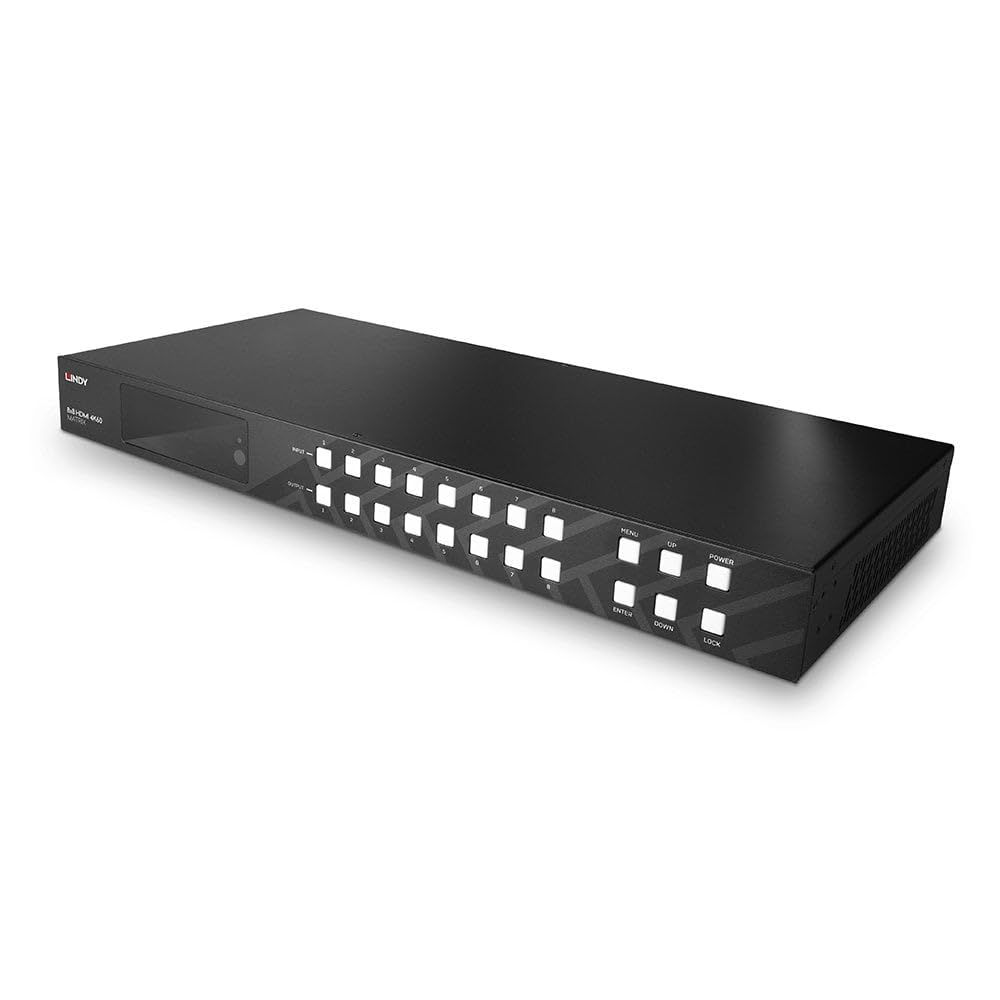
Figure 1: Front view of the LINDY 38334 8x8 HDMI 4K60 Matrix. The front panel features a display window on the left, followed by two rows of eight buttons each for input and output selection. On the right, there are control buttons for Menu, Up, Down, Enter, Power, and Lock functions.
Front Panel
- Display Window: Shows current input/output status and menu options.
- Input Buttons (1-8): Selects the HDMI input source.
- Output Buttons (1-8): Selects the HDMI output display.
- MENU: Accesses the on-screen display (OSD) menu.
- UP/DOWN: Navigates through menu options or adjusts settings.
- ENTER: Confirms selection or enters a submenu.
- POWER: Turns the unit on or off.
- LOCK: Locks the front panel buttons to prevent accidental changes.
Rear Panel (Conceptual Description)
The rear panel of the LINDY 38334 features eight HDMI input ports and eight HDMI output ports for connecting source devices and displays. It also includes dedicated SPDIF audio output ports for separate audio connections, an Ethernet port for Web GUI control, an IR extender port, and a power input socket.
Setup
- Power Off: Ensure all devices (matrix, sources, displays) are powered off before making connections.
- Connect HDMI Sources: Connect your HDMI source devices (e.g., Blu-ray player, game console, media player) to the HDMI Input ports (1-8) on the rear of the matrix using high-quality HDMI cables.
- Connect HDMI Displays: Connect your HDMI displays (e.g., TV, monitor, projector) to the HDMI Output ports (1-8) on the rear of the matrix using high-quality HDMI cables.
- Connect Audio Systems (Optional): If using separate audio systems, connect them to the SPDIF output ports corresponding to your desired HDMI outputs.
- Connect IR Extender (Optional): If using the IR extender for remote control, plug it into the IR port.
- Connect Network (Optional): For Web GUI control, connect an Ethernet cable from your network router/switch to the Ethernet port on the matrix.
- Connect Power: Plug the provided power cable into the matrix's power input and then into a suitable power outlet.
- Power On: Power on the matrix, then power on your HDMI source devices and displays.
Operating the Matrix
Front Panel Control
- To switch an output to a specific input: Press the desired Output button (e.g., "Output 1"), then press the desired Input button (e.g., "Input 3"). The display window will show the current routing.
- Use the MENU, UP, DOWN, and ENTER buttons to navigate the on-screen display (OSD) for advanced settings such as EDID management, audio settings, and firmware updates.
- Press the LOCK button to disable the front panel buttons, preventing unintended changes. Press again to unlock.
Remote Control Operation
The included remote control provides convenient wireless operation. Buttons on the remote correspond to the front panel controls for input/output selection, menu navigation, and power. Point the remote control towards the IR receiver on the front panel or the connected IR extender.
Web GUI Control
For advanced control and configuration, the matrix features an intuitive web-based graphical user interface (GUI). Connect the matrix to your network via the Ethernet port. Access the Web GUI by entering the matrix's IP address into a web browser on a connected computer. Refer to the OSD menu or network settings for the device's IP address.
Key Features
- 4K to Full HD Downscaling: Each output port can automatically downscale a 4K input signal to Full HD (1080p) if the connected display does not support 4K resolution. This ensures compatibility with a wider range of displays.
- Audio Return Channel (ARC): For compatible displays connected to an ARC-enabled output, audio from the TV can be sent back to an audio system connected to the matrix via the same HDMI cable, simplifying cabling.
- HDMI Audio Pass-through & SPDIF: Supports various audio formats passed through HDMI. Dedicated SPDIF ports allow for separate digital audio output to external amplifiers or sound systems.
Maintenance
- Clean the unit with a soft, dry, lint-free cloth.
- Do not use liquid cleaners or aerosol cleaners.
- Ensure all cables are securely connected.
- Store the device in a cool, dry place when not in use for extended periods.
Troubleshooting
| Problem | Possible Cause | Solution |
|---|---|---|
| No picture on display. | Incorrect input/output selection; loose HDMI cables; HDCP issues; incompatible resolution. | Verify input/output routing. Check all HDMI cable connections. Ensure source and display support HDCP 2.2. Try enabling 4K to Full HD downscaling. Power cycle all devices. |
| No audio. | Audio settings incorrect; loose audio cables; ARC not enabled. | Check audio settings on the matrix and display. Ensure SPDIF cables are connected correctly. Verify ARC is enabled on both TV and matrix if using ARC. |
| Remote control not working. | Batteries low/dead; IR path blocked; IR extender not connected. | Replace batteries. Ensure clear line of sight to IR receiver. Connect IR extender if using. |
| Front panel buttons unresponsive. | Buttons are locked. | Press the LOCK button to unlock the front panel. |
Specifications
| Feature | Detail |
|---|---|
| Brand | LINDY |
| Model | 38334 |
| Compatible Devices | Television, Blu-Ray Player |
| Data Transfer Rate | 18 Gigabits Per Second |
| Number of Ports | 8 (Input), 8 (Output) |
| Connector Type | HDMI |
| Colour | Black |
| Dimensions (L x W x H) | 51.9 x 21.7 x 14 cm |
| Weight | 4.41 kg |
| Special Features | 4K to Full HD Downscaling, ARC, Web GUI Control |
Warranty and Support
The LINDY 38334 8x8 HDMI 4K60 Matrix comes with a 2-year warranty from the date of purchase. For technical support, troubleshooting assistance, or warranty claims, please contact LINDY customer service through their official website or the contact information provided with your purchase documentation.
Please retain your proof of purchase for warranty validation.

