
TP-Link Tapo C225, Tapo C500
TP-Link Tapo Pan-Tilt Wi-Fi Security Camera User Manual
Models: Tapo C225, Tapo C500
1. Introduction
Welcome to the user manual for your TP-Link Tapo Pan-Tilt Wi-Fi Security Cameras. This manual provides detailed instructions for setting up, operating, and maintaining your Tapo C225 (Indoor) and Tapo C500 (Outdoor) cameras. These cameras offer advanced surveillance features to enhance your home security.
2. Product Features
The TP-Link Tapo Pan-Tilt Wi-Fi Security Cameras are equipped with a range of features designed for comprehensive home surveillance:
- Physical Privacy Mode: The camera lens can be physically covered by the housing to ensure privacy when activated.
- Pan and Tilt Functionality: Offers a 360° horizontal field of view. Includes intelligent motion tracking that precisely follows and keeps a subject in the camera's view with rotation speeds up to 120°/s.
- Motion Detection and Notifications: Alerts you instantly when motion is detected by the camera.
- Easy Setup: Follow the in-app instructions for quick setup within minutes.
- Secure and Flexible Storage: Supports local storage up to 512GB on a microSD card (not included) or cloud storage (free 30-day trial with 30-day video clip history).
- Light and Sound Alarm: Activate light and sound effects to deter unwanted visitors.
- Advanced Night Vision: Provides clear visual range up to 30 meters, even in complete darkness.
- Two-Way Audio: Communicate through the built-in microphone and speaker.
- Smart AI Detection and Notification: Intelligent AI identifies people, pets, and vehicles, detects crying babies and other sounds, and notifies users as needed.
3. Package Contents
Please check the package for the following items:
- Tapo C225 Pan-Tilt AI Home Security Wi-Fi Camera (Indoor)
- Tapo C500 Outdoor Pan-Tilt Security Wi-Fi Camera (Outdoor)
- Power Adapters for each camera
- Mounting Screws and Anchors
- Mounting Template
- Quick Start Guide
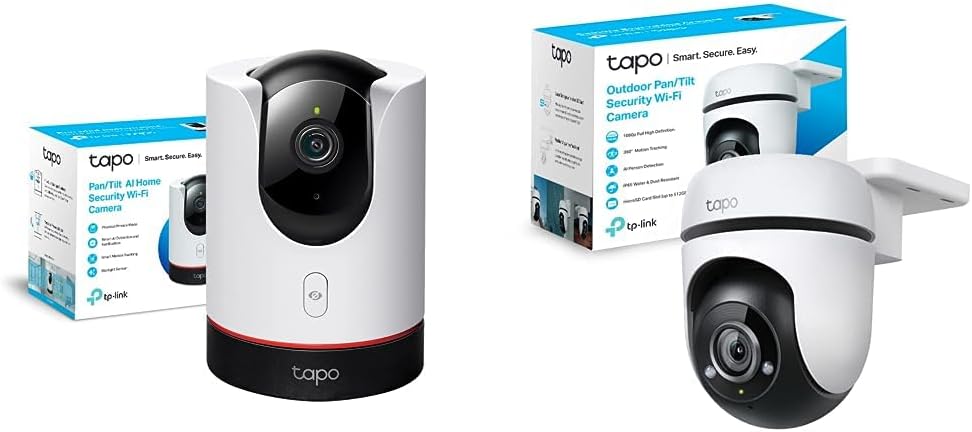
Image: The TP-Link Tapo C225 indoor camera and Tapo C500 outdoor camera, shown with their respective packaging.
4. Setup Guide
Follow these steps to set up your Tapo cameras:
- Download the Tapo App: Search for "Tapo" in the Apple App Store or Google Play Store, or scan the QR code provided in the Quick Start Guide.
- Create a TP-Link ID: Open the Tapo app and sign up for a TP-Link ID. If you already have one, log in.
- Add Your Camera: Tap the "+" button in the app, select your camera model (Tapo C225 or Tapo C500), and follow the on-screen instructions to connect it to your Wi-Fi network.
- Position Your Camera:
- Tapo C225 (Indoor): Place on a flat surface or mount to a wall/ceiling using the provided mounting kit. Ensure it has a clear view of the area you wish to monitor.
- Tapo C500 (Outdoor): Mount securely to an outdoor wall or ceiling. Ensure it is within Wi-Fi range and has access to a power outlet. Consider weather protection for the power connection.
- Power On: Connect the camera to a power outlet using the provided power adapter. The LED indicator will flash red and green, indicating it's ready for setup.


Image: The Tapo C225 indoor camera and Tapo C500 outdoor camera, ready for setup.
5. Operating Instructions
5.1 Using the Tapo App
The Tapo app is your central control hub for managing your cameras. From the app, you can:
- Live View: Access real-time video streams from your cameras.
- Pan & Tilt Control: Manually adjust the camera's viewing angle by swiping on the live view screen.
- Two-Way Audio: Speak through the camera's speaker and listen through its microphone.
- Record & Screenshot: Capture video recordings or still images directly from the live view.
- Playback: Review recorded footage stored on the microSD card or cloud.
- Privacy Mode: Activate the physical privacy mode for the Tapo C225 to physically block the lens.
- Motion Detection Settings: Customize detection zones, sensitivity, and notification preferences.
- Alarm Settings: Configure light and sound alarms to deter intruders.

Image: Key features of the Tapo C225, including pan & tilt, two-way audio, motion detection, and privacy mode.
5.2 Night Vision
Both cameras feature advanced night vision capabilities. The Tapo C225 includes a Starlight Sensor for enhanced low-light performance, providing clearer images in dim conditions.

Image: A visual comparison demonstrating the improved clarity of night vision with the Starlight Sensor on the Tapo C225.
5.3 Smart AI Detection and Tracking
The cameras utilize intelligent AI to differentiate between various types of motion and objects, reducing false alarms and providing more relevant notifications. The Tapo C500, in particular, excels at outdoor person detection and smart tracking.

Image: The Tapo C500 outdoor camera actively detecting and tracking individuals in an outdoor setting.
6. Maintenance
To ensure optimal performance and longevity of your cameras, follow these maintenance guidelines:
- Cleaning: Gently wipe the camera lens and body with a soft, dry cloth. Do not use liquid cleaners or abrasive materials.
- Firmware Updates: Regularly check for and install firmware updates via the Tapo app to ensure your camera has the latest features and security enhancements.
- Power Supply: Use only the original power adapter provided with your camera.
- Environmental Conditions:
- Tapo C225 (Indoor): Keep in a dry environment, away from direct sunlight and extreme temperatures.
- Tapo C500 (Outdoor): While IP65 rated for weather resistance, ensure its power connection is protected from direct water exposure.
- MicroSD Card: If using a microSD card, periodically check its status in the app and consider formatting it every few months to maintain performance.
7. Troubleshooting
If you encounter issues with your Tapo camera, try the following solutions:
| Problem | Possible Solution |
|---|---|
| Camera offline |
|
| Cannot connect to Wi-Fi |
|
| Motion detection not working |
|
| Poor video quality |
|
For further assistance, please refer to the TP-Link support website or contact customer service.
8. Specifications
Below are the general specifications for the TP-Link Tapo Pan-Tilt Wi-Fi Security Cameras (Tapo C225 & Tapo C500 bundle):
| Feature | Detail |
|---|---|
| Compatible Devices | Tablet, Smartphone |
| Power Source | Wired |
| Connectivity Protocol | Wi-Fi (2.4 GHz) |
| Mounting Type | Wall Mount (for C500), Tabletop/Wall/Ceiling (for C225) |
| Viewing Angle | 360 Degrees (Horizontal Pan) |
| Night Vision Range | Up to 30 Meters |
| Material | Metal (housing) |
| Special Features | Night Vision, Motion Detection, Two-Way Audio, AI Detection, Privacy Mode (C225), Weather Resistance (IP65 for C500) |
| Recommended Applications | Home Security, Pet Monitoring, Baby Monitoring |
| Indoor/Outdoor Use | Tapo C225: Indoor; Tapo C500: Outdoor |

Image: The Tapo C500 outdoor camera, showcasing its IP65 weather protection and 360-degree pan capability.
9. Warranty and Support
For warranty information, technical support, and frequently asked questions, please visit the official TP-Link website or contact their customer support. Keep your purchase receipt for warranty claims.
TP-Link Support Website: www.tp-link.com/support/
Related documentsTapo C225, Tapo C500


Ask a question about this manual
Ask about setup, troubleshooting, compatibility, parts, safety, or missing instructions. Manuals+ will review the question and use this page’s manual context to help answer it.