
PARAMITA R8
PARAMITA R8 Bone Conduction Bluetooth Headphone User Manual
Model: R8 | Brand: PARAMITA
Introduction
Welcome to the user manual for your PARAMITA R8 Real Bone Conduction Bluetooth Headphone. This manual provides detailed instructions on how to set up, operate, and maintain your new headset, ensuring you get the best experience from its advanced features.
The PARAMITA R8 features an open-ear design for environmental awareness, IPX6 waterproofing, and Bluetooth 5.3 connectivity, making it ideal for sports, work, and daily use.
Key Features
- Open Ear Design: Transfers sound through the cheekbone, allowing you to remain aware of your surroundings.
- IPX6 Waterproof & Sweat Resistant: Designed for durability during intense activities like cycling, hiking, and running.
- HD Calling MEMS Microphones: Provides loud and clear talking effect for calls.
- Long Battery Life: Built-in 230mAh lithium battery offers up to 8 hours of playtime at 80% volume.
- Bluetooth 5.3 Connectivity: Ensures stable connection up to 15 meters and supports multipoint pairing.
- Lightweight & Comfortable: Weighs only 0.88 ounces with an ergonomic design for extended wear without discomfort.
Product Overview
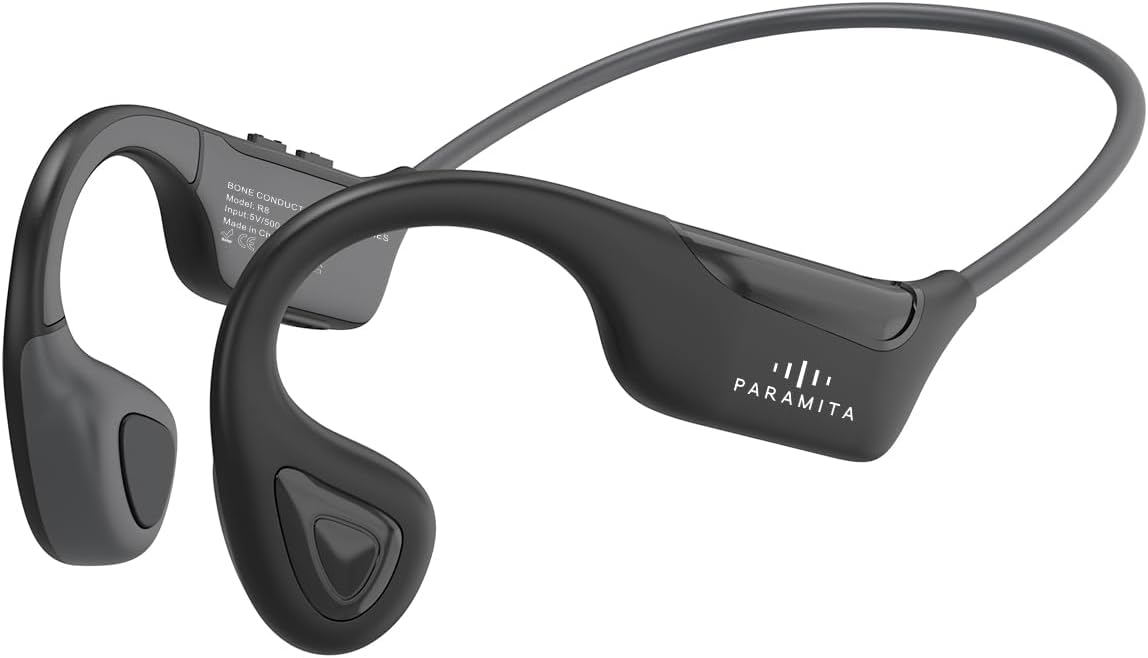
The PARAMITA R8 features a sleek, ergonomic design that rests comfortably around your head, with transducers positioned on your cheekbones. The controls are intuitively placed for easy access during use.
Setup
What's in the Box
- PARAMITA R8 Bone Conduction Headphone
- Charging Cable
Charging the Headphone
Before first use, fully charge your PARAMITA R8 headphone. Connect the provided charging cable to the charging port on the headphone and a USB power source. A full charge takes approximately 1.5 hours. The LED indicator will change color or turn off once charging is complete.

Bluetooth Pairing
- Ensure the headphone is turned off.
- Press and hold the Power button for 3 seconds until the LED indicator flashes blue and red, indicating pairing mode.
- On your device (smartphone, tablet, laptop), enable Bluetooth and search for available devices.
- Select "PARAMITA R8" from the list of devices.
- Once connected, the LED indicator will turn solid blue.
- The headphone supports multipoint pairing, allowing connection to two Bluetooth devices simultaneously.

Operating Instructions
Basic Controls

| Action | Control |
|---|---|
| Power ON/OFF | Long press 3s |
| Volume + | Click one |
| Volume - | Click one |
| Next Song | Double click |
| Previous Song | Three click |
| Answer and hang up call | Click one |
| Reject calls | Long press 1-2s |
| Turn off call mic | Long press 2s |
| Music Play/Pause | Short press 1s |
| Activate Siri/Voice Assistant | Long press 1s |
Making and Receiving Calls
The built-in HD MEMS microphone ensures clear communication during calls. Use the controls described above to manage your calls.

Environmental Awareness
The open-ear design allows you to hear ambient sounds, which is crucial for safety during outdoor activities like cycling or running, and for staying aware of your surroundings at home or work.


Maintenance
Cleaning
Due to its IPX6 waterproof rating, the PARAMITA R8 can withstand splashes and sweat. To clean, gently wipe the headphones with a damp cloth. Do not submerge the headphones in water or use harsh chemicals.

Storage
Store your headphones in a cool, dry place away from direct sunlight and extreme temperatures. Avoid placing heavy objects on top of the headphones.
Troubleshooting
Common Issues and Solutions
- No Power: Ensure the headphones are fully charged.
- Cannot Pair: Make sure the headphones are in pairing mode (flashing blue and red). Turn off and on Bluetooth on your device. If issues persist, try forgetting the device on your phone and re-pairing.
- No Sound: Check the volume level on both the headphones and your connected device. Ensure the headphones are properly connected via Bluetooth.
- Poor Sound Quality: Ensure you are within the 15-meter Bluetooth range. Reduce interference from other wireless devices.
- Call Quality Issues: Ensure the microphone is not obstructed. Check your device's network signal.
If you encounter issues not listed here, please refer to the support section or contact customer service.
Specifications
| Feature | Detail |
|---|---|
| Model Name | R8 Black |
| Connectivity Technology | Wireless (Bluetooth) |
| Bluetooth Version | 5.3 |
| Bluetooth Range | 15 Meters |
| Battery Capacity | 230mAh Lithium Battery |
| Battery Life (Playtime) | Up to 8 Hours (at 80% volume) |
| Charging Time | 1.5 Hours |
| Water Resistance Level | IPX6 Waterproof |
| Item Weight | 0.882 ounces (25 Grams) |
| Product Dimensions | 4.72 x 3.54 x 6.3 inches |
| Audio Driver Type | Bone Conduction Driver |
| Frequency Range | 20Hz - 20,000Hz |
| Control Method | Touch |
| Ear Placement | On Ear |
| Material | Plastic, Titanium frame, ABS, skin friendly silica gel |
Official Product Video
This video provides a visual overview of the PARAMITA R8 Bone Conduction Headphones, highlighting its key features and benefits. It demonstrates the open-ear design, comfortable fit, and suitability for various activities.
Warranty and Support
For warranty information and customer support, please refer to the product packaging or contact the seller directly through the platform where you purchased the product. Keep your proof of purchase for any warranty claims.
For further assistance, you may also visit the official PARAMITA website or contact their customer service team.
Ask a question about this manual
Ask about setup, troubleshooting, compatibility, parts, safety, or missing instructions. Manuals+ will review the question and use this page’s manual context to help answer it.