
AODK 55-inch L Shaped Computer Desk
AODK L Shaped Computer Desk User Manual
Brand: AODK | Model: 55-inch L Shaped Computer Desk
Introduction
This manual provides essential instructions for the assembly, operation, maintenance, and troubleshooting of your AODK 55-inch L Shaped Computer Desk. Please read this manual thoroughly before assembly and use to ensure proper function and longevity of your product.
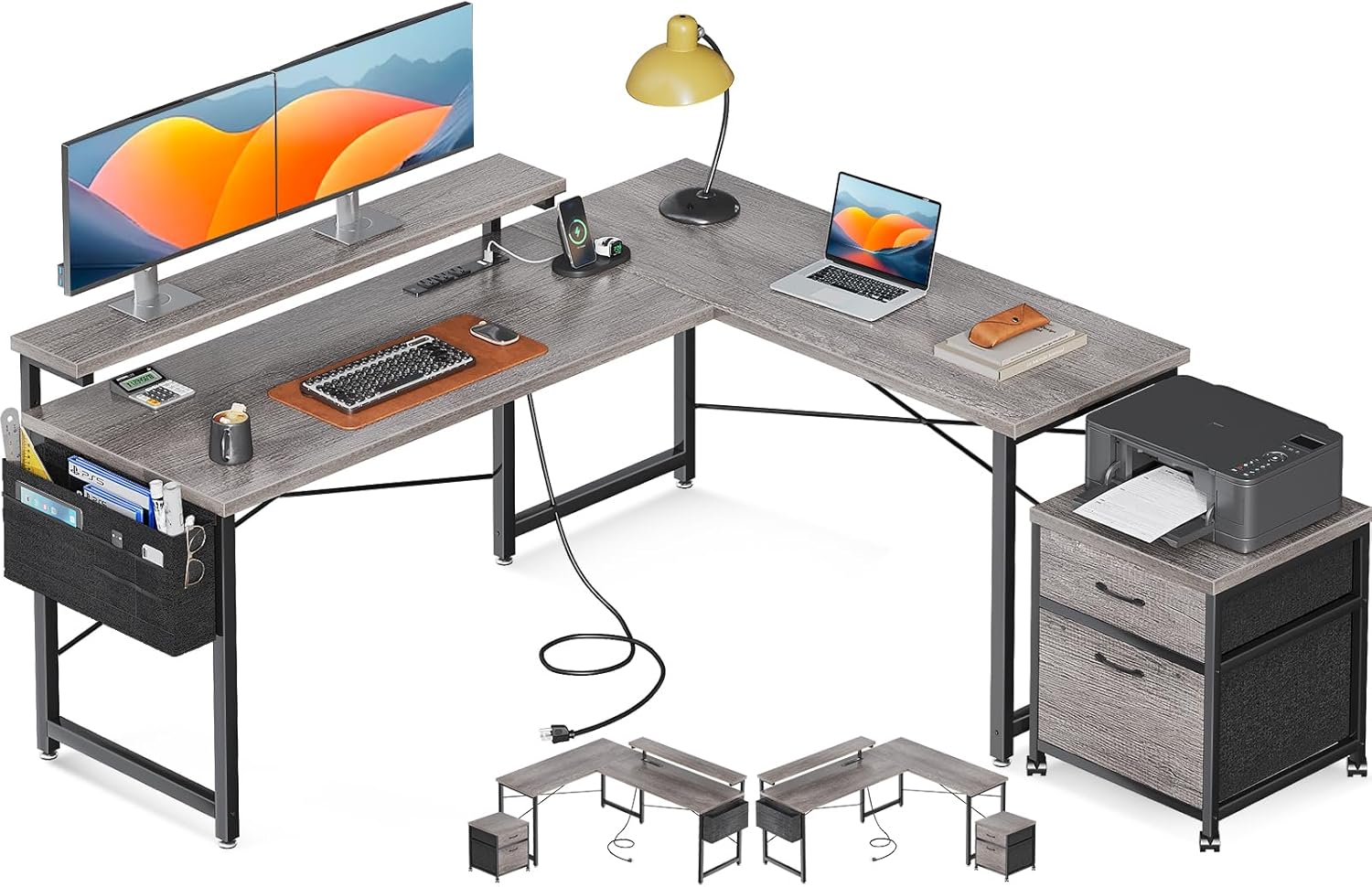
Figure 1: The AODK 55-inch L Shaped Computer Desk, showcasing its spacious design, integrated monitor stand, power outlet, and accompanying file cabinet.
Setup Instructions
The AODK L Shaped Computer Desk requires assembly. An assembly manual with detailed, step-by-step instructions is included in the product packaging. Please follow these instructions carefully. All necessary hardware and tools are typically provided.
Reversible Configuration
This desk features a reversible design, allowing it to be configured for either a left-hand or right-hand corner setup. Refer to the assembly manual for specific steps on how to achieve your desired orientation.

Figure 2: Dimensional diagram of the AODK L Shaped Computer Desk, illustrating its reversible design and key measurements for planning your space.
Pre-Assembly Checklist
- Verify all components are present according to the parts list in the assembly manual.
- Ensure you have adequate space for assembly.
- Protect your floor surface during assembly to prevent scratches.
Operating Features
Your AODK L Shaped Computer Desk is designed with several features to enhance your workspace efficiency and comfort.
Adjustable Monitor Stand
The integrated monitor stand offers three height options to help you achieve an ergonomic viewing position. Adjust the stand to your preferred height (3.2", 4.3", or 5.5") to reduce neck and eye strain. This stand is designed to accommodate two monitors simultaneously.
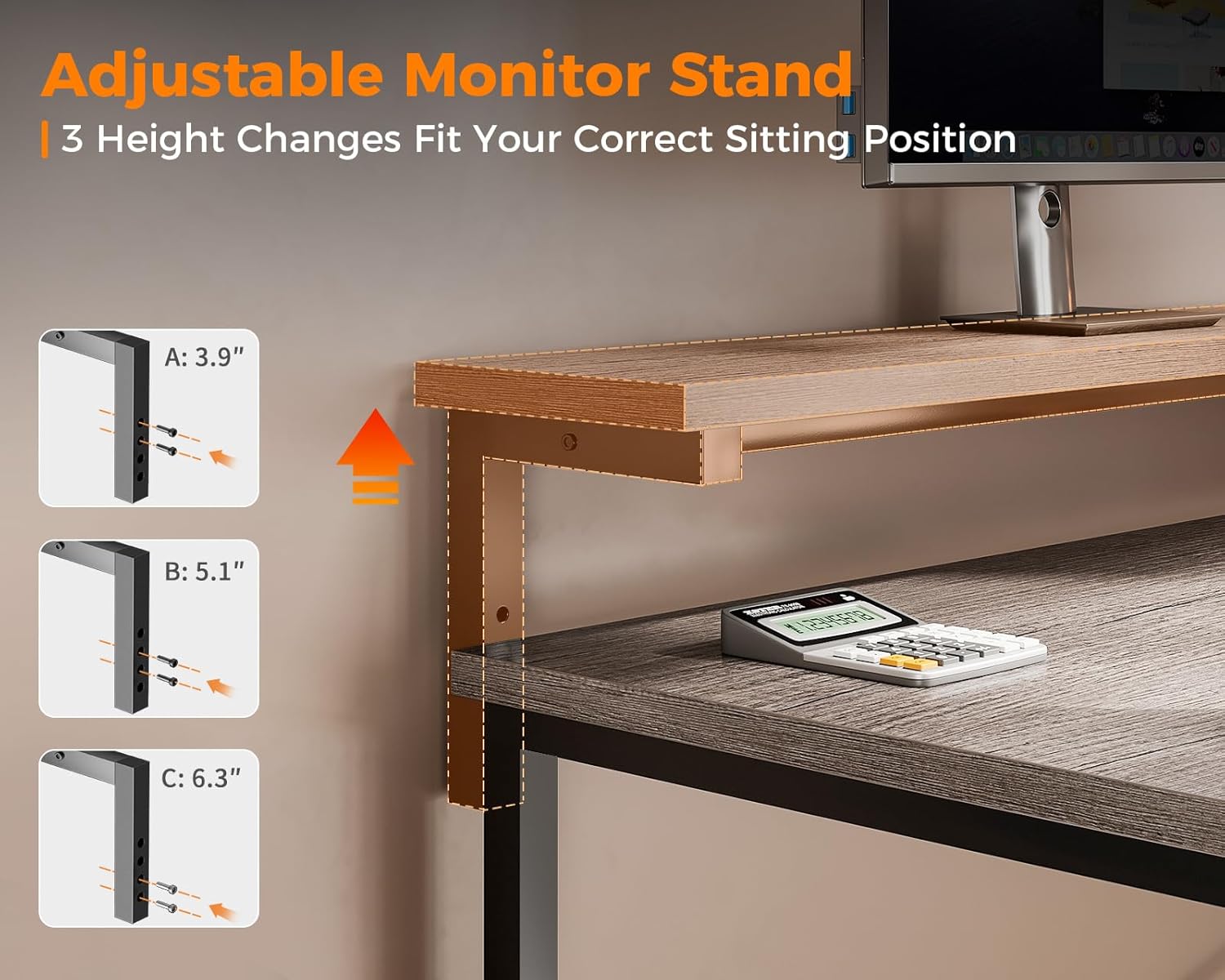
Figure 3: Detail of the adjustable monitor stand, showing the three available height settings for ergonomic customization.
Built-in Power Outlet
The desk includes a built-in power outlet featuring 4 AC outlets and 2 USB ports. This allows for convenient charging and powering of multiple devices directly from your desk. The power cord is 6.6 feet long.

Figure 4: The integrated power strip with multiple AC and USB ports, providing convenient access to power for various electronic devices.
File Cabinet and Storage Bag
A separate file cabinet with two drawers is included for organizing letter, legal, and A4 size files. This cabinet is mobile and can be placed anywhere in your workspace. Additionally, a storage bag is provided to hang on the side of the desk, ideal for power cords, headphones, and other small items, helping to keep your desktop clear and organized.

Figure 5: The mobile two-drawer file cabinet and the convenient side-mounted storage bag, designed for enhanced organization.
Maintenance
Regular maintenance will help preserve the appearance and functionality of your desk.
- Cleaning: Wipe surfaces with a soft, damp cloth. Avoid harsh chemicals or abrasive cleaners that may damage the finish.
- Spills: Clean up spills immediately to prevent staining or damage to the wood surface.
- Hardware: Periodically check and tighten all screws and fasteners to ensure stability.
- Power Outlet: Ensure the power outlet is kept dry and free from dust. Do not overload the outlets.
Troubleshooting
If you encounter any issues with your AODK L Shaped Computer Desk, refer to the following common solutions:
- Desk is Wobbly:
- Ensure all screws and bolts are securely tightened.
- Check if the desk is on an even surface. Adjust the leveling feet if present.
- Power Outlet Not Working:
- Verify the main power cord is securely plugged into a functional wall outlet.
- Check if the power strip has a reset button (if applicable) and press it.
- Ensure the total power draw of connected devices does not exceed the outlet's capacity.
- Drawers Not Sliding Smoothly:
- Check for any obstructions in the drawer slides.
- Ensure the drawer slides are properly aligned and installed according to the assembly manual.
Specifications
| Feature | Detail |
|---|---|
| Brand | AODK |
| Model | 55-inch L Shaped Computer Desk |
| Shape | L-Shape (Reversible) |
| Color | Oak Grey |
| Product Dimensions (L x W x H) | 120.14 x 139.95 x 91.69 cm (approx. 55" x 47" x 36") |
| Item Weight | 26.31 kg |
| Top Material Type | Oak Wood |
| Base Material | Metal |
| Monitor Stand | Adjustable (3.2", 4.3", 5.5" height options) |
| Power Outlet | 4 AC Outlets, 2 USB Ports (5V-2A), 6.6-foot power cord |
| File Cabinet | 2 drawers, fits letter, legal, A4 files |
| Room Type | Bedroom, Living Room, Office |
Warranty Information
For specific warranty details regarding your AODK L Shaped Computer Desk, please refer to the warranty card or documentation included with your purchase. Warranty terms typically cover manufacturing defects under normal use. Keep your proof of purchase for any warranty claims.
Customer Support
Should you require assistance with assembly, parts replacement, or have any questions not covered in this manual, please contact AODK customer support. Refer to the product packaging or the included documentation for contact information (e.g., website, email, phone number).
Ask a question about this manual
Ask about setup, troubleshooting, compatibility, parts, safety, or missing instructions. Manuals+ will review the question and use this page’s manual context to help answer it.