
AODK Vintage
AODK 55" L Shaped Computer Desk User Manual
Model: Vintage
Brand: AODK
Introduction
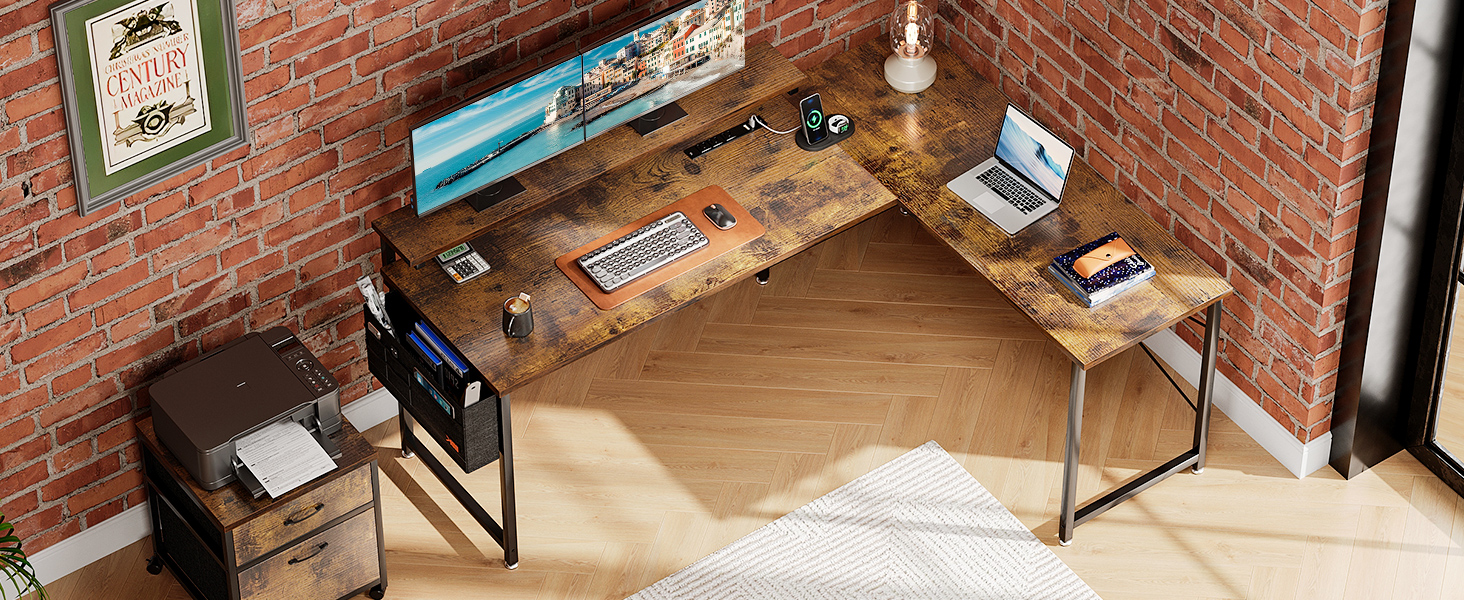
This manual provides comprehensive instructions for the assembly, operation, and maintenance of your AODK 55" L Shaped Computer Desk. Designed for home office environments, this desk features a reversible L-shaped configuration, an adjustable monitor stand, a built-in power outlet, a two-drawer file cabinet, and a convenient storage bag. Please read this manual carefully before beginning assembly or use to ensure proper setup and safe operation.
Safety Information
Please observe the following safety guidelines to prevent injury or damage to the product:
- Always assemble the desk on a stable, level surface.
- Do not overload the desk, as it may tip over.
- Keep the power outlet dry and away from water.
- Always unplug the power outlet when not in use.
- Do not use the desk near heat sources or open flames.
- Always follow the assembly instructions carefully to ensure the desk is stable and secure.
Setup (Assembly)
The AODK L Shaped Computer Desk requires assembly. A detailed step-by-step assembly manual is included with your product. Please ensure all components are present and undamaged before beginning assembly.
Reversible Configuration
The desk is designed to be reversible, allowing you to configure the L-shape to either the left or right side to best fit your space. Follow the instructions in the assembly manual for your desired orientation.

This image illustrates the reversible design of the L-shaped desk, highlighting its dimensions and showing how it can be assembled in two different directions to accommodate various room layouts.
Operating Instructions
Adjustable Monitor Stand
The desk features an ergonomic monitor stand with three adjustable height options to help you achieve a comfortable viewing position. This stand can support two monitors simultaneously.
- Height Option A: Approximately 3.9 inches (from desk surface)
- Height Option B: Approximately 5.1 inches (from desk surface)
- Height Option C: Approximately 6.3 inches (from desk surface)

This image displays the adjustable monitor stand, detailing the three available height settings (A, B, C) that allow users to customize their screen elevation for optimal ergonomics.
Built-in Power Outlet
The desk is equipped with an integrated power strip for convenient access to power for your electronic devices.
- 3 AC Outlets (125V/12A)
- 2 USB Ports (5V-2A)
- 6.6-Foot Power Cord

This image shows the integrated power outlet, featuring three AC sockets and two USB ports, along with its 6.6-foot power cord, providing convenient charging and power access.
File Cabinet
A separate, mobile file cabinet with two drawers is included to help organize your documents. The drawers are designed to accommodate letter, legal, and A4 size files.

This image illustrates the two-drawer file cabinet, demonstrating its capacity to store both A4 and Letter-sized documents, making it suitable for various filing needs.
Storage Bag
A fabric storage bag is provided, designed to hang on the side of the desk. Use it to store small items such as power cords, headphones, or stationery to keep your desktop tidy and organized.
This image shows the fabric storage bag attached to the desk, filled with items like a tablet, phone, and documents, demonstrating its utility for decluttering the workspace.
Maintenance
Cleaning
To clean the desk surfaces, use a soft, damp cloth. Avoid using abrasive cleaners, harsh chemicals, or solvents, as these may damage the finish.
Waterproof Surface
The desk board features a waterproof surface. In case of spills, promptly wipe them with a dry cloth to prevent any potential damage or staining.

This image highlights the waterproof characteristic of the desk's surface, indicating its resistance to liquid spills and ease of cleaning.
Stability Check
Periodically inspect all screws and fasteners to ensure they remain tight. Re-tighten any loose connections to maintain the desk's structural integrity and stability.

This image shows an adjustable foot at the base of a desk leg, which can be rotated to level the desk on uneven floor surfaces, enhancing stability.

This image illustrates the X-bracing support structure beneath the desk, designed to provide additional stability and prevent wobbling.
Troubleshooting
- Wobbly Desk: Ensure all assembly screws are securely tightened. Adjust the leveling feet on the bottom of each desk leg to compensate for uneven floor surfaces.
- Power Outlet Not Working: Verify that the desk's power cord is firmly plugged into a functional wall outlet. Check if the power strip itself has a power switch and ensure it is in the 'on' position. Avoid overloading the outlets with too many high-power devices.
- Drawers Sticking: Confirm that the file cabinet is placed on a level surface. Open the drawers fully and inspect the slides for any obstructions or debris. Ensure the drawer contents are evenly distributed.
Specifications
| Feature | Detail |
|---|---|
| Brand | AODK |
| Model Number | Vintage |
| Product Dimensions (D x W x H) | 47.3" x 55.1" x 29.9" |
| Color | Vintage |
| Style | Modern |
| Base Material | Metal |
| Top Material Type | Engineered Wood |
| Item Weight | 58 Pounds |
| Shape | L-Shape |
| Number of Drawers | 2 (in file cabinet) |
| Number of Shelves | 1 (monitor stand) |
| Special Features | Built-In USB Outlet, Adjustable Monitor Stand, Reversible Design, File Cabinet, Storage Bag |
| Assembly Required | Yes |
Warranty and Support
For specific warranty information regarding your AODK 55" L Shaped Computer Desk, please refer to the documentation included with your purchase or contact the retailer from whom the product was acquired. Warranty terms may vary.
For further assistance, technical support, or inquiries about your product, please contact AODK customer support through their official website or the customer service channels provided by your retailer.
Ask a question about this manual
Ask about setup, troubleshooting, compatibility, parts, safety, or missing instructions. Manuals+ will review the question and use this page’s manual context to help answer it.