
1. Introduction
Thank you for choosing the Coleshome 66-inch L-Shaped Gaming and Office Desk. This versatile desk is designed to maximize your workspace, offering ample surface area for gaming, studying, or working from home. It features integrated power outlets, USB ports, a dedicated CPU stand, and a headphone hook for enhanced convenience and organization. Please read this manual carefully before assembly and use to ensure proper setup and longevity of your desk.
2. Safety Information
- Keep all small parts and packaging materials away from children and pets to prevent choking hazards.
- Ensure all screws and fasteners are securely tightened before use. Periodically check and re-tighten as necessary.
- Do not overload the desk. Refer to the specifications for maximum weight capacity.
- Place the desk on a level surface to prevent tipping. Use the adjustable leg pads to stabilize on uneven floors.
- Avoid placing hot items directly on the desk surface without protective padding.
- Keep liquids away from electrical outlets and connections to prevent electrical shock.
3. Package Contents
Please verify that all components listed below are present before beginning assembly. If any parts are missing or damaged, please contact customer service.
- Desk Panels (L-shaped sections)
- Metal Frame Components
- CPU Stand
- Recessed Power Strip with USB Ports
- Headphone Hook
- Assembly Hardware (screws, bolts, etc.)
- Adjustable Leg Pads
- Assembly Instructions Manual
Note: All assembly tools are not included. Please prepare your own screwdriver and other necessary tools.
4. Assembly Instructions
The Coleshome L-shaped desk is designed for clear and detailed assembly. Follow the included step-by-step instructions carefully. It is recommended to assemble the desk with two people for ease and safety.
- Unpack all components and lay them out on a clean, soft surface to prevent scratches.
- Identify each part using the labels and the parts list in the separate instruction booklet.
- Attach the metal frame components according to the diagrams, ensuring all screws are finger-tightened initially.
- Secure the desk panels to the assembled frame.
- Install the CPU stand and headphone hook in your desired locations.
- Carefully insert the recessed power strip into its designated slot on the desk surface.
- Once all parts are in place, fully tighten all screws with the appropriate tools.
- Attach the adjustable leg pads to the bottom of the desk legs.


5. Features & Operation
5.1. USB Charging Ports & Power Outlets
The desk features a recessed power strip with 3 standard AC outlets and 2 USB ports. This allows for convenient charging of laptops, smartphones, tablets, printers, and gaming devices directly from your workspace. The power strip is connected via a 6.6-foot power cord.

5.2. Ample Workspace & CPU Stand
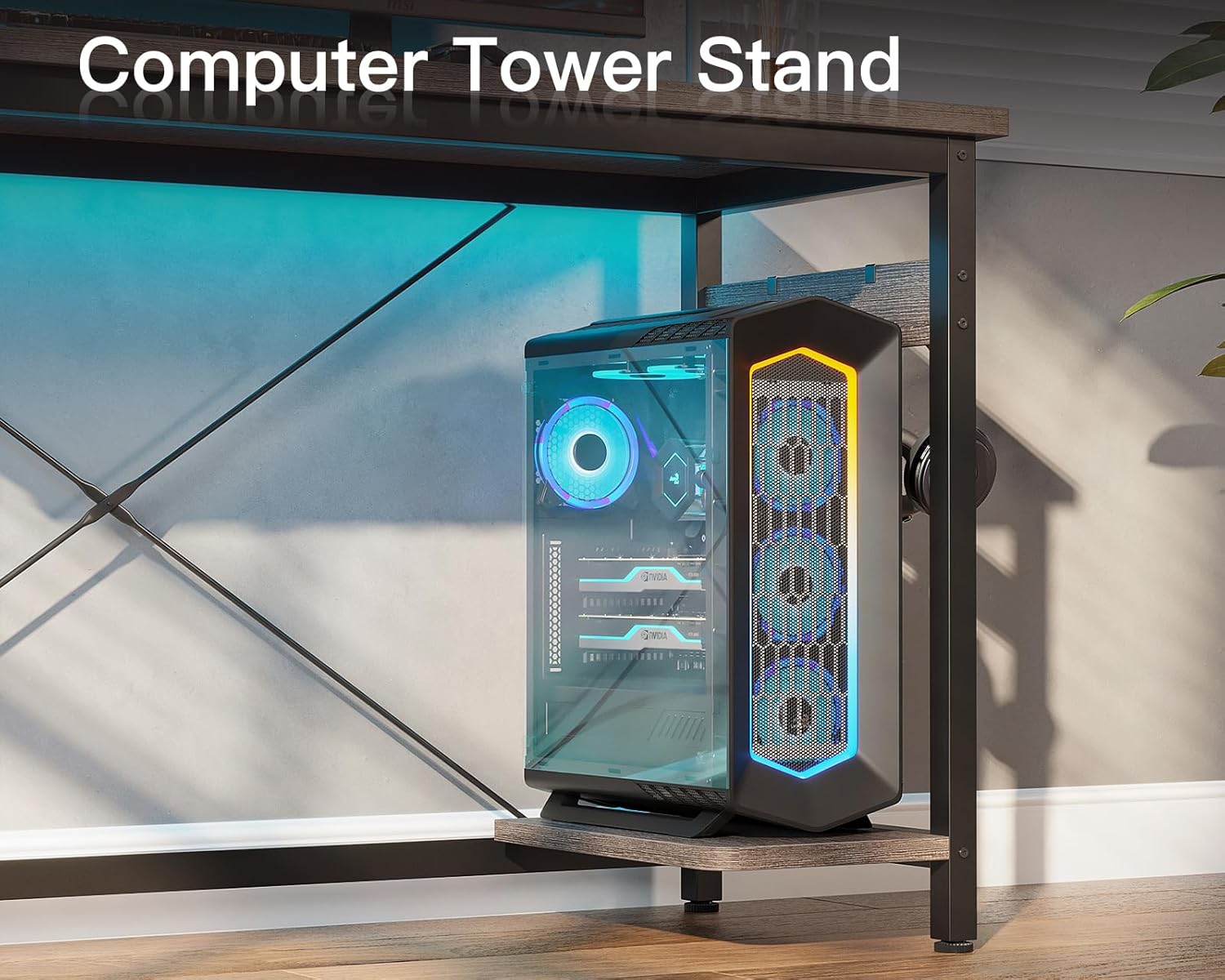
The L-shaped design provides a generous surface for multiple monitors, keyboards, and other office or gaming accessories. A dedicated CPU stand is included to keep your computer tower off the floor, protecting it from dust and improving airflow.
5.3. Headphone Hook
An iron hook is provided for hanging your headphones, keeping them easily accessible and your desk clutter-free.

5.4. Sturdy Construction & Adjustable Leg Pads
The desk is constructed with a premium MDF board and a sturdy metal frame, reinforced with two diagonal braces for high stability and long-lasting use. Adjustable leg pads ensure the desk remains stable on uneven floors.
6. Maintenance
- Cleaning: Wipe the desk surface with a soft, damp cloth. Avoid harsh chemicals or abrasive cleaners that may damage the finish.
- Spills: Immediately wipe up any spills to prevent staining or damage to the wood and electrical components.
- Fasteners: Periodically check all screws and bolts to ensure they are tight. Re-tighten if necessary to maintain stability.
- Heat: Do not place hot items directly on the desk surface. Use coasters or protective pads.
7. Troubleshooting
- Desk Wobbles: Ensure all screws are tightened. Adjust the leg pads on the bottom of the desk legs to level the desk on uneven surfaces.
- Power Outlets Not Working: Check if the main power cord is securely plugged into a wall outlet. Verify that the power strip's circuit breaker (if present) has not tripped.
- Missing Parts: If any parts are missing upon arrival, please contact Coleshome customer service immediately for assistance.
8. Specifications
| Feature | Detail |
|---|---|
| Brand | Coleshome |
| Shape | L-Shape |
| Product Dimensions | 66.1"D x 47.2"W x 29.13"H |
| Color | Grey Oak |
| Top Material Type | Engineered Wood |
| Base Material | Metal |
| Special Feature | Adjustable Leg Pads, Built-in USB Port, Headphone Hook, CPU Stand |
| Included Components | Desk, CPU Stand, Headphone Hook, Built-in USB Port |
| Required Assembly | Yes |
| UL Listed | No |
| Includes All Assembly Tools | No |
9. Warranty & Support
For any questions, concerns, or assistance with your Coleshome L-Shaped Desk, our 24-hour online professional customer service team is available to help. Please refer to your purchase documentation for specific warranty details, as this information is not provided in the product description.
Contact information can typically be found on the retailer's website or your order details.
