
1. Introduction
Thank you for choosing the TOPXCDZ WS2812B Digital Flexible Individually Addressable RGB LED Strip. This manual provides essential information for the safe and effective installation, operation, and maintenance of your LED strip. Please read this manual thoroughly before use and retain it for future reference.
2. Safety Information
- Power Supply: This LED strip operates exclusively on a DC 5V power supply. Using a DC 12V or DC 24V power supply will damage the product and void any warranty.
- Bending: Do not bend the LED strip sharply. Excessive bending can damage the internal circuitry and LEDs.
- Installation Surface: For models with adhesive tape (IP30/IP65), ensure the installation surface is smooth, clean, and dry to guarantee proper adhesion.
- Voltage Drop: For longer runs of the LED strip, it is recommended to power the strip from both ends to minimize voltage drop and ensure consistent brightness along the entire length.
- Cutting: The LED strip can be cut between every LED segment. Ensure power is disconnected before cutting.
- Water Resistance: Refer to the product specifications for the IP rating (IP30, IP65, or IP67) to understand its level of protection against dust and water. IP30 is non-waterproof, IP65 is splash-proof, and IP67 is waterproof for temporary immersion.
3. Package Contents
The package includes:
- 1 x WS2812B LED Strip (Length and LED density vary by model: 5m for 30/60/74/96 LEDs/m, 1m for 144 LEDs/m)
Note: Power supply and remote controller are NOT included and must be purchased separately.
4. Product Overview
The WS2812B LED strip features individually addressable RGB LEDs, allowing for dynamic and complex lighting effects. Each 5050 SMD RGB LED has a built-in improved version of the WS2811 IC, meaning each LED is controlled independently by a single IC. The strip supports full-color RGB and various dream color changing effects.
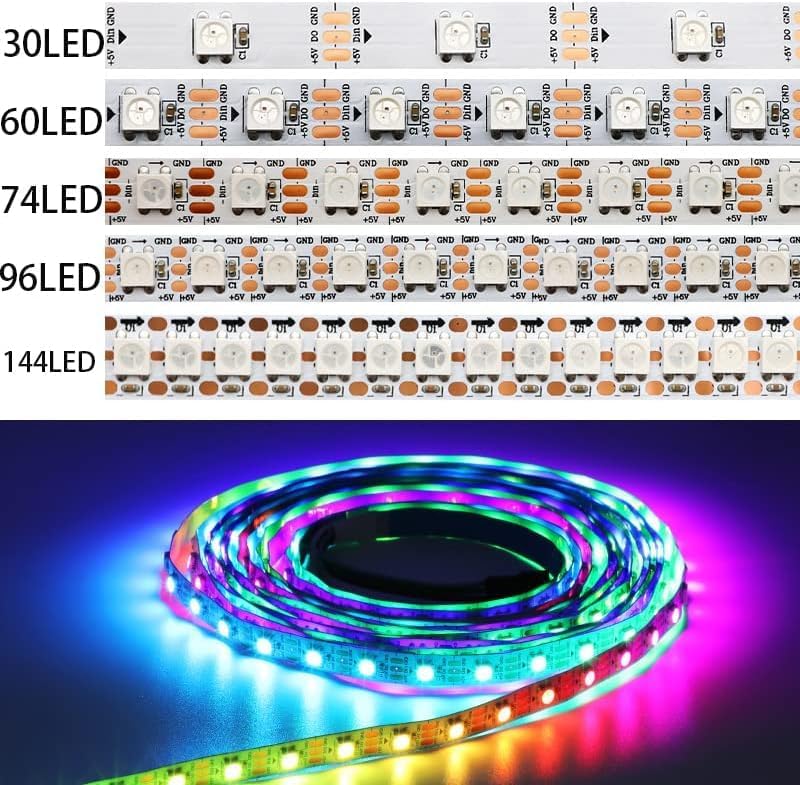
Image: Illustration of different LED densities (30, 60, 74, 96, 144 LEDs/m) and a coiled, illuminated WS2812B LED strip.
The strip comes with 3-pin JST-SM connectors on both ends for easy connection. Separate power and ground wires are also provided on both ends for flexible wiring options.
JST Connector Pinout:
- Red: VCC (+5V)
- White: GND (Ground)
- Green: DATA (Data Input)
5. Setup
- Prepare the Installation Surface: If using an IP30 or IP65 strip with adhesive backing, ensure the surface is clean, dry, and smooth.
- Measure and Cut (Optional): If a custom length is required, measure the desired length and cut the strip only at the designated cut lines, which are located between every LED. Ensure power is disconnected before cutting.
- Connect Power Supply: Connect a DC 5V power supply (not included) to the VCC (Red) and GND (White) wires of the JST connector. Ensure correct polarity.
- Connect Controller: Connect a suitable LED controller (not included) to the DATA (Green) wire, VCC (Red), and GND (White) wires of the JST connector. The controller sends data signals to control the individual LEDs.
- Adhere the Strip: For IP30/IP65 strips, peel off the protective backing from the 3M adhesive tape and firmly press the strip onto the prepared surface.
- Powering Longer Runs: If installing a long strip, consider injecting power at both ends of the strip to maintain consistent brightness and prevent color shifts due to voltage drop.
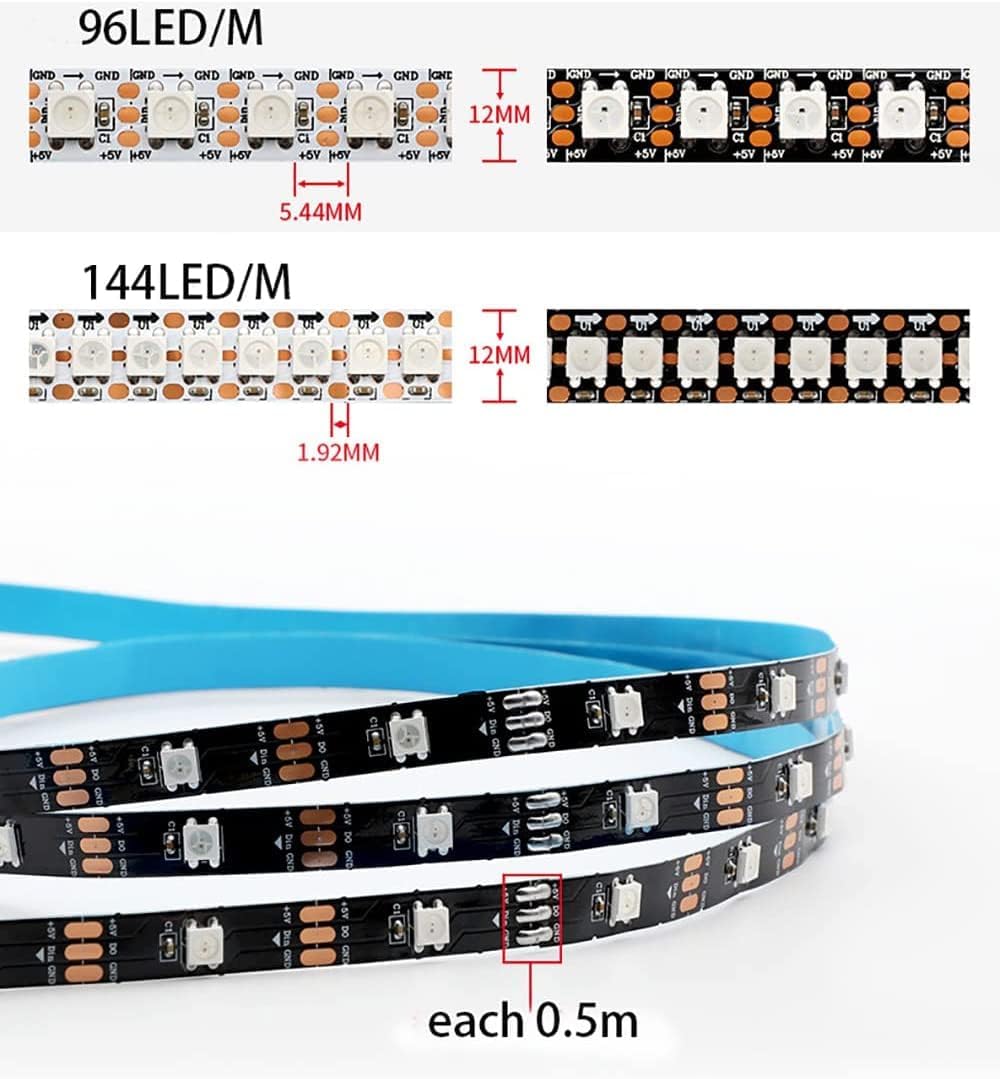
Image: Detailed view of LED strip dimensions and cut points for various LED densities.
6. Operating
Once the LED strip is properly installed and connected to a DC 5V power supply and a compatible controller, you can begin operating it. The functionality and available lighting effects depend entirely on the controller used.
- Controller Operation: Refer to the instruction manual provided with your specific LED controller for details on how to select lighting modes, adjust brightness, change colors, and create custom effects.
- Dynamic Effects: With a suitable controller, the WS2812B strip can produce a wide range of dynamic effects such as curtain-up, flowing water, raindrop, and jump flash patterns. Advanced users can often program custom animations using software like Flash/LedEdit.
7. Maintenance
- Cleaning: Gently wipe the surface of the LED strip with a soft, dry cloth if dust accumulates. Avoid using harsh chemicals or abrasive materials.
- Inspection: Periodically inspect the strip for any signs of damage, loose connections, or wear.
- Environmental Conditions: Ensure the strip is used within its specified IP rating. For IP30 (non-waterproof) strips, avoid exposure to moisture. For IP65 (splash-proof) and IP67 (waterproof) strips, ensure seals are intact if applicable.

Image: Visual comparison of IP20, IP65, and IP67 protection levels for LED strips.
8. Troubleshooting
- Strip Not Lighting Up:
- Check if the power supply is DC 5V. Incorrect voltage (e.g., 12V or 24V) will prevent operation or damage the strip.
- Verify all connections (power, ground, data) are secure and correctly polarized.
- Ensure the controller is functioning correctly and sending data signals.
- Inconsistent Brightness or Color:
- This often indicates voltage drop. For longer strips, try injecting power at both ends of the strip.
- Ensure the power supply has sufficient wattage for the entire length of the strip.
- Individual LEDs Not Working:
- While rare, individual LED failures can occur. If a segment is cuttable, you may replace the faulty segment.
- Strip Not Responding to Controller:
- Confirm the controller is compatible with WS2812B ICs.
- Check the data line connection (Green wire) for continuity and proper connection to the controller's data output.
9. Specifications
| Feature | Detail |
|---|---|
| Model | WS2812B |
| Input Voltage | DC 5V |
| LED Resource | WS2812B LED (5050 SMD RGB LED with built-in improved WS2811 IC) |
| IC Type | Improved Version WS2812 IC (built inside the 5050SMD RGB LED) |
| IC per LED | 1 IC drives 1 LED chip |
| Colors | Full Color RGB, Dream Color Changing |
| Grey Scale | 256 levels per color (8-Bits/Color) |
| Cuttable | Every LED is cuttable |
| JST Connector Wire | 20AWG |
| FPC Color Options | Black / White |
| Protection Rate (IP Rating) | IP30 (Non-waterproof), IP65 (Splash-proof), IP67 (Waterproof) |
| Adhesive Tape | 3M adhesive tape on back (for IP30 & IP65 models only) |
| Current Product Variant (ASIN: B0C71CWK4R) | 5M 74LED/M, White PCB, IP65 |
| Wattage (for 74LED/M) | 14.8 Watt/meter |
Power Consumption by LED Density:
- 30 LEDs/m: 6 Watt/meter
- 60 LEDs/m: 12 Watt/meter
- 74 LEDs/m: 14.8 Watt/meter
- 96 LEDs/m: 19.8 Watt/meter
- 144 LEDs/m: 28.8 Watt/meter
FPC Width by LED Density:
- 30 LEDs/m: 10mm
- 60 LEDs/m: 10mm
- 74 LEDs/m: 10mm
- 96 LEDs/m: 10mm
- 144 LEDs/m: 12mm
10. Warranty and Support
For warranty information and customer support, please refer to the documentation provided with your purchase or contact the seller directly through the platform where the product was acquired. Keep your purchase receipt as proof of purchase.