
iTouchless SP13GG
iTouchless Prime 13.2 Gallon Sensor Trash Can
Model: SP13GG
Brand: iTouchless
Introduction
The iTouchless Prime 13.2 Gallon Sensor Trash Can is designed for modern living, offering a hygienic and efficient way to manage waste. Its advanced sensor technology provides touchless operation, while its durable plastic construction ensures longevity and easy maintenance. This manual provides comprehensive instructions for setup, operation, and care of your new sensor trash can.

The iTouchless Prime 13.2 Gallon Sensor Trash Can, featuring a sleek charcoal gray finish and touchless sensor lid.
Key Features:
- 100% Touchless & Hygienic: Automatic lid opening with a simple hand motion.
- Durable Construction: Made from tough, dent-proof, and easy-to-clean plastic.
- Space-Saving Design: Efficient rectangular shape fits snugly against walls and in tight spaces.
- Large Capacity: 50 Liter / 13.2 Gallon capacity, accommodating standard 13-gallon trash bags without an inner bucket for 25% more space.
- Battery Powered: Operates on 4 AA batteries (not included) for convenient, cord-free placement.
- Premium Sensor Features: Includes a lid closing timer, instant lid re-opening, and manual open/close buttons for extended use.
Setup
Unpacking and Assembly:
- Carefully remove all components from the packaging: 1 Trash Can Body, 1 Lid, 1 Ring, and the User Manual.
- Place the trash can body in your desired location.
- Install 4 AA batteries (not included) into the battery compartment located on the underside of the lid. Ensure correct polarity.
- Place a standard 13-gallon trash bag into the can, securing the top edge of the bag under the retaining ring.
- Carefully place the sensor lid onto the trash can body, ensuring it is properly aligned and seated.

Illustration of proper trash bag installation using the retaining ring.
Visual Guide: Bag Installation & Operation
This video demonstrates the process of installing a trash bag and the touchless operation of the iTouchless sensor trash can.
Operating Instructions
Touchless Sensor Operation:
The iTouchless Prime trash can features an infrared sensor for hands-free operation. Simply wave your hand approximately 6 inches above the sensor located on the lid. The lid will open automatically.

The touchless sensor allows for hygienic, hands-free lid opening.
Automatic Lid Closing:
After opening, the lid will remain open for a few seconds (typically 5 seconds) and then close automatically. A countdown timer on the lid indicates the remaining time before closing.
Manual Open/Close Buttons:
For longer tasks or when you need the lid to stay open, use the manual open and close buttons located on the lid. Press the 'OPEN' button to keep the lid open indefinitely. Press the 'CLOSE' button to close the lid manually.
Power Off Feature:
To conserve battery life when the trash can will not be used for an extended period (e.g., during vacations), you can power off the lid. Refer to the detailed user manual for the exact location of the power switch.

Advanced sensor technology ensures reliable and safe operation, preventing accidental lid closure.
Maintenance
Cleaning the Canister:
The plastic canister of the iTouchless Prime trash can is waterproof and designed for easy cleaning. It can be washed by spraying water directly, for example, with a garden hose. Ensure the lid is removed before cleaning the canister with water.
The waterproof canister can be easily cleaned with water for thorough hygiene.
Cleaning the Lid:
The lid contains electronic components and should not be submerged in water. Wipe the lid clean with a soft, damp cloth. Avoid using abrasive cleaners or harsh chemicals that could damage the finish or electronic parts.
Battery Replacement:
When the sensor operation becomes sluggish or stops working, it is time to replace the batteries. Always replace all 4 AA batteries at once with new, high-quality alkaline batteries for optimal performance.
Troubleshooting
| Problem | Possible Cause | Solution |
|---|---|---|
| Lid does not open/close automatically. | Low batteries; Sensor obstructed; Power switch off. | Replace batteries; Clean sensor area; Ensure power switch is ON. |
| Lid closes too quickly or unexpectedly. | Sensor interference; Object too close to sensor. | Ensure no objects are within 6 inches of the sensor; Check for strong light sources directly above the sensor. |
| Fingerprints or smudges on the lid. | Normal use, especially with oily hands. | Wipe clean with a soft, damp cloth. The plastic material is designed to be smudge-proof, but occasional cleaning may be necessary. |
If you encounter issues not listed here or if the suggested solutions do not resolve the problem, please contact iTouchless Customer Support.
Specifications
| Attribute | Detail |
|---|---|
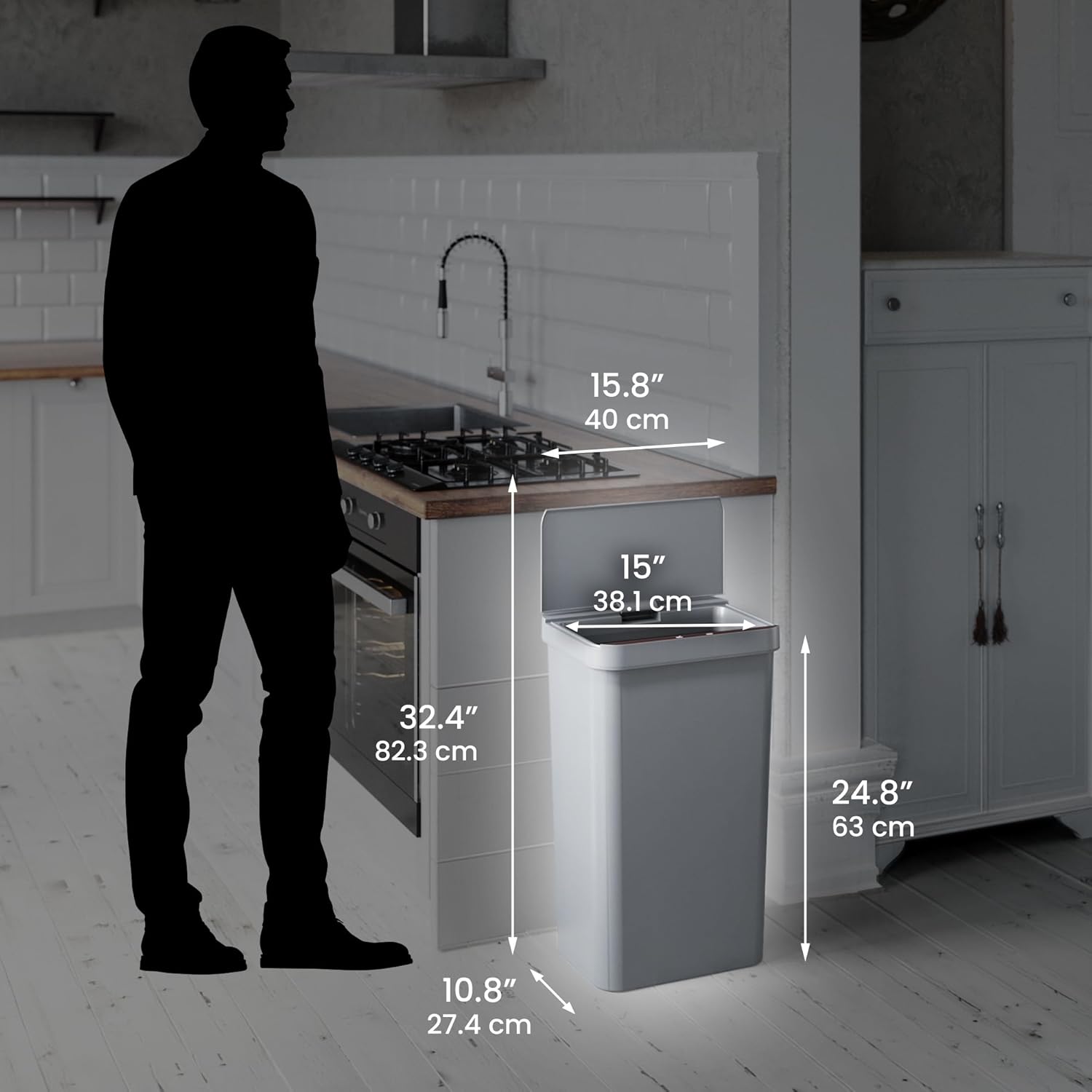
| Product Dimensions | 10.8 inch Length x 15.8 inch Width x 24.8 inch Height (32.4 inch Height with lid open) |
| Weight | 5.95 Pounds |
| Item Model Number | SP13GG |
| Capacity | 13.2 Gallons (50 Liters) |
| Color | Charcoal Gray |
| Opening Mechanism | Motion-Sensor |
| Material | Plastic (ABS plastic) |
| Power Source | 4 AA Batteries (not included) |
| Recommended Use | Indoor |
| Shape | Rectangular |

Detailed dimensions of the iTouchless Prime 13.2 Gallon Sensor Trash Can.
Warranty and Support
iTouchless is committed to ensuring your satisfaction. For any questions, feedback, or support needs regarding your iTouchless Prime 13.2 Gallon Sensor Trash Can, please reach out to our dedicated U.S.-based Customer Service Team.
Please refer to the original user manual included with your product for specific warranty details and the most current contact information for customer support. You may also visit the official iTouchless website for further assistance and product registration.
For additional resources, you can visit the iTouchless store on Amazon: iTouchless Store
Related documentsSP13GG


Ask a question about this manual
Ask about setup, troubleshooting, compatibility, parts, safety, or missing instructions. Manuals+ will review the question and use this page’s manual context to help answer it.