
Introduction
Thank you for choosing the Soshine 5V 6W Monocrystalline USB Solar Panel. This product is designed to provide a reliable and environmentally friendly power source for various 5V devices, including security cameras, mobile phones, power banks, and camping lanterns. Its high-efficiency monocrystalline cells ensure optimal performance even in weak light conditions. Please read this manual carefully to ensure proper setup, operation, and maintenance of your solar panel.
Package Contents
- 1 x Soshine 5-Volt Solar Battery Charger
- 1 x Mounting Bracket
- 2 x Hooks
- 1 x Cable with Type-C, Micro USB, and Barrel Plugs
Product Features
- High Conversion Efficiency: Features a high conversion rate and excellent performance in low light, with a maximum charging current of 1000mA (normal 500mA).
- Versatile 5V Output: Converts sunlight into electrical energy to charge 5V rechargeable devices.
- Durable Construction: Made with rugged monocrystalline solar cells, waterproof, UV, and scratch-resistant for long-term outdoor use.
- Compact and Lightweight: Measuring 10.6" x 6.9" and weighing 8.88 oz (250g), it is easy to transport for outdoor activities.
- Broad Compatibility: Suitable for security cameras, mobile phones, power banks, camping lanterns, and other 5V devices.
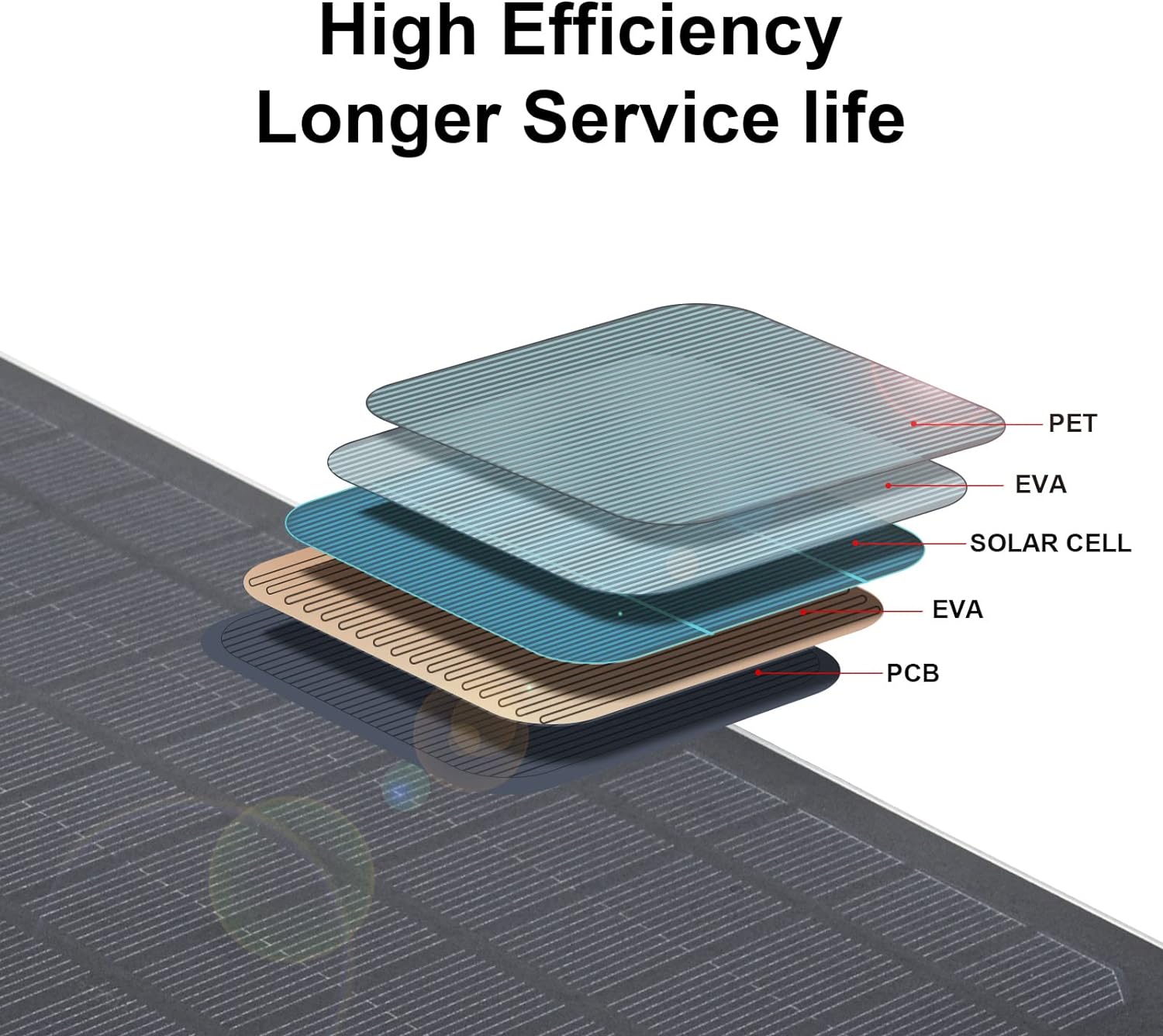
Diagram illustrating the layered construction of the Soshine Monocrystalline Solar Panel, including PET, EVA, Solar Cell, EVA, and PCB layers, contributing to high efficiency and longer service life.
Setup Instructions
- Unpack Components: Carefully remove all items from the packaging.
- Choose Location: Select a location that receives maximum direct sunlight throughout the day. Avoid shaded areas from trees, buildings, or other obstructions.
- Mounting the Panel:
- Attach the provided mounting bracket to the back of the solar panel using the included hardware.
- Secure the bracket to a wall, fence, or other stable surface using appropriate screws (not included).
- Adjust the panel's angle to face the sun directly for optimal charging. The bracket allows for 90-degree vertical and 360-degree horizontal rotation.
- Connect Device: Use the provided multi-plug cable (Type-C, Micro USB, Barrel Plugs) to connect your 5V device to the solar panel's USB output port. Ensure the connection is secure.

Soshine USB Solar Panel with adjustable mounting bracket, showing 90-degree vertical and 360-degree horizontal rotation for optimal sun exposure.

Two examples of the Soshine USB Solar Panel mounted outdoors, providing power to security cameras. One panel is mounted on a wall, the other on a brick ledge, both positioned to capture sunlight.
Operating Instructions
- Sunlight Exposure: Ensure the solar panel is exposed to direct sunlight. The more direct sunlight it receives, the higher the charging efficiency.
- Charging Devices: Once connected, the solar panel will automatically begin charging your device when sufficient sunlight is available. The charging indicator on your device (if applicable) will confirm charging status.
- Optimal Performance: For best results, periodically adjust the panel's angle to track the sun's movement throughout the day, especially during peak sunlight hours.
- Multiple Devices: The panel is designed for single-device charging at a time to ensure optimal power delivery.

The Soshine USB Solar Panel charging a smartphone outdoors, highlighting its portability and utility for mobile device charging.

The Soshine USB Solar Panel connected to a power bank, which in turn powers a small aquarium pump, demonstrating its versatility for various low-power devices.

A Soshine USB Solar Panel attached to a backpack, being carried by a person hiking in a mountainous landscape, illustrating its use for portable power during outdoor activities.
Maintenance
The Soshine solar panel is designed for durability and minimal maintenance. However, following these guidelines will help ensure its longevity and optimal performance:
- Cleaning: Periodically wipe the surface of the solar panel with a soft, damp cloth to remove dust, dirt, or debris that may accumulate and reduce efficiency. Do not use harsh chemicals or abrasive materials.
- Inspection: Regularly check the panel and cables for any signs of damage, such as cracks, frayed wires, or loose connections. Address any issues promptly.
- Water Resistance: The panel is designed to be waterproof. However, avoid prolonged submersion or exposure to extreme weather conditions beyond its intended use.
This video demonstrates the waterproof capabilities of the Soshine USB Solar Panel. It shows the panel being tested after being submerged in water, confirming its continued functionality.
Troubleshooting
- Device not charging:
- Ensure the solar panel is in direct sunlight.
- Check all cable connections to ensure they are secure.
- Verify that your device requires 5V input and is compatible with the provided connectors.
- Clean the solar panel surface if it is dirty.
- Test with a different device or cable to rule out device/cable issues.
- Slow charging:
- Ensure the panel is angled directly towards the sun.
- Cloudy weather or partial shading will reduce charging speed.
- High power consumption devices may charge slower.
- Panel appears damaged:
- Discontinue use if the panel or cables show significant physical damage.
- Contact customer support for assistance.
Specifications
| Brand | Soshine |
| Model Number | 5v6w+zhijia |
| Material | Monocrystalline Silicon |
| Maximum Power | 6 Watts |
| Maximum Voltage | 5 Volts |
| Amperage Capacity | 500 milliamps (normal), 1000 milliamps (max) |
| Efficiency | High Efficiency |
| Product Dimensions (L x W x H) | 10.6" x 6.9" x 8.88" (Note: 8.88" is likely a typo for thickness, actual panel size is 10.6"L x 6.9"W) |
| Item Weight | 8.88 ounces (250g) |
| Connector Type | USB (Type-C, Micro USB, Barrel Plugs) |
Safety Information
- Do not attempt to disassemble or modify the solar panel.
- Keep the panel away from open flames or extreme heat sources.
- Avoid dropping or subjecting the panel to severe impacts.
- Ensure children do not play with the solar panel or its components.
- Dispose of the product responsibly according to local regulations at the end of its lifespan.
Warranty and Support
Soshine products are manufactured to high-quality standards. For warranty information, technical support, or any questions regarding your Soshine USB Solar Panel, please refer to the contact information provided with your purchase or visit the official Soshine website.