
1. Introduction
This manual provides comprehensive instructions for the installation, operation, maintenance, and troubleshooting of the Xiaomi L43M7-FVEU TD.MT9020.781 1MST31A1 Main Board. This component is designed for specific Xiaomi television models and serves as the central processing unit for various functions, including video processing, audio output, and external connectivity. Please read this manual thoroughly before attempting any installation or repair procedures.
2. Safety Information
Important Safety Instructions:
- Always disconnect the power supply from the television before installing or removing the main board.
- Handle the main board by its edges to avoid touching sensitive electronic components.
- Wear anti-static gloves or use an anti-static wrist strap to prevent electrostatic discharge (ESD) damage.
- Ensure all connections are secure and correctly oriented before reapplying power.
- If you are unsure about any step, consult a qualified technician.
3. Product Overview
The Xiaomi L43M7-FVEU TD.MT9020.781 1MST31A1 Main Board is a critical component for compatible Xiaomi television models. It integrates various functionalities necessary for the television's operation.
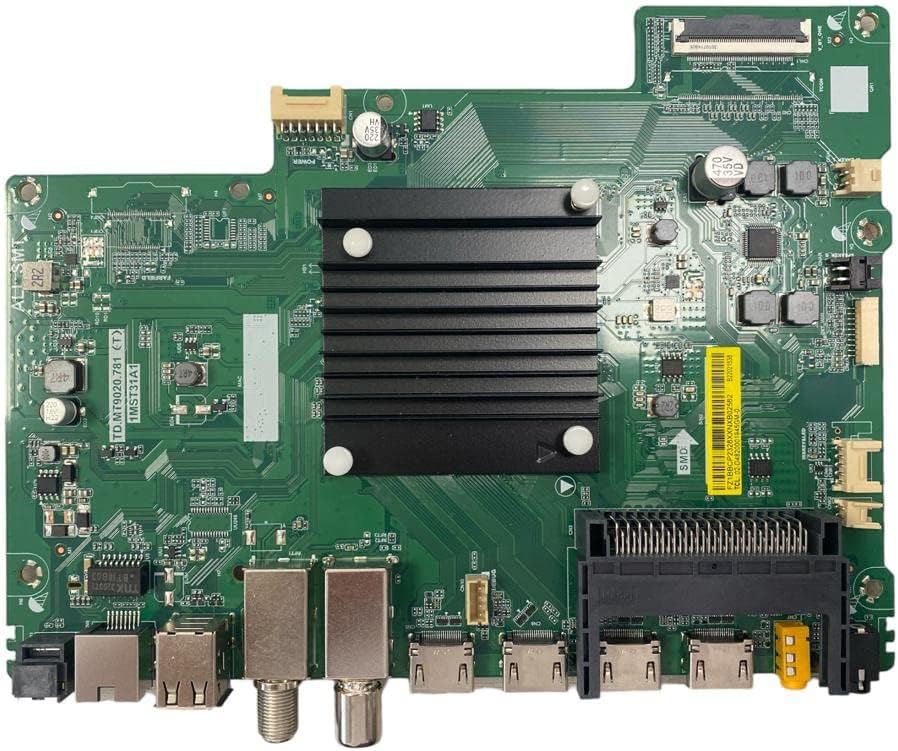
Figure 1: Xiaomi L43M7-FVEU TD.MT9020.781 1MST31A1 Main Board. This image displays the green circuit board with various integrated circuits, connectors, and a prominent black heatsink. Key markings visible include "TD.MT9020.781" and "1MST31A1". Input/output ports such as HDMI, USB, and antenna connectors are visible along the bottom edge.
Key Features:
- Integrated video and audio processing.
- Multiple input/output ports (HDMI, USB, Antenna, etc.).
- Central control unit for television functions.
4. Setup and Installation
This section outlines the general steps for installing the main board. Specific television models may have variations. Always refer to your television's service manual for detailed instructions.
- Preparation: Disconnect the television from the power outlet. Place the television face down on a soft, clean surface to prevent screen damage. Remove the back cover of the television.
- Locate Old Board: Identify the existing main board. Carefully disconnect all cables and connectors attached to it (e.g., power, ribbon cables, antenna, HDMI, USB). Note their positions for reassembly.
- Remove Old Board: Unscrew any mounting screws securing the old main board to the television chassis. Gently lift and remove the old board.
- Install New Board: Carefully position the new Xiaomi L43M7-FVEU TD.MT9020.781 1MST31A1 Main Board into place. Ensure it aligns with the mounting holes. Secure it with the appropriate screws.
- Reconnect Cables: Reconnect all cables and connectors to their corresponding ports on the new main board. Ensure all connections are firm and correctly seated. Pay special attention to delicate ribbon cables.
- Final Checks: Before replacing the back cover, double-check all connections. Reconnect the power cable and test the television's functionality. If everything operates correctly, disconnect power again and replace the back cover.
5. Operation (Post-Installation)
After successful installation, the main board will function as the core of your television. Power on the television and verify the following:
- The television powers on and displays the manufacturer's logo.
- All input sources (HDMI, USB, Antenna) are recognized and function correctly.
- Audio output is present and clear.
- Remote control functions are responsive.
- Network connectivity (if applicable to your TV model) is established.
If any issues arise, refer to the Troubleshooting section.
6. Maintenance
The main board itself requires minimal maintenance. To ensure its longevity and optimal performance:
- Keep the television in a well-ventilated area to prevent overheating.
- Avoid exposing the television to excessive dust, moisture, or extreme temperatures.
- Do not attempt to clean the internal components of the main board with liquids. Use compressed air to remove dust if necessary, ensuring the television is unplugged.
7. Troubleshooting
If you encounter issues after installing the main board, consider the following common problems and solutions:
| Problem | Possible Cause | Solution |
|---|---|---|
| Television does not power on. | Loose power connection, faulty power supply unit, incorrectly installed main board. | Check power cable connection. Verify power supply unit functionality. Re-check all main board connections. |
| No picture or distorted picture. | Loose ribbon cable to display panel, incorrect input source selected, faulty display panel. | Ensure display ribbon cables are securely connected. Select correct input source. |
| No sound. | Loose speaker connections, audio settings incorrect, faulty audio IC on main board. | Check speaker connections. Adjust audio settings. |
| External devices not recognized (HDMI, USB). | Loose port connection, faulty port, incompatible device. | Ensure cables are fully inserted. Test with a different device. |
If these steps do not resolve the issue, professional assistance may be required.
8. Specifications
Technical specifications for the Xiaomi L43M7-FVEU TD.MT9020.781 1MST31A1 Main Board:
- Model Number: L43M7-FVEU TD.MT9020.781 1MST31A1
- Compatible Devices: Personal Computer (Note: This specification from the product data may refer to the board's internal processing capabilities or a generic classification. The board is primarily intended for specific Xiaomi TV models.)
- ASIN: B0C6XT72YL
- Manufacturer: Unknown
- Date First Available on Amazon.com.be: June 2, 2023
Note: Information regarding software updates and spare parts availability is not provided by the manufacturer.
9. Warranty and Support
For warranty information and technical support, please refer to the documentation provided with your original television set or contact the retailer from whom this replacement part was purchased. As this is a replacement component, warranty terms may vary.