
1. Introduction
The BITFUNX RetroScaler2x is a versatile AV/SV/YPBPR to HDMI converter designed to enhance the visual experience of retro gaming consoles on modern HDMI displays. It supports various input signals and offers multiple output modes, including line doubling and filtering, to provide a clearer and more stable image without introducing significant lag.

Image 1.1: The RetroScaler2x device and its retail packaging.
2. Package Contents
- RetroScaler2x AV/SV/YPBPR to HDMI Converter
- USB Power Cable
- Quick Start Guide

Image 2.1: Contents of the RetroScaler2x package.
3. Product Features
- Wide Compatibility: Supports 240p/480i/288p/576i NTSC/PAL sources.
- Multiple Signal Inputs: Accepts AV (Composite), S-Video, and YPBPR (Component) signals.
- Zero Latency: Engineered for minimal input lag, ensuring responsive gameplay.
- Enhanced Output: Converts to 480p/576p HDMI-compatible output (480p for NTSC, 576p for PAL).
- Filter Mode: Adds a filtering option to minimize image aliasing, particularly beneficial for 3D games or reducing flicker in 480i content.
- Pass-Through Mode: Outputs the input signal directly to HDMI without changing the resolution.

Image 3.1: Key features of the RetroScaler2x converter.
4. Setup
4.1. Connecting the RetroScaler2x
- Connect your retro console to the appropriate input connectors on the RetroScaler2x (Composite, Component YPBPR, or S-Video). Note: Only one input can be used at a time. It is strongly suggested to disconnect other consoles even if they are powered off.
- Ensure the RetroScaler2x is connected to a 5V Micro USB power source.
- Connect the HDMI output of the RetroScaler2x to your display (TV or monitor).
- Power on your RetroScaler2x using the ON/OFF switch.
- Select the appropriate video mode (CVBS, SVIDEO, YPBPR) using the 'Input Select' button on the device.

Image 4.1: Input and output connections on the RetroScaler2x.
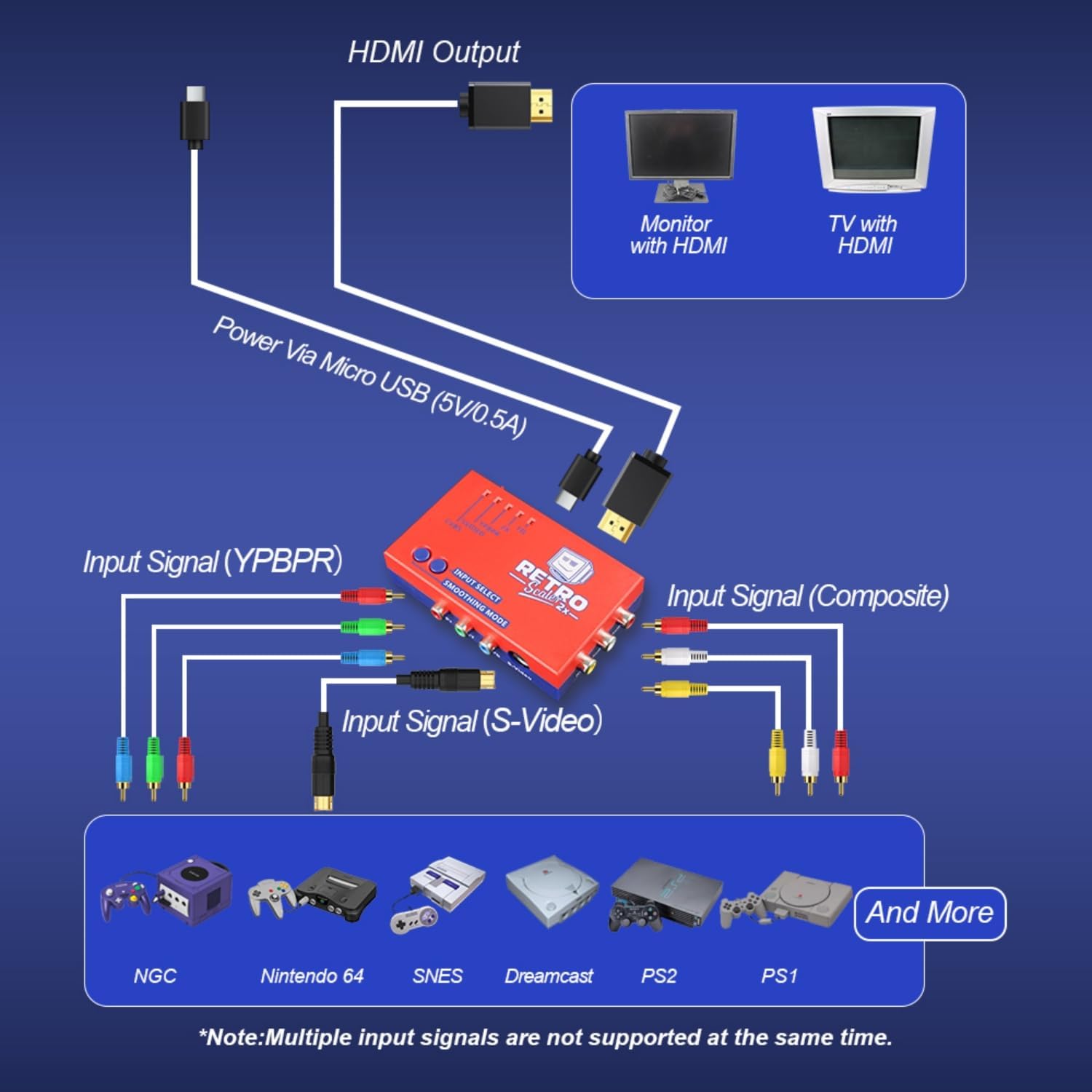
Image 4.2: Detailed connection diagram for different input signals.
4.2. Power Supply
The RetroScaler2x is powered by a standard 5-volt Micro USB port. This can be supplied by a normal power adapter or a device with a USB port (e.g., a TV's USB port). Always ensure the power supply is regulated to prevent damage to the equipment.
5. Operating Modes
The RetroScaler2x offers several modes to optimize your retro gaming experience:
- 2x Mode (Line Doubler): This is the standard mode that outputs 480p/576p. It doubles the input resolution (240p/288p/480i/576i) to a higher resolution for modern displays. This mode is the system default when powered on.
- Filter Mode (FIL): This mode adds a filtering option to minimize image aliasing for the 480p/576p output. It can help reduce flicker with some 480i-only games and is often preferred for 3D games.
- Pass-Through Mode: In this mode, incoming composite, S-Video, or component signals are simply digitized into HDMI without changing the original resolution. Both orange and blue LEDs will be off in this mode.

Image 5.1: Visual comparison of 2X Mode and Smooth Mode.

Image 5.2: Illustration of the three supported input signal modes.
5.1. Button Functions
- Input Select: Toggles between CVBS, SVIDEO, and YPBPR inputs.
- Smoothing Mode: Toggles the filtering option (FIL) on or off when in 2x Mode.
5.2. Official Product Videos
Video 5.3: How to Use RetroScaler2x Converter. This video demonstrates the basic setup and functionality of the converter.
Video 5.4: Introduction and Operation of Signal Mode. This video provides a detailed guide on switching between different input and output modes.
6. Compatibility
The RetroScaler2x is compatible with a wide range of retro gaming consoles and modern displays:
6.1. Supported Consoles (Input)
- PlayStation 2 (PS2)
- Nintendo 64 (N64)
- Sega Dreamcast
- Sega Saturn
- Sega Megadrive (MD)
- Nintendo GameCube (NGC)
- Super Famicom (SFC)
- Super Nintendo Entertainment System (SNES)
- NES
- Atari 2600
- Vic20
- MSX
6.2. Supported Displays (Output)
- Monitors with HDMI input
- 4K TVs with HDMI input

Image 6.1: Wide compatibility of the RetroScaler2x with various gaming systems.
6.3. Region Compatibility
Both NTSC and PAL signals are supported, but they are not converted to each other. This means you can plug in whatever signal your target device is compatible with, but NTSC might not work on PAL HDMI devices and vice versa.
7. Important Safety Information
Please observe the following safety precautions when using your RetroScaler2x:
- Use the correct power supply: The RetroScaler2x is powered by a regular 5-volt Micro USB port. Ensure the power supply you are using meets this requirement. Never use an unregulated power supply to prevent damage.
- Turn off the power before connecting/disconnecting: To prevent damage to the device's internal components, always turn off the power before connecting or disconnecting any cables or devices.
- Do not expose to moisture: Droplets of moisture may contact the PCB and cause a short circuit. Never submerge the unit in water.
- Keep away from fire or high heat sources: The RetroScaler2x is not flammable, but high temperatures may melt the plastic casing.
- Please supervise children: This product is not a toy and is not designed for use by children. Supervise children if they use the RetroScaler2x.
8. Troubleshooting
- No Signal / Black Screen: Ensure all cables (power, input, HDMI output) are securely connected. Verify the correct input mode is selected on the RetroScaler2x. Check your TV's input source.
- Black and White Video (Wii Example): Some consoles may require specific output settings. For example, with a Nintendo Wii, changing the output resolution from 480p to 480i in the console's settings may resolve display issues.
- Blurry or Distorted Image: Experiment with the 'Smoothing Mode' button. For 2D games, turning the filter off might be preferred. For 3D games or to reduce flicker, turning the filter on may improve image quality.
- Input Lag: The RetroScaler2x is designed for zero lag. If you experience noticeable lag, ensure all connections are secure and try different cables.
- Audio Issues: Check audio cable connections. Ensure your display's audio settings are correctly configured.
9. Specifications
| Feature | Detail |
|---|---|
| Product Dimensions | 1.1 x 4.33 x 2.48 inches |
| Item Weight | 4.1 ounces |
| Item Model Number | RetroScaler2x |
| Manufacturer | BITFUNX |
| Compatible Devices | PS2, N64, Dreamcast, Saturn, Megadrive, SNES, SFC |
| Connector Type | HDMI |
| Color | Red |
10. Warranty and Support
Specific warranty information and detailed support contacts are not provided in this manual. For warranty claims, technical assistance, or further inquiries, please refer to the official BITFUNX website or contact their customer service directly.