
Important Safety Instructions
Please read and understand all safety instructions before operating this appliance. Failure to follow these instructions may result in electric shock, fire, or serious injury.
- Always connect the unit to a properly grounded electrical outlet.
- Do not operate the unit with a damaged cord or plug. If the cord or plug is damaged, contact VEVOR customer service for replacement.
- Keep the unit away from water or wet environments. Do not immerse the unit in water or spray water directly onto it.
- Do not block air intake or exhaust vents. Ensure adequate clearance around the unit for proper airflow.
- Unplug the unit before performing any maintenance, cleaning, or filter replacement.
- Do not look directly at the UV-C light when it is active, as it can cause eye and skin damage. Ensure the unit is off and unplugged before accessing the UV-C lamp.
- This appliance is not intended for use by persons (including children) with reduced physical, sensory or mental capabilities, or lack of experience and knowledge, unless they have been given supervision or instruction concerning use of the appliance by a person responsible for their safety.
- Use only VEVOR-approved replacement filters. Using non-approved filters may reduce performance and void the warranty.
Product Overview
Key Features
- UV-C Light Technology: Built-in UV-C light eliminates airborne pollutants and breaks down odor molecules.
- 3-Stage Filtration: Features a pre-filter (MERV-10), carbon filter, and H13 HEPA filter, capturing 99.97% of particles as small as 0.3 microns.
- 800 CFM Airflow: High-efficiency copper motor provides optimal purification with a filtration area of 5,500 cubic feet and adjustable airflow.
- User-friendly Control Panel: Easy operation for airflow adjustment, resettable timer, UV-C switch, circuit breaker, and filter change indicator.
- Daisy Chain Capability: Two auxiliary sockets allow daisy-chaining up to 3 units for a combined airflow speed of 2400 CFM.
- Portable and Stackable: Weighs 35 pounds with a foldable handle for easy transport and storage.
Components
The VEVOR Air Scrubber is a robust unit designed for effective air purification. It includes the main housing, a control panel, and a multi-stage filtration system.

Image: The VEVOR Air Scrubber 800CFM main unit, showcasing its compact and stackable design.

Image: A diagram illustrating the 3-stage filtration process, including the pre-filter, carbon filter, H13 HEPA filter, and UV-C light.
Setup
Unpacking and Initial Inspection
- Carefully remove the air scrubber from its packaging.
- Inspect the unit for any signs of damage during transit. If damage is found, do not operate and contact VEVOR customer service.
- Ensure all components listed in the packing list are present.
Filter Installation (if not pre-installed)
The unit typically comes with filters pre-installed. If not, or for future replacements, follow these steps:
- Unlatch the filter access panel on the side of the unit.
- Insert the pre-filter (MERV-10) first, followed by the carbon filter, and then the H13 HEPA filter. Ensure they are seated correctly.
- Close and latch the filter access panel securely.
Placement
Place the air scrubber in an area where air quality improvement is desired. Ensure it is on a stable, level surface and that air intake and exhaust are not obstructed.
Power Connection
Plug the power cord into a standard 120V AC grounded electrical outlet.

Image: A VEVOR Air Scrubber being positioned in a room, demonstrating its portability and ease of placement.
Operating Instructions
Control Panel Overview

Image: A detailed view of the VEVOR Air Scrubber's control panel, highlighting the hour meter, variable speed dial, UV-C switch, filter change indicator, reset button, and auxiliary outlets.
- Hour Meter: Displays the total operating hours of the unit.
- Variable Speed Dial: Adjusts the airflow from minimum to maximum (800 CFM).
- UV-C Switch: Turns the UV-C light on or off.
- Filter Change Indicator: Illuminates when filters need to be replaced.
- Reset Button: Resets the filter change indicator after filter replacement.
- Auxiliary Outlets (2): Allows daisy-chaining of up to 3 units.
- Circuit Breaker: Provides overheat protection. Press to reset if tripped.
Starting the Unit
- Ensure the unit is plugged into a grounded outlet.
- Turn the Variable Speed Dial clockwise to the desired airflow setting. The unit will start operating.
- To activate the UV-C light, flip the UV-C Switch to the 'ON' position.
Daisy Chaining Multiple Units
For larger areas or increased airflow, multiple VEVOR Air Scrubber units can be connected in series:
- Connect the first unit to a grounded electrical outlet.
- Use a suitable extension cord (not included) to connect one of the auxiliary outlets on the first unit to the power inlet of a second unit.
- Repeat for a third unit if needed, connecting it to the auxiliary outlet of the second unit. A maximum of 3 units can be daisy-chained.

Image: Multiple VEVOR Air Scrubber units operating in a large room, demonstrating the daisy-chaining capability for extended coverage.
Maintenance
Filter Replacement
The filter change indicator light will illuminate when it's time to replace the filters. Regular filter replacement is crucial for maintaining optimal performance.
- Power Off and Unplug: Always turn off the unit and unplug it from the power source before replacing filters.
- Access Filters: Unlatch and open the filter access panel.
- Remove Old Filters: Carefully remove the old pre-filter, carbon filter, and H13 HEPA filter. Dispose of them according to local regulations.
- Install New Filters: Insert new VEVOR-approved filters in the correct order: pre-filter first, then carbon filter, then H13 HEPA filter. Ensure they fit snugly.
- Close Panel: Close and securely latch the filter access panel.
- Reset Indicator: Plug the unit back in and press the 'Reset' button on the control panel to turn off the filter change indicator light.
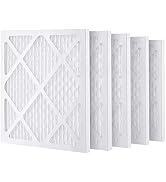
Image: A pack of VEVOR protective pre-filters, essential for the first stage of filtration.

Image: A VEVOR H13 HEPA air filter, used for the final stage of filtration in the air scrubber.
Cleaning
Wipe the exterior of the unit with a soft, damp cloth. Do not use abrasive cleaners or solvents. Ensure the unit is unplugged before cleaning.
Troubleshooting
| Problem | Possible Cause | Solution |
|---|---|---|
| Unit does not power on | No power supply; Circuit breaker tripped; Power cord not securely plugged in. | Check power outlet; Reset the circuit breaker on the control panel; Ensure power cord is firmly connected. |
| Low airflow or reduced performance | Clogged filters; Obstruction in air intake/exhaust. | Check and replace filters if the indicator light is on or if they appear dirty; Ensure no objects are blocking the vents. |
| Filter change indicator light remains on after filter replacement | Indicator not reset. | Press the 'Reset' button on the control panel. |
| Unusual noise during operation | Loose components; Foreign object inside; Unit not on a stable surface. | Turn off and unplug the unit, inspect for loose parts or foreign objects; Ensure the unit is placed on a stable, level surface. |
Specifications
| Feature | Detail |
|---|---|
| Model Number | ZHP2301-800 |
| Airflow | 800 CFM (Cubic Feet per Minute) |
| Filtration System | 3-Stage (Pre-filter MERV-10, Carbon Filter, H13 HEPA Filter) |
| UV-C Light | Yes |
| Power Source | AC |
| Wattage | 300 watts |
| Noise Level | 75 dB |
| Product Dimensions (D x W x H) | 24.2" x 23.5" x 15.9" |
| Weight | 35 lbs (16 kg) |
| Filtration Area | 5,500 cubic feet |
| Particle Retention Size | 0.3 micron |
| Control Method | Touch, Button Control |
| Special Features | Stackable, Foldable Handle, Auxiliary Sockets for Daisy Chaining |
| Certification | CARB Certified |

Image: A diagram showing the key dimensions of the VEVOR Air Scrubber unit.
Warranty and Support
For detailed warranty information, product registration, and technical support, please visit the official VEVOR website or contact their customer service department. Keep your purchase receipt for warranty claims.
VEVOR Official Website: www.vevor.com
Product Videos
VEVOR Air Scrubber with 3-Stage, MERV10, Carbon, H13 HEPA
Video: This official seller video provides a comprehensive overview of the VEVOR Air Scrubber, detailing its 3-stage filtration system, including the MERV10 pre-filter, carbon filter, and H13 HEPA filter, and demonstrating its features.


