
The Voice VHOL-6/2069
The Voice Hollywood Wireless Headphones User Manual
Model: VHOL-6/2069 | Brand: The Voice
Introduction
Thank you for choosing The Voice Hollywood Wireless Headphones. These headphones are designed to provide a superior audio experience with the convenience of wireless connectivity. Featuring HD Ultra Max Sound, a comfortable adjustable headband, and a tri-fold design for portability, they are optimized for seamless integration with Siri and Google Assistant. This manual provides detailed instructions for setup, operation, maintenance, and troubleshooting to ensure optimal performance and longevity of your device.
Safety Information
- Do not expose the headphones to extreme temperatures, humidity, or corrosive substances.
- Avoid listening at high volume levels for extended periods to prevent hearing damage.
- Do not use the headphones while driving, cycling, or in situations where inability to hear ambient sounds could be dangerous.
- Keep the headphones away from children and pets.
- Only use the provided charging cable and accessories.
- Do not attempt to disassemble or modify the headphones. This will void the warranty.
Package Contents
Please verify that all items are present in your package:
- The Voice Hollywood Wireless Headphones
- USB Type-C Charging Cable
- 3.5mm Audio Cable (AUX)

Figure 1: Included components and key features of the headphones.
Product Overview
The Hollywood Wireless Headphones feature an ergonomic design for extended comfort and intuitive controls for ease of use. The over-ear cups provide a comfortable fit, and the adjustable headband ensures a secure fit for various head sizes. The tri-fold design allows for compact storage and portability.

Figure 2: Front view of the headphones.

Figure 3: Headphones in folded position for portability.
Controls and Ports
Refer to Figure 1 for a visual guide to the controls and ports. The main controls are located on the ear cups and include:
- Power Button: Used to power on/off and initiate Bluetooth pairing.
- Volume Up/Next Track Button: Short press for volume up, long press for next track.
- Volume Down/Previous Track Button: Short press for volume down, long press for previous track.
- Multi-function Button (MFB): Play/pause, answer/end calls, activate voice assistant.
- USB Type-C Port: For charging the headphones.
- 3.5mm Audio Jack: For wired connection using the AUX cable.
- Built-in Microphone: For hands-free calling and voice assistant commands.
Setup
Charging the Headphones
Before first use, fully charge your headphones. A full charge typically takes approximately 2-3 hours.
- Connect the small end of the USB Type-C charging cable to the charging port on the headphone ear cup.
- Connect the larger end of the USB cable to a USB power adapter (not included) or a computer's USB port.
- The LED indicator light will illuminate during charging and turn off or change color once fully charged.
Bluetooth Pairing
Pair your headphones with your Bluetooth-enabled device (e.g., smartphone, tablet, computer).
- Ensure the headphones are turned off.
- Press and hold the Power button for approximately 5-7 seconds until the LED indicator light flashes blue and red alternately, indicating pairing mode.
- On your device, enable Bluetooth and search for new devices.
- Select "Hollywood" from the list of available devices.
- Once successfully paired, the LED indicator will flash blue slowly or turn solid blue.
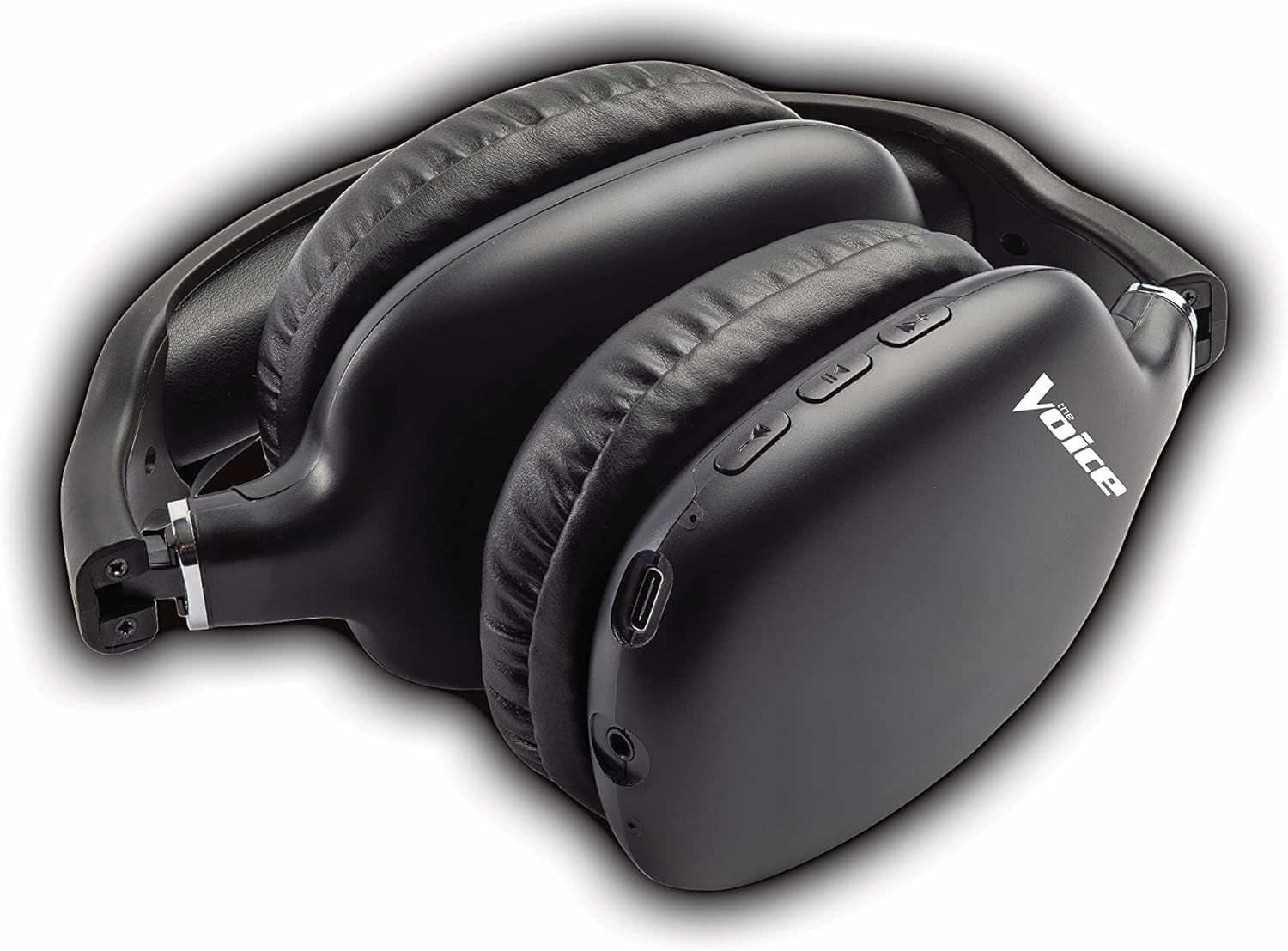
Figure 4: Headphones paired with a smartphone.
Wired Connection (AUX Mode)
You can use the headphones with non-Bluetooth devices or when the battery is depleted using the included 3.5mm audio cable.
- Plug one end of the 3.5mm audio cable into the audio jack on the headphone ear cup.
- Plug the other end into the 3.5mm audio output jack of your device.
- The headphones will automatically switch to wired mode.
Operating Instructions
Power On/Off
- Power On: Press and hold the Power button for approximately 3 seconds until the LED indicator flashes blue.
- Power Off: Press and hold the Power button for approximately 3 seconds until the LED indicator turns off.
Music Playback
- Play/Pause: Short press the Multi-function Button (MFB).
- Next Track: Long press the Volume Up button.
- Previous Track: Long press the Volume Down button.
- Volume Up: Short press the Volume Up button.
- Volume Down: Short press the Volume Down button.
Call Management
- Answer/End Call: Short press the Multi-function Button (MFB).
- Reject Call: Long press the Multi-function Button (MFB).
- Redial Last Number: Double-press the Multi-function Button (MFB).
Voice Assistant Activation
- Activate Siri/Google Assistant: Triple-press the Multi-function Button (MFB).
Video 1: Demonstrates the adjustable and padded comfort, built-in mic, and connectivity to Google or Siri for The Voice Hollywood Wireless Headphones.

Figure 5: User enjoying audio with the headphones, highlighting comfort and usability.
Maintenance
Cleaning
Regular cleaning helps maintain the headphones' appearance and functionality.
- Wipe the ear cups and headband with a soft, dry, lint-free cloth.
- For stubborn dirt, slightly dampen the cloth with water and mild soap, then wipe dry immediately.
- Do not use abrasive cleaners, alcohol, or chemical solvents.
Storage
When not in use, store your headphones in a cool, dry place, away from direct sunlight and extreme temperatures. Utilize the tri-fold feature for compact storage.
Troubleshooting
If you encounter issues with your headphones, refer to the table below for common problems and solutions.
| Problem | Possible Cause | Solution |
|---|---|---|
| Headphones do not power on | Low battery | Charge the headphones fully. |
| Cannot pair with device | Headphones not in pairing mode; Device Bluetooth off; Too far from device | Ensure headphones are in pairing mode (flashing red/blue). Turn device Bluetooth on/off. Move headphones closer to device (within 10 meters). |
| No sound | Volume too low; Not connected; Incorrect audio source | Increase volume on headphones and device. Ensure headphones are properly paired/connected. Check audio output settings on your device. |
| Sound distortion | Interference; Device volume too high | Move away from other wireless devices. Lower the volume on your device. |
| Microphone not working | Not connected; Device settings | Ensure headphones are properly paired. Check microphone input settings on your device. |
Specifications
| Feature | Detail |
|---|---|
| Model Name | Hollywood |
| Connectivity Technology | Wireless, Wired (Bluetooth) |
| Ear Placement | Over Ear |
| Form Factor | Over Ear |
| Control Type | Voice Control, Built-in buttons and microphone |
| Frequency Range | 20Hz - 20kHz |
| Item Weight | 13.4 ounces |
| Dimensions (Package) | 9.65 x 8.35 x 3.58 inches |
| Model Number | VHOL-6/2069 |
| UPC | 841133120698 |
Warranty and Support
The Voice Hollywood Wireless Headphones come with a standard manufacturer's warranty. For detailed warranty information, technical support, or service inquiries, please refer to the warranty card included in your product packaging or visit the official The Voice Electronics website. Do not attempt to repair the product yourself.
Related documentsVHOL-6/2069


Ask a question about this manual
Ask about setup, troubleshooting, compatibility, parts, safety, or missing instructions. Manuals+ will review the question and use this page’s manual context to help answer it.