
1. Product Overview
The 1Mii B06T2 is a versatile 2-in-1 Bluetooth 5.3 audio adapter designed to enhance your audio experience. It functions as both a Bluetooth transmitter (TX) and a Bluetooth receiver (RX), allowing you to wirelessly stream audio to or from various devices. Equipped with advanced Qualcomm chips, it supports a range of audio codecs including SBC, MP3, AAC, aptX, aptX-LL, aptX-HD, and aptX-Adaptive for high-quality, low-latency sound.
Package Contents
- 1Mii B06T2 Bluetooth Audio Adapter
- 3.5mm to 3.5mm Converter
- USB-C Charging Cable
- User Manual

Image: Package Contents of the 1Mii B06T2
Device Layout

Image: 1Mii B06T2 Device Layout and Features
- Power/Pairing Button: Press and hold for 2 seconds to power on/off or enter pairing mode. Short press to play/pause in TX mode.
- LED Indicator: Displays current status (pairing, connected, codec).
- TX/RX Switch: Selects Transmitter or Receiver mode.
- Reset Button: Press and hold for 2 seconds to clear pairing history and re-enter pairing mode.
- Type-C Port: For charging and functions as a USB audio input in TX mode.
- 3.5mm AUX Jack: Audio input/output connection.
2. Setup
Charging the Device
Before first use, fully charge the 1Mii B06T2. Connect the provided USB-C charging cable to the device's Type-C port and a standard USB power adapter (not included). A full charge takes approximately 1.5 hours and provides up to 15 hours of playback in either TX or RX mode.
Mode Selection
The 1Mii B06T2 operates in two modes: Transmitter (TX) and Receiver (RX). Use the TX/RX switch on the side of the device to select the desired mode before connecting.
- TX Mode: Transmits audio from a non-Bluetooth device (e.g., TV, PC) to Bluetooth headphones or speakers.
- RX Mode: Receives audio from a Bluetooth-enabled device (e.g., smartphone, tablet) and outputs it to a wired audio system (e.g., home stereo, car stereo).
3. Operating Instructions
Transmitter Mode (TX)
Use TX mode to add Bluetooth transmission capabilities to devices without built-in Bluetooth.
- Switch the B06T2 to TX mode.
- Connect the 3.5mm AUX jack of the B06T2 to the audio output port (e.g., headphone jack) of your non-Bluetooth device (TV, PC, MP3 player). Alternatively, connect the Type-C port to your PC for USB audio input.
- Press and hold the Power/Pairing button for 2 seconds to turn on the device and enter pairing mode. The LED indicator will flash red and blue alternately.
- Put your Bluetooth headphones or speaker into pairing mode.
- Place the B06T2 and your Bluetooth audio device close to each other. Once paired, the LED indicator will stop flashing and remain solid blue (or another color depending on the codec).

Image: TX Mode Connection Diagram
Dual Link in TX Mode: The B06T2 can connect to two Bluetooth headphones simultaneously. After successfully pairing with the first device, put the second Bluetooth headphone into pairing mode and press the Power/Pairing button on the B06T2 once to connect. The LED will indicate successful dual connection.
TX Mode Use Cases:
- TV/PC Audio: Enjoy TV shows or PC games with Bluetooth headphones without disturbing others.
- Airplane Entertainment: Connect to in-flight entertainment systems using the 3.5mm jack and use your personal Bluetooth headphones.

Image: Using B06T2 in TX Mode on an Airplane
Receiver Mode (RX)
Use RX mode to enable Bluetooth reception for wired audio systems.
- Switch the B06T2 to RX mode.
- Connect the 3.5mm AUX jack of the B06T2 to the audio input port (e.g., AUX-in) of your wired speaker, amplifier, or car stereo.
- Press and hold the Power/Pairing button for 2 seconds to turn on the device and enter pairing mode. The LED indicator will flash red and blue alternately.
- On your smartphone or tablet, enable Bluetooth and search for "B06T2" in the list of available devices. Select it to pair.
- Once paired, the LED indicator will stop flashing and remain solid blue (or another color depending on the codec). You can now stream audio from your device to your wired system.

Image: RX Mode Connection Diagram
Dual Link in RX Mode: The B06T2 can connect to two smartphones/tablets simultaneously. After successfully pairing with the first device, pair the second device. The LED will indicate successful dual connection.
RX Mode Use Cases:
- Home Stereo: Revitalize your old Hi-Fi system by enabling Bluetooth streaming from your phone.
- Car Audio: Stream music from your smartphone to your car's AUX input. (Note: Does not support phone calls in car mode).

Image: Using B06T2 in RX Mode in a Car
Understanding aptX Low Latency and aptX HD
The 1Mii B06T2 supports advanced audio codecs for superior sound quality and reduced latency:
- aptX Low Latency (aptX-LL): Provides ultra-low latency (under 36ms) for perfect audio-visual synchronization, ideal for watching TV, movies, or gaming. For aptX-LL to function, both the B06T2 and your receiving/transmitting device (e.g., headphones) must support aptX-LL.
- aptX HD: Delivers high-definition audio quality (24-bit/48kHz) for an immersive listening experience. For aptX HD to function, both the B06T2 and your receiving/transmitting device must support aptX HD.

Image: AptX Low Latency for Perfect Audio Synchronization

Image: AptX HD for Immersive Music Experience
Video Tutorials
For visual guidance on setup and pairing, please refer to the following official video:
Video: How to Pair the 1Mii B06T2 with a Headset (TX Mode)
Video: 1Mii B06T2 2-in-1 Bluetooth Transmitter Receiver Overview
4. Maintenance
To ensure the longevity and optimal performance of your 1Mii B06T2, follow these maintenance guidelines:
- Keep the device dry. Moisture can damage internal circuits.
- Avoid extreme temperatures. High temperatures can shorten the life of electronic devices.
- Do not expose the device to direct sunlight for extended periods.
- Clean the device with a soft, dry cloth. Do not use harsh chemicals or abrasive cleaners.
- Store the device in a cool, dry place when not in use.
5. Troubleshooting
If you encounter issues with your 1Mii B06T2, try the following solutions:
- Device not pairing:
- Ensure the B06T2 is in the correct TX or RX mode.
- Make sure both the B06T2 and your target audio device are in pairing mode (LED flashing red and blue alternately).
- Bring the devices closer together.
- Press and hold the RESET button on the B06T2 for 2 seconds to clear previous pairing history, then try pairing again.
- No sound or poor sound quality:
- Check all cable connections (3.5mm AUX, USB-C). Ensure they are securely plugged in.
- Verify that the volume on both the B06T2 and the connected audio device is turned up.
- Ensure the correct audio input/output is selected on your external device (e.g., AUX input on a speaker).
- If experiencing noise, avoid connecting the power cord to the TV for charging while in use, as this can generate current noise. Use a separate USB power adapter.
- High latency (audio delay):
- For ultra-low latency, ensure both the B06T2 and your Bluetooth headphones/speaker support aptX Low Latency (aptX-LL).
- Reduce the distance between the B06T2 and the connected Bluetooth device.
- Minimize obstacles between the devices.
- Cannot connect to Airpods Max or Airpods Pro 2nd generation: The device is compatible with Airpods but not with Airpods Max or Airpods Pro 2nd generation.
- Not suitable for musical instruments: The B06T2 cannot be used as an instrument transmitter for electric guitars or keyboards due to potential latency issues.
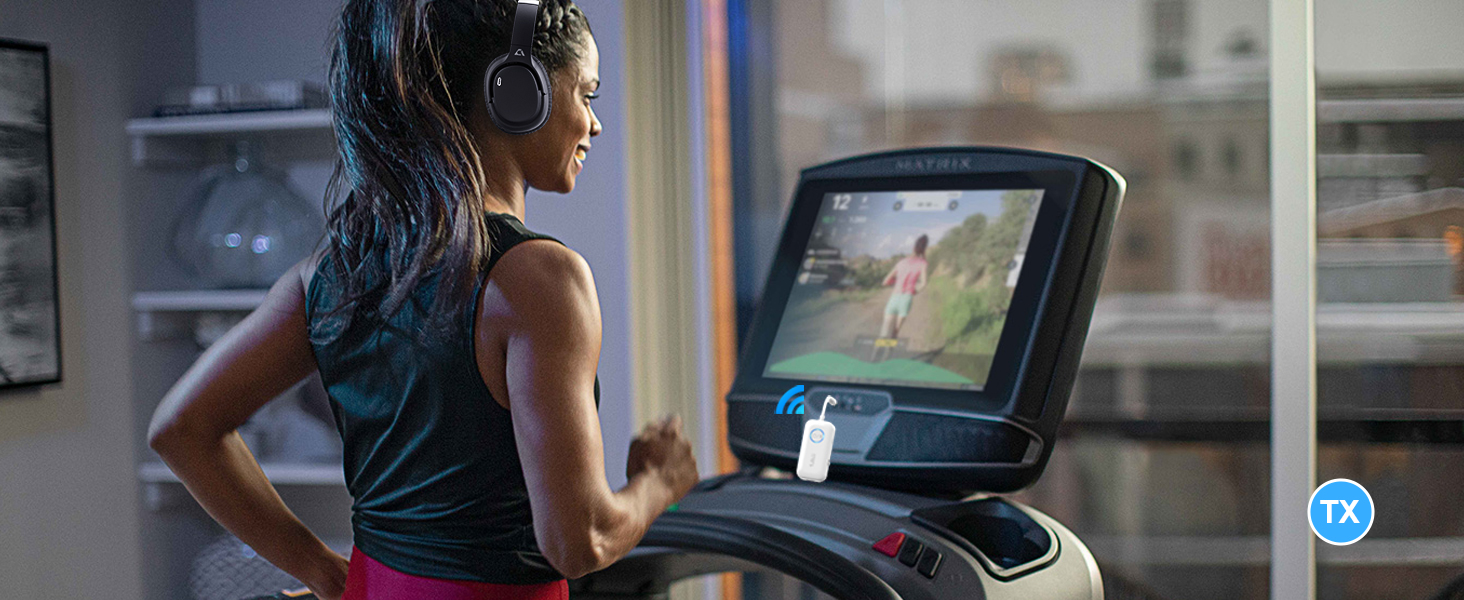
Image: Reset Button for Troubleshooting
6. Specifications
| Feature | Specification |
|---|---|
| Brand | 1Mii |
| Model Number | B06T2 |
| Connectivity Technology | Bluetooth 5.3 |
| Audio Codecs Supported | SBC, MP3, AAC, aptX, aptX-LL, aptX-HD, aptX-Adaptive |
| Operating Modes | Transmitter (TX), Receiver (RX) |
| Input/Output | 3.5mm AUX Jack, USB-C (charging/audio input in TX mode) |
| Battery Type | Lithium-polymer |
| Battery Life (Playback) | Up to 15 hours |
| Charging Time | Approx. 1.5 hours |
| Wireless Range | Up to 20 meters (without obstacles) |
| Dimensions | 6.1L x 3W x 1.4H cm |
| Weight | 22 Grams |
7. Warranty and Support
Warranty Information
The 1Mii B06T2 comes with a 2-Year Limited Warranty from the manufacturer. Please retain your proof of purchase for warranty claims. The warranty covers defects in materials and workmanship under normal use.
Customer Support
For further assistance, technical support, or warranty inquiries, please contact 1Mii customer service through their official website or the retailer where you purchased the product. Please have your model number (B06T2) and purchase details ready when contacting support.


