
Introduction
This manual provides detailed instructions for the setup, operation, and maintenance of your TONOR TW-820 Wireless Microphone System. Designed for clear and pristine sound quality, this system is ideal for various applications including home karaoke, meetings, parties, church events, DJ performances, weddings, and KTV. Please read this manual thoroughly before using the product to ensure optimal performance and longevity.
What's in the Box
Carefully unpack your TONOR TW-820 Wireless Microphone System and ensure all components are present:
- 2 x Handheld Microphones
- 1 x Receiver Unit
- 2 x Anti-slip Rings
- 1 x 6.35mm Audio Cable
- 2 x Mic Covers
- 1 x Power Adapter
- 1 x User Manual

Image: All components included in the TONOR TW-820 Wireless Microphone System package.
Product Overview
UHF Wireless Receiver
The receiver unit is the central hub for your wireless microphones, featuring dual antennas for enhanced signal stability and an LCD display for channel and frequency information.

Image: Detailed view of the UHF Wireless Receiver, highlighting its controls and ports.
Dynamic Handheld Microphones
Each microphone is constructed with an all-metal casing and a steel mesh grille for durability. They feature a cardioid dynamic capsule for clear sound capture and an LCD display for battery level and channel information.

Image: Close-up of a handheld microphone, illustrating its features and battery insertion.
Setup Guide
Follow these steps for a quick and easy setup of your wireless microphone system:
- Power the Receiver: Connect the provided power adapter to the receiver's DC 12V IN port and plug it into a power outlet. Turn on the receiver using the power switch.
- Connect to Audio System: Use the 6.35mm audio cable to connect the receiver's MIX OUT port to the microphone input of your amplifier, karaoke machine, speaker, Partybox, PA system, or mixer. For balanced audio, use XLR cables (not included) to connect the BAL A and BAL B outputs to your mixer.
- Insert Microphone Batteries: Unscrew the bottom part of each handheld microphone. Insert 2 x AA batteries (not included) into each microphone, ensuring correct polarity.
- Power On Microphones: Long-press the power button on each microphone to turn them on. The microphones and receiver will automatically pair. The LCD display on both the microphones and receiver will show channel and frequency information once paired.
- Attach Anti-slip Rings and Mic Covers: Slide the anti-slip rings onto the microphone bodies to prevent them from rolling. Place the mic covers over the microphone heads to reduce plosives and protect the capsule.
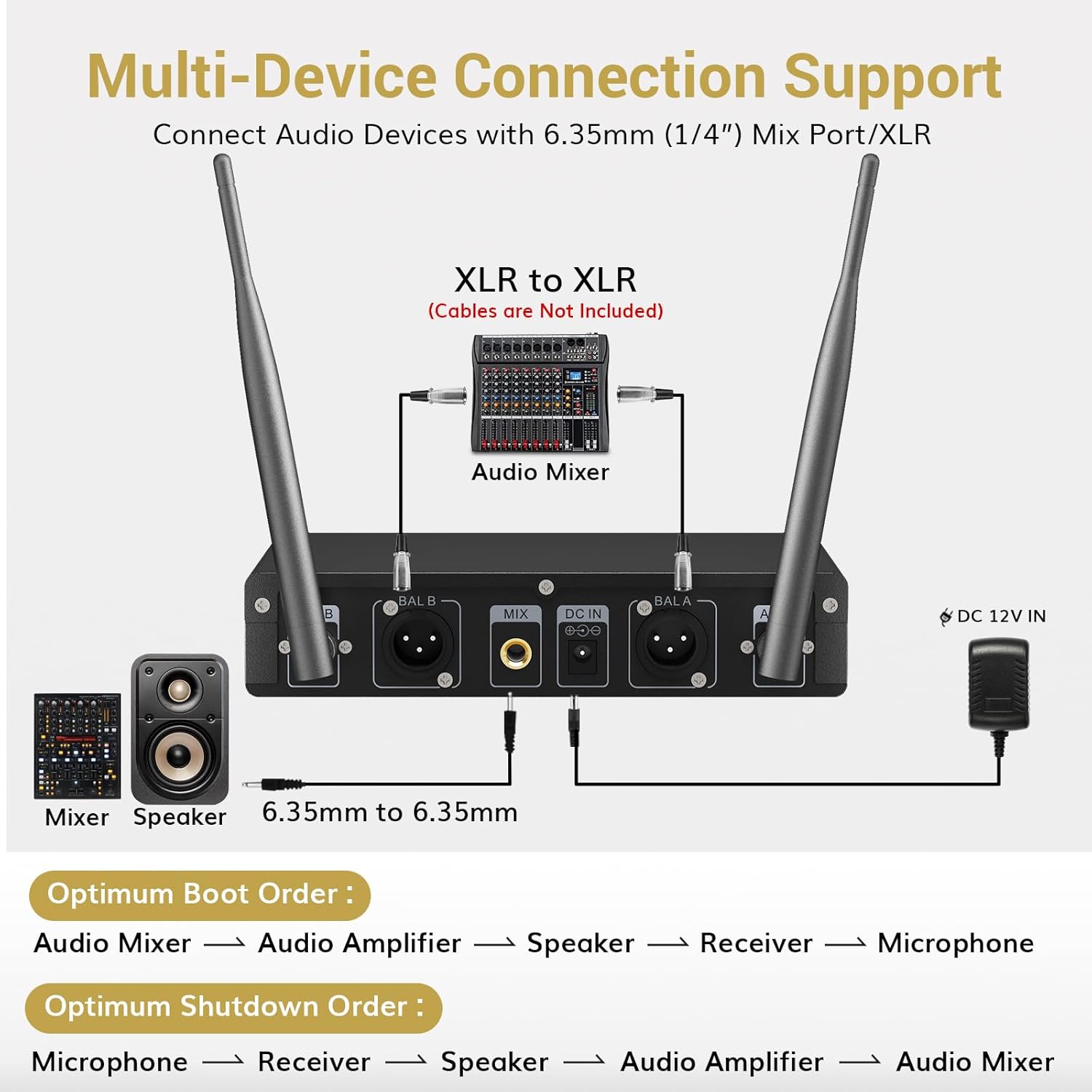
Image: Multi-device connection support diagram for the receiver.
Optimum Boot and Shutdown Order:
- Boot Order: Audio Mixer → Audio Amplifier → Speaker → Receiver → Microphone
- Shutdown Order: Microphone → Receiver → Speaker → Audio Amplifier → Audio Mixer
Video: An overview of the TONOR TW-820 Wireless Microphone System, demonstrating its components and basic functionality.
Operating Instructions
Sound Quality and Range
The TW-820 system features a professional cardioid dynamic capsule that effectively captures clear, pure, and full sound while minimizing background noise and howling. It offers an enhanced signal stability with 15 adjustable frequencies per UHF mic and a long transmission range of up to 200ft (60m) in open space, allowing up to 15 sets to be used simultaneously without interference.

Image: Explanation of the microphone's sound quality and noise reduction capabilities.

Image: Visual representation of the system's powerful wireless range.
Adjusting Volume and Frequencies
- Volume Control: The receiver box has separate volume controls for each wireless microphone (Channel A and Channel B). Adjust these knobs to achieve the desired audio level.
- Frequency Adjustment: The system offers 15 adjustable frequencies per microphone. Refer to the detailed instructions in the included user manual for specific steps on how to change frequencies if interference is encountered.
- Mute Function: Each microphone features a mute function. Press the power button briefly to mute/unmute the microphone. The microphone's LCD display will indicate its mute status.
Maintenance
- Battery Care: Replace AA batteries in microphones when the battery indicator on the LCD display is low. Always use fresh batteries for optimal performance.
- Cleaning: Use a soft, dry cloth to clean the receiver and microphones. Avoid using liquid cleaners or abrasive materials.
- Storage: Store the system in a cool, dry place away from direct sunlight and extreme temperatures when not in use.
Troubleshooting
- No Sound: Ensure the receiver is powered on and connected correctly to your audio system. Check microphone batteries and ensure microphones are powered on and paired with the receiver. Verify volume levels on both the microphones and receiver.
- Interference/Static: Try changing the frequency of the microphones. Ensure there are no obstructions between the microphones and the receiver. Keep other wireless devices away from the system.
- Short Range: Ensure the receiver antennas are fully extended and positioned correctly. Avoid placing the receiver near metal objects or other electronic devices that may cause interference.
Important Usage Notes:
- This system is not compatible with laptops, iPads, cellphones, or AV receivers directly.
- An adapter may be needed for mobile and laptop connections (not included).
- The system does not support Bluetooth connectivity.
- Requires an intermediary audio device (like an amplifier, karaoke machine, speaker, Partybox, PA System, or Mixer) for sound output.
Specifications
| Feature | Specification |
|---|---|
| Brand | TONOR |
| Model Name | TW820 |
| Connectivity Technology | UHF |
| Microphone Form Factor | Handheld |
| Material | Metal |
| Power Source | Battery Powered (2 x AA per mic) |
| Audio Sensitivity | 52 Decibels |
| Signal-to-Noise Ratio | 80 dB |
| Polar Pattern | Unidirectional |
| Number of Channels | 15 adjustable frequencies per mic |
| Transmission Range | Up to 200ft (60m) in open space |
| Special Feature | Mute Function, All Metal Design, Volume Control |
| Compatible Devices | Amplifier, Karaoke Machine, Speaker, Partybox, PA System, Mixer |
Warranty and Support
For warranty information and customer support, please refer to the documentation included with your product or visit the official TONOR store. The manufacturer typically offers support for product-related inquiries and issues.
Visit the TONOR Store for additional products and support resources.


