
1. Introduction
Welcome to the Smartstitch S-1201 Compact Embroidery Machine user manual. This guide provides essential information for the safe and efficient operation, maintenance, and troubleshooting of your new embroidery machine. Please read this manual thoroughly before operating the machine to ensure proper usage and to maximize the lifespan of your equipment.
2. Important Safety Instructions
Always follow basic safety precautions when using electrical appliances to reduce the risk of fire, electric shock, or injury to persons.
General Safety
- Read all instructions before using the machine.
- Keep the work area clean and well-lit. Cluttered or dark areas invite accidents.
- Do not operate the machine in explosive atmospheres, such as in the presence of flammable liquids, gases, or dust.
- Keep children and bystanders away while operating the machine. Distractions can cause you to lose control.
Electrical Safety
- Do not expose the machine to rain or wet conditions. Water entering an electrical appliance will increase the risk of electric shock.
- Do not abuse the cord. Never use the cord for carrying, pulling, or unplugging the machine. Keep cord away from heat, oil, sharp edges, or moving parts.
- Unplug the machine from the power source before making any adjustments, changing accessories, or storing the machine.
Operation Safety
- Always wear appropriate eye protection.
- Do not operate the machine if you are tired or under the influence of drugs, alcohol, or medication.
- Use safety clamps or other practical ways to secure and support the workpiece to a stable platform. Holding the work by hand or against your body is unstable and may lead to loss of control.
3. Product Overview
The Smartstitch S-1201 is a compact, 12-needle commercial embroidery machine designed for various applications including flat, hat, and T-shirt embroidery. It features a 10-inch LCD touchscreen, Wi-Fi connectivity, and a maximum embroidery speed of 1200 stitches per minute (SPM).
Key Features
- Compact Size & Lightweight: Dimensions of 29"x23"x19" and a weight of 39kgs (86 lbs) for easy movement and storage.
- Large Embroidery Area: Offers a maximum embroidery area of 9.5"x12.6".
- 10-inch LCD Touchscreen: Intuitive interface for design management and machine control.
- High Speed: Max working speed of 1200 SPM.
- Extensive Memory: Up to 100 million maximum memory stitches.
- Precision Features: Includes laser positioning and automatic color change.
- Versatile Application: Capable of stitching on denim, canvas, leather, vinyl, caps, shoes, bags, and more.
- Connectivity: Supports design transfer via USB and Wi-Fi.
- Starter Pack Included: Comes with machine embroidery threads, stabilizers, and bobbin threads to get started.
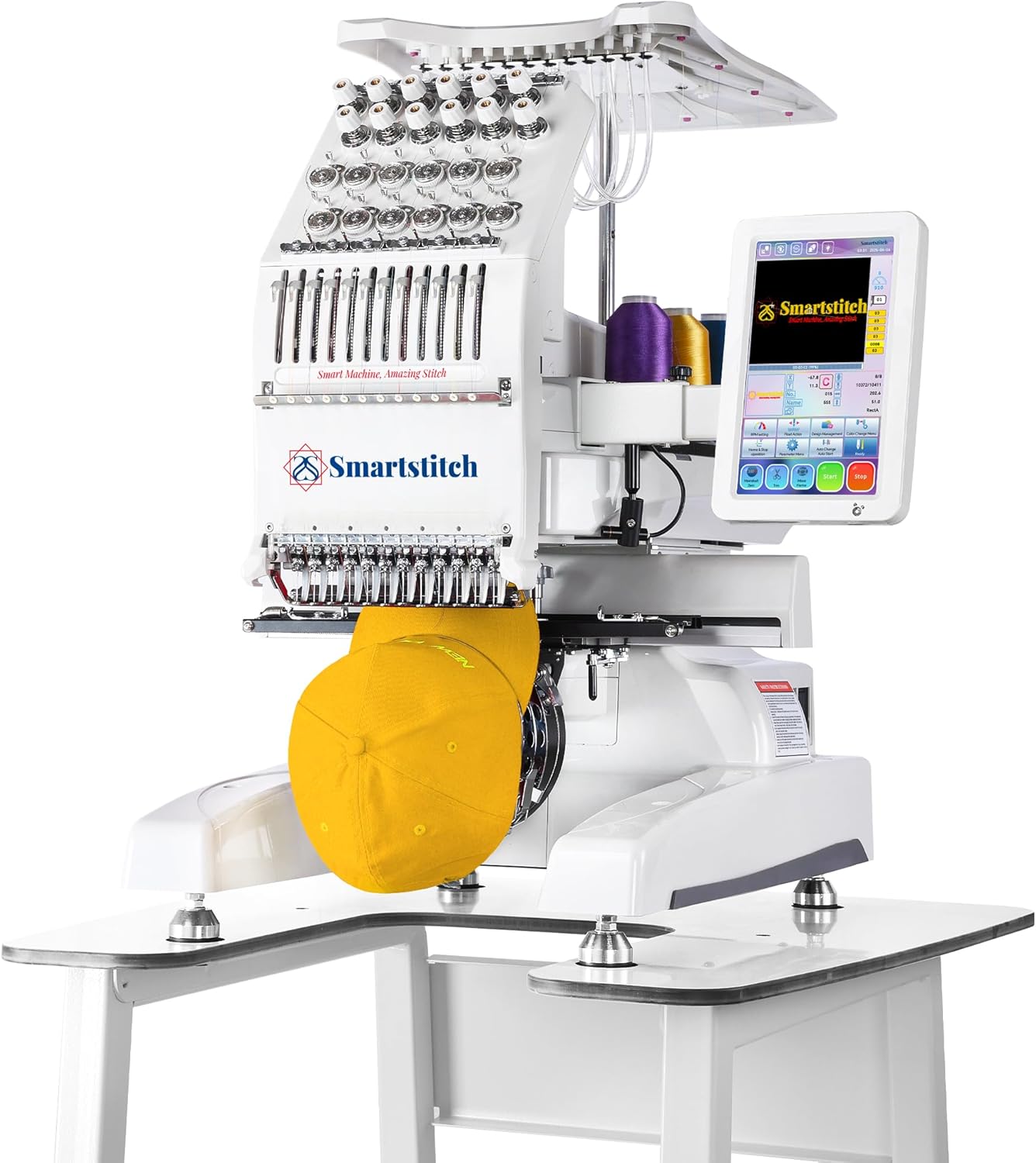
Figure 3.1: The Smartstitch S-1201 12-Needle Compact Embroidery Machine, showcasing its compact design and integrated touchscreen.

Figure 3.2: A visual representation of the free accessories included with the Smartstitch S-1201, such as cap embroidery attachments, various hoop sizes, a flat embroidery table, armrests, a tool box, and a bobbin winder.

Figure 3.3: Close-up of the 10-inch LCD touchscreen with Wi-Fi, illustrating the updated and advanced computer system with a fast operation guide. Key elements like design preview, color sequence menu, stitch progress bar, and control buttons are visible.

Figure 3.4: Diagram showing the machine's weight (39kg/86lb) and overall dimensions, including the 360° rolling stand with omnidirectional wheels.
4. Setup
4.1 Unpacking
Carefully unpack the machine from its shipping container. It is crucial to retain the wooden pallet, inner boxes for accessories, metal buckles, and fixed bolts. These items are necessary for secure transportation or in the event of a return.
4.2 Assembly
The Smartstitch S-1201 arrives largely pre-assembled. Refer to the included quick start guide for any minor assembly steps, such as attaching the machine to its stand. Ensure all components are securely fastened before proceeding.
4.3 Power Connection
Connect the machine to a suitable power outlet. Verify that the electrical voltage matches the machine's specified requirements to prevent damage.
4.4 Threading the Machine
Follow the designated threading path for each of the 12 needles. Ensure all threads are correctly seated in the tension discs and thread guides to prevent tangles and ensure consistent stitch quality.
4.5 Bobbin Installation
Install the bobbin into the bobbin case. Proper bobbin tension is critical for balanced stitches. Ensure the bobbin thread is correctly tensioned according to your project's requirements.
5. Operating Instructions
5.1 Power On
Turn on the main power switch. The 10-inch LCD touchscreen will illuminate and display the main operating interface.
5.2 Design Loading
Load your embroidery designs (DST/DSB files) into the machine. This can be done conveniently via a USB drive or through Wi-Fi connectivity.
5.3 Hoop Selection and Attachment
Select the appropriate hoop size for your design and the fabric you are using. Securely hoop the fabric and attach the hoop to the machine's embroidery arm.
5.4 Color Sequence and Threading
On the touchscreen, assign the desired thread colors to your design's sequence. Ensure the correct thread colors are loaded into the corresponding needles on the machine.
5.5 Laser Positioning
Utilize the built-in laser positioning feature to accurately align your design on the hooped fabric. This helps ensure precise placement of the embroidery.
5.6 Starting Embroidery
After confirming all settings, including design, colors, and positioning, press the start button on the touchscreen to begin the embroidery process.
5.7 Automatic Color Change
The Smartstitch S-1201 features automatic color change, which will switch between needles according to the programmed design sequence, minimizing manual intervention.
6. Maintenance
Regular maintenance is essential to keep your Smartstitch S-1201 operating efficiently and to prolong its lifespan.
6.1 Regular Cleaning
- Needle Area: Use a small brush or vacuum to remove lint and thread fragments from around the needles and presser feet after each use.
- Bobbin Case: Periodically remove the bobbin case and clean out any lint or dust accumulation.
- Tension Discs: Ensure tension discs are free of lint, which can affect thread tension.
6.2 Lubrication
Apply lubrication to designated moving parts as indicated in the machine's detailed operation manual. Use only recommended sewing machine oil.
6.3 Needle Replacement
Replace needles regularly, typically after 8-10 hours of embroidery, or immediately if they become bent, dull, or damaged. Using sharp, undamaged needles prevents fabric snags and thread breaks.
6.4 Tension Adjustment
Periodically check and adjust both upper and bobbin thread tension to achieve balanced stitches. Incorrect tension can lead to looping, puckering, or thread breakage.
7. Troubleshooting
This section addresses common issues you might encounter during operation. For more detailed troubleshooting, consult the comprehensive operation manuals or contact technical support.
7.1 Common Issues
- Skipped Stitches:
Possible Causes: Incorrect needle size or type, bent needle, improper threading, insufficient tension, or incorrect stabilizer.
Solutions: Replace needle, re-thread the machine, adjust tension, or use appropriate stabilizer. - Thread Breakage:
Possible Causes: High thread tension, poor quality thread, burrs on needle plate or bobbin case, incorrect needle, or tangled thread.
Solutions: Reduce tension, use quality thread, inspect and clean thread path, replace needle, or re-thread. - Poor Stitch Quality (e.g., Looping, Puckering):
Possible Causes: Unbalanced tension, improper hooping, wrong stabilizer, or dull needle.
Solutions: Adjust upper and bobbin tension, ensure fabric is hooped tautly without stretching, use correct stabilizer for fabric type, or replace needle. - Machine Not Responding:
Possible Causes: Power issue, emergency stop engaged, or software error.
Solutions: Check power connection, release emergency stop button, restart the machine, or consult the manual for software reset procedures.
7.2 Technical Support
For complex issues or problems not covered in this manual, Smartstitch provides comprehensive operation manuals and video trainings. Our experienced engineers are available for online assistance. Local technical support may also be available. Please contact Smartstitch customer service through your purchase platform or the official Smartstitch website for further assistance.
8. Specifications
| Feature | Detail |
|---|---|
| Brand | Smartstitch |
| Model Number | S-1201 (SS-EM-12N) |
| Needles | 12 |
| Max Speed | 1200 SPM (Stitches Per Minute) |
| Screen | 10-inch LCD Touchscreen |
| Connectivity | Wi-Fi, USB |
| Max Embroidery Area | 9.5" x 12.6" |
| Max Memory Stitches | 100 Million |
| Product Dimensions (Machine) | 29" x 23" x 19" (approx. 28.74 x 36.61 x 35.04 inches) |
| Item Weight | 86 pounds (39 kg) |
| Color | Silver |
| UPC | 630456812461 |
| Date First Available | June 1, 2023 |
9. Warranty and Support
9.1 Return Policy
This product is returnable until January 31, 2026. To facilitate any potential return, please ensure all original packaging, including the wooden pallet, inner boxes for accessories, metal buckles, and fixed bolts, are kept in intact condition. Pictures and videos may be required to verify that all accessories are returned and the machine is undamaged and securely fixed in its wooden pallet.
9.2 Customer Support
Smartstitch is dedicated to providing comprehensive support. We offer detailed operation manuals and video training resources to help you get started and troubleshoot common issues. Our experienced engineers are available for online assistance, and local technical support may also be available in your region. For further assistance, please contact Smartstitch customer service through your purchase platform or the official Smartstitch website.
10. Manufacturing Process
Smartstitch is committed to quality and precision in the manufacturing of its embroidery machines. Our factory, established in 1988, spans over 40,000 m² and has an annual output of 8,000 units, supported by 100 R&D employees. Each machine undergoes rigorous quality control to ensure optimal performance and durability before reaching our customers.
Video 10.1: This video provides an overview of the Smartstitch manufacturing process, showcasing the factory, assembly lines, quality control measures, and how machines are prepared for shipment to customers.

