
Introduction
Welcome to the Liectroux C30B Robotic Vacuum Cleaner and Mop. This intelligent device is designed to simplify your home cleaning routine by sweeping, vacuuming, and mopping various floor types, including hard floors, carpets, and rugs. It features smart navigation, app control, and compatibility with virtual assistants like Alexa and Google Home, ensuring a thorough and effortless cleaning experience.
This manual provides detailed instructions for setting up, operating, and maintaining your Liectroux C30B robot vacuum to ensure optimal performance and longevity.
Video: Overview of the Liectroux C30B Robotic Vacuum Cleaner and Mop, demonstrating its key features and operation.
Product Overview
The Liectroux C30B is an advanced robotic cleaner offering multiple functionalities for a pristine home environment. It combines powerful suction with intelligent mopping capabilities, adapting to various surfaces and cleaning needs.
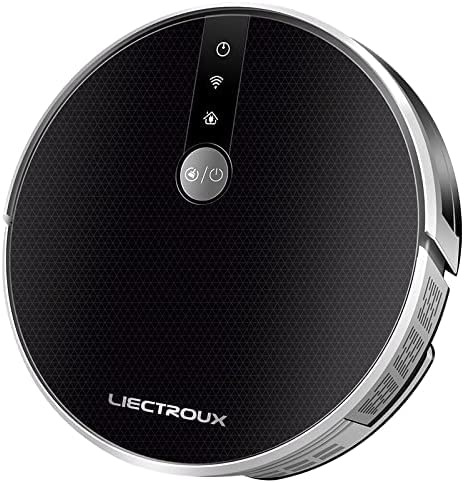
Image: Top-down view of the Liectroux C30B Robotic Vacuum Cleaner, showcasing its sleek design.
Key Features:
- 3-in-1 Cleaning: Sweeps, vacuums, and mops various floor types, including hard floors and carpets, with a V-shaped central brush for efficient particle collection.
- High Suction Power: Provides maximum power for effective cleaning, removing even the smallest debris.
- Smart Navigation: Utilizes intelligent mapping to plan the most efficient cleaning routes, avoiding repetitive actions and ensuring complete coverage.
- Anti-Collision and Anti-Fall Sensors: Equipped with a comprehensive set of sensors to detect obstacles and prevent falls from stairs or elevated surfaces.
- Slim Design: Its low profile allows it to clean under furniture, beds, and sofas, reaching difficult-to-access areas.
- Automatic Recharging: Returns to its charging base automatically when the battery is low or cleaning is complete.
- App Control: Manage and monitor cleaning schedules, modes, and real-time location from your smartphone, even when you are away from home.
- Voice Control: Compatible with virtual assistants like Amazon Alexa and Google Assistant for convenient hands-free operation.
- Multiple Cleaning Modes: Offers various modes including Automatic, Single Room, Spot Cleaning, Edge Cleaning, and Mopping to suit different cleaning requirements.
- Quiet Operation: Designed with a noise reduction system for a quiet cleaning experience.

Image: Illustration of the Liectroux C30B's high suction power, effectively capturing debris.

Image: Visual representation of the Liectroux C30B's smart map navigation, showing its cleaning path.

Image: Screenshot of the mobile application showing real-time cleaning tracking for the Liectroux C30B.

Image: Close-up of the Liectroux C30B's smart water reservoir for mopping functionality.

Image: Depiction of the Liectroux C30B's compatibility with virtual assistants like Alexa and Google Home.

Image: Image illustrating the Liectroux C30B's quiet operation, suitable for use while resting.

Image: Diagram showing the anti-fall and anti-collision sensor system of the Liectroux C30B.
What's in the Box
Upon unboxing your Liectroux C30B, please ensure all components are present and in good condition. The package typically includes:
- Liectroux C30B Robotic Vacuum Cleaner
- Charging Dock
- Power Adapter
- Side Brushes (set)
- Main Brush
- Dustbin
- Water Tank with Mop Cloth
- Cleaning Tool
- User Manual
- Remote Control (if applicable)

Image: The Liectroux C30B robot vacuum alongside its remote control and a smartphone displaying the control app.
Setup
- Unpack and Remove Protective Film: Carefully remove the robot and all accessories from the packaging. Remove any protective films or stickers from the robot and charging dock.
- Install Side Brushes: Press the side brushes onto the posts at the bottom of the robot until they click into place.
- Place Charging Dock: Position the charging dock against a wall in an open area, ensuring there are no obstacles within 1 meter (3 feet) to the sides and 2 meters (6 feet) in front. Plug the power adapter into the dock and a wall outlet.
- Initial Charge: Place the robot onto the charging dock. Ensure the charging contacts on the robot align with those on the dock. The robot will begin charging, and the indicator light will show its charging status. For first use, fully charge the robot (approximately 4-6 hours).
- Download the App: Scan the QR code in the manual or search for the 'Liectroux' app in your smartphone's app store (iOS or Android). Follow the in-app instructions to register and connect your robot to your home Wi-Fi network.
- Prepare for Mopping (Optional): If using the mopping function, fill the water tank with clean water (and a small amount of neutral cleaning solution if desired). Attach the mop cloth firmly to the water tank and slide the tank into the robot until it clicks.
Operating Instructions
Starting and Stopping Cleaning:
- Manual Start: Press the power button on the robot or the 'Clean' button on the remote control to start automatic cleaning.
- App Start: Open the Liectroux app, select your device, and tap 'Start' or choose a specific cleaning mode.
- Voice Command: If connected to Alexa or Google Home, use commands like "Alexa, start cleaning" or "Hey Google, tell Liectroux to clean."
- Pause/Stop: Press the power button again, the 'Pause' button on the remote, or use the app to pause or stop cleaning.
Cleaning Modes:
The Liectroux C30B offers several cleaning modes to suit your needs:
- Automatic Cleaning: The robot intelligently navigates and cleans the entire area.
- Spot Cleaning: Focuses on a specific dirty area, cleaning in a spiral pattern.
- Edge Cleaning: Cleans along walls and furniture edges.
- Single Room Cleaning: Cleans a designated room and then returns to the charging dock.
- Mopping Mode: When the water tank is installed, the robot will mop the floor while vacuuming.
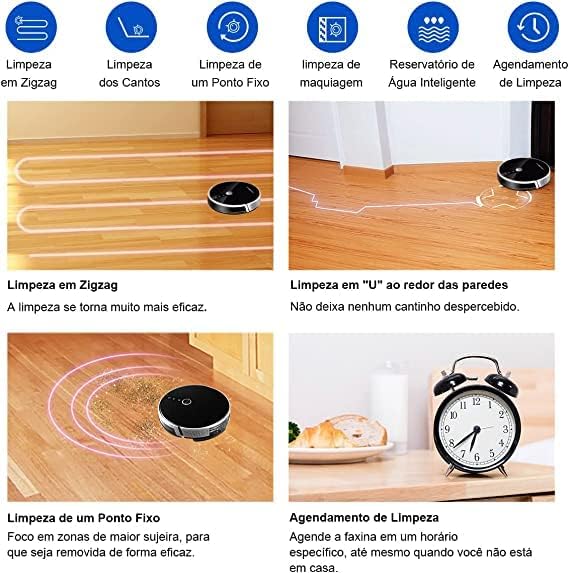
Image: Visual guide to the Liectroux C30B's various cleaning modes, including zigzag, edge, spot, and scheduled cleaning.
Scheduling Cleaning:
Use the Liectroux app to set up cleaning schedules. You can program the robot to clean at specific times and days, even when you are not home.
Maintenance
Regular maintenance ensures your Liectroux C30B operates efficiently and extends its lifespan. Always turn off the robot and disconnect it from the charging dock before performing any maintenance.
Dustbin and Filters:
- Empty Dustbin: After each cleaning cycle, or when the dustbin full indicator lights up, remove and empty the dustbin.
- Clean Filters: Tap the HEPA filter to remove dust. Rinse the primary filter and dustbin with water. Allow them to air dry completely before reinserting. Replace HEPA filters every 3-6 months, depending on usage.
Water Tank and Mop Cloth:
- Empty Water Tank: After each mopping session, empty any remaining water from the tank.
- Clean Mop Cloth: Remove the mop cloth and wash it by hand or machine. Allow it to air dry completely.
Brushes:
- Main Brush: Remove the main brush cover and lift out the brush. Use the cleaning tool to remove hair and debris. Cut tangled hair with scissors if necessary.
- Side Brushes: Pull the side brushes off. Remove any hair or debris. If brushes are worn or damaged, replace them.
Sensors and Charging Contacts:
- Wipe all sensors (anti-drop, anti-collision) and charging contacts on both the robot and the charging dock with a clean, dry cloth.
Troubleshooting
If you encounter issues with your Liectroux C30B, refer to the following common problems and solutions:
| Problem | Possible Cause | Solution |
|---|---|---|
| Robot does not turn on. | Low battery; Power switch off. | Charge the robot; Ensure power switch is on. |
| Robot does not charge. | Charging contacts dirty; Charging dock not powered. | Clean charging contacts; Ensure dock is plugged in. |
| Robot gets stuck frequently. | Obstacles; Loose cables/rugs. | Clear obstacles; Tidy up cables and loose rugs. |
| Poor cleaning performance. | Dustbin full; Brushes tangled; Filters clogged. | Empty dustbin; Clean/replace brushes and filters. |
| Robot cannot connect to Wi-Fi. | Incorrect password; Router issues; 5GHz network. | Verify password; Restart router; Ensure 2.4GHz network. |
Specifications
Here are the technical specifications for the Liectroux C30B Robotic Vacuum Cleaner and Mop:
- Brand: LIECTROUX
- Model: C30B
- Color: Black
- Compatible Devices: Amazon Echo, Google Home, Smartphones, Tablets
- Special Features: Scheduling, Anti-collision, Anti-fall, Wet/Dry Cleaning, Portable
- Power Source: Battery Powered
- Battery Type: Lithium-ion
- Battery Life: Up to 100 Minutes
- Voltage: 110-220 Volts (Bivolt)
- Form Factor: Robotic
- Package Dimensions: 58 x 40 x 13.5 cm
- Item Weight: 2.7 kg
- GTIN/EAN: 6939809301671
Warranty and Support
The Liectroux C30B Robotic Vacuum Cleaner and Mop comes with a manufacturer's warranty. Please refer to the warranty card included in your product packaging for specific terms and conditions, including warranty duration and coverage details.
For technical support, troubleshooting assistance, or to inquire about replacement parts, please contact Liectroux customer service through the contact information provided in your product documentation or on the official Liectroux website. Keep your purchase receipt as proof of purchase for warranty claims.


