
Senco 10X0022N
Senco DS-530M1 Auto-Feed Screwdriver Attachment Instruction Manual
Model: 10X0022N (Makita Style)
Introduction
This manual provides essential instructions for the safe and effective operation, maintenance, and troubleshooting of your Senco DS-530M1 3-inch Auto-Feed Screwdriver Attachment (Makita Style). Please read this manual thoroughly before using the product to ensure proper function and to prevent injury or damage.
The Senco DS-530M1 is designed to enhance efficiency when driving 1-inch to 3-inch screws, compatible with specific Makita screwdriver models.
Safety Information
Always observe general power tool safety guidelines when operating this attachment. Failure to follow these instructions may result in serious injury.
- Wear appropriate personal protective equipment (PPE), including safety glasses, hearing protection, and gloves.
- Ensure the attachment is securely fastened to the compatible screwdriver before use.
- Keep hands and loose clothing away from moving parts.
- Disconnect the power tool from its power source before making any adjustments or changing bits.
- Do not operate the tool in explosive atmospheres, such as in the presence of flammable liquids, gases, or dust.
Product Components
The Senco DS-530M1 Auto-Feed Screwdriver Attachment includes the following main components:
- Auto-Feed Mechanism
- Extension Pole
- Quick Release Clamp
- Sliding Screw Guide
- Corner-Fit Feed System
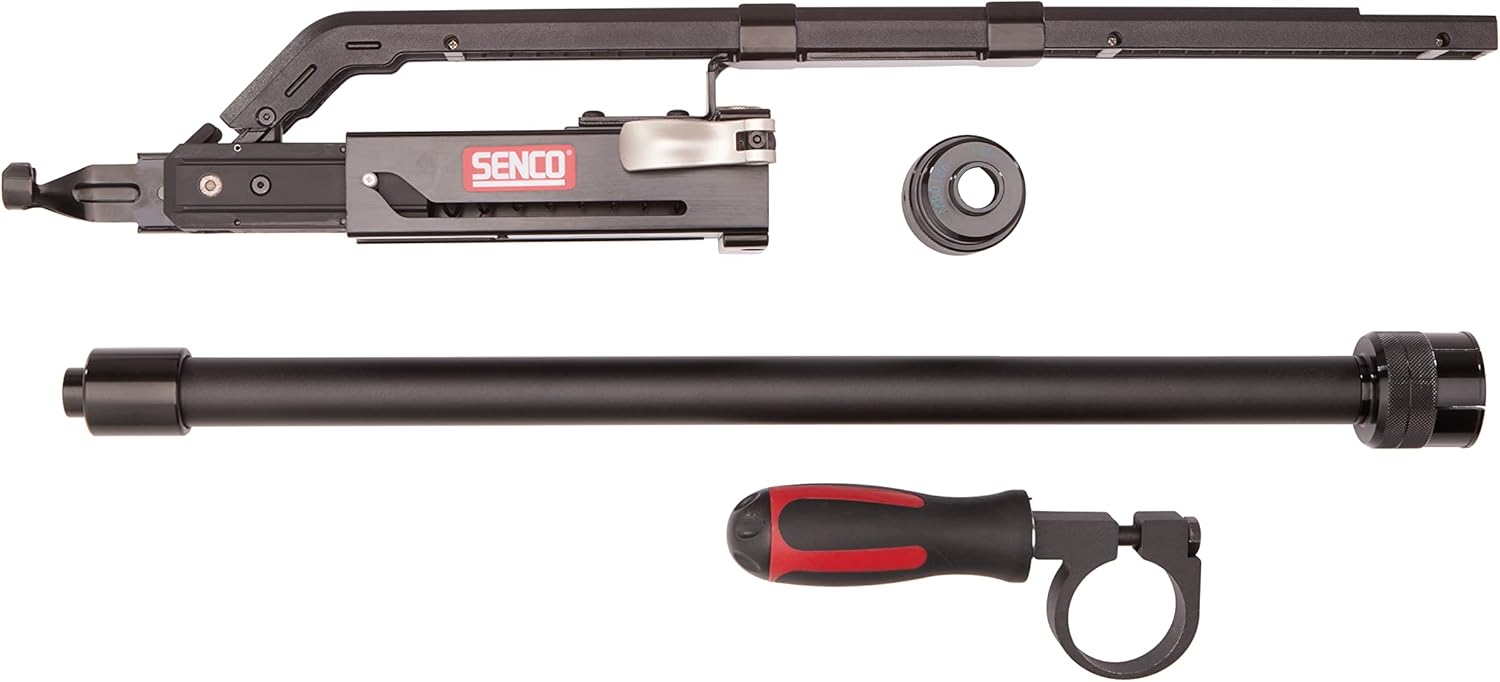
Figure 1: Overview of the Senco DS-530M1 Auto-Feed Screwdriver Attachment components, including the main auto-feed unit, extension pole, and handle.

Figure 2: Front view of the assembled Senco DS-530M1 attachment, showing the screw guide and feed system.
Compatibility
This attachment is specifically designed for use with the following Makita Screwdriver models:
- FS2200
- FS2500
- FS4200
- FS6200
- XSF03*
- XSF04*
- XSF05*
*For Canada: DFS452Z, DFS250Z, DFS251Z.

Figure 3: Visual confirmation of compatibility with Makita screwdriver models, listing specific model numbers.
Setup and Installation
- Prepare the Screwdriver: Ensure your Makita screwdriver is unplugged or its battery is removed.
- Attach the Auto-Feed Unit: Align the Senco DS-530M1 attachment with the front of your compatible Makita screwdriver. Secure it firmly using the provided clamping mechanism. Ensure it clicks into place or is tightened according to the screwdriver's instructions.
- Insert Screws: Load collated screws into the magazine of the auto-feed attachment. Ensure the screws are properly seated and aligned with the feed system. The attachment is designed for 1-inch to 3-inch screws.
- Adjust Screw Depth: Use the depth adjustment dial on the attachment to set the desired screw depth. Test on a scrap piece of material to verify the setting.
- Attach Extension Pole (Optional): For standing applications, attach the extension pole to the main auto-feed unit. Ensure it is securely fastened.

Figure 4: Side view of the Senco DS-530M1, illustrating the depth adjustment mechanism and screw magazine.
Operating Instructions
- Power On: Connect your Makita screwdriver to its power source or insert the battery.
- Positioning: Place the tip of the attachment firmly against the workpiece where the screw is to be driven.
- Driving Screws: Apply steady, even pressure to the tool and activate the screwdriver. The auto-feed mechanism will advance the next screw automatically once the previous one is driven to the set depth.
- Corner Access: Utilize the Corner-Fit Feed System for improved line of sight and easier operation in tight spaces.
- Bit Changes: To change or replace bits, use the Quick Release Clamp. Disconnect power before changing bits.

Figure 5: Rear view of the Senco DS-530M1, showing the attachment point to the screwdriver and the overall ergonomic design for operation.
Maintenance
- Cleaning: Regularly clean the attachment, especially the screw guide and feed mechanism, to prevent debris buildup. Use a dry cloth or compressed air.
- Lubrication: Refer to the main screwdriver manual for lubrication requirements. The auto-feed attachment typically requires minimal lubrication.
- Inspection: Periodically inspect the attachment for any signs of wear, damage, or loose components. Replace worn parts as necessary.
- Storage: Store the attachment in a clean, dry place away from direct sunlight and extreme temperatures.
Troubleshooting
| Problem | Possible Cause | Solution |
|---|---|---|
| Screws not feeding | Incorrect screw size; magazine empty; debris in feed system; screw binding. | Verify screw size (1-3 inches); reload magazine; clean feed system; check for bent screws. |
| Screws not driving to depth | Incorrect depth setting; insufficient pressure; worn bit. | Adjust depth setting; apply more consistent pressure; replace bit. |
| Attachment loose on screwdriver | Improper installation; clamp not secured. | Re-attach the unit, ensuring the clamping mechanism is fully engaged and tightened. |
Specifications
| Feature | Detail |
|---|---|
| Model Number | 10X0022N (DS-530M1) |
| Brand | Senco |
| Compatible Screw Lengths | 1 inch - 3 inches |
| Style | Makita Style |
| Material | Plastic |
| Item Weight | 4.64 pounds |
| Product Dimensions | 3.5 x 22.8 x 4.4 inches |
| Head Style Compatibility | Rex, Phillips, Square |
| UPC | 741474151439 |
Warranty Information
This Senco product comes with a manufacturer's warranty. For specific details regarding warranty coverage, duration, and claims procedures, please refer to the warranty documentation included with your purchase or visit the official Senco website. Keep your proof of purchase for warranty validation.
Note: Protection plans may be available for extended coverage. Refer to your retailer for details.
Customer Support
For further assistance, technical support, or to order replacement parts, please contact Senco customer service. Contact information can typically be found on the Senco official website or on the product packaging.
Online Resources: www.senco.com
Related documents10X0022N


Ask a question about this manual
Ask about setup, troubleshooting, compatibility, parts, safety, or missing instructions. Manuals+ will review the question and use this page’s manual context to help answer it.